点击视频讲解更加详细
this.$route:当前激活的路由的信息对象。每个对象都是局部的,可以获取当前路由的 path, name, params, query 等属性。this.$router:全局的 router 实例。通过 vue 根实例中注入 router 实例,然后再注入到每个子组件,从而让整个应用都有路由功能。其中包含了很多属性和对象(比如 history 对象),任何页面也都可以调用其 push(), replace(), go() 等方法。声明式:
简单来说,就是使用 router-link 组件来导航,通过传入 to 属性指定链接(router-link 默认会被渲染成一个a标签)。
编程式:
采用这种方式就需要导入 VueRouter 并调用了。
src\router\index.js
import Vue from 'vue';import VueRouter from 'vue-router';Vue.use(VueRouter)// 1. 定义一些路由// 每个路由都需要映射到一个组件。const routes = [ { path: '/home', component: ()=> import('../views//home.vue') }, { path: '/about', component: ()=> import('../views/about.vue') },]const router = new VueRouter({ // mode: 'hash', //默认是hash模式,url是带#号的 mode: 'history', //history模式url不带#号 routes }) export default routersrc\views\home.vue
<template> <div id="app"> <h1>home</h1> <button @click="handerHerf">跳转</button> </div></template><script>export default { name: 'App', data(){ return { } }, mounted() { }, components:{ }, methods:{ handerHerf(){ console.log('this.$router',this.$router) this.$router.push('/about') } }}</script><style scoped></style>src\views\about.vue
<template> <div> <h1>about</h1> </div></template><script>export default { name: 'about', data(){ return { } }, created(){ console.log('this.$route',this.$route) }, mounted() { }, computed:{ }, methods:{ }}</script><style scoped></style>this.$router参数详情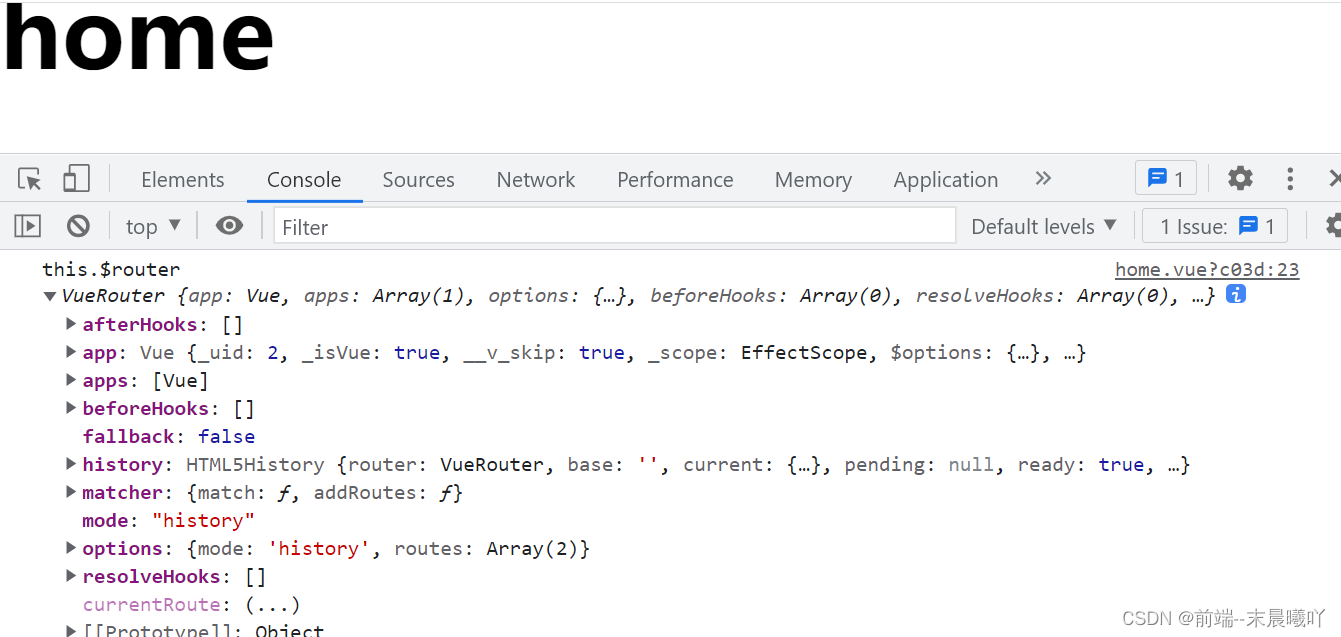
this.$route参数详情
若对您有帮助,请点击跳转到B站一键三连哦!感谢支持!!!

