REST(Representational State Transfer),表现形式状态转换,它是一种软件架构风格
当我们想表示一个网络资源的时候,可以使用两种方式:
传统风格资源描述形式
http://localhost/user/getById?id=1 查询id为1的用户信息
http://localhost/user/saveUser 保存用户信息
REST风格描述形式
http://localhost/user/1
http://localhost/user
传统方式一般是一个请求url对应一种操作,这样做不仅麻烦,也不安全,因为会程序的人读取了你的请求url地址,就大概知道该url实现的是一个什么样的操作。
查看REST风格的描述,你会发现请求地址变的简单了,并且光看请求URL并不是很能猜出来该URL的具体功能
所以REST的优点有:
隐藏资源的访问行为,无法通过地址得知对资源是何种操作
书写简化
但是我们的问题也随之而来了,一个相同的url地址即可以是新增也可以是修改或者查询,那么到底我们该如何区分该请求到底是什么操作呢?
按照REST风格访问资源时使用行为动作区分对资源进行了何种操作
http://localhost/users 查询全部用户信息 采用GET请求(查询)
http://localhost/users/1 查询指定用户信息 采用GET请求(查询)
http://localhost/users 添加用户信息 采用POST请求(新增/保存)
http://localhost/users 修改用户信息 采用PUT请求(修改/更新)
http://localhost/users/1 删除用户信息 采用DELETE请求(删除)
请求的方式比较多,但是比较常用的就4种,分别是GET,POST,PUT,DELETE。
按照不同的请求方式代表不同的操作类型。
发送GET请求是用来做查询
发送POST请求是用来做新增
发送PUT请求是用来做修改
发送DELETE请求是用来做删除
注意:
上述行为是约定方式,约定不是规范,可以打破,所以称REST风格,而不是REST规范
REST提供了对应的架构方式,按照这种架构设计项目可以降低开发的复杂性,提高系统的可伸缩性
REST中规定GET/POST/PUT/DELETE针对的是查询/新增/修改/删除,但是我们如果非要用GET请求做删除,这点在程序上运行是可以实现的
描述模块的名称通常使用复数,也就是加s的格式描述,表示此类资源,而非单个资源,例如:users、books、accounts......
清楚了什么是REST风格后,我们后期会经常提到一个概念叫RESTful,那什么又是RESTful呢?
根据REST风格对资源进行访问称为RESTful。
后期我们在进行开发的过程中,大多是都是遵从REST风格来访问我们的后台服务,所以可以说咱们以后都是基于RESTful来进行开发的。
创建一个Web的Maven项目
pom.xml添加Spring依赖
<?xml version="1.0" encoding="UTF-8"?>?<project xmlns="http://maven.apache.org/POM/4.0.0" xmlns:xsi="http://www.w3.org/2001/XMLSchema-instance" xsi:schemaLocation="http://maven.apache.org/POM/4.0.0 http://maven.apache.org/xsd/maven-4.0.0.xsd"> <modelVersion>4.0.0</modelVersion>? <groupId>com.itheima</groupId> <artifactId>springmvc_06_rest</artifactId> <version>1.0-SNAPSHOT</version> <packaging>war</packaging>? <dependencies> <dependency> <groupId>javax.servlet</groupId> <artifactId>javax.servlet-api</artifactId> <version>3.1.0</version> <scope>provided</scope> </dependency> <dependency> <groupId>org.springframework</groupId> <artifactId>spring-webmvc</artifactId> <version>5.2.10.RELEASE</version> </dependency> <dependency> <groupId>com.fasterxml.jackson.core</groupId> <artifactId>jackson-databind</artifactId> <version>2.9.0</version> </dependency> </dependencies>? <build> <plugins> <plugin> <groupId>org.apache.tomcat.maven</groupId> <artifactId>tomcat7-maven-plugin</artifactId> <version>2.1</version> <configuration> <port>80</port> <path>/</path> </configuration> </plugin> </plugins> </build></project>?创建对应的配置类
public class ServletContainersInitConfig extends AbstractAnnotationConfigDispatcherServletInitializer { protected Class<?>[] getRootConfigClasses() { return new Class[0]; }? protected Class<?>[] getServletConfigClasses() { return new Class[]{SpringMvcConfig.class}; }? protected String[] getServletMappings() { return new String[]{"/"}; }? //乱码处理 @Override protected Filter[] getServletFilters() { CharacterEncodingFilter filter = new CharacterEncodingFilter(); filter.setEncoding("UTF-8"); return new Filter[]{filter}; }}?@Configuration@ComponentScan("com.itheima.controller")//开启json数据类型自动转换@EnableWebMvcpublic class SpringMvcConfig {}??编写模型类User和Book
public class User { private String name; private int age; //getter...setter...toString省略}?public class Book { private String name; private double price; //getter...setter...toString省略}编写UserController和BookController
@Controllerpublic class UserController { @RequestMapping("/save") @ResponseBody public String save(@RequestBody User user) { System.out.println("user save..."+user); return "{'module':'user save'}"; }? @RequestMapping("/delete") @ResponseBody public String delete(Integer id) { System.out.println("user delete..." + id); return "{'module':'user delete'}"; }? @RequestMapping("/update") @ResponseBody public String update(@RequestBody User user) { System.out.println("user update..." + user); return "{'module':'user update'}"; }? @RequestMapping("/getById") @ResponseBody public String getById(Integer id) { System.out.println("user getById..." + id); return "{'module':'user getById'}"; }? @RequestMapping("/findAll") @ResponseBody public String getAll() { System.out.println("user getAll..."); return "{'module':'user getAll'}"; }}??@Controllerpublic class BookController { @RequestMapping(value = "/books",method = RequestMethod.POST) @ResponseBody public String save(@RequestBody Book book){ System.out.println("book save..." + book); return "{'module':'book save'}"; }? @RequestMapping(value = "/books/{id}",method = RequestMethod.DELETE) @ResponseBody public String delete(@PathVariable Integer id){ System.out.println("book delete..." + id); return "{'module':'book delete'}"; }? @RequestMapping(value = "/books",method = RequestMethod.PUT) @ResponseBody public String update(@RequestBody Book book){ System.out.println("book update..." + book); return "{'module':'book update'}"; }? @RequestMapping(value = "/books/{id}",method = RequestMethod.GET) @ResponseBody public String getById(@PathVariable Integer id){ System.out.println("book getById..." + id); return "{'module':'book getById'}"; }? @RequestMapping(value = "/books",method = RequestMethod.GET) @ResponseBody public String getAll(){ System.out.println("book getAll..."); return "{'module':'book getAll'}"; } }最终创建好的项目结构如下:
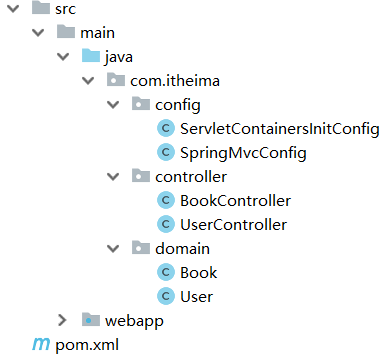
需求:将增删改查替换成RESTful的开发方式。
1.不同的请求有不同的路径,现在要将其修改为统一的请求路径
修改前: 新增: /save ,修改: /update,删除 /delete...
修改后: 增删改查: /users
2.根据GET查询、POST新增、PUT修改、DELETE删除对方法的请求方式进行限定
3.发送请求的过程中如何设置请求参数?
@Controllerpublic class UserController { //设置当前请求方法为POST,表示REST风格中的添加操作 @RequestMapping(value = "/users",method = RequestMethod.POST) @ResponseBody public String save() { System.out.println("user save..."); return "{'module':'user save'}"; }}将请求路径更改为/users
访问该方法使用 POST: http://localhost/users
使用method属性限定该方法的访问方式为POST
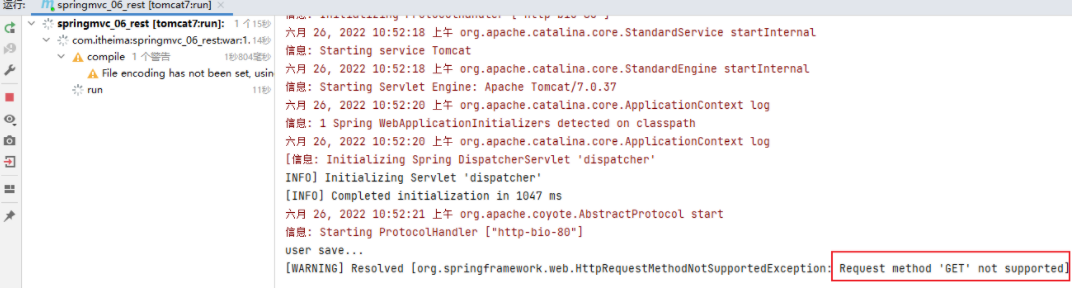
如果发送的不是POST请求,比如发送GET请求,则会报错
@Controllerpublic class UserController { //设置当前请求方法为DELETE,表示REST风格中的删除操作 @RequestMapping(value = "/users",method = RequestMethod.DELETE) @ResponseBody public String delete(Integer id) { System.out.println("user delete..." + id); return "{'module':'user delete'}"; }}将请求路径更改为/users
访问该方法使用 DELETE: http://localhost/users
访问成功,但是删除方法没有携带所要删除数据的id,所以针对RESTful的开发,如何携带数据参数?
前端发送请求的时候使用:http://localhost/users/1,路径中的1就是我们想要传递的参数。
后端获取参数,需要做如下修改:
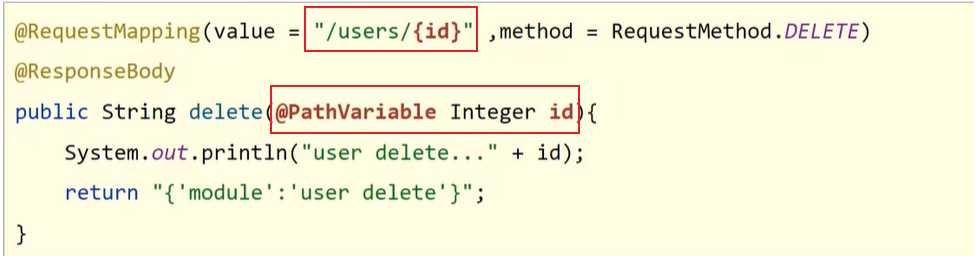
修改@RequestMapping的value属性,将其中修改为/users/{id},目的是和路径匹配
在方法的形参前添加@PathVariable注解
@Controllerpublic class UserController { //设置当前请求方法为DELETE,表示REST风格中的删除操作 @RequestMapping(value = "/users/{id}",method = RequestMethod.DELETE) @ResponseBody public String delete(@PathVariable Integer id) { System.out.println("user delete..." + id); return "{'module':'user delete'}"; }}思考如下两个问题:
(1)如果方法形参的名称和路径{}中的值不一致,该怎么办?

(2)如果有多个参数需要传递该如何编写?
前端发送请求的时候使用:http://localhost/users/1/tom,路径中的1和tom就是我们想要传递的两个参数。
后端获取参数,需要做如下修改:
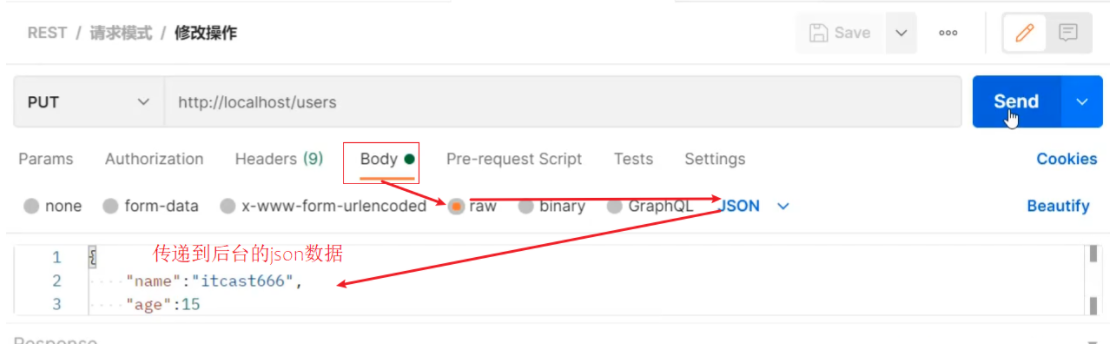
@Controllerpublic class UserController { //设置当前请求方法为DELETE,表示REST风格中的删除操作 @RequestMapping(value = "/users/{id}/{name}",method = RequestMethod.DELETE) @ResponseBody public String delete(@PathVariable Integer id,@PathVariable String name) { System.out.println("user delete..." + id+","+name); return "{'module':'user delete'}"; }}@Controllerpublic class UserController { //设置当前请求方法为PUT,表示REST风格中的修改操作 @RequestMapping(value = "/users",method = RequestMethod.PUT) @ResponseBody public String update(@RequestBody User user) { System.out.println("user update..." + user); return "{'module':'user update'}"; }}将请求路径更改为/users
访问该方法使用 PUT: http://localhost/users
访问并携带参数:
@Controllerpublic class UserController { //设置当前请求方法为GET,表示REST风格中的查询操作 @RequestMapping(value = "/users/{id}" ,method = RequestMethod.GET) @ResponseBody public String getById(@PathVariable Integer id){ System.out.println("user getById..."+id); return "{'module':'user getById'}"; }}将请求路径更改为/users
访问该方法使用 GET: http://localhost/users/666
@Controllerpublic class UserController { //设置当前请求方法为GET,表示REST风格中的查询操作 @RequestMapping(value = "/users" ,method = RequestMethod.GET) @ResponseBody public String getAll() { System.out.println("user getAll..."); return "{'module':'user getAll'}"; }}将请求路径更改为/users
访问该方法使用 GET: http://localhost/users
小结
RESTful入门案例,我们需要学习的内容如下:
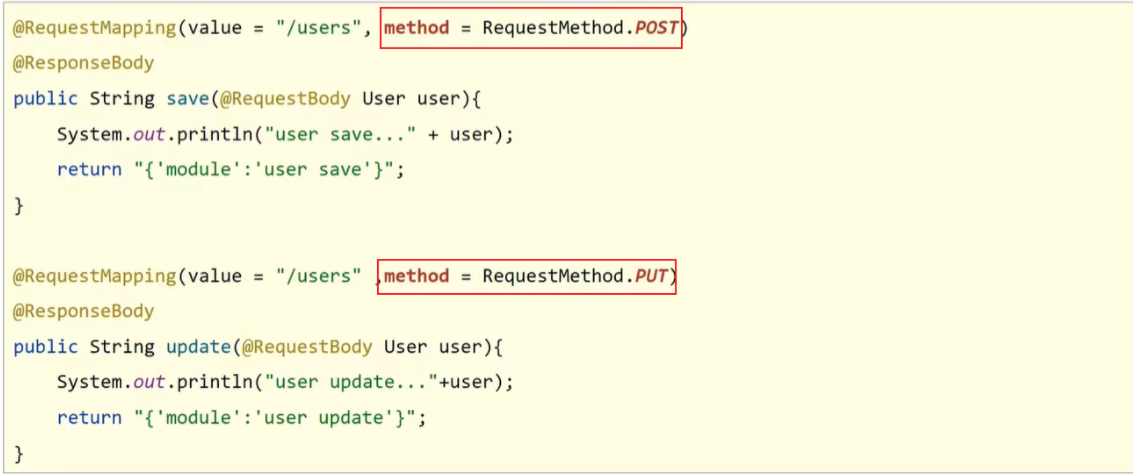
(1)设定Http请求动作(动词)
@RequestMapping(value="",method = RequestMethod.POST|GET|PUT|DELETE)
(2)设定请求参数(路径变量)
@RequestMapping(value="/users/{id}",method = RequestMethod.DELETE)
@ReponseBody
public String delete(@PathVariable Integer id){
}
| 名称 | @PathVariable |
|---|---|
| 类型 | 形参注解 |
| 位置 | SpringMVC控制器方法形参定义前面 |
| 作用 | 绑定路径参数与处理器方法形参间的关系,要求路径参数名与形参名一一对应 |
关于接收参数三个注解@RequestBody、@RequestParam、@PathVariable,这三个注解之间的区别和应用分别是什么?
区别
@RequestParam用于接收url地址传参或表单传参
@RequestBody用于接收json数据
@PathVariable用于接收路径参数,使用{参数名称}描述路径参数
应用
后期开发中,发送请求参数超过1个时,以json格式为主,@RequestBody应用较广
如果发送非json格式数据,选用@RequestParam接收请求参数
采用RESTful进行开发,当参数数量较少时,例如1个,可以采用@PathVariable接收请求路径变量,通常用于传递id值
做完了RESTful的开发,你会发现好麻烦,麻烦在哪?

对于上面所提的这三个问题,具体该如何解决?
@RestController //@Controller + ReponseBody@RequestMapping("/books")public class BookController { //@RequestMapping(method = RequestMethod.POST) @PostMapping public String save(@RequestBody Book book){ System.out.println("book save..." + book); return "{'module':'book save'}"; }? //@RequestMapping(value = "/{id}",method = RequestMethod.DELETE) @DeleteMapping("/{id}") public String delete(@PathVariable Integer id){ System.out.println("book delete..." + id); return "{'module':'book delete'}"; }? //@RequestMapping(method = RequestMethod.PUT) @PutMapping public String update(@RequestBody Book book){ System.out.println("book update..." + book); return "{'module':'book update'}"; }? //@RequestMapping(value = "/{id}",method = RequestMethod.GET) @GetMapping("/{id}") public String getById(@PathVariable Integer id){ System.out.println("book getById..." + id); return "{'module':'book getById'}"; }? //@RequestMapping(method = RequestMethod.GET) @GetMapping public String getAll(){ System.out.println("book getAll..."); return "{'module':'book getAll'}"; } }对于刚才的问题,我们都有对应的解决方案:
每个方法的@RequestMapping注解中都定义了访问路径/books,重复性太高。
将@RequestMapping提到类上面,用来定义所有方法共同的访问路径。每个方法的@RequestMapping注解中都要使用method属性定义请求方式,重复性太高。
使用@GetMapping @PostMapping @PutMapping @DeleteMapping代替每个方法响应json都需要加上@ResponseBody注解,重复性太高。
1.将ResponseBody提到类上面,让所有的方法都有@ResponseBody的功能2.使用@RestController注解替换@Controller与@ResponseBody注解,简化书写| 名称 | @RestController |
|---|---|
| 类型 | 类注解 |
| 位置 | 基于SpringMVC的RESTful开发控制器类定义上方 |
| 作用 | 设置当前控制器类为RESTful风格, 等同于@Controller与@ResponseBody两个注解组合功能 |
| 名称 | @GetMapping @PostMapping @PutMapping @DeleteMapping |
|---|---|
| 类型 | 方法注解 |
| 位置 | 基于SpringMVC的RESTful开发控制器方法定义上方 |
| 作用 | 设置当前控制器方法请求访问路径与请求动作,每种对应一个请求动作, 例如@GetMapping对应GET请求 |
| 相关属性 | value(默认):请求访问路径 |
本文来自博客园,作者:|旧市拾荒|,转载请注明原文链接:https://www.cnblogs.com/xiaoyh/p/16444673.html

