程序中的数据总是在流动着,既然是流动就会有方向。数据从程序的外部流到程序内部,称为输入;数据从程序内部流到外部称为输出。
C++提供有相应的API实现程序和外部数据之间的交互,统称这类API为 IO 流API。
流是一个形象概念,数据从一端传递到另一端时,类似于水一样在流动,只是流动的不是水,而是数据。
概括而言,流对象可连接 2 端,并在两者之间搭建起一个通道 ,让数据通过此通道流过来、流过去。
初学C++时,会接触 cout和cin 两个流对象。
cout称为标准输出流对象,其一端连接程序,一端连接标准输出设备(标准输出设备一般指显示器),cout的作用是把程序中的数据显示在显示器上。
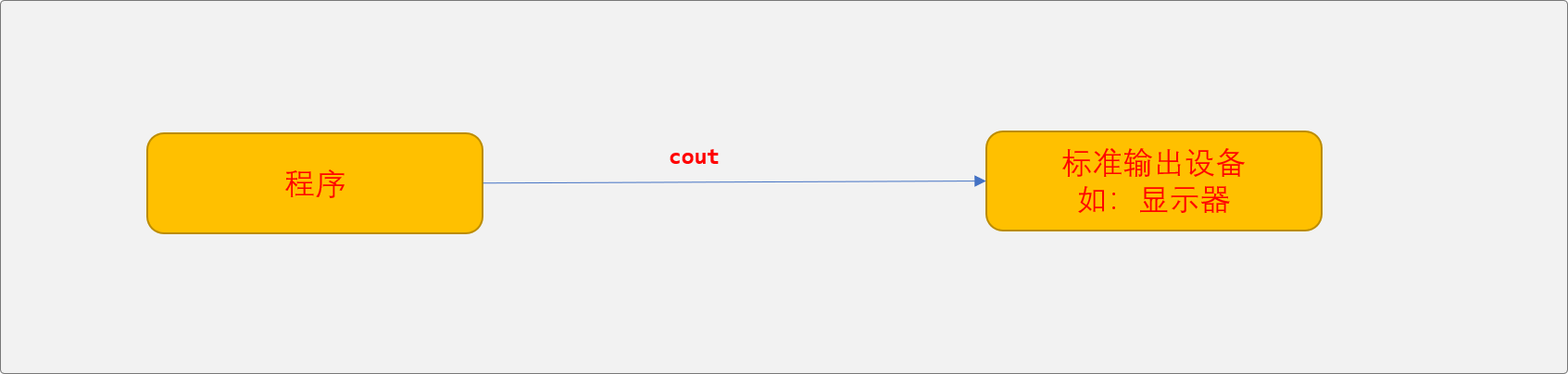
除了cout,还有cerr,其作用和 cout相似。两者区别:
cout带有数据缓存功能,cerr不带缓存功能。
缓存类似于蓄水池,输出时,先缓存数据,然后再从缓存中输出到显示器上。
cout输出程序通用数据(测试,逻辑结果……),cerr输出错误信息。
另还有一个
clog对象,和cerr类似,与cerr不同之处,带有缓存功能。
cin 称为标准输入流对象,一端连接程序,一端连接标准输入设备(标准输入设备一般指键盘),cin用来把标准输入设备上的数据输入到程序中。
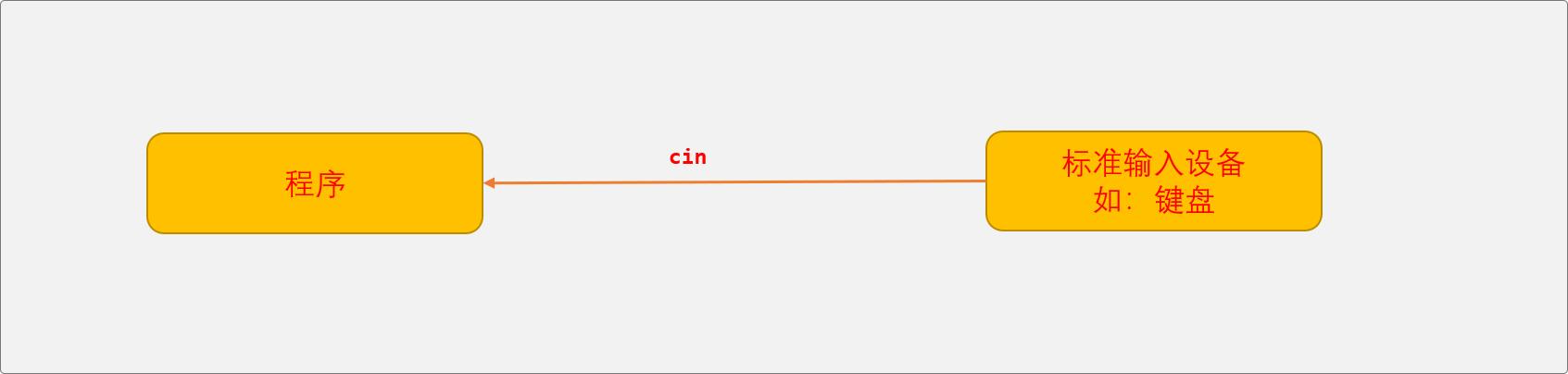
使用 cout和cin时需要包含 iostream头文件。
#include <iostream>打开 iostream 源代码,可以看到 iostream文件中包含了另外 2 个头文件:
#include <ostream>#include <istream>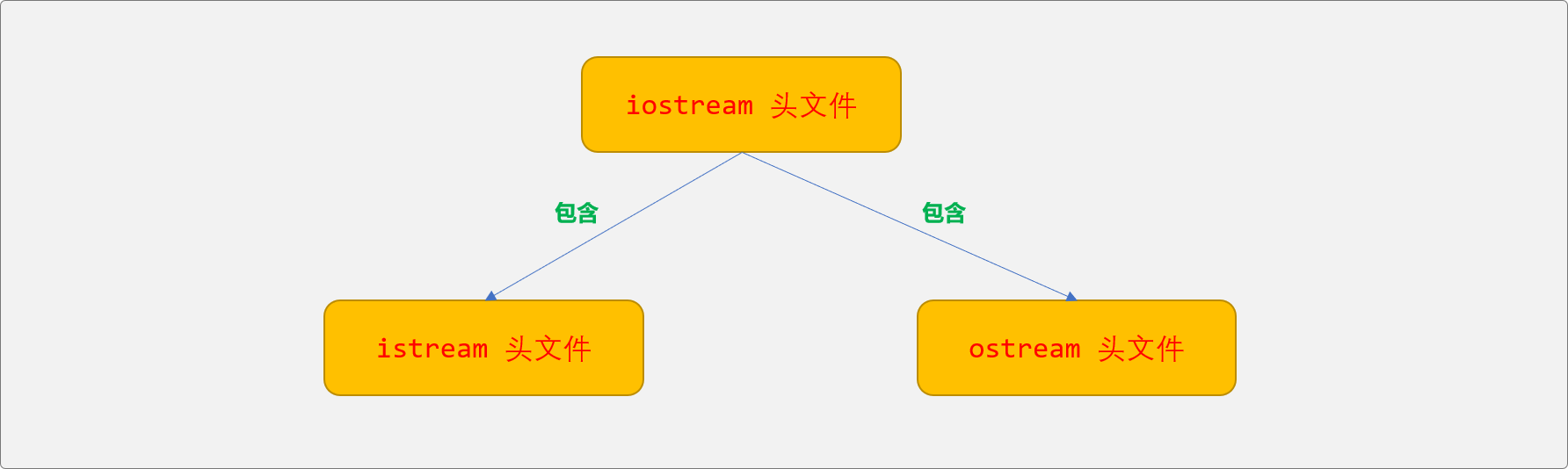
且在 iostream头文件中可以查找到如下代码:
extern istream cin; /// Linked to standard inputextern ostream cout; /// Linked to standard outputextern ostream cerr; /// Linked to standard error (unbuffered)extern ostream clog; /// Linked to standard error (buffered)cout、cerr、clog是 ostream类的实例化对象,cin是 istream 类的实例化对象。
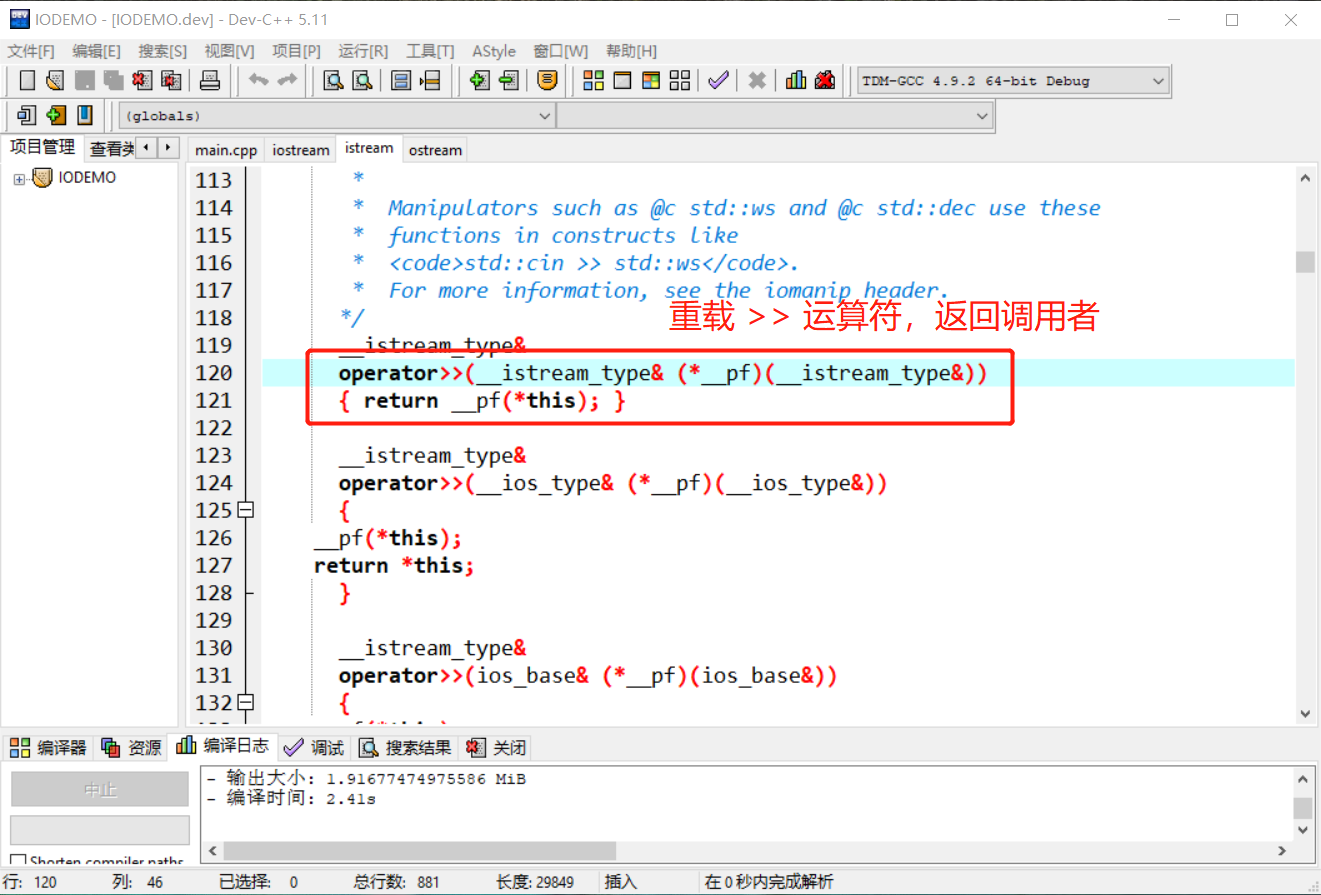
ostream类重载了<< 运算符,istream类重载了>>运算符,可以使用这 2 个运算符方便、快速地完成输入、输出各种类型数据。打开源代码,可以查看到 <<运算符返回调用者本身。意味着使用 cout<<数据时,返回 cout本身,可以以链式方式进行数据输出。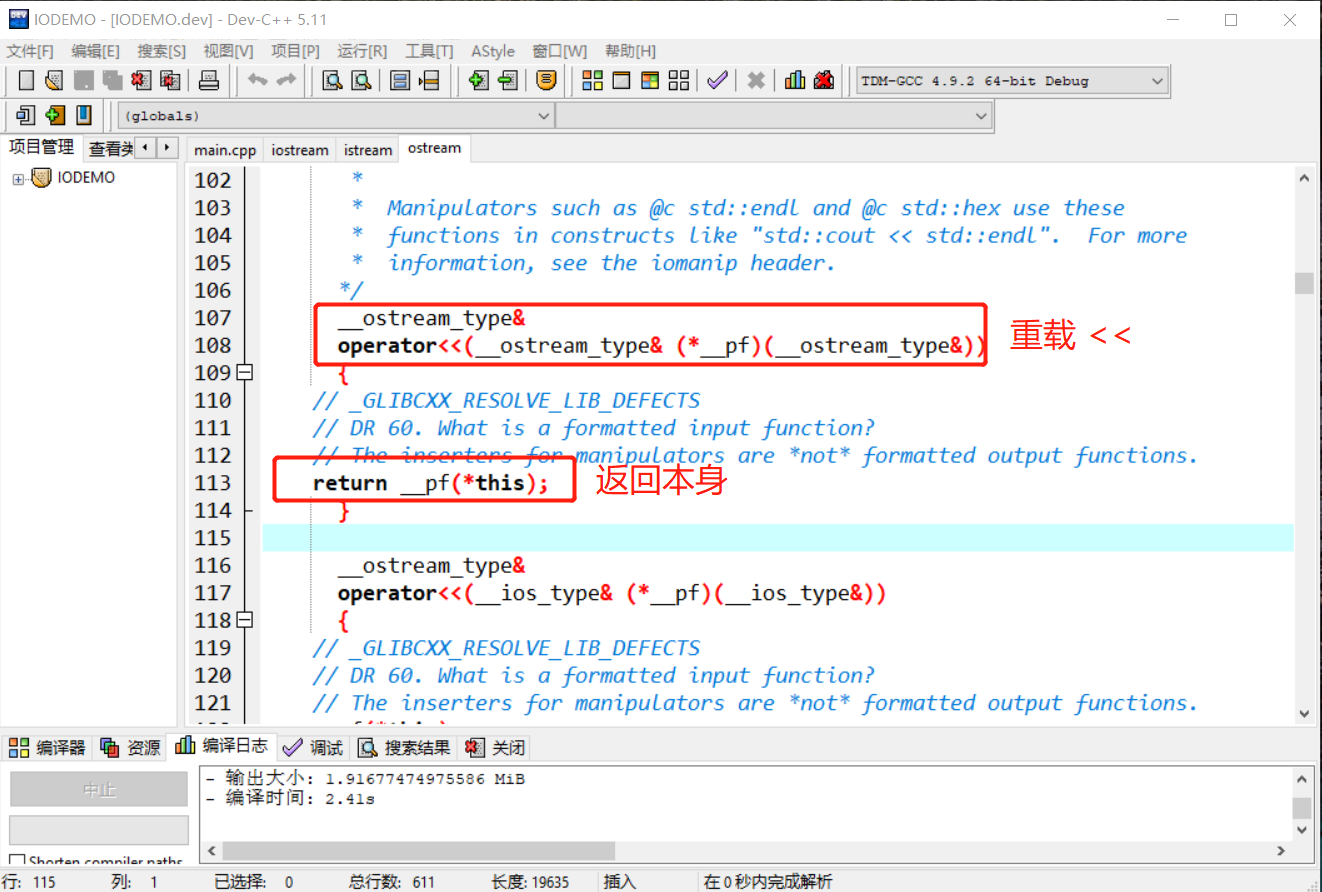
#include <iostream>using namespace std;int main(int argc, char** argv) { string name="果壳"; int age=12; //链式输出格式 cout<<"姓名:"<<name<<"年龄:"<<age; return 0;}istream类重载了 >>运算符,返回调用者(即 istream 对象)本身,也可以使用链式方式进行输入。
#include <iostream>using namespace std;int main(int argc, char** argv) { char sex; int age; //链式输入 cin>>sex>>age; return 0;}cout、cin 流对象的其它函数暂不介绍,继续本文的重点文件流。
文件流 API完成程序中的数据和文件中的数据的输入与输出,使用时,需要包含 fstream头文件。
#include <fstream>ifstream从 istream类派生,用来实现把文件中的数据l输入(读)到程序中。
输入操作对程序而言,也称为
读操作。
文件输入流对象的使用流程:
使用 ifstream流对象的 open函数建立起程序和外部存储设备中的文件资源之间的流通道。
文件类型分文本文件和二进制文件。

使用之前,了解一下 open函数的原型说明。打开ifstream头文件,可查看到 ifstream 类中有如下的信息说明:
template<typename _CharT, typename _Traits>class basic_ifstream : public basic_istream<_CharT, _Traits>{ /** * @brief Opens an external file. * @param __s The name of the file. * @param __mode The open mode flags. * * Calls @c std::basic_filebuf::open(s,__mode|in). If that function * fails, @c failbit is set in the stream's error state. * * Tip: When using std::string to hold the filename, you must use * .c_str() before passing it to this constructor. */ void open(const char* __s, ios_base::openmode __mode = ios_base::in) { if (!_M_filebuf.open(__s, __mode | ios_base::in)) this->setstate(ios_base::failbit); else // _GLIBCXX_RESOLVE_LIB_DEFECTS // 409. Closing an fstream should clear error state this->clear(); } #if __cplusplus >= 201103L /** * @brief Opens an external file. * @param __s The name of the file. * @param __mode The open mode flags. * * Calls @c std::basic_filebuf::open(__s,__mode|in). If that function * fails, @c failbit is set in the stream's error state. */ void open(const std::string& __s, ios_base::openmode __mode = ios_base::in) { if (!_M_filebuf.open(__s, __mode | ios_base::in)) this->setstate(ios_base::failbit); else // _GLIBCXX_RESOLVE_LIB_DEFECTS // 409. Closing an fstream should clear error state this->clear(); } #endif }ifstream重载了 open函数,2 个函数参数数量一致,但第一个参数的类型不相同。调用时需要传递 2 个参数:
open函数通过 const char* __s类型(字符串指针)接受,第二个open函数通过const std::string& __s类型(字符串对象)接受。ios_base::in(输入)模式。打开模式如下所示:enum _Ios_Openmode { _S_app = 1L << 0, _S_ate = 1L << 1, _S_bin = 1L << 2, _S_in = 1L << 3, _S_out = 1L << 4, _S_trunc = 1L << 5, _S_ios_openmode_end = 1L << 16 }; typedef _Ios_Openmode openmode; /// 以写的方式打开文件,写入的数据追加到文件末尾 static const openmode app = _S_app; /// 打开一个已有的文件,文件指针指向文件末尾 static const openmode ate = _S_ate; /// 以二进制方式打开一个文件,如不指定,默认为文本文件方式 static const openmode binary = _S_bin; /// 以输入(读)方式打开文件 static const openmode in = _S_in; /// 以输出(写)方式打开文件,如果没有此文件,则创建,如有此文件,此清除原文件中数据 static const openmode out = _S_out; /// 打开文件的时候丢弃现有文件里边的内容 static const openmode trunc = _S_trunc;打开文件实现:
#include <iostream>#include <fstream>using namespace std;int main(int argc, char** argv) { ifstream inFile; //文件路径保存在字符数组中 char fileName[50]="d:\\guoke.txt"; inFile.open(fileName,ios_base::in); //文件路径保存在字符串对象中 string fileName_="d:\\guoke.txt" ; inFile.open(fileName_,ios_base::in); return 0;}除了直接调用 open函数外,还可以使用 ifstream的构造函数,如下代码,本质还是调用 open函数。
char fileName[50]="d:\\guoke.txt";//构造函数ifstream inFile(fileName,ios_base::in);或者:
string fileName_="d:\\guoke.txt" ;ifstream inFile(fileName_,ios_base::in);可以使用ifstream的 is_open函数检查文件是否打开成功。
打开文件后,意味着输入流通道建立起来,默认情况下,文件指针指向文件的首位置,等待读取操作。
读或写都是通过移动文件指针实现的。
读取数据的方式:
>> 运算符。ifstream是istream的派生类,继承了父类中的所有公共函数,如同 cin一样可以使用 >>运算符实现对文件的读取操作。
cin使用>>把标准输入设备上的数据输入至程序。
ifstream使用>>把文件中的数据输入至程序。两者的数据源不一样,目的地一样。
提前在 guoke.txt文件中写入如下内容,也可以用空白隔开数字。
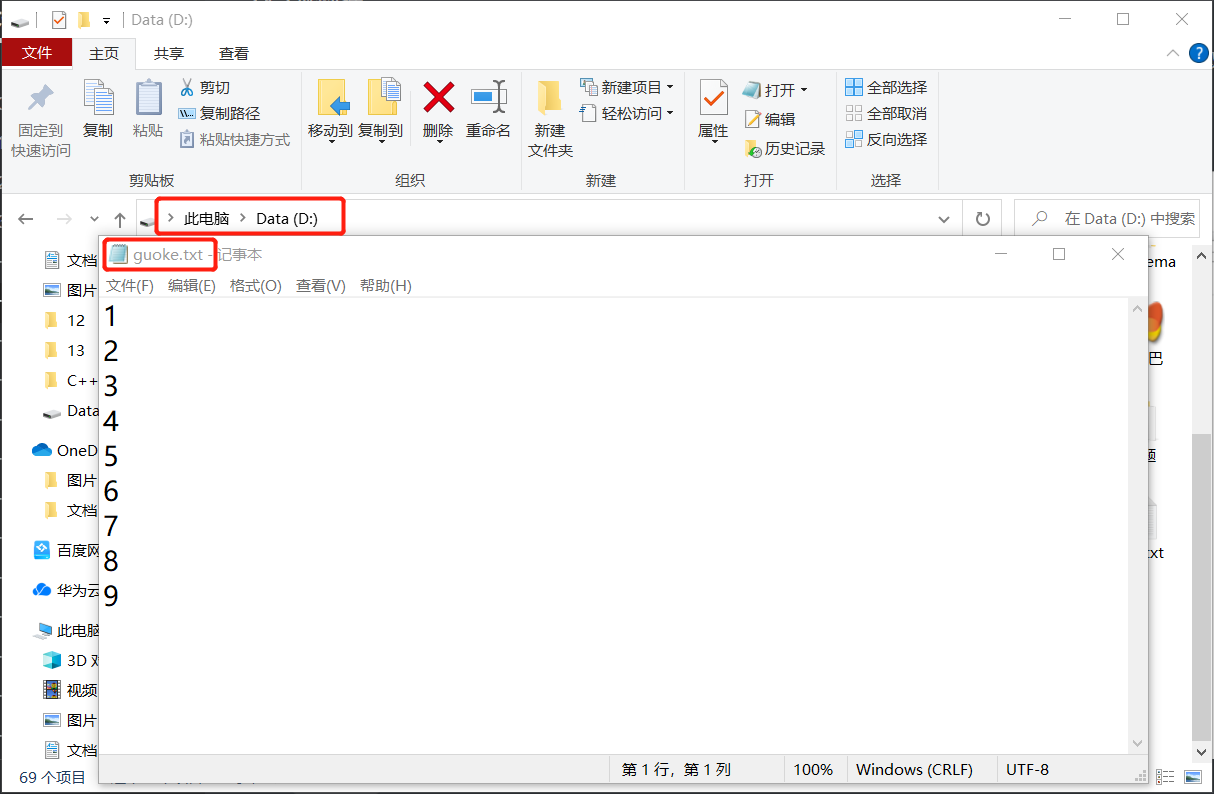
#include <iostream>#include <fstream>using namespace std;int main(int argc, char** argv) { //用来存储文件中的数据 int nums[10]; //文件输入流对象 ifstream inFile; //文件路径 char fileName[50]="d:\\guoke.txt"; //打开文件 inFile.open(fileName,ios_base::in); if(inFile.is_open()) { //检查文件是否正确打开 cout<<"文件打开成功"<<endl; //读取文件中的内容 for(int i=0; i<5; i++){ //读取 inFile>>nums[i]; //输出到显示器 cout<<nums[i]<<endl; } } return 0;}如上代码,把文件中的 5 个数字读取到 nums 数组中。
用
>>运算符读取时,以换行符、空白等符号作为结束符。
get、getline函数。ifstream类提供有 get、getline函数,可用来读取文件中数据。get函数有多个重载,本文使用如下的 2 个。getline函数和get函数功能相似,其差异之处后文再述。
//以字符为单位读取istream &get( char &ch );//以字符串为单位读取istream &get( char *buffer, streamsize num );先在 D盘使用记事本创建 guoke.txt文件,并在文件中输入以下 2 行信息:
this is a testhello wellcome编写如下代码,使用 get函数以字符类型逐个读取文件中的内容。
#include <iostream>#include <fstream>using namespace std;int main(int argc, char** argv) { //用来存储文件中的数据 int nums[10]; ifstream inFile; char fileName[50]="d:\\guoke.txt"; inFile.open(fileName,ios_base::in); char myChar; if(inFile.is_open()) { cout<<"文件打开成功"<<endl; //以字符为单位读取数据 while(inFile.get(myChar)){ cout<<myChar; } } return 0;}//输出结果this is a testhello wellcome读取时,需要知道是否已经达到了文件的未尾,或者说如何知道文件中已经没有数据。
如上使用 get 函数读取时,如果没有数据了,会返回false。
使用 eof函数。eof的全称是 end of file, 当文件指针移动到文件无数据处时,eof函数返回 true。建议使用此函数。
while(!inFile.eof()){ inFile.get(myChar); cout<<myChar;} 使用 get的重载函数以字符串类型读取。
#include <iostream>#include <fstream>using namespace std;int main(int argc, char** argv) { //用来存储文件中的数据 int nums[10]; ifstream inFile; char fileName[50]="d:\\guoke.txt"; inFile.open(fileName,ios_base::in); char myChar[100]; if(inFile.is_open()) { cout<<"文件打开成功"<<endl; while(!inFile.eof() ) { //以字符串为单位读取 inFile.get(myChar,100); cout<<myChar<<endl; //为什么要调用无参的 get 函数? inFile.get(); } } return 0;}输出结果:
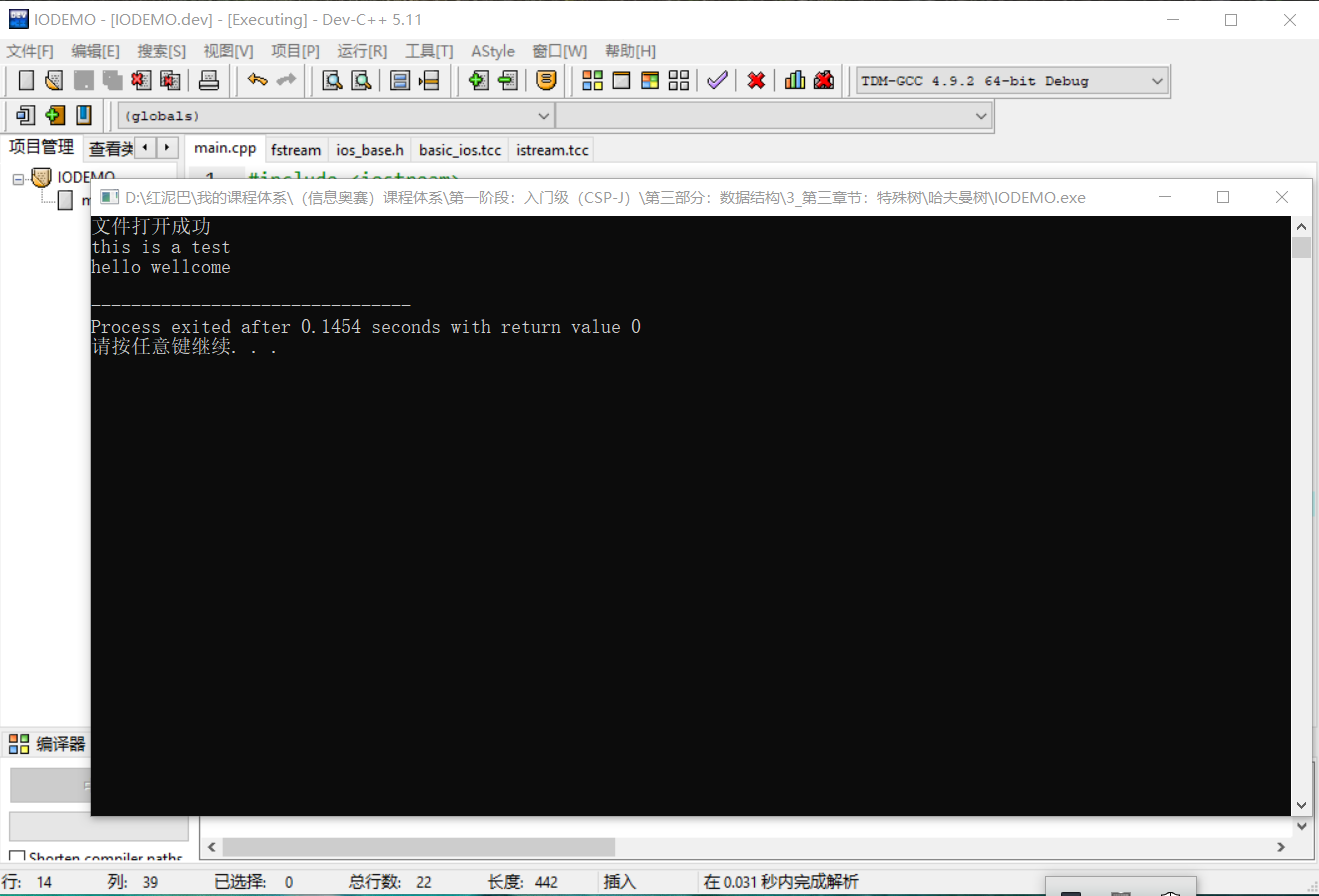
上述 get函数以字符串为单位进行数据读取,会把读出来的数据保存在第一个参数 myChar数组中,第二个参数限制每次最多读 num-1个字符。
如果把上述的
inFile.get(myChar,100);改成
inFile.get(myChar,10);则程序运行结果如下:
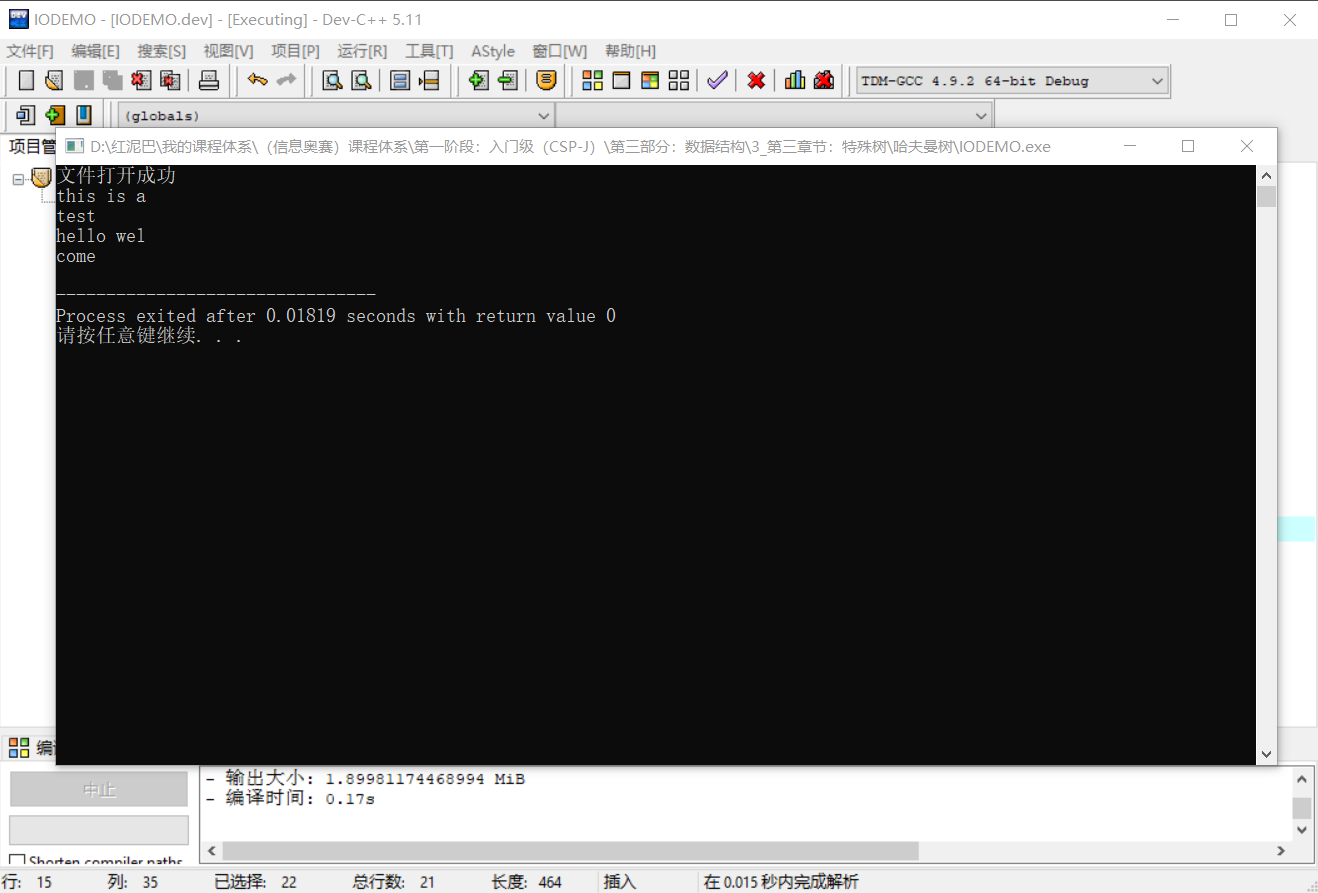
第一次读了 9 个字符后结束 ,第二次遇到到换行符后结束,第三行读了 9 个字符后结束,第四行遇到文件结束后结束 。
为什么在代码要调用无参 get函数?
因为get读数据时会把换行符保留在缓存器中,在读到第二行之前,需要调用无参的 get函数提前清除(读出)缓存器。否则后续数据读不出来。
getline和 get函数一样,可以以字符串为单位读数据,但不会缓存换行符(结束符)。如下同样可以读取到文件中的所有内容。
while(inFile.eof()){ inFile.getline(myChar,100) cout<<myChar<<endl;}read 函数。除了get和getline函数还可以使用 read函数。函数原型如下:
istream &read( char *buffer, streamsize num );#include <iostream>#include <fstream>using namespace std;int main(int argc, char** argv) { //用来存储文件中的数据 int nums[10]; ifstream inFile; char fileName[50]="d:\\myinfo.txt"; inFile.open(fileName,ios_base::in); char myChar[100]; if(inFile.is_open()) { cout<<"文件打开成功"<<endl; inFile.read(myChar,100); cout<<myChar; } return 0;}read一次性读取到num个字节或者遇到 eof(文件结束符)停止读操作。这点和 get和getline不同,后者以换行符为结束符号。
读操作结束后,需要关闭文件对象。
inFile.close(); ofstream称为文件输出流,其派生于ostream,用于把程序中的数据输出(写)到文件中。和使用 ifstream的流程一样,分 3 步走:
使用 ofstream流对象的 open函数(和 ifstream的 open函数参数说明一样)打开文件,因为是写操作,打开的模式默认是ios_stream::out,当然,可以指定其它的如ios_stream::app模式。
#include <iostream>#include <fstream>using namespace std;int main(int argc, char** argv) { //输出流对象 ofstream outFile; char fileName[50]="d:\\guoke.txt"; outFile.open(fileName,ios_base::out); if (outFile.is_open()){ cout<<"打开文件成功"<<endl; } return 0;}<<运算符。#include <iostream>#include <fstream>using namespace std;int main(int argc, char** argv) { //输出流对象 ofstream outFile; char fileName[50]="d:\\guoke.txt"; outFile.open(fileName,ios_base::out); if (outFile.is_open()){ cout<<"打开文件成功"<<endl; for(int i=0;i<10;i++){ //向文件中写入 10 个数字 outFile<<i; } } return 0;}输出结果:
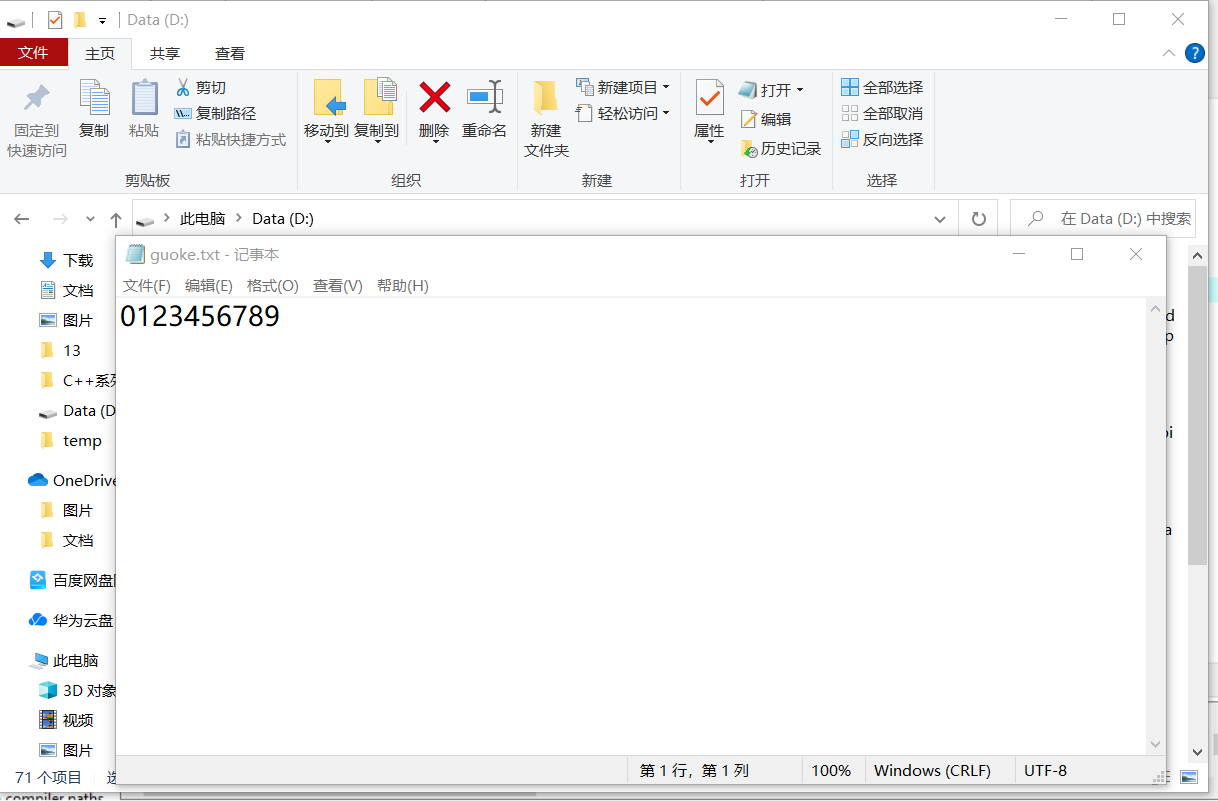
put 、write函数。put函数以字符为单位向文件中写入数据,put函数原型如下:
ostream &put( char ch );#include <iostream>#include <fstream>using namespace std;int main(int argc, char** argv) { //输出流对象 ofstream outFile; char fileName[50]="d:\\guoke.txt"; outFile.open(fileName,ios_base::out); if (outFile.is_open()){ cout<<"打开文件成功"<<endl; for(int i=0;i<10;i++){ //写入 10 个大写字母 outFile.put(char(i+65) ); } } return 0;}write可以把字符串写入文件中,如下为write函数原型:
ostream &write( const char *buffer, streamsize num );参数说明:
char类型指针。#include <iostream>#include <fstream>using namespace std;int main(int argc, char** argv) { //输出流对象 ofstream outFile; char fileName[50]="d:\\guoke.txt"; outFile.open(fileName,ios_base::out); char infos[50]="thisisatest"; if (outFile.is_open()){ cout<<"打开文件成功"<<endl; outFile.write(infos,50); } return 0;}文件中内容:
thisisatest如果把
outFile.write(infos,50);改成
outFile.write(infos,5);则文件中内容为
thisi操作完成后,需要调用close函数关闭文件。
outFile.close();随机访问指可以根据需要移动二进制文件中的文件指针,随机读或写二进制文件中的内容。
随机访问要求打开文件时,指定文件打开模式为
ios_base::binary。
随机读写分 2 步:
随机访问的关键是使用文件指针的定位函数进行位置定位:
gcount() 返回最后一次输入所读入的字节数tellg() 返回输入文件指针的当前位置seekg(文件中的位置) 将输入文件中指针移到指定的位置seekg(位移量,参照位置) 以参照位置为基础移动若干字节tellp() 返回输出文件指针当前的位置seekp(文件中的位置) 将输出文件中指针移到指定的位置seekp(位移量,参照位置) 以参照位置为基础移动若干字节如下代码,使用文件输出流向文件中写入数据,然后随机定位文件指针位置,再进行读操作。
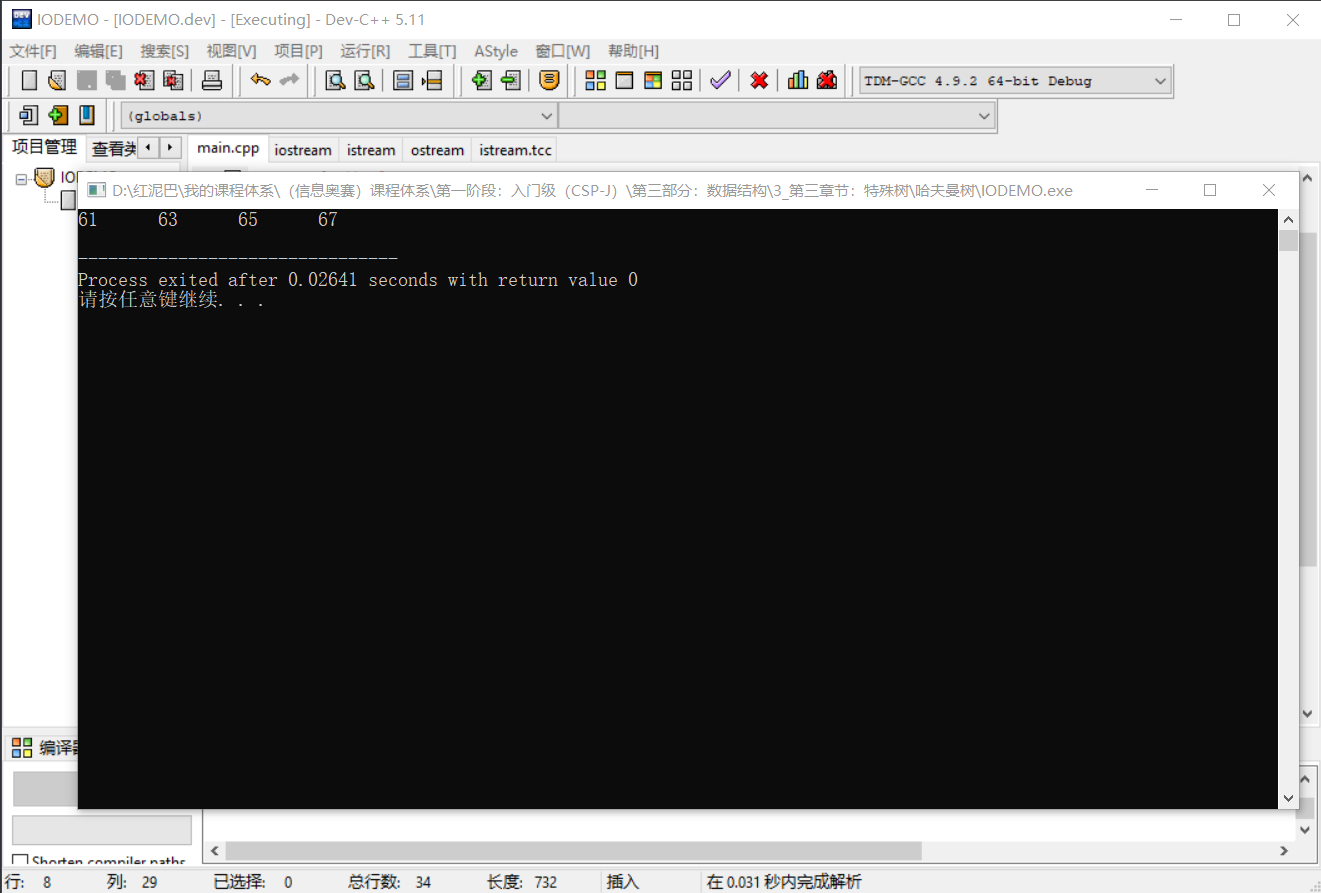
#include<fstream>#include<iostream>using namespace std;int main() { int i,x; // 以写的模式打开文件 ofstream outfile("d:\\guoke.txt",ios_base::out | ios_base::binary); if(!outfile.is_open()) { cout << "open error!"; exit(1); } for(i=1; i<100; i+=2) //向文件中写入数据 outfile.write((char*)&i,sizeof(int)); outfile.close(); //输入流 ifstream infile("d:\\guoke.txt",ios_base::in|ios_base::binary); if(!infile.is_open()) { cout <<"open error!\n"; exit(1); } //定位 infile.seekg(30*sizeof(int)); for(i=0; i<4 &&!infile.eof(); i++) { //读数据 infile.read((char*)&x,sizeof(int)); cout<<x<<'\t'; } cout <<endl; infile.close(); return 0;}原文件中内容:
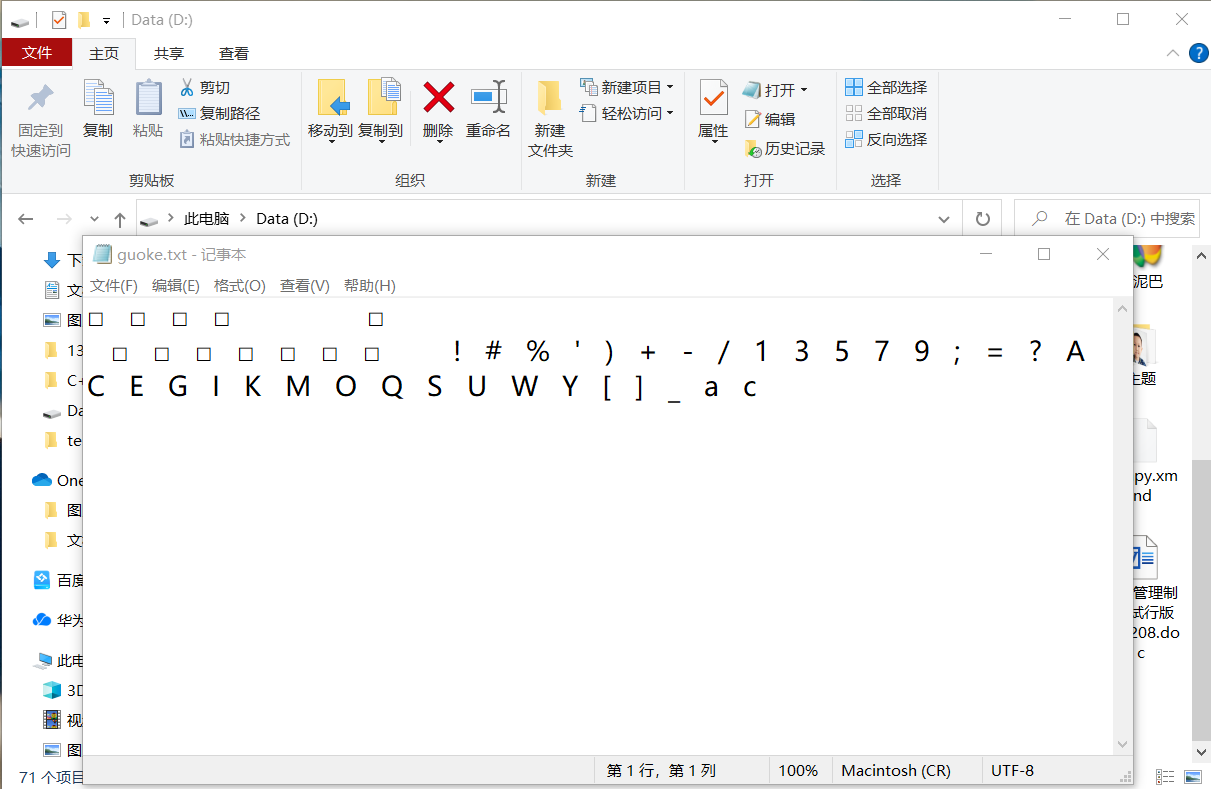
代码执行后的运行结果,并没有输入文件中的所有内容。
本文讲述了标准输入、输出流和文件流对象。

