# nfs的Server配置文件和配置方法echo '/newnfs 192.168.3.*rw,sync,no_root_squash)' >> /etc/exports# 根目录新建文件夹,权限777mkdir /newnfs && chmod 777 /newnfs
# 重新启动rpcbind和nfs-server服务systemctl restart rpcbind && systemctl restart nfs-server# nfs的Client# 查看Sever信息showmount -e 192.168.2.197
# 挂载mkdir /newnfsmount -t nfs 192.168.2.197:/newnfs /newnfs
# 可以先查询一下本机是否有安装了nfs # rpm系列Linuxrpm -aq | grep nfs# deb系列dpkg -l | grep nfs# 查询rpcbind也是同理
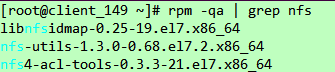
# 没有就安装一下啦# rpm,当然用dnf命令也可以安装的yum install nfs-utils rpcbind # deb apt install nfs-utils rpcbind
[root@client_149 ~]# cat /etc/exports[root@client_149 ~]#
1共享目录的路径 2允许访问的NFS客户端ip(3共享权限参数)
参数 | 备注 |
文件读写权限相关 |
|
登录账号映射匿名 |
|
同步数据的方式 |
|
/root/newdir 192.168.2.149(rw,sync,root_squash)
[root@server_197 ~]# mkdir /newnfs[root@server_197 ~]# ll / | grep newnfsdrwxr-xr-x. 2 root root 6 Aug 30 19:57 newnfs[root@server_197 ~]# chmod -R 777 /newnfs/[root@server_197 ~]# ll / | grep newnfsdrwxrwxrwx. 2 root root 6 Aug 30 19:57 newnfs
[root@server_197 ~]# echo '/newnfs 192.168.2.*rw,sync,no_root_squash)' >> /etc/exports[root@server_197 ~]# cat /etc/exports /newnfs192.168.2.(rw,sync,no_root_squash)
如果你在使用ipstables,或者是有有其他网段端口的限制,可能需要固定一下端口。
RQUOTAD_PORT=4001LOCKD_TCPPORT=4002LOCKD_UDPPORT=4002MOUNTD_PORT=4003STATD_PORT=4004
[root@server_197 ~]# systemctl restart rpcbind[root@server_197 ~]# systemctl enable rpcbind[root@server_197 ~]# systemctl restart nfs-server
[root@server_197 ~]# systemctl enable nfs-serverCreated symlink from /etc/systemd/system/multi-user.target.wants/nfs-server.service to /usr/lib/systemd/system/nfs-server.service.
用netstat看一下是不是有端口监听了,有就是启动成功了。
[root@server_197 ~]# netstat -tlpn | grep "2049\|111"tcp 0 0 0.0.0.0:111 0.0.0.0:* LISTEN 1/systemdtcp 0 0 0.0.0.0:2049 0.0.0.0:* LISTEN -tcp6 0 0 :::111 :::* LISTEN 1/systemdtcp6 0 0 :::2049 :::* LISTEN -
systemctl stop iptablessystemctl disable iptables[root@server_197 ~]# firewall-cmd --permanent --add-service=nfssuccess[root@server_197 ~]# firewall-cmd --permanent --add-service=rpc-bindsuccess[root@server_197 ~]# firewall-cmd --permanent --add-service=mountdsuccess[root@server_197 ~]# firewall-cmd --reloadsuccess
iptables这个有点局限性,如果非要使用,先依据前面可选的先固定好mountd的端口。我一般情况都先关了iptables留firewall。不过还是这样写一下啦,万一用得上。
以之前设置的mountd固定端口,4001-4004,以及nfs:2049、rpc:111
iptables -A INPUT -p tcp -m tcp --dport 111 -j ACCEPT iptables -A INPUT -p udp -m udp --dport 111 -j ACCEPT iptables -A INPUT -p tcp -m tcp --dport 2049 -j ACCEPTiptables -A INPUT -p udp -m udp --dport 2049 -j ACCEPTiptables -A INPUT -p tcp -m tcp --dport 4001:4004 -j ACCEPT iptables -A INPUT -p udp -m udp --dport 4001:4004 -j ACCEPT# iptables -I : 新加一条规则链# iptables -A :增加一条规则链# ptables -I 添加的规则放在现有规则的最前面,iptables -A 放在现有规则的最后。
重新启动一下防火墙啦
作为使用Client,相当于Sever分享了一块硬盘,我们可以直接挂载在Client本地。
先看一下Sever共享信息,也就是对应我们之前在Sever的/etc/exports的配置。
如果不在许可范围内会提示mount.nfs: access denied by server while mounting。
mount -t nfs 192.168.2.197:/newnfs /newnfs
[root@client_149 ~]# showmount -e 192.168.2.197 #看一下先Sever共享信息Export list for 192.168.2.197:/newnfs 192.168.2.*[root@client_149 ~]# mount -t nfs 192.168.2.197:/newnfs /newnfs
# 新建个文件夹用于挂载Server的根目录[root@client_149 ~]# mkdir /nfs_197# 挂载[root@client_149 ~]# mount -t nfs 192.168.2.197:/ /nfs_197# 查看一下挂载好的目录内容[root@client_149 ~]# ll /nfs_197total 0drwxrwxrwx. 2 root root 20 Aug 31 01:30 newnfs
重新启动后就要重新挂载啦,我们可以编辑一下/etc/fstab设置一下自动挂载。
在最后面追加
echo '192.168.2.197:/newnfs /newnfs nfs 0 0' >> /etc/fstab如果不生效,将自动挂载也设置为开机启动
systemctl start remote-fs.targetsystemctl enable remote-fs.target当然,也可以开机时候自动执行挂载的命令/etc/rc.local
# 把之前的mount命令追加到rc.local的末尾[root@client_149 ~]# echo 'mount -t nfs 192.168.2.197:/newnfs /newnfs' >> /etc/rc.local# 追加完成后看一下[root@client_149 ~]# cat /etc/rc.local | grep -v "#"touch /var/lock/subsys/localmount -t nfs 192.168.2.197:/newnfs /newnfs
这里记得要这个/etc/rc.local可执行+x
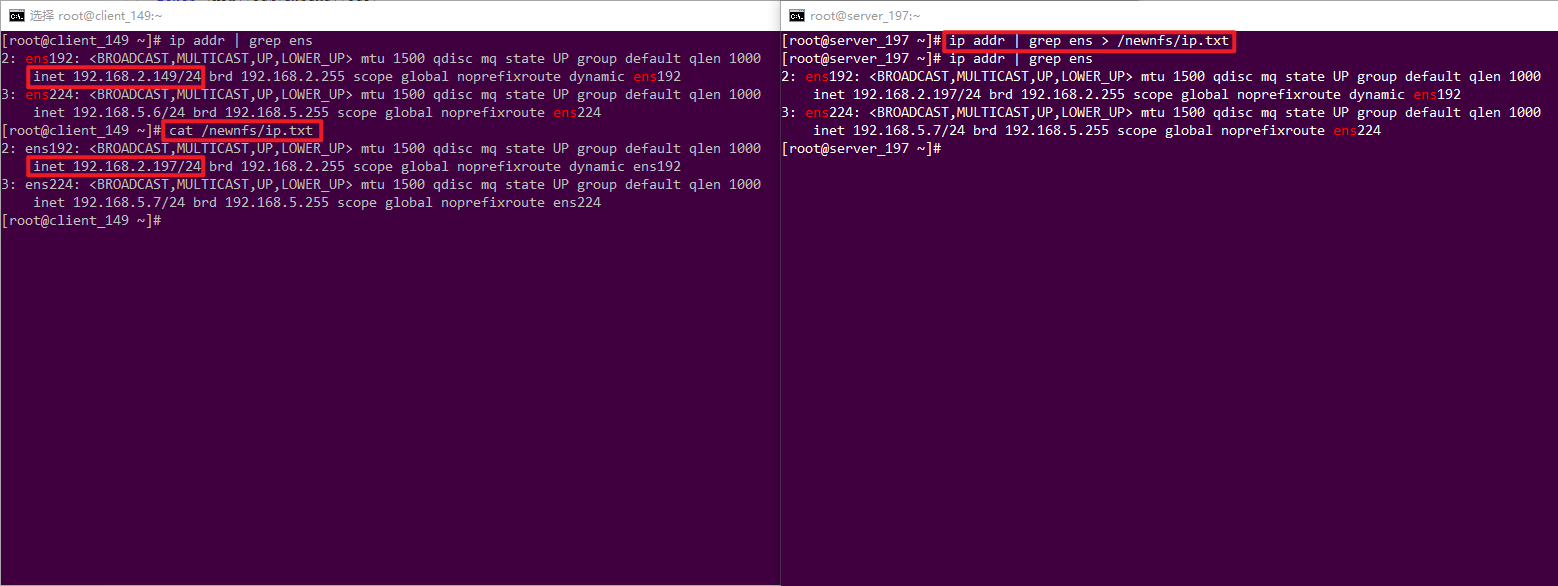
目前Server和Client都已经配置好,我们在Server、Client任意主机在共享、挂载的目录内新建个文件,再在另一主机上查看一下。