闲聊:
小颖今年四月底从西安跑到深圳来找工作,本来想着好好赚钱还房贷,结果快转正了被通知要么无薪待岗,要么办理离职,嗯~ o(* ̄▽ ̄*)o.............................. 想骂人咋办 ?
小颖之前没怎么写过小程序,到这边后接手了离职小姐姐的工作,看代码、看api、自己试着建项目,后面摸索着根据需求开发前端静态页面,一边写还要一边和产品沟通,说的是按PC端开发移动端,但产品给的原型和PC端差异很大,有的是Pc端没有按他当时给的需求写,有的是产品遗漏了······,反正写的时候是真费劲,后来组里又招了个前端,不过我的队友有自己的想法,写的时候只看当前页面不封装不整理,也不调用别人写的············,UI出来了也是不按UI的来写个大概的样式,然后他负责的模块前端进度就是一排排的
给他说把一个模块改完了再弄下一个也不听········反正就是很有自己的想法,然后后面调接口时,他就开始吐槽他好忙,我也不知道怎么接话,我三个模块的接口都联调完了,他一个模块都没完,虽然领导要求我们1、2、4、6加班,但他的进度依旧真怕后面我把活干完了,他没干完领导让我给他擦屁股,这下要被劝退了就不用担心啦 所以这么想想就觉得其实还挺开心的,起码不用再和我的队友一起写代码了,毕竟现在跑哦那个比后面发现坑太多跑不急的好,那么希望我俩后面不要再面试同一家了,希望我们接下来找的工作都比现在的工资高、待遇好,加油??
偷偷向下看: 其实想想我这还好不算惨,我们另一个组和我一起入职的男生,刚被上一家释放,来这边快转正了又遇到释放·············这更惨,所以想想也就不那么难过啦,所以不要觉得自己过的不如意,过得不如意时看看比自己惨的就突然释怀了,觉得自己也没那么惨了,也就没那么焦虑啦。
无薪待岗 or 离职 ,我当然选择离职啦,赶紧提桶跑路,那就在跑前把自己写的部分组件整理下,虽然不是什么复杂组件,但记录一下,方便以后找代码,不然靠脑子的话,怕是有点难为我自己,哈哈。那就上代码
具体怎么弄,请大家移步到:HBuilderx 创建 、运行uniapp项目

根据自己的需求是否 注册、创建同名目录
{ "pages": [ //pages数组中第一项表示应用启动页,参考:https://uniapp.dcloud.io/collocation/pages { "path": "pages/index/index", "style": { "navigationBarTitleText": "小组件", "navigationBarBackgroundColor": "#ffffff" } }, { "path": "pages/echarts-report/echarts-report", "style": { "navigationBarTitleText": "报表组件", "enablePullDownRefresh": false } }, { "path": "pages/show-com/show-com", "style": { "navigationBarTitleText": "", "enablePullDownRefresh": false } } ], "tabBar": { // "height": "67px", "color": "#8F919F", "selectedColor": "#2F65DF", "borderStyle": "black", "backgroundColor": "#ffffff", "list": [{ "pagePath": "pages/index/index", // "iconPath": "./static/tabbar/tab_workbench_nromal.png", // "selectedIconPath": "./static/tabbar/tab_workbench_select.png", "text": "其他" }, { "pagePath": "pages/echarts-report/echarts-report", // "iconPath": "./static/tabbar/tab_my_normal.png", // "selectedIconPath": "./static/tabbar/tab_my_select.png", "text": "报表" } ] }, "globalStyle": { "navigationBarTextStyle": "black", "navigationBarTitleText": "uni-app", "navigationBarBackgroundColor": "#F8F8F8", "backgroundColor": "#F8F8F8" }}
其中 tabBar 中配置的底部导航信息,pages 中配置页面路由信息
因为小颖的这个小程序里就只有两个菜单,俩菜单模块中点击进去后就开始渲染相应的组件,所以小颖就把他们拆分成两个菜单页和一个加载组件页,菜单页样式和交互方式一样所以,小颖把才对呢单独提了个组件,两个页面是各自底部导航点进入的页面,把渲染组件的页面用的同一页组件,具体怎么实现的呢,代码一个一个往上贴哈哈
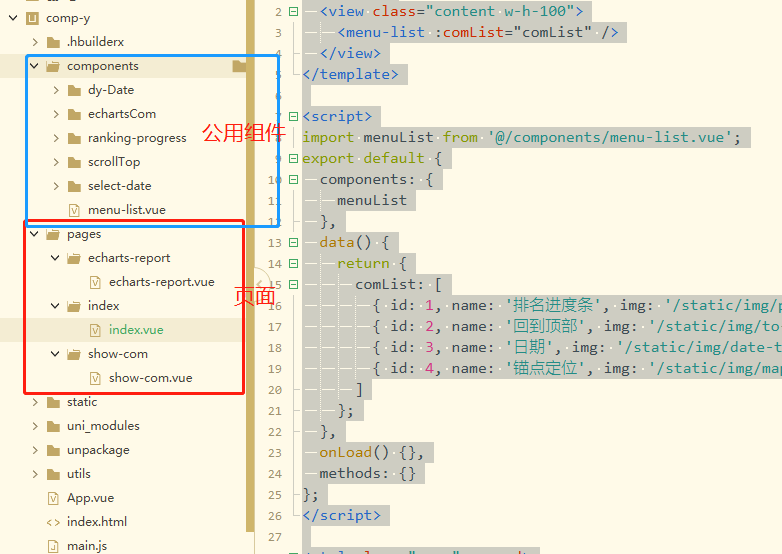
<template> <view > <menu-list :comList="comList" /> </view></template><script>import menuList from '@/components/menu-list.vue';export default { components: { menuList }, data() { return { comList: [ { id: 1, name: '排名进度条', img: '/static/img/progress-icon.svg', url: '/pages/show-com/show-com?type=progress' }, { id: 2, name: '回到顶部', img: '/static/img/to-top.svg', url: '/pages/show-com/show-com?type=toTop' }, { id: 3, name: '日期', img: '/static/img/date-time.svg', url: '/pages/show-com/show-com?type=Time' }, { id: 4, name: '锚点定位', img: '/static/img/map-fill.svg', url: '/pages/show-com/show-com?type=aimingPosition' } ] }; }, onLoad() {}, methods: {}};</script><style lang="scss" scoped>.content { background-color: $uni-bg-color-grey;}</style>
<template> <!-- 报表组件 --> <view ><menu-list :comList="comList" /></view></template><script>import menuList from '@/components/menu-list.vue';export default { components: { menuList }, data() { return { comList: [ { id: 1, name: '饼状图', img: '/static/img/pie-icon.svg', url: '/pages/show-com/show-com?type=pieEchart' }, { id: 2, name: '柱状图', img: '/static/img/bar-icon.svg', url: '/pages/show-com/show-com?type=barEchart' }, { id: 3, name: '混合图', img: '/static/img/bar-line-icon.svg', url: '/pages/show-com/show-com?type=barLineEChart' } // { id: 4, name: '堆叠', img: '/static/img/map-fill.svg' } ] }; }, methods: {}};</script><style></style>
<template> <view > <view :key="dt.id" v-for="dt in comList" @click="changePage(dt.url)"> <view ><image :src="dt.img"></image></view> <view >{{ dt.name }}</view> </view> </view></template><script>export default { props: { comList: { type: Array, required: true } }, data() { return {}; }, methods: { changePage(url) { uni.navigateTo({url}); } }};</script><style lang="scss" scoped>.menu-list-box { padding-top: 30rpx; margin-left: 32rpx; .list-item { border-radius: 12rpx; height: 170rpx; flex: 2; background-color: $uni-bg-color; margin: 16rpx 32rpx 16rpx 0; image { width: 90rpx; height: 90rpx; margin: 20rpx 0 10rpx 0; } } .menu-name { font-size: 28rpx; width: 100%; text-align: center; } }</style>
<template> <!-- 展示组件 --> <view > <!-- 进度条 --> <view v-if="showCom == 'progress'"> <ranking-prog :unitType="2" :rankList="rankingData" unitTxt="个" /> <ranking-prog :unitType="1" :rankList="rankingData" unitTxt="亿" /> </view> <!-- 回到顶部 --> <view v-if="showCom == 'toTop'"> <scroll-view scroll-y="true" scroll-with-animation="true" :scroll-top="scrollTopNum" @scroll="scrollFun"> <view ></view> <!-- 回到顶部 --> <scroll-top :showToTop="showToTops" @goTopFun="goTopFun" /> </scroll-view> </view> <!-- 瞄点定位 --> <view v-if="showCom == 'aimingPosition'" > <uni-data-select v-model="toView" :localdata="anchorPoints" @change="changeFun" /> <scroll-view scroll-y="true" scroll-with-animation="true" :scroll-into-view="toView"> <view id="anchor1" >内容模块1</view> <view id="anchor2" >内容模块2</view> <view id="anchor3" >内容模块3</view> </scroll-view> </view> <!-- 日期 --> <view v-if="showCom == 'Time'" > <!-- 不支持设置默认时间 --> <view > <view > <view > <view ><text >日期类型:</text></view> <view ><uni-data-select v-model="timePram.timeType" :localdata="timeTypeList" @change="changeType" /></view> </view> </view> <view ><select-dt :timeType="timePram.timeType" :endTime="true" @getStartT="getStartTime" @getEndT="getEndTime" /></view> </view> <text v-if="timePram.timeType">所选日期:{{ timePram.startTime }}-{{ timePram.endTime }}</text> </view> <!-- 饼状图 --> <pie-echart v-if="showCom == 'pieEchart'" :pieCanvasId="'chartsPie'" :pieChartData="ChartData" ref="chartsPie" /> <!-- 柱状图 --> <bar-echart v-if="showCom == 'barEchart'" :barCanvasId="'columnCanvas'" :barChartData="ChartData" :ontouch="true" /> <!-- 折现+柱状混合图 --> <barLineEChart v-if="showCom == 'barLineEChart'" :chartData="ChartData" /> </view></template><script>import rankingProg from '@/components/ranking-progress/ranking-progress.vue';import scrollTop from '@/components/scrollTop/scrollTop.vue';import selectDt from '@/components/select-date/select-date.vue';import pieEchart from '@/components/echartsCom/pie-y.vue';import barEchart from '@/components/echartsCom/bar-charts.vue';import barLineEChart from '@/components/echartsCom/bar-line-charts.vue';import { pieChart } from '@/utils/echarts.config.js';import moment from '@/static/js/moment.min.js';export default { name: 'show-com', components: { rankingProg, scrollTop, selectDt, pieEchart, barEchart, barLineEChart }, data() { return { showCom: 'pieEchart', ChartData: {}, rankingData: [], oldScrollNum: 0, scrollTopNum: 0, showToTops: false, toView: '', anchorPoints: [{ value: 'anchor1', text: '内容模块1' }, { value: 'anchor2', text: '内容模块2' }, { value: 'anchor3', text: '内容模块3' }], timePram: { timeType: 'day', startTime: '', endTime: '', startTimeTxt: '', endTimeTxt: '' }, timeTypeList: [{ value: 'day', text: '日' }, { value: 'month', text: '月' }, { value: 'quarter', text: '季度' }, { value: 'year', text: '年' }] }; }, onLoad(option) { let type = option.type, _title = ''; this.showCom = type; switch (type) { case 'progress': _title = '组件-排名进度条'; this.initProgress(); break; case 'toTop': _title = '组件-回到顶部'; this.initBarChar(); break; case 'Time': _title = '组件-日期'; this.initTimeCom(); break; case 'aimingPosition': _title = '组件-锚点定位'; break; case 'pieEchart': _title = '组件-饼图'; this.initPieChar(); break; case 'barEchart': _title = '组件-柱状图'; this.initBarChar(); break; case 'barLineEChart': _title = '组件-折线+柱状图'; this.initBarLineEChart(); break; } uni.setNavigationBarTitle({ title: _title }); }, methods: { initProgress() { this.rankingData = [ { name: 'XXXXXXXXXXXXXXXX银行分理处1', percentage: 82, num: 385 }, { name: 'XXXXXXX中国银行分理处2', percentage: 80, num: 345 }, { name: '中国工商银行雄县支行3', percentage: 70, num: 233 }, { name: '容城县津海大街光大银行分理处4', percentage: 55, num: 214 }, { name: '农业银行雄县支行5', percentage: 40, num: 128 }, { name: '农业银行雄县支行6', percentage: 40, num: 128 }, { name: '容城闲罗萨大街中国银行分理处7', percentage: 80, num: 345 }, { name: '中国工商银行雄县支行8', percentage: 70, num: 233 }, { name: '容城县津海大街光大银行分理处9', percentage: 55, num: 214 }, { name: '农业银行雄县支行10', percentage: 40, num: 128 }, { name: '2农业银行雄县支行11', percentage: 40, num: 128 } ]; }, scrollFun(e) { this.oldScrollNum = e.detail.scrollTop; if (this.oldScrollNum > 500 || this.oldScrollNum == 500) { this.showToTops = true; } else { this.showToTops = false; } }, // 回滚到顶部 goTopFun(v) { // 解决view层不同步的问题 this.scrollTopNum = this.oldScrollNum; this.$nextTick(() => { this.scrollTopNum = 0; }); }, initTimeCom() { this.timePram.startTime = moment(new Date().getTime()).format('YYYY-MM-DD'); this.timePram.endTime = this.timePram.startTime; }, getStartTime(time) { this.timePram.startTime = time._time; this.timePram.startTimeTxt = time.timeY; console.log('开始时间', time); }, getEndTime(time) { this.timePram.endTime = time._time; this.timePram.endTimeTxt = time.timeY; console.log('结束时间', time); }, changeType(value) { this.timePram.timeType = value; }, changeFun(id) { if (!id) { return; } let anchorId = id; setTimeout(() => { this.$nextTick(() => { this.toView = anchorId; }); }, 1000); }, initPieChar() { setTimeout(() => { this.ChartData = JSON.parse(JSON.stringify(pieChart.series)); this.ChartData.series[0].data = [{ name: '缴存', value: 200 }, { name: '提取', value: 200 }, { name: '贷款', value: 201 }]; this.$refs.chartsPie.pieEopts.title.text = '本月检核问题类型占比'; }, 500); }, initBarChar() { //模拟从服务器获取数据时的延时 setTimeout(() => { //模拟服务器返回数据,如果数据格式和标准格式不同,需自行按下面的格式拼接 let res = { categories: ['202108', '202109', '202110', '202111', '202112', '202201', '202202', '202203', '202204', '202205', '202206', '202207'], series: [ { name: '问题数量', data: [990, 850, 790, 700, 700, 450, 700, 650, 590, 580, 550, 570] } ] }; this.ChartData = JSON.parse(JSON.stringify(res)); }, 500); }, initBarLineEChart() { setTimeout(() => { let res = { categories: ['2016', '2017', '2018', '2019', '2020', '2021'], series: [ { name: '发放金额', type: 'column', data: [70, 90, 88, 88, 65, 78] }, { name: '同期发放金额', type: 'column', data: [50, 58, 56, 58, 43, 55] }, { name: '同比增长率', index: 1, type: 'line', data: [-2, -6, 4, 3, 4, 0], addPoint: true }, { name: '环比增长率', index: 1, type: 'line', data: [-5, -9, 5, -5, -14, 0], addPoint: true } ] }; this.ChartData = JSON.parse(JSON.stringify(res)); }, 500); } }};</script><style lang="scss" scoped>.charts-content { /deep/.ranking-progress-box { padding: 20rpx 32rpx; } .row-item { flex: 1; .time-type-txt { height: 70rpx; line-height: 70rpx; } } .show-time-com { padding-top: 50rpx; padding: 50rpx 32rpx 0 32rpx; } .scroller-box { height: 1600rpx; .scroller-content { height: 1500px; background-color: aliceblue; } } .aiming-position-box { .scroller-box { height: 1500rpx; } } .has-back { height: 800rpx; width: 100%; background-color: antiquewhite; } #anchor2 { background-color: paleturquoise; } #anchor3 { background-color: greenyellow; }}</style>
瞄点定位那个小颖没有提成组件,其实就是 下拉框 和 scroll-view的结合 ,需要注意: scroll-view 要给高 并且里面的小模块的高加起来要大于 scroll-view 的 高,这样才能滚起来
回到顶部那个也是需要注意 scroll-view 设定高,不然不会触发它的 @scroll 事件
其他组件麻烦大家移步:comp-y


