本文基于SDK 29
一、ViewModel与LiveData的作用:
1、viewModel:
数据共享,屏幕旋转不丢失数据,并且在Activity与Fragment之间共享数据。
2、LiveData:
感知生命周期并且通知观察者刷新,防止内存泄漏。
二、用法
三、原理:
1、ViewModel:
ViewModelProviders.of(this).get(MyViewModel::class.java)我们通过这个方法来构造ViewModel。
@NonNull@MainThreadpublic static ViewModelProvider of(@NonNull FragmentActivity activity) { return of(activity, null);}/** * Creates a {@link ViewModelProvider}, which retains ViewModels while a scope of given Activity * is alive. More detailed explanation is in {@link ViewModel}. * <p> * It uses the given {@link Factory} to instantiate new ViewModels. * * @param activity an activity, in whose scope ViewModels should be retained * @param factory a {@code Factory} to instantiate new ViewModels * @return a ViewModelProvider instance */@NonNull@MainThreadpublic static ViewModelProvider of(@NonNull FragmentActivity activity, @Nullable Factory factory) { Application application = checkApplication(activity); if (factory == null) { factory = ViewModelProvider.AndroidViewModelFactory.getInstance(application); } return new ViewModelProvider(activity.getViewModelStore(), factory);}
从源码中可以看出,ViewModelProviders.of(this)获取了一个ViewModelProvider 对象,而该对象中持有一个ViewModelProvider.AndroidViewModelFactory(因为我们传进入的是null)
和activity.getViewModelStore()。
private final Factory mFactory;private final ViewModelStore mViewModelStore;public ViewModelProvider(@NonNull ViewModelStore store, @NonNull Factory factory) { mFactory = factory; this.mViewModelStore = store;}我们再来看看ViewModelStore这个类,从名字中已经可以看出它的用途,那便是存储ViewModel。
public class ViewModelStore { private final HashMap<String, ViewModel> mMap = new HashMap<>(); final void put(String key, ViewModel viewModel) { ViewModel oldViewModel = mMap.put(key, viewModel); if (oldViewModel != null) { oldViewModel.onCleared(); } } final ViewModel get(String key) { return mMap.get(key); } /** * Clears internal storage and notifies ViewModels that they are no longer used. */ public final void clear() { for (ViewModel vm : mMap.values()) { vm.onCleared(); } mMap.clear(); }}
我们的ViewModel便是存储在上面的HashMap中。
接下来我们再来看ViewModelProviders.of(this).get(MyViewModel::class.java)的get方法:
@NonNull @MainThread public <T extends ViewModel> T get(@NonNull Class<T> modelClass) { String canonicalName = modelClass.getCanonicalName(); if (canonicalName == null) { throw new IllegalArgumentException("Local and anonymous classes can not be ViewModels"); } return get(DEFAULT_KEY + ":" + canonicalName, modelClass); }@NonNull@MainThreadpublic <T extends ViewModel> T get(@NonNull String key, @NonNull Class<T> modelClass) { ViewModel viewModel = mViewModelStore.get(key); if (modelClass.isInstance(viewModel)) { //noinspection unchecked return (T) viewModel; } else { //noinspection StatementWithEmptyBody if (viewModel != null) { // TODO: log a warning. } } viewModel = mFactory.create(modelClass); mViewModelStore.put(key, viewModel); //noinspection unchecked return (T) viewModel;}可以看出,所以会去存储ViewModel的ViewModelStore中拿,发现已经有了便直接返回,如果没有的话,那边使用mFactory工厂进行构建,然后再放进ViewModelStore中。
从之前的分析可以看出,这里的mFactory便是AndroidViewModelFactory。
@NonNull@Overridepublic <T extends ViewModel> T create(@NonNull Class<T> modelClass) { if (AndroidViewModel.class.isAssignableFrom(modelClass)) { //noinspection TryWithIdenticalCatches try { return modelClass.getConstructor(Application.class).newInstance(mApplication); } catch (NoSuchMethodException e) { throw new RuntimeException("Cannot create an instance of " + modelClass, e); } catch (IllegalAccessException e) { throw new RuntimeException("Cannot create an instance of " + modelClass, e); } catch (InstantiationException e) { throw new RuntimeException("Cannot create an instance of " + modelClass, e); } catch (InvocationTargetException e) { throw new RuntimeException("Cannot create an instance of " + modelClass, e); } } return super.create(modelClass);}其实该工厂也只是直接实例出该类而已。
此时我们便已经拿到了ViewModel。
可是它是怎么做到数据共享的呢,想做到数据共享,按理说它应该只有一个实例对象,我们且看。
@NonNull@MainThreadpublic static ViewModelProvider of(@NonNull FragmentActivity activity, @Nullable Factory factory) { Application application = checkApplication(activity); if (factory == null) { factory = ViewModelProvider.AndroidViewModelFactory.getInstance(application); } return new ViewModelProvider(activity.getViewModelStore(), factory);}在获取ViewModelProvider的时候传进去了activity.getViewModelStore(),那我们看一下activity.getViewModelStore()是怎么获取ViewModelStore的。
@NonNull@Overridepublic ViewModelStore getViewModelStore() { if (getApplication() == null) { throw new IllegalStateException("Your activity is not yet attached to the " + "Application instance. You can't request ViewModel before onCreate call.") } if (mViewModelStore == null) { NonConfigurationInstances nc = (NonConfigurationInstances) getLastNonConfigurationInstance(); if (nc != null) { // Restore the ViewModelStore from NonConfigurationInstances mViewModelStore = nc.viewModelStore; } if (mViewModelStore == null) { mViewModelStore = new ViewModelStore(); } } return mViewModelStore;}关键的代码在于这一句:NonConfigurationInstances nc = (NonConfigurationInstances) getLastNonConfigurationInstance();
static final class NonConfigurationInstances { Object activity; HashMap<String, Object> children; FragmentManagerNonConfig fragments; ArrayMap<String, LoaderManager> loaders; VoiceInteractor voiceInteractor; } /* package */ NonConfigurationInstances mLastNonConfigurationInstances;@Nullablepublic Object getLastNonConfigurationInstance() { return mLastNonConfigurationInstances != null ? mLastNonConfigurationInstances.activity : null;}将mLastNonConfigurationInstances.activity强转成FragmentActivity中的一个类:NonConfigurationInstances,然后获取ViewModelStore
static final class NonConfigurationInstances { Object custom; ViewModelStore viewModelStore; FragmentManagerNonConfig fragments;}
NonConfigurationInstances是个静态类,所以里面的ViewModelStore 也是唯一的,因此ViewModelStore 能做到数据共享。
2、LivaData
我们先看这个语句:
viewModel?.livaData?.observe(this, Observer<Int> { integer -> Log.d("MainActivity", integer!!.toString()) })从这个语句往源码里面探究:
@MainThreadpublic void observe(@NonNull LifecycleOwner owner, @NonNull Observer<? super T> observer) { assertMainThread("observe"); if (owner.getLifecycle().getCurrentState() == DESTROYED) { // ignore return; } LifecycleBoundObserver wrapper = new LifecycleBoundObserver(owner, observer); ObserverWrapper existing = mObservers.putIfAbsent(observer, wrapper); if (existing != null && !existing.isAttachedTo(owner)) { throw new IllegalArgumentException("Cannot add the same observer" + " with different lifecycles"); } if (existing != null) { return; } owner.getLifecycle().addObserver(wrapper);}如果这个activity处于销毁状态,那么便不会添加该观察者,否则,构造一个LifecycleBoundObserver对象,放进mObservers里面,mObservers即为:
private SafeIterableMap<Observer<? super T>, ObserverWrapper> mObservers = new SafeIterableMap<>();然后将LifecycleBoundObserver对象放进LifecycleRegistry里面。
LifecycleBoundObserver里面持有的对象如下:

当我们给LiveData设置值的时候:livaData.value = i
public class MutableLiveData<T> extends LiveData<T> { @Override public void postValue(T value) { super.postValue(value); } @Override public void setValue(T value) { super.setValue(value); }}里面还有个postValue方法:
protected void postValue(T value) { boolean postTask; synchronized (mDataLock) { postTask = mPendingData == NOT_SET; mPendingData = value; } if (!postTask) { return; } ArchTaskExecutor.getInstance().postToMainThread(mPostValueRunnable);}postValue最终也会调用到主线程。postValue可以在子线程调用,而setValue必须在主线程调用,否则会抛出异常。
我们看setValue方法:
@MainThreadprotected void setValue(T value) { assertMainThread("setValue"); mVersion++; mData = value; dispatchingValue(null);}
void dispatchingValue(@Nullable ObserverWrapper initiator) { if (mDispatchingValue) { mDispatchInvalidated = true; return; } mDispatchingValue = true; do { mDispatchInvalidated = false; if (initiator != null) { considerNotify(initiator); initiator = null; } else { for (Iterator<Map.Entry<Observer<? super T>, ObserverWrapper>> iterator = mObservers.iteratorWithAdditions(); iterator.hasNext(); ) { considerNotify(iterator.next().getValue()); if (mDispatchInvalidated) { break; } } } } while (mDispatchInvalidated); mDispatchingValue = false;}这里我们传进来的initiator为null,所以我们主要看:
for (Iterator<Map.Entry<Observer<? super T>, ObserverWrapper>> iterator = mObservers.iteratorWithAdditions(); iterator.hasNext(); ) { considerNotify(iterator.next().getValue()); if (mDispatchInvalidated) { break; }}这里的mObservers即为:
private SafeIterableMap<Observer<? super T>, ObserverWrapper> mObservers = new SafeIterableMap<>();里面存放着我们之前放进去的LifecycleBoundObserver对象。
iterator.next().getValue()获取的便是LifecycleBoundObserver对象。
private void considerNotify(ObserverWrapper observer) { if (!observer.mActive) { return; } // Check latest state b4 dispatch. Maybe it changed state but we didn't get the event yet. // // we still first check observer.active to keep it as the entrance for events. So even if // the observer moved to an active state, if we've not received that event, we better not // notify for a more predictable notification order. if (!observer.shouldBeActive()) { observer.activeStateChanged(false); return; } if (observer.mLastVersion >= mVersion) { return; } observer.mLastVersion = mVersion; //noinspection unchecked observer.mObserver.onChanged((T) mData);}检测当前生命周期,至少是处于start。
@Overrideboolean shouldBeActive() { return mOwner.getLifecycle().getCurrentState().isAtLeast(STARTED);}然后执行observer.mObserver.onChanged((T) mData);回调出去。
observer.mObserver便是我们传进去的观察者:
Observer<Int> { integer -> Log.d("MainActivity", integer!!.toString()) }
由以上也可以看出:我们是可以注册多个观察者的,所以要注意在一个Activity中只能够注册一次,否则会发生多个回调。
那么有个疑问,我们这样已经实现了,那问什么在liveData?.observe方法里面,不但将LifecycleBoundObserver放进LiveData的SafeIterableMap里面,还要将其放入LifecycleRegistry
里面。owner.getLifecycle()获取到的便是LifecycleRegistry
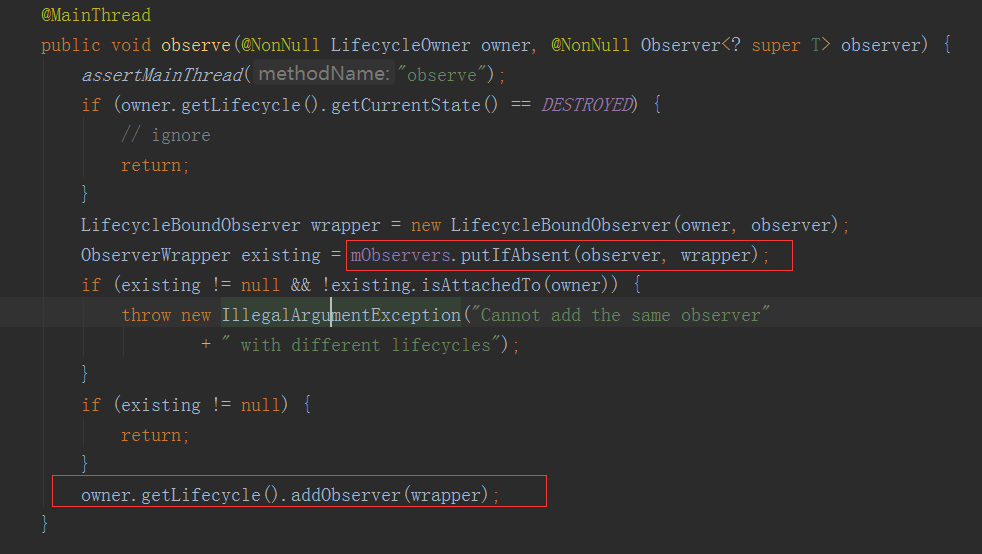
这是为了在相关的生命周期内做相关的操作,根据上一篇文章,我们可以知道,当activity的生命周期发生改变的时候,会获取添加进LifecycleRegistry的观察者,然后对每个观察者进行回调处理。
而在这里便会回调LifecycleBoundObserver的onStateChanged方法。
@Overridepublic void onStateChanged(@NonNull LifecycleOwner source, @NonNull Lifecycle.Event event) { if (mOwner.getLifecycle().getCurrentState() == DESTROYED) { removeObserver(mObserver); return; } activeStateChanged(shouldBeActive());}
判断如果当前处于DESTROYED状态,那么便将我们添加进入的观察者移除。
否则会调用activeStateChanged(shouldBeActive())方法。

如果当前的活跃状态与上一次一样,那么就直接返回。
否则如果变为活跃的状态,那么会调用dispatchingValue(this);
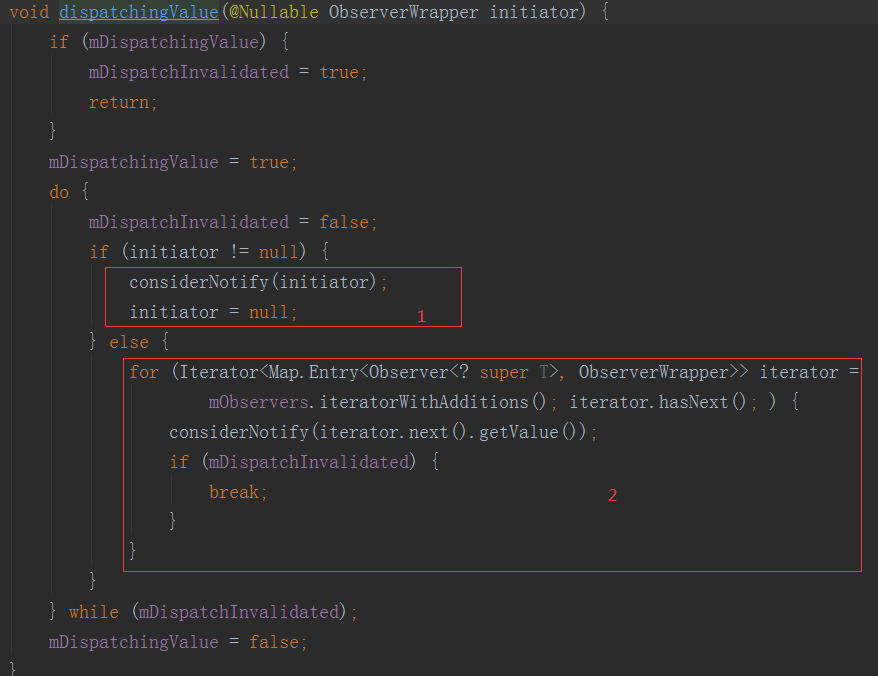
这里要注意,我们之前调用LiveData的setValue的时候,走的的2,但是现在走的是1,因为这次传进来的参数不为空。
private void considerNotify(ObserverWrapper observer) { if (!observer.mActive) { return; } // Check latest state b4 dispatch. Maybe it changed state but we didn't get the event yet. // // we still first check observer.active to keep it as the entrance for events. So even if // the observer moved to an active state, if we've not received that event, we better not // notify for a more predictable notification order. if (!observer.shouldBeActive()) { observer.activeStateChanged(false); return; } if (observer.mLastVersion >= mVersion) { return; } observer.mLastVersion = mVersion; observer.mObserver.onChanged((T) mData);}
然后进入considerNotify这个方法,里面有一个判断十分重要:
if (observer.mLastVersion >= mVersion) { return;}
这个判断是做什么用的呢?mVersion是什么时候被赋值的,这时候就要我们回过去头去看LiveData的setValue方法:
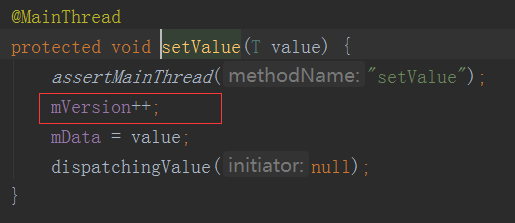
每调用一次,那么这个mVersion就会自加一。
所以这个判断便保证了,必须是刷新了LiveData里面的data值,才能够回调观察者事件:observer.mObserver.onChanged((T) mData);
如果生命周期变化的时候,LiveData里面的data值没有刷新,就不能回调出去。所以如果刷新LiveData里面的值的时候不处于活跃状态导致没有回调,当生命周期来到onStart的时候就会去回调。