Allure是一个开源的测试报告生成框架,提供了测试报告定制化功能,相较于我们之前使用过pytest-html插件生成的html格式的测试报告,通过Allure生成的报告更加规范、清晰、美观。
pytest框架支持使用Allure生成测试报告,接下来让介绍pytest怎样结合Allure生成测试报告。
allure-pytest步骤1需要先安装插件allure-pytest,可以理解为用于连接pytest和allure,使它们可以结合使用。
安装命令:pip install allure-pytest
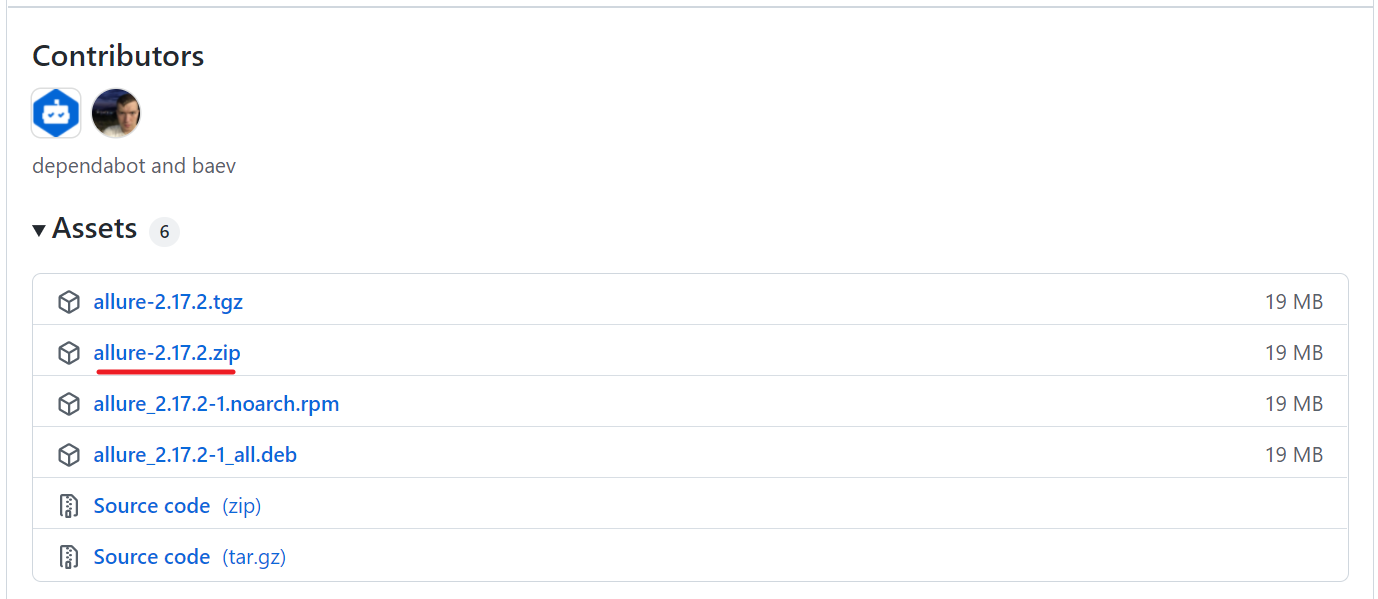
步骤2中需要安装Allure,需要去github下载,地址为:https://github.com/allure-framework/allure2/releases
根据操作系统在最新版本中选择对应格式的安装文件进行下载,Windows系统选择allure-2.xx.x.zip下载,如下图所示:
下载后解压文件,并将bin文件所在的路径加入系统环境变量,再重启电脑,怎样加入环境变量这里不啰嗦,不知道的同学可以百度。
至此,环境搭建完成。
Allure提供了很多特性用于定制生成测试报告,脚本中加入这些特性可以对测试步骤进行详细的说明,且不会对测试代码逻辑产生影响。
接下来以在线购物平台的购物车功能模块和下单模块简单举例说明,测试模块test_case.py代码如下:
import allureimport pytestimport os@allure.step("登录获取token")def get_token(): print("请求登录接口获取token")@allure.step("加入购物车")def add_to_shopping_trolley(): print("请求加入购物车接口")@allure.step("查询我的购物车")def get_shopping_trolley_goods(): print("请求查询我的购物车接口")@allure.step("清空购物车")def empty_shopping_trolley(): print("请求清空购物车接口")@allure.step("下单")def place_order(): print("请求下单接口")@allure.epic("xx在线购物平台接口测试")@allure.feature("购物车功能模块")class TestShoppingTrolley: @allure.story("商品加入购物车") @allure.title("正向用例--将库存数>0的商品加入购物车") @allure.description("校验库存数不为0的商品加入购物车是否正常") @allure.severity("critical") def test_add_goods(self): get_token() add_to_shopping_trolley() @allure.story("商品加入购物车") @allure.title("异常用例--将库存数=0的商品加入购物车") @allure.description("校验库存数为0的商品加入购物车是否提示正确的错误信息") @allure.severity("normal") def test_add_goods_error(self): get_token() add_to_shopping_trolley() @allure.story("查询购物车商品数量") @allure.title("查询购物车所有商品的总数量") @allure.description("校验查询购物车所有商品的总数量是否正常") @allure.severity("critical") def test_get_goods_quantity(self): get_token() add_to_shopping_trolley() get_shopping_trolley_goods() @allure.story("查询购物车商品数量") @allure.title("查询购物车单个商品的数量") @allure.description("校验查询购物车单个商品的数量是否正常") @allure.severity("critical") def test_get_goods_quantity(self): get_token() add_to_shopping_trolley() get_shopping_trolley_goods() @allure.story("清空购物车") @allure.title("加入商品后再清空购物车") @allure.description("校验清空购物车接口功能是否正常") @allure.severity("normal") def test_empty_shopping_trolley(self): get_token() add_to_shopping_trolley() empty_shopping_trolley()@allure.epic("xx在线购物平台接口测试")@allure.feature("下单模块")class TestPlaceOrder: @allure.story("购物车下单") @allure.title("商品加入购物车再下单") @allure.description("校验清购物车下单功能是否正常") @allure.severity("critical") def test_place_order(self): get_token() add_to_shopping_trolley() place_order() @allure.story("立即购买下单") @allure.title("选择商品不加入购物车立即购买下单") @allure.description("校验立即购买下单功能是否正常") @allure.severity("critical") def test_order(self): get_token() place_order()上面测试代码中使用了Allure的一些特性,为了更好的理解这些特性的使用,我们可以将测试脚本由上至下进行分层:
对照以上分层,我们再来理解代码中使用的这些Allure特性,如下:
@allure.epic(),用于描述被测软件系统
@allure.feature(),用于描述被测软件的某个功能模块
@allure.story(),用于描述功能模块下的功能点或功能场景,也即测试需求
@allure.title(),用于定义测试用例标题
@allure.description(),用于测试用例的说明描述
@allure.severity(),标记测试用例级别,由高到低分为 blocker、critical、normal、minor、trivial 五级
@pytest.allure.step(),标记通用函数使之成为测试步骤,测试方法/测试函数中调用此通用函数的地方会向报告中输出步骤描述
pytest中Allure生成测试报告需要经过如下两步操作:
首先,生成测试结果数据:
# python代码执行pytest.main(['testcase/test_case.py', '-s', '-q', '--alluredir', './result'])# 命令行形式pytest testcase/test_case.py --alluredir ./result即运行testcase/目录下的测试用例,将测试结果以json文件的形式保存至当前目录下的result文件夹中。
参数--alluredir用于指定测试结果保存路径。
然后,生成HTML格式的测试报告:
# python代码执行os.system('allure generate ./result -o ./report --clean')# 命令行形式allure generate ./result -o ./report --clean即将当前目录下的result文件夹中的json数据,生成测试报告结果及index.html,并保存至当前目录下的report文件夹中。
--clean表示先清除之前的测试报告,使用与否视情况自行选择。
因此,执行模块run.py代码编写如下:
run.py:
if __name__ == '__main__': pytest.main(['testcase/test_case.py', '-s', '-q', '--alluredir', './result']) os.system('allure generate ./result -o ./report --clean')运行run.py,结果如下:
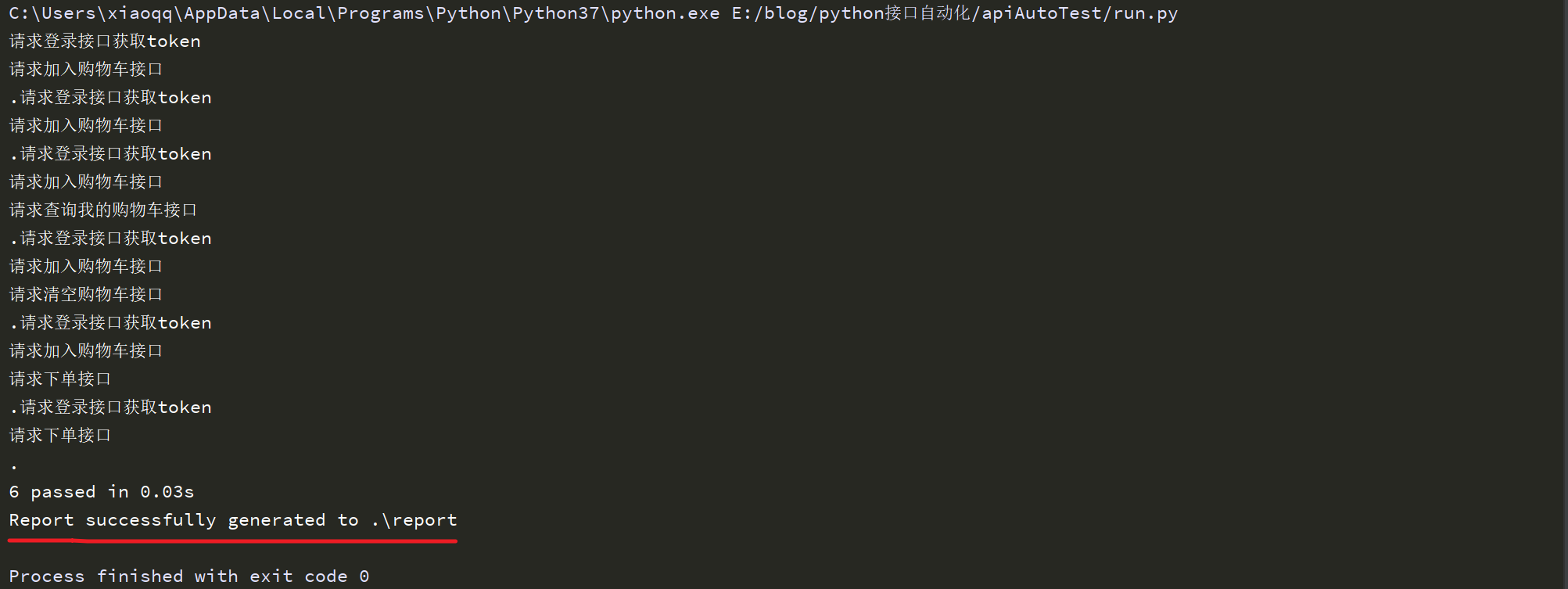
运行run.py后,在run.py同级目录下新增了result文件夹,以及文件夹下的json文件,有多少条测试用例就生成多少个名称为xxxx-result.json的结果文件。
同样在run.py同级目录下新增了report文件夹,report文件夹中生成了一些文件,包括index.html,如下:
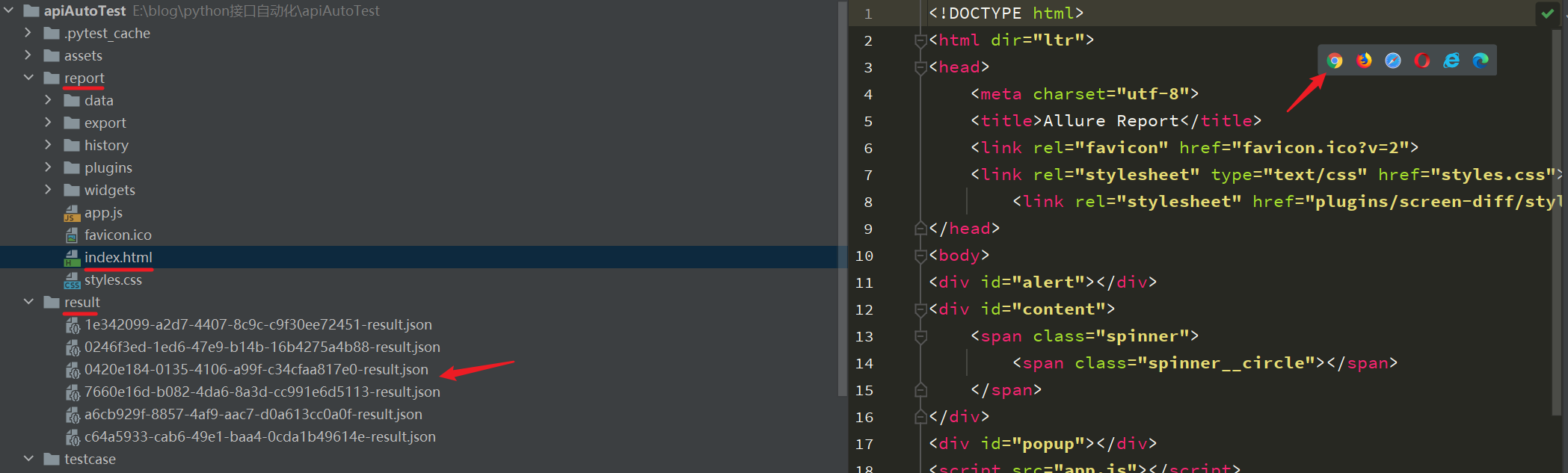
在浏览器中打开index.html,打开后首页如下:
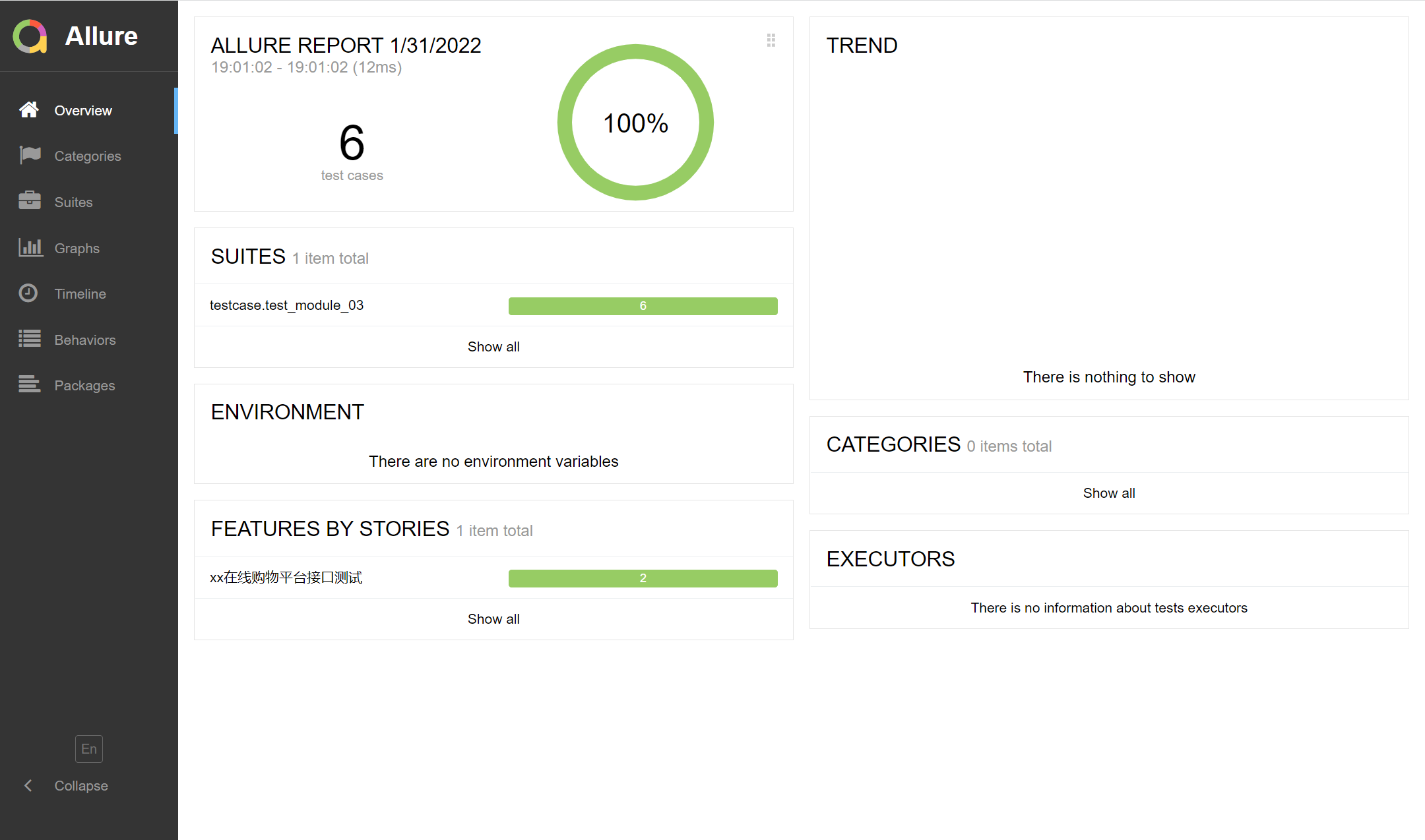
选择点击Behaviors后,结果如下:
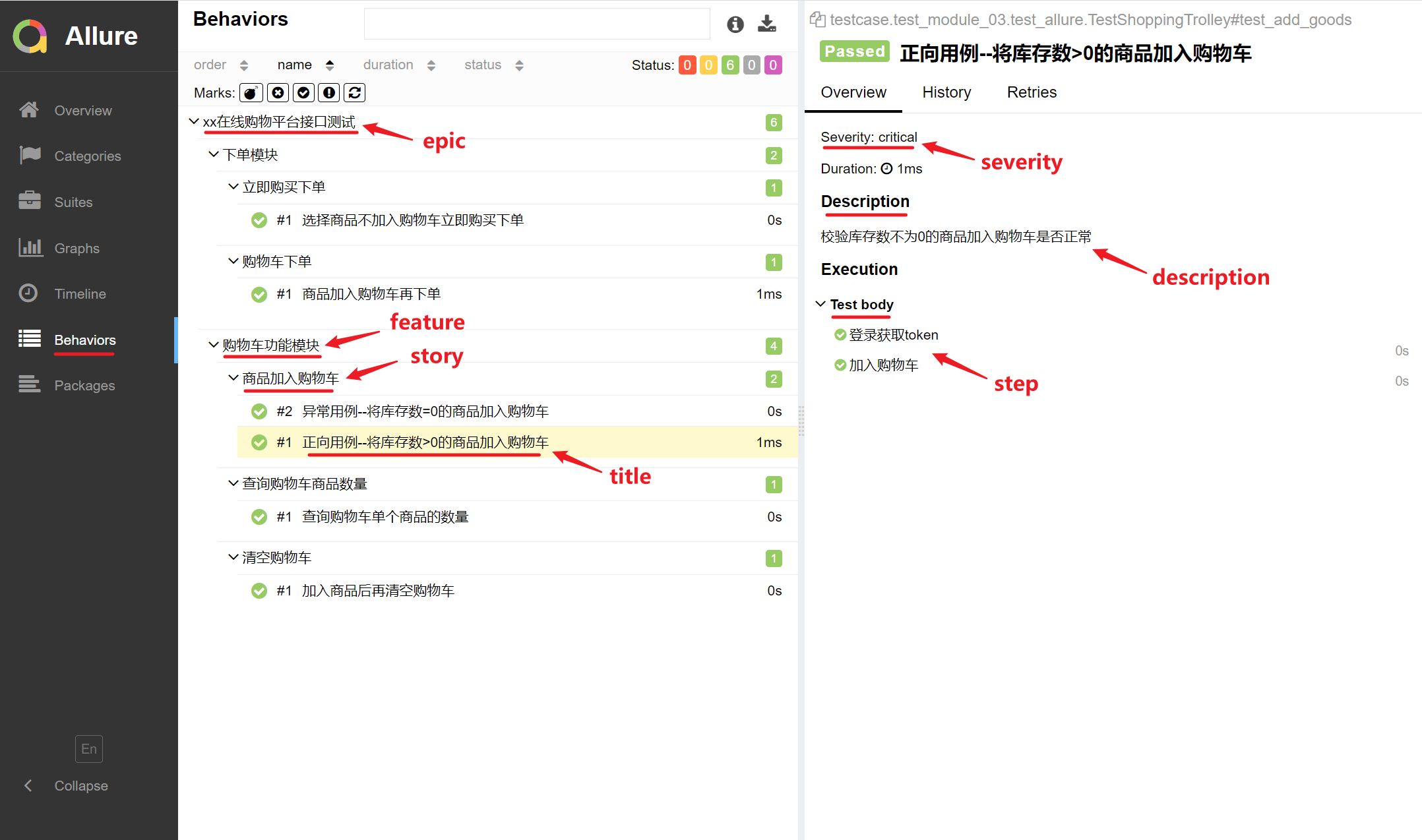
Allure报告默认语言为英文,可以选择中文,如下:
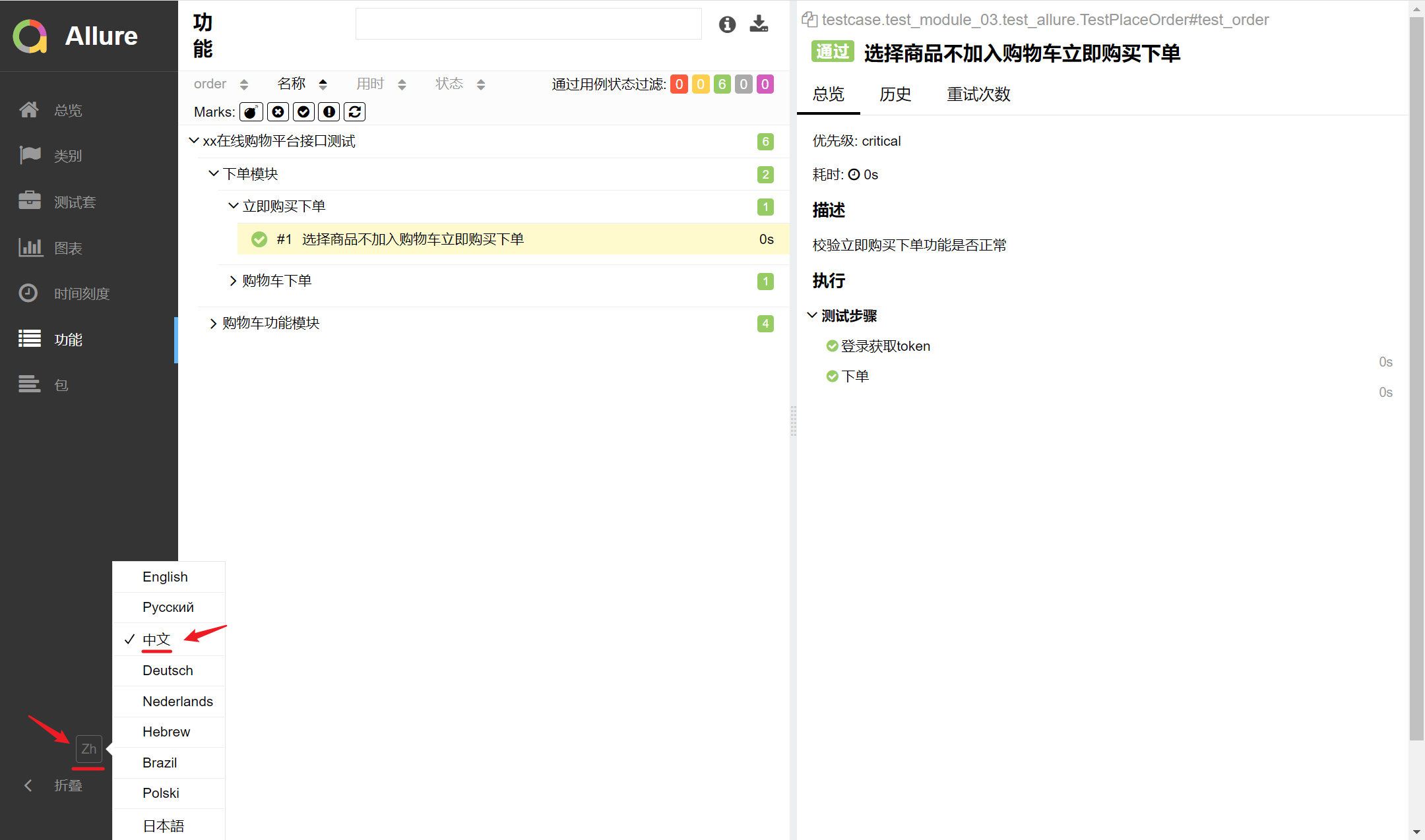
可以把epic、feature、story理解为将测试用例按照功能模块进行分类,epic为一级类目,feature为二级类目,story为三级类目。
而title、description、severity、step等则用于测试用例自身相关的描述定义。
当然,Allure还有其他的常用特性,下篇文章我们再继续学习。