摘要:在正式编写前需要了解一下如何在 python 函数中去判断,一个请求是 get 还是 post。
本文分享自华为云社区《【首发】flask 实现ajax 数据入库,并掌握文件上传》,作者:梦想橡皮擦。
在正式编写前需要了解一下如何在 python 函数中去判断,一个请求是 get 还是 post。
python 文件代码如此所示:
# route()方法用于设定路由;@app.route('/hello.html', methods=['GET', 'POST'])def hello_world(): if request.method == 'GET': # args = request.args return render_template('hello.html') if request.method == "POST": print("POST请求")
上述代码通过 requests.method 属性判断当前请求类型,然后实现相应的逻辑。
注意上述内容中的 @app.route('/hello.html', methods=['GET', 'POST']) ,绑定的方法由参数 methods 决定。
HTML 页面代码如下所示:
<!DOCTYPE html><html lang="zh-cn"><head> <meta charset="UTF-8"> <title>这是第一个HTML页面</title> <script src="http://libs.baidu.com/jquery/2.0.0/jquery.min.js"></script></head><body> {{name}} <input type="button" value="点击发送请求" id="btn" /> <script> $(function() { $('#btn').on('click', function() { alert($(this).val()); }); }) </script></body></html>
在 HTML 页面中提前导入 jquery 的 CDN 配置,便于后续实现模拟请求操作。
再次完善一些 POST 请求的相关参数判断,通过 requests.form 获取表单参数。
# route()方法用于设定路由;@app.route('/hello.html', methods=['GET', 'POST'])def hello_world(): if request.method == 'GET': args = request.args name = args.get('name') return render_template('hello.html',name=name) if request.method == "POST": print("POST请求") arges = request.form print(arges) return "PPP"
同步修改一下前端请求部分,这里改造主要需要的是前端知识。
<body> {{name}} <input type="button" value="点击发送请求" id="btn" /> <script> $(function() { $('#btn').on('click', function() { //alert($(this).val()); $.post('./hello.html', function(result) { console.log(result); }) }); }) </script></body>
测试的时候同步开启浏览器的开发者工具,并且切换到网络请求视图,查看请求与返回数据。
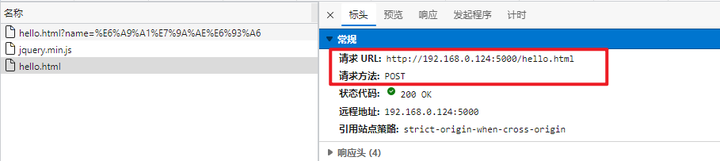
数据传递到后台之后,通过将 flask 与 mysql 实现对接,完成一个入库操作,然后将数据存储到 MySQL 中。
了解了POST请求之后,就可以通过该模式实现文件上传操作了。
优先修改 HTML 页面,实现一个文件选择按钮。
<input type="file" id="file" /><script type="text/javascript"> $(function() { $('#btn').on('click', function() { //alert($(this).val()); $.post('./hello.html', function(result) { console.log(result); }) }); var get_file = document.getElementById("file"); get_file.onchange = function(e) { file = e.currentTarget.files[0]; //所有文件,返回一个数组 var form_data = new FormData(); form_data.append("file", file); console.log(form_data); form_data.append("file_name", e.currentTarget.files[0].name); $.ajax({ url: '/upload', type: 'post', data: form_data, contentType: false, processData: false, success: function(res) { console.log(res.data); } }); } })</script>
服务端处理文件的代码如下所示
@app.route('/upload', methods=['POST'], strict_slashes=False)def upload(): if request.method == "POST": print("POST请求") file = request.files.get('file') name = request.form.get('file_name') print(name) file.save("./"+name) # print(name) return "PPP"
这里需要注意的是如果 Python 端存在BUG,前端的AJAX请求会出现 400或者500错误。文件名通过前端传递 file_name 参数获取。本案例可以扩展上传成功之后,返回JSON数据到前端进行后续处理。
项目在实测的过程中发现一个问题,在读取前台传递的文件流时,需要使用 request.files.get() 方法实现,而不能用 request.form['参数名'] 。
点击关注,第一时间了解华为云新鲜技术~

