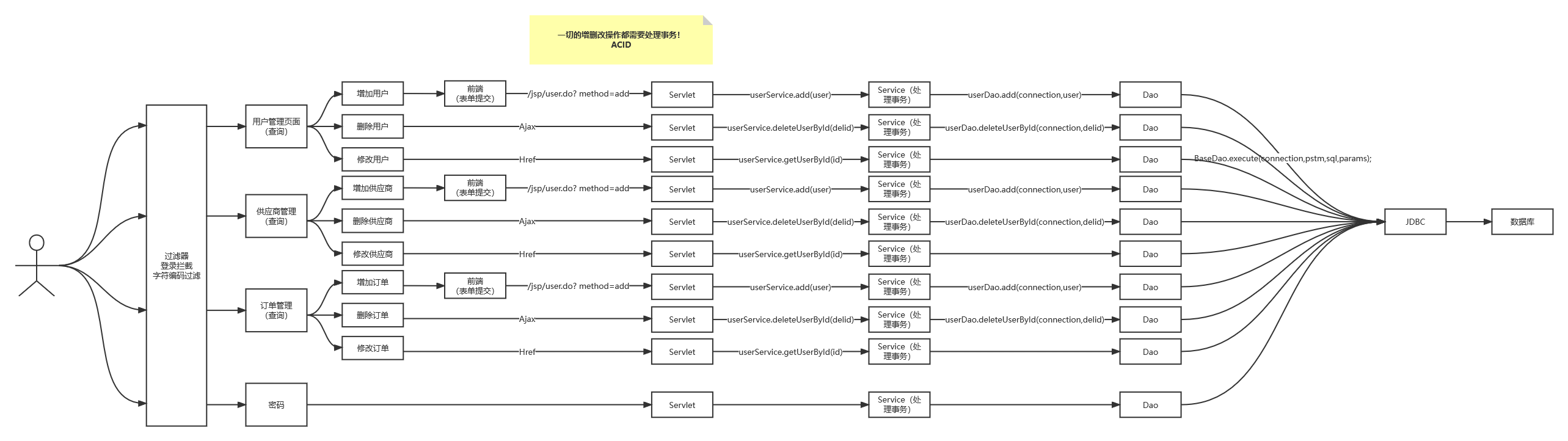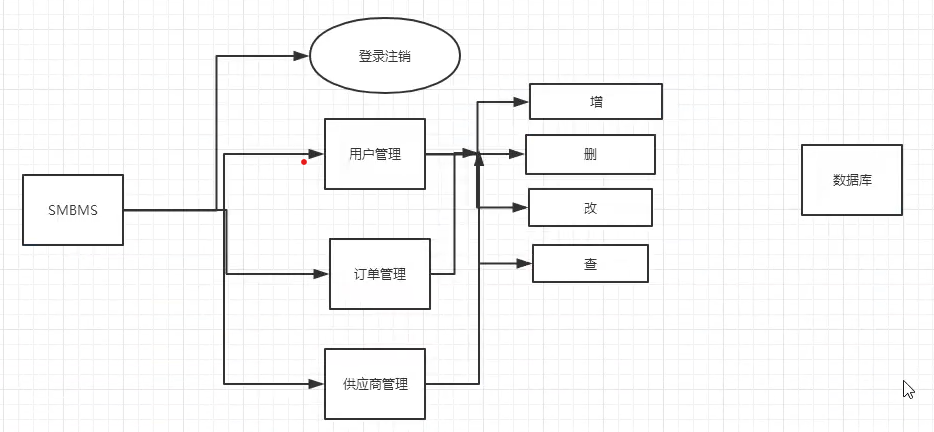
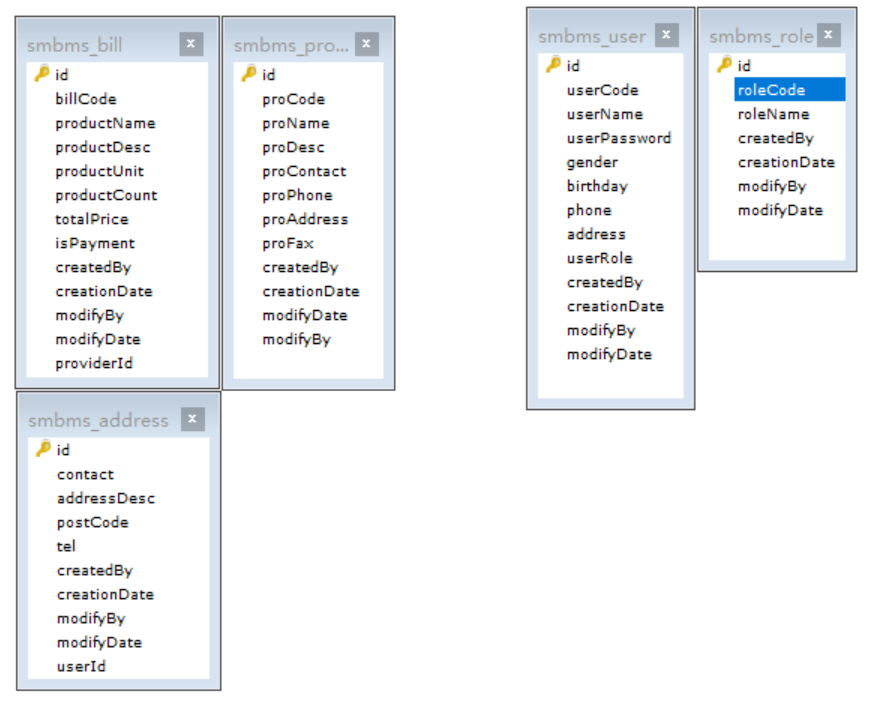
数据库:
项目如何搭建?
考虑使用不使用Maven?依赖,Jar
搭建一个maven web项目
配置Tomcat
测试项目是否能够跑起来
导入项目中会遇到的jar包;
jsp,Servlet,mysql驱动,jstl,standard...
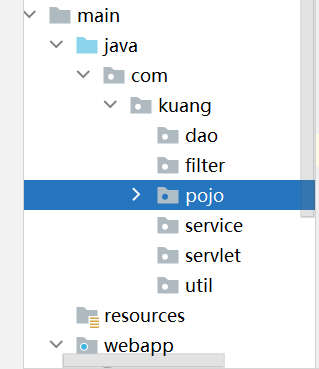
创建项目包结构
编写实体类;
ORM映射:表-类映射
编写基础公共类
数据库配置文件
driver=com.mysql.cj.jdbc.Driverurl=jdbc:mysql://localhost:3306?useUnicode=true&characterEncoding=UTF-8&useSSL=true&setServiceTime=GMTusername=rootpassword=123456编写数据库的公共类
//操作数据库的公共类public class BaseDao { private static String driver; private static String url; private static String username; private static String password; //静态代码块,类加载的时候就初始化了 static { Properties properties = new Properties(); //通过类加载器读取对应的资源 InputStream is = BaseDao.class.getClassLoader().getResourceAsStream("db.properties"); try { properties.load(is); } catch (IOException e) { e.printStackTrace(); } driver = properties.getProperty("driver"); url = properties.getProperty("url"); username = properties.getProperty("username"); password = properties.getProperty("password"); } //获取数据库的连接 public static Connection getConnection(){ Connection connection = null; try { Class.forName("driver"); connection = DriverManager.getConnection(url, username, password); } catch (Exception e) { e.printStackTrace(); } return connection; } //编写查询公共类 public static ResultSet execute(Connection connection,String sql,Object[] params,ResultSet resultSet,PreparedStatement preparedStatement) throws SQLException { //预编译的sql,在后面直接执行就可以了 preparedStatement = connection.prepareStatement(sql); for (int i = 0; i < params.length; i++) { //setObject,占位符从1开始,但是我们的数组是从0开始! preparedStatement.setObject(i+1,params[i]); } resultSet = preparedStatement.executeQuery(); return resultSet; } //编写增删改公共方法 public static int execute(Connection connection, String sql, Object[] params, PreparedStatement preparedStatement) throws SQLException { preparedStatement = connection.prepareStatement(sql); for (int i = 0; i < params.length; i++) { //setObject,占位符从1开始,但是我们的数组是从0开始! preparedStatement.setObject(i+1,params[i]); } int updateRows = preparedStatement.executeUpdate(); return updateRows; } //释放资源 public static boolean closeResource(Connection connection,PreparedStatement preparedStatement,ResultSet resultSet){ boolean flag = true; if (resultSet!=null){ try { resultSet.close(); //GC回收 resultSet = null; } catch (SQLException e) { e.printStackTrace(); flag = false; } } if (preparedStatement!=null){ try { preparedStatement.close(); //GC回收 preparedStatement = null; } catch (SQLException e) { e.printStackTrace(); flag = false; } } if (connection!=null){ try { connection.close(); //GC回收 connection = null; } catch (SQLException e) { e.printStackTrace(); flag = false; } } return flag; }}编写字符编码过滤器
导入静态资源
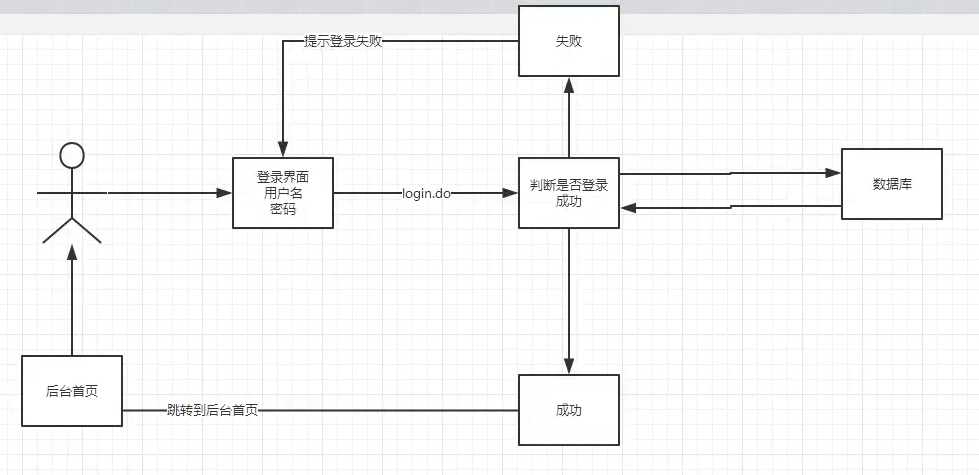
编写前端页面
设置首页
<!--设置欢迎页面--><welcome-file-list> <welcome-file>login.jsp</welcome-file></welcome-file-list>编写dao层得到用户登录的接口
DAO:data access object
//得到要登录的用户public User getLoginUser(Connection connection,String userCode) throws SQLException;编写dao接口的实现类
public class UserDaoImpl implements UserDao{ public User getLoginUser(Connection connection, String userCode) throws SQLException { PreparedStatement pstm = null; ResultSet rs = null; User user = null; if (connection!=null){ String sql = "select * from smbms_user where userCode=?"; Object[] params = {userCode}; rs = BaseDao.execute(connection, pstm, rs, sql, params); if (rs.next()){ user = new User(); user.setId(rs.getInt("id")); user.setUserCode(rs.getString("userCode")); user.setUserName(rs.getString("userName")); user.setUserPassword(rs.getString("userPassword")); user.setGender(rs.getInt("gender")); user.setBirthday(rs.getDate("birthday")); user.setPhone(rs.getString("phone")); user.setAddress(rs.getString("address")); user.setUserRole(rs.getInt("userRole")); user.setCreatedBy(rs.getInt("createdBy")); user.setCreationDate(rs.getTimestamp("creationDate")); user.setModifyBy(rs.getInt("modifyBy")); user.setModifyDate(rs.getTimestamp("modifyDate")); } BaseDao.closeResource(null,pstm,rs); } return user; }}业务层接口
//用户登录public User login(String userCode,String password);业务层实现类
public class UserServiceImpl implements UserService { //业务层都会调用dao层,所以我们要引入Dao层; private UserDao userDao; public UserServiceImpl() { userDao = new UserDaoImpl(); } public User login(String userCode, String password) { Connection connection = null; User user = null; connection = BaseDao.getConnection(); try { user = userDao.getLoginUser(connection, userCode); } catch (SQLException e) { e.printStackTrace(); } finally { BaseDao.closeResource(connection, null, null); } return user; }}编写Servlet
public class LoginServlet extends HttpServlet { //Servlet:控制层,调用业务层代码 @Override protected void doGet(HttpServletRequest req, HttpServletResponse resp) throws ServletException, IOException { System.out.println("LoginServlet--start...."); //获取用户名和密码 String userCode = req.getParameter("userCode"); String userPassword = req.getParameter("userPassword"); //和数据库中的密码进行对比,调用业务层; UserService userService = new UserServiceImpl(); User user = userService.login(userCode, userPassword); //这里已经把登录的人给查出来了 if (user!=null){ //查有此人,可以登录 //将用户的信息放到Session中; req.getSession().setAttribute(Constants.USER_SESSION,user); //跳转到主页 resp.sendRedirect("jsp/frame.jsp"); }else {//查无此人,无法登录 //转发回登录页面,顺带提示它,用户名或者密码错误 req.setAttribute("error","用户名或者密码不正确"); req.getRequestDispatcher("login.jsp").forward(req,resp); } } @Override protected void doPost(HttpServletRequest req, HttpServletResponse resp) throws ServletException, IOException { doGet(req, resp); }}注册Servlet
<!--Servlet--><servlet> <servlet-name>LoginServlet</servlet-name> <servlet-class>com.kuang.servlet.user.LoginServlet</servlet-class></servlet><servlet-mapping> <servlet-name>LoginServlet</servlet-name> <url-pattern>/login.do</url-pattern></servlet-mapping>测试访问,确保以上功能成功!
注销功能:
思路:移除Session,返回登录页面
public class LogoutServlet extends HttpServlet { @Override protected void doGet(HttpServletRequest req, HttpServletResponse resp) throws ServletException, IOException { //移除用户的Constants.USER_SESSION req.getSession().removeAttribute(Constants.USER_SESSION); resp.sendRedirect(req.getContextPath()+"/login.jsp");//返回登录页面 } @Override protected void doPost(HttpServletRequest req, HttpServletResponse resp) throws ServletException, IOException { doGet(req, resp); }}注册xml
<servlet> <servlet-name>LogoutServlet</servlet-name> <servlet-class>com.kuang.servlet.user.LogoutServlet</servlet-class></servlet><servlet-mapping> <servlet-name>LogoutServlet</servlet-name> <url-pattern>/jsp/logout.do</url-pattern></servlet-mapping>登录拦截优化
编写一个过滤器并注册
public class SysFilter implements Filter { public void init(FilterConfig filterConfig) throws ServletException { } public void doFilter(ServletRequest req, ServletResponse resp, FilterChain chain) throws IOException, ServletException { HttpServletRequest request = (HttpServletRequest) req; HttpServletResponse response = (HttpServletResponse) resp; //过滤器,从Session中获取用户, User user = (User) request.getSession().getAttribute(Constants.USER_SESSION); if (user==null){ //已经被移除或者注销了,或者未登录 response.sendRedirect("/smbms/error.jsp"); }else { chain.doFilter(req,resp); } } public void destroy() { }}<!--用户登录过滤器--><filter> <filter-name>SysFilter</filter-name> <filter-class>com.kuang.filter.SysFilter</filter-class></filter><filter-mapping> <filter-name>SysFilter</filter-name> <url-pattern>/jsp/*</url-pattern></filter-mapping>测试,登录,注销权限,都要保证OK!
导入前端素材
<li><a href="${pageContext.request.contextPath }/jsp/pwdmodify.jsp">密码修改</a></li>写项目,建议从底层向上写
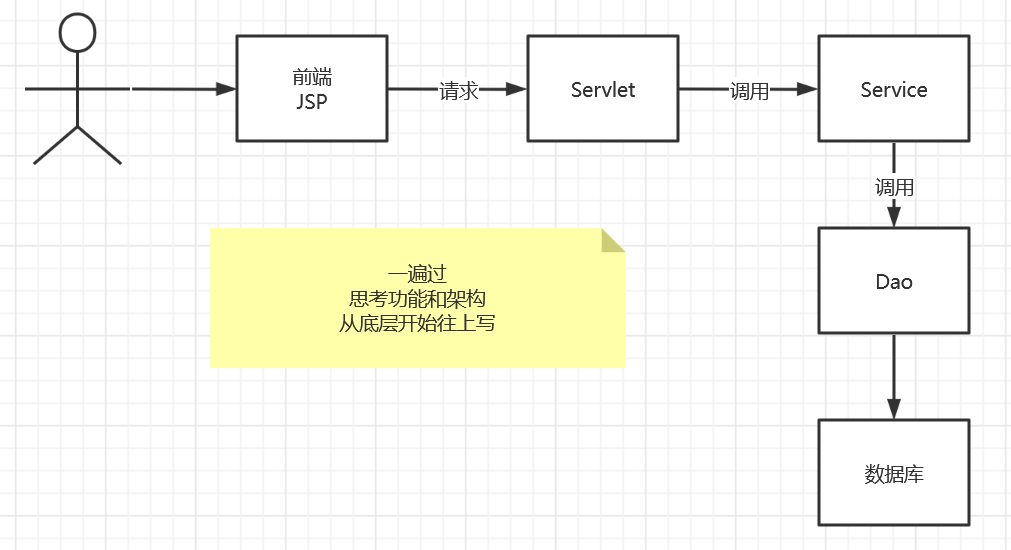
UserDao接口
//修改当前用户密码public int updatePwd(Connection connection,int id,int password) throws SQLException;UserDao接口实现类
//修改当前用户密码public int updatePwd(Connection connection, int id, int password) throws SQLException { PreparedStatement pstm = null; int execute = 0; if (connection!=null){ String sql = "update smbms_user set userPassword = ? where id = ?"; Object params[] = {password,id}; execute = BaseDao.execute(connection, pstm, sql, params); BaseDao.closeResource(null,pstm,null); } return execute;}UserService层
//根据用户ID修改密码public boolean updatePwd(int id, int pwd);UserService实现类
public boolean updatePwd(int id, int pwd) { Connection connection = null; boolean flag = false; //修改密码 try { connection = BaseDao.getConnection(); if (userDao.updatePwd(connection,id,pwd)>0){ flag = true; } } catch (SQLException e) { e.printStackTrace(); }finally { BaseDao.closeResource(connection,null,null); } return flag;}Servlet记得实现复用,需要提取出方法!
@Overrideprotected void doGet(HttpServletRequest req, HttpServletResponse resp) throws ServletException, IOException { String method = req.getParameter("method"); if (method.equals("savepwd")&&method!=null){ this.updatePwd(req, resp); }}public void updatePwd(HttpServletRequest req, HttpServletResponse resp){ //从Session里面拿ID; Object o = req.getSession().getAttribute(Constants.USER_SESSION); String newpassword = req.getParameter("newpassword"); System.out.println("UserServlet"+newpassword); boolean flag = false; //if (o!=null && !StringUtils.isNullOrEmpty(newpassword)){ if (o!=null && newpassword!=null){ UserService userService = new UserServiceImpl(); flag = userService.updatePwd(((User) o).getId(), newpassword); if (flag){ req.setAttribute("message","修改密码成功,请退出,使用新密码登录"); //密码修改成功,移除当前Session req.getSession().removeAttribute(Constants.USER_SESSION); }else { req.setAttribute("message","密码修改失败"); //密码修改成功,移除当前Session } }else { req.setAttribute("message","新密码有问题"); } try { req.getRequestDispatcher("pwdmodify.jsp").forward(req,resp); } catch (ServletException e) { e.printStackTrace(); } catch (IOException e) { e.printStackTrace(); }}<servlet> <servlet-name>UserServlet</servlet-name> <servlet-class>com.kuang.servlet.user.UserServlet</servlet-class></servlet><servlet-mapping> <servlet-name>UserServlet</servlet-name> <url-pattern>/jsp/user.do</url-pattern>测试
优化密码修改使用Ajax;
阿里巴巴的fastjson
<!-- https://mvnrepository.com/artifact/com.alibaba/fastjson --><dependency> <groupId>com.alibaba</groupId> <artifactId>fastjson</artifactId> <version>1.2.79</version></dependency>后台代码修改
//修改密码public void updatePwd(HttpServletRequest req, HttpServletResponse resp){ //从Session里面拿ID; Object o = req.getSession().getAttribute(Constants.USER_SESSION); String newpassword = req.getParameter("newpassword"); System.out.println("UserServlet"+newpassword); boolean flag = false; //if (o!=null && !StringUtils.isNullOrEmpty(newpassword)){ if (o!=null && newpassword!=null){ UserService userService = new UserServiceImpl(); flag = userService.updatePwd(((User) o).getId(), newpassword); if (flag){ req.setAttribute("message","修改密码成功,请退出,使用新密码登录"); //密码修改成功,移除当前Session req.getSession().removeAttribute(Constants.USER_SESSION); }else { req.setAttribute("message","密码修改失败"); //密码修改成功,移除当前Session } }else { req.setAttribute("message","新密码有问题"); } try { req.getRequestDispatcher("pwdmodify.jsp").forward(req,resp); } catch (ServletException e) { e.printStackTrace(); } catch (IOException e) { e.printStackTrace(); }}//验证旧密码,session中有用户的密码public void pwdModify(HttpServletRequest req, HttpServletResponse resp){ //从Session里面拿oldpassword; Object o = req.getSession().getAttribute(Constants.USER_SESSION); String oldpassword = req.getParameter("oldpassword"); //万能的Map : 结果集 HashMap<String, String> resultMap = new HashMap<String,String>(); if (o==null){ //Session失效了,session过期了 resultMap.put("result","sessionerror"); }else if (StringUtils.isNullOrEmpty(oldpassword)){ //输入的密码为空 resultMap.put("result","error"); }else { String userPassword = ((User) o).getUserPassword(); //Session中用户的密码 if (oldpassword.equals(userPassword)){ resultMap.put("result","true"); }else { resultMap.put("result","false"); } } try { resp.setContentType("application/json"); PrintWriter writer = resp.getWriter(); //JSONArray 阿里巴巴的JSON工具类,转换格式 /* resultMap = ["result","sessionerror","result","error"] Json格式 = {key:value} */ writer.write(JSONArray.toJSONString(resultMap)); writer.flush(); writer.close(); } catch (IOException e) { e.printStackTrace(); }}测试
思路:
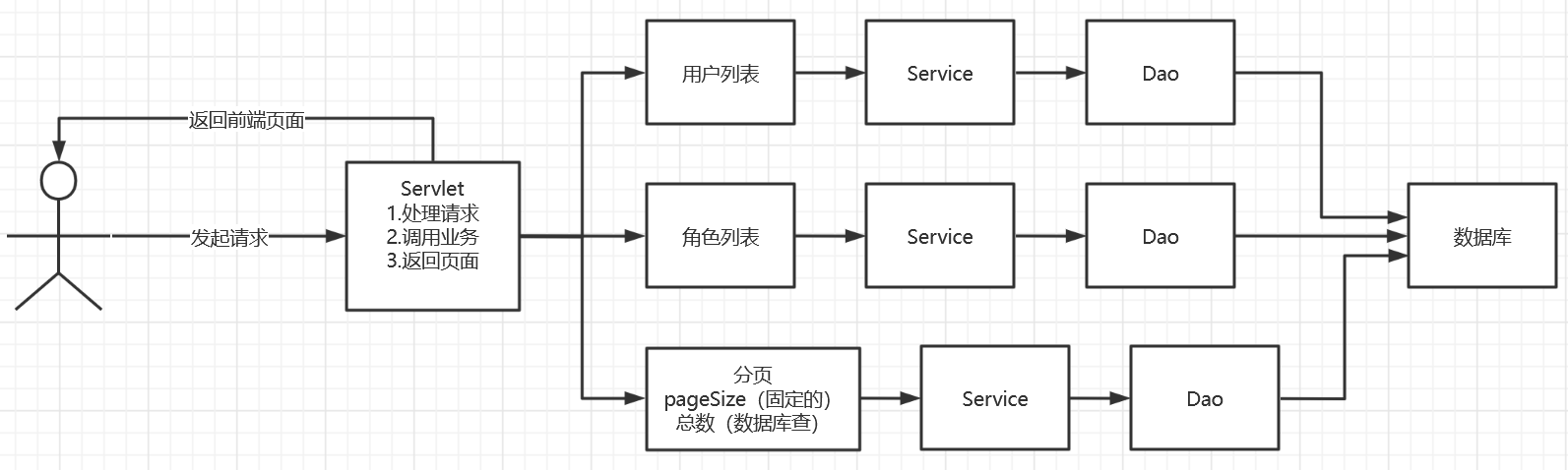
导入分页的工具类
用户列表页面导入
userlist.jsp
rollpage.jsp
UserDao
//根据用户名或者角色查询用户总数public int getUserCount(Connection connection,String username,int userRole) throws SQLException;UserDaoImpl
//根据用户名或者角色查询用户总数【最难理解的SQL】public int getUserCount(Connection connection, String username, int userRole) throws SQLException { PreparedStatement pstm = null; ResultSet rs = null; int count = 0; if (connection!=null){ StringBuffer sql = new StringBuffer(); sql.append("select count(1) as count from smbms_user u,smbms_role r where u.userRole = r.id"); ArrayList<Object> list = new ArrayList<Object>();//存放我们的参数 if (!StringUtils.isNullOrEmpty(username)){ //拼接sql语句 sql.append(" and u.userName like ?"); list.add("%"+username+"%"); //index:0 } if (userRole>0){ sql.append(" and u.userRole = ?"); list.add(userRole); //index:1 } //怎么把list转换为数组 Object[] params = list.toArray(); System.out.println("UserDaoImpl->getUserCount"+sql.toString()); //输出最后完整的SQL语句 rs = BaseDao.execute(connection, pstm, null, sql.toString(), params); if (rs.next()){ count = rs.getInt("count");//从结果集中获取最终的数量 } BaseDao.closeResource(null,pstm,rs); } return count;}UserService
//查询记录数public int getUserCount(String username, int userRole);UserServiceImpl
//查询记录数public int getUserCount(String username, int userRole) { Connection connection = null; int count = 0; try { connection = BaseDao.getConnection(); count = userDao.getUserCount(connection, username, userRole); } catch (SQLException e) { e.printStackTrace(); } finally { BaseDao.closeResource(connection,null,null); } return count;}userdao
//通过条件查询-userListpublic List<User> getUserList(Connection connection, String username, int userRole, int currentPageNo, int pageSize) throws Exception;userdaoImpl
public List<User> getUserList(Connection connection, String username, int userRole, int currentPageNo, int pageSize) throws Exception { PreparedStatement pstm = null; ResultSet rs = null; List<User> userList = new ArrayList<User>(); if (connection!=null){ StringBuffer sql = new StringBuffer(); sql.append("select u.*,r.roleName as userRoleName from smbms_user u,smbms_role r where u.userRole = r.id"); List<Object> list = new ArrayList<Object>();//存放我们的参数 if (!StringUtils.isNullOrEmpty(username)){ //拼接sql语句 sql.append(" and u.userName like ?"); list.add("%"+username+"%"); //index:0 } if (userRole>0){ sql.append(" and u.userRole = ?"); list.add(userRole); //index:1 } //在数据库中,分页使用 limit startIndex,pageSize; 总数 //当前页 (当前页-1)*页面大小 //0,5 1 0 01234 //5,5 2 5 56789 //10,5 3 10 sql.append(" order by creationDate DESC limit ?,?"); currentPageNo = (currentPageNo-1)*pageSize; list.add(currentPageNo); list.add(pageSize); //怎么把list转换为数组 Object[] params = list.toArray(); System.out.println("sql-->"+sql.toString()); //输出最后完整的SQL语句 rs = BaseDao.execute(connection, pstm, null, sql.toString(), params); while (rs.next()){ User user = new User(); user.setId(rs.getInt("id")); user.setUserCode(rs.getString("userCode")); user.setUserName(rs.getString("userName")); user.setGender(rs.getInt("gender")); user.setBirthday(rs.getDate("birthday")); user.setPhone(rs.getString("phone")); user.setUserRole(rs.getInt("userRole")); user.setUserRoleName(rs.getString("userRoleName")); userList.add(user); } BaseDao.closeResource(null,pstm,rs); } return userList;}userService
//通过条件查询-userListpublic List<User> getUserList(String queryUserName, int queryUserRole, int currentPageNo, int pageSize);userServiceImpl
public List<User> getUserList(String queryUserName, int queryUserRole, int currentPageNo, int pageSize) { Connection connection = null; List<User> userList = null; try { connection = BaseDao.getConnection(); userList = userDao.getUserList(connection, queryUserName, queryUserRole,currentPageNo,pageSize); } catch (Exception e) { e.printStackTrace(); } finally { BaseDao.closeResource(connection,null,null); } return userList;}为了我们职责统一,可以把角色的操作单独放在一个包中,和POJO类对应
RoleDao
public interface RoleDao { //获取角色列表 public List<Role> getRoleList(Connection connection) throws SQLException;}RoleDaoImpl
public List<Role> getRoleList(Connection connection) throws SQLException { PreparedStatement pstm = null; ResultSet resultSet = null; ArrayList<Role> roleList = new ArrayList<Role>(); if (connection!=null){ String sql = "select * from smbms_role"; Object[] params = {}; resultSet = BaseDao.execute(connection, pstm, resultSet, sql, params); while (resultSet.next()){ Role _role = new Role(); _role.setId(resultSet.getInt("id")); _role.setRoleCode(resultSet.getString("roleCode")); _role.setRoleName(resultSet.getString("roleName")); roleList.add(_role); } BaseDao.closeResource(null,pstm,resultSet); } return roleList;}RoleService
//获取角色列表public List<Role> getRoleList();RoleServiceImpl
public class RoleServiceImpl implements RoleService{ //引入Dao private RoleDao roleDao = null; public RoleServiceImpl(){ roleDao = new RoleDaoImpl(); } public List<Role> getRoleList() { Connection connection = null; List<Role> roleList = null; try { connection = BaseDao.getConnection(); roleList = roleDao.getRoleList(connection); } catch (SQLException e) { e.printStackTrace(); } finally { BaseDao.closeResource(connection,null,null); } return roleList; }}//重点,难点public void query(HttpServletRequest req, HttpServletResponse resp){ //查询用户列表 //从前端获取数据: String queryUserName = req.getParameter("queryname"); String temp = req.getParameter("queryUserRole"); String pageIndex = req.getParameter("pageIndex"); int queryUserRole = 0; //获取用户列表 UserServiceImpl userService = new UserServiceImpl(); List<User> userList = null; //第一次走这个请求,一定是第一页,页面大小固定的; int pageSize = 5;//可以把这个写到配置文件中,方便后期修改; int currentPageNo = 1; if (queryUserName == null){ queryUserName = ""; //不手动赋值会产生空指针异常 } if (temp != null && !temp.equals("")){ queryUserRole = Integer.parseInt(temp); //给查询赋值!0,1,2,3 } if (pageIndex != null){ currentPageNo = Integer.parseInt(pageIndex); } //获取用户的总数(分页:上一页,下一页的情况) int totalCount = userService.getUserCount(queryUserName,queryUserRole); //总页数支持 PageSupport pageSupport = new PageSupport(); pageSupport.setCurrentPageNo(currentPageNo); pageSupport.setPageSize(pageSize); pageSupport.setTotalCount(totalCount); int totalPageCount = pageSupport.getTotalPageCount(); //总共有几页 //控制首页和尾页 //如果页面要小于1了,就显示第一页的东西 if (totalPageCount<1){ currentPageNo = 1; }else if (currentPageNo>totalPageCount){ //当前页面大于了最后一项; currentPageNo = totalPageCount; } //获取用户列表展示 userList = userService.getUserList(queryUserName, queryUserRole, currentPageNo, pageSize); req.setAttribute("userList",userList); RoleServiceImpl roleService = new RoleServiceImpl(); List<Role> roleList = roleService.getRoleList(); req.setAttribute("roleList",roleList); req.setAttribute("totalCount",totalCount); req.setAttribute("currentPageNo",currentPageNo); req.setAttribute("totalPageCount",totalPageCount); req.setAttribute("queryUserName",queryUserName); req.setAttribute("queryUserRole",queryUserRole); //返回前端 try { req.getRequestDispatcher("userlist.jsp").forward(req,resp); } catch (ServletException e) { e.printStackTrace(); } catch (IOException e) { e.printStackTrace(); }}小黄鸭调试法