从 Hudi 0.10.0版本开始,我们很高兴推出在数据库领域中称为 Z-Order 和 Hilbert 空间填充曲线的高级数据布局优化技术的支持。
Amazon EMR 团队最近发表了一篇很不错的文章展示了对数据进行聚簇是如何提高查询性能的,为了更好地了解发生了什么以及它与空间填充曲线的关系,让我们仔细研究该文章的设置。
文章中比较了 2 个 Apache Hudi 表(均来自 Amazon Reviews 数据集):
未聚簇的 amazon_reviews 表(即数据尚未按任何特定键重新排序)
amazon_reviews_clustered 聚簇表。当数据被聚簇后,数据按字典顺序排列(这里我们将这种排序称为线性排序),排序列为star_rating、total_votes两列(见下图)

为了展示查询性能的改进,对这两个表执行以下查询:


这里要指出的重要考虑因素是查询指定了排序的两个列(star_rating 和 total_votes)。但不幸的是这是线性/词典排序的一个关键限制,如果添加更多列,排序的价值会会随之减少。
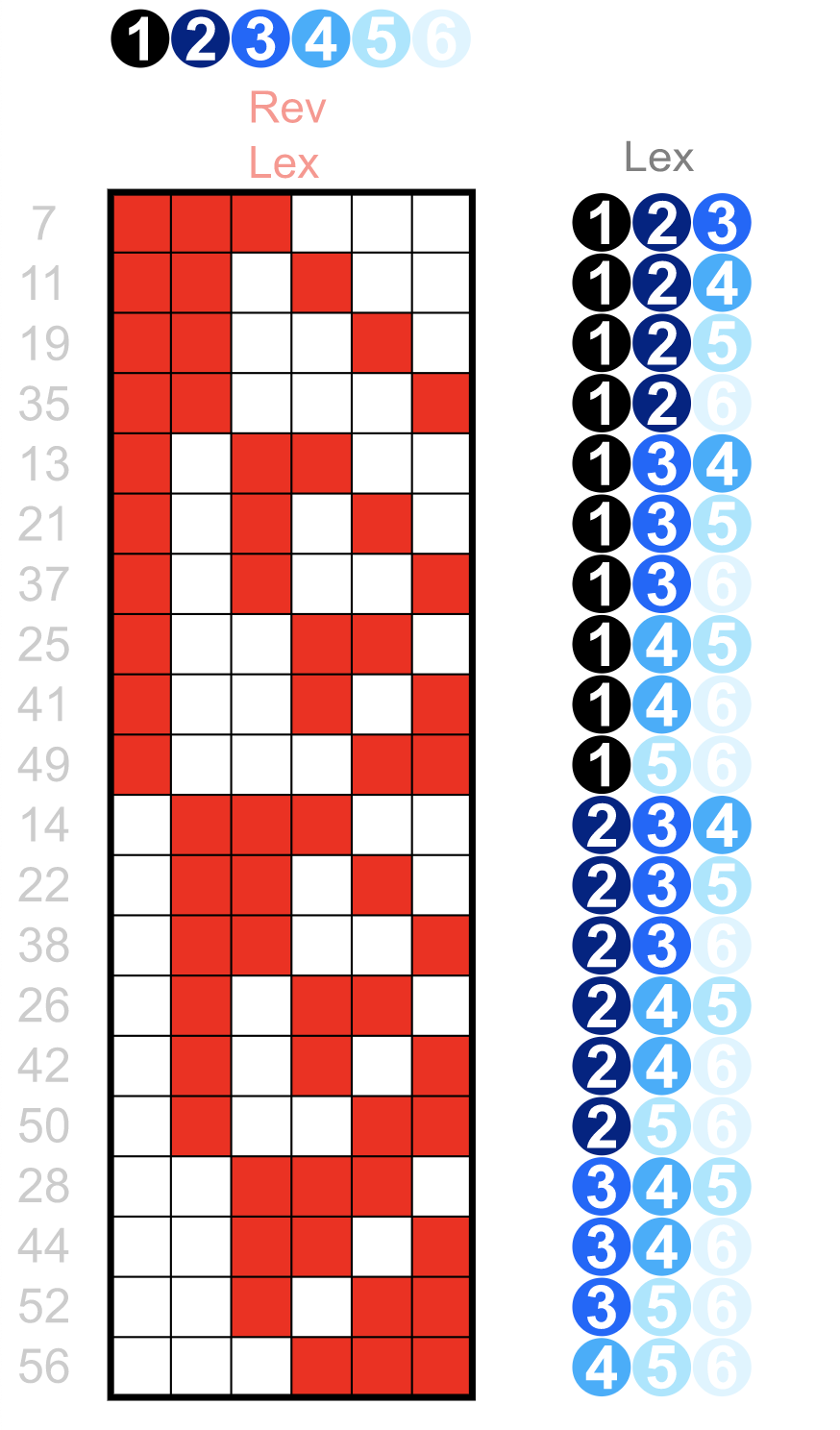
从上图可以看到,对于按字典顺序排列的 3 元组整数,只有第一列能够对所有具有相同值的记录具有关键的局部性属性:例如所有记录都具有以“开头的值” 1"、"2"、"3"(在第一列中)很好地聚簇在一起。但是如果尝试在第三列中查找所有值为"5"的值,会发现这些值现在分散在所有地方,根本没有局部性,过滤效果很差。
提高查询性能的关键因素是局部性:它使查询能够显着减少搜索空间和需要扫描、解析等的文件数量。
但是这是否意味着如果我们按表排序的列的第一个(或更准确地说是前缀)以外的任何内容进行过滤,我们的查询就注定要进行全面扫描?不完全是,局部性也是空间填充曲线在枚举多维空间时启用的属性(我们表中的记录可以表示为 N 维空间中的点,其中 N 是我们表中的列数)
那么它是如何工作的?我们以 Z 曲线为例:拟合二维平面的 Z 阶曲线如下所示:
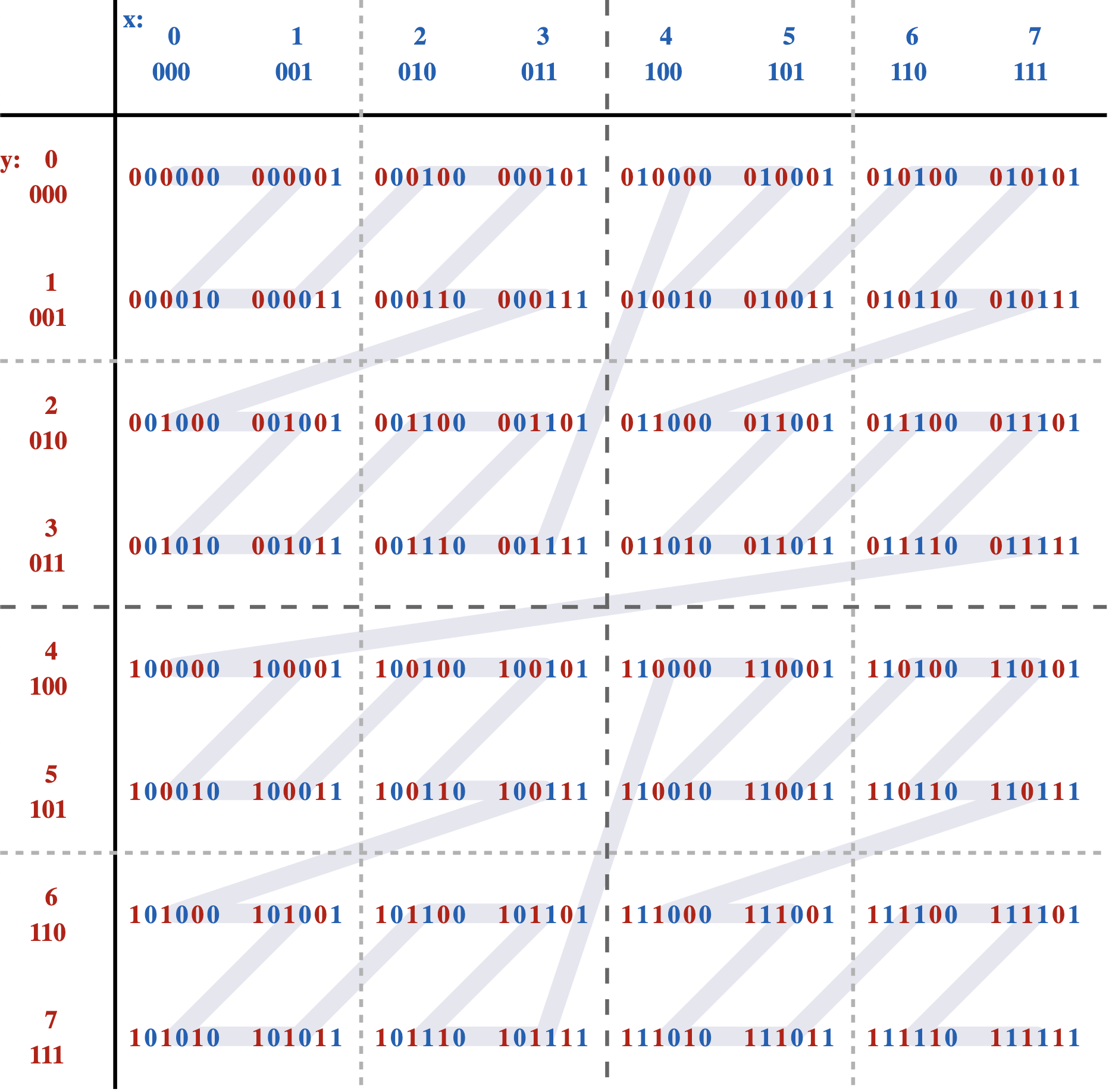
可以看到按照路径,不是简单地先按一个坐标 ("x") 排序,然后再按另一个坐标排序,它实际上是在对它们进行排序,就好像这些坐标的位已交织成单个值一样:
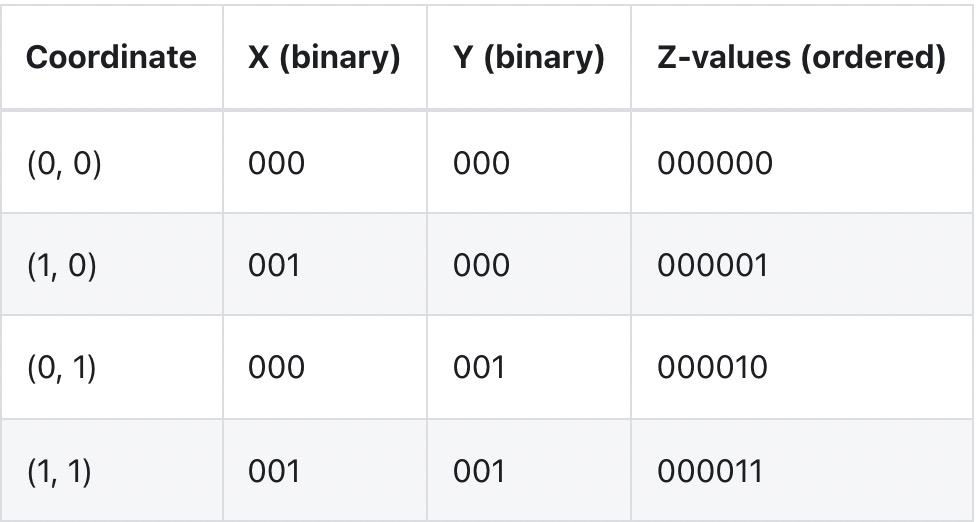
在线性排序的情况下局部性仅使用第一列相比,该方法的局部性使用到所有列。
以类似的方式,希尔伯特曲线允许将 N 维空间中的点(我们表中的行)映射到一维曲线上,基本上对它们进行排序,同时仍然保留局部性的关键属性,在此处阅读有关希尔伯特曲线的更多详细信息,到目前为止我们的实验表明,使用希尔伯特曲线对数据进行排序会有更好的聚簇和性能结果。
现在让我们来看看它的实际效果!
我们将再次使用 Amazon Reviews 数据集,但这次我们将使用 Hudi 按 product_id、customer_id 列元组进行 Z-Order排序,而不是聚簇或线性排序。
数据集不需要特别的准备,可以直接从 S3 中以 Parquet 格式下载并将其直接用作 Spark 将其摄取到 Hudi 表。
启动spark-shell
./bin/spark-shell --master 'local[4]' --driver-memory 8G --executor-memory 8G \ --jars ../../packaging/hudi-spark-bundle/target/hudi-spark3-bundle_2.12-0.10.0.jar \ --packages org.apache.spark:spark-avro_2.12:2.4.4 \ --conf 'spark.serializer=org.apache.spark.serializer.KryoSerializer'导入Hudi表
import org.apache.hadoop.fs.{FileStatus, Path}import scala.collection.JavaConversions._import org.apache.spark.sql.SaveMode._import org.apache.hudi.{DataSourceReadOptions, DataSourceWriteOptions}import org.apache.hudi.DataSourceWriteOptions._import org.apache.hudi.common.fs.FSUtilsimport org.apache.hudi.common.table.HoodieTableMetaClientimport org.apache.hudi.common.util.ClusteringUtilsimport org.apache.hudi.config.HoodieClusteringConfigimport org.apache.hudi.config.HoodieWriteConfig._import org.apache.spark.sql.DataFrameimport java.util.stream.Collectorsval layoutOptStrategy = "z-order"; // OR "hilbert"val inputPath = s"file:///${System.getProperty("user.home")}/datasets/amazon_reviews_parquet"val tableName = s"amazon_reviews_${layoutOptStrategy}"val outputPath = s"file:///tmp/hudi/$tableName"def safeTableName(s: String) = s.replace('-', '_')val commonOpts = Map( "hoodie.compact.inline" -> "false", "hoodie.bulk_insert.shuffle.parallelism" -> "10" )////////////////////////////////////////////////////////////////// Writing to Hudi////////////////////////////////////////////////////////////////val df = spark.read.parquet(inputPath)df.write.format("hudi") .option(DataSourceWriteOptions.TABLE_TYPE.key(), COW_TABLE_TYPE_OPT_VAL) .option("hoodie.table.name", tableName) .option(PRECOMBINE_FIELD.key(), "review_id") .option(RECORDKEY_FIELD.key(), "review_id") .option(DataSourceWriteOptions.PARTITIONPATH_FIELD.key(), "product_category") .option("hoodie.clustering.inline", "true") .option("hoodie.clustering.inline.max.commits", "1") // NOTE: Small file limit is intentionally kept _ABOVE_ target file-size max threshold for Clustering, // to force re-clustering .option("hoodie.clustering.plan.strategy.small.file.limit", String.valueOf(1024 * 1024 * 1024)) // 1Gb .option("hoodie.clustering.plan.strategy.target.file.max.bytes", String.valueOf(128 * 1024 * 1024)) // 128Mb // NOTE: We're increasing cap on number of file-groups produced as part of the Clustering run to be able to accommodate for the // whole dataset (~33Gb) .option("hoodie.clustering.plan.strategy.max.num.groups", String.valueOf(4096)) .option(HoodieClusteringConfig.LAYOUT_OPTIMIZE_ENABLE.key, "true") .option(HoodieClusteringConfig.LAYOUT_OPTIMIZE_STRATEGY.key, layoutOptStrategy) .option(HoodieClusteringConfig.PLAN_STRATEGY_SORT_COLUMNS.key, "product_id,customer_id") .option(DataSourceWriteOptions.OPERATION.key(), DataSourceWriteOptions.BULK_INSERT_OPERATION_OPT_VAL) .option(BULK_INSERT_SORT_MODE.key(), "NONE") .options(commonOpts) .mode(ErrorIfExists)每个单独的测试请在单独的 spark-shell 中运行,以避免缓存影响测试结果。
////////////////////////////////////////////////////////////////// Reading///////////////////////////////////////////////////////////////// Temp Table w/ Data Skipping DISABLEDval readDf: DataFrame = spark.read.option(DataSourceReadOptions.ENABLE_DATA_SKIPPING.key(), "false").format("hudi").load(outputPath)val rawSnapshotTableName = safeTableName(s"${tableName}_sql_snapshot")readDf.createOrReplaceTempView(rawSnapshotTableName)// Temp Table w/ Data Skipping ENABLEDval readDfSkip: DataFrame = spark.read.option(DataSourceReadOptions.ENABLE_DATA_SKIPPING.key(), "true").format("hudi").load(outputPath)val dataSkippingSnapshotTableName = safeTableName(s"${tableName}_sql_snapshot_skipping")readDfSkip.createOrReplaceTempView(dataSkippingSnapshotTableName)// Query 1: Total votes by product_category, for 6 monthsdef runQuery1(tableName: String) = { // Query 1: Total votes by product_category, for 6 months spark.sql(s"SELECT sum(total_votes), product_category FROM $tableName WHERE review_date > '2013-12-15' AND review_date < '2014-06-01' GROUP BY product_category").show()}// Query 2: Average star rating by product_id, for some productdef runQuery2(tableName: String) = { spark.sql(s"SELECT avg(star_rating), product_id FROM $tableName WHERE product_id in ('B0184XC75U') GROUP BY product_id").show()}// Query 3: Count number of reviews by customer_id for some 5 customersdef runQuery3(tableName: String) = { spark.sql(s"SELECT count(*) as num_reviews, customer_id FROM $tableName WHERE customer_id in ('53096570','10046284','53096576','10000196','21700145') GROUP BY customer_id").show()}//// Query 1: Is a "wide" query and hence it's expected to touch a lot of files//scala> runQuery1(rawSnapshotTableName)+----------------+--------------------+|sum(total_votes)| product_category|+----------------+--------------------+| 1050944| PC|| 867794| Kitchen|| 1167489| Home|| 927531| Wireless|| 6861| Video|| 39602| Digital_Video_Games|| 954924|Digital_Video_Dow...|| 81876| Luggage|| 320536| Video_Games|| 817679| Sports|| 11451| Mobile_Electronics|| 228739| Home_Entertainment|| 3769269|Digital_Ebook_Pur...|| 252273| Baby|| 735042| Apparel|| 49101| Major_Appliances|| 484732| Grocery|| 285682| Tools|| 459980| Electronics|| 454258| Outdoors|+----------------+--------------------+only showing top 20 rowsscala> runQuery1(dataSkippingSnapshotTableName)+----------------+--------------------+|sum(total_votes)| product_category|+----------------+--------------------+| 1050944| PC|| 867794| Kitchen|| 1167489| Home|| 927531| Wireless|| 6861| Video|| 39602| Digital_Video_Games|| 954924|Digital_Video_Dow...|| 81876| Luggage|| 320536| Video_Games|| 817679| Sports|| 11451| Mobile_Electronics|| 228739| Home_Entertainment|| 3769269|Digital_Ebook_Pur...|| 252273| Baby|| 735042| Apparel|| 49101| Major_Appliances|| 484732| Grocery|| 285682| Tools|| 459980| Electronics|| 454258| Outdoors|+----------------+--------------------+only showing top 20 rows//// Query 2: Is a "pointwise" query and hence it's expected that data-skipping should substantially reduce number // of files scanned (as compared to Baseline)//// NOTE: That Linear Ordering (as compared to Space-curve based on) will have similar effect on performance reducing// total # of Parquet files scanned, since we're querying on the prefix of the ordering key//scala> runQuery2(rawSnapshotTableName)+----------------+----------+|avg(star_rating)|product_id|+----------------+----------+| 1.0|B0184XC75U|+----------------+----------+scala> runQuery2(dataSkippingSnapshotTableName)+----------------+----------+|avg(star_rating)|product_id|+----------------+----------+| 1.0|B0184XC75U|+----------------+----------+//// Query 3: Similar to Q2, is a "pointwise" query, but querying other part of the ordering-key (product_id, customer_id)// and hence it's expected that data-skipping should substantially reduce number of files scanned (as compared to Baseline, Linear Ordering).//// NOTE: That Linear Ordering (as compared to Space-curve based on) will _NOT_ have similar effect on performance reducing// total # of Parquet files scanned, since we're NOT querying on the prefix of the ordering key//scala> runQuery3(rawSnapshotTableName)+-----------+-----------+|num_reviews|customer_id|+-----------+-----------+| 50| 53096570|| 3| 53096576|| 25| 10046284|| 1| 10000196|| 14| 21700145|+-----------+-----------+scala> runQuery3(dataSkippingSnapshotTableName)+-----------+-----------+|num_reviews|customer_id|+-----------+-----------+| 50| 53096570|| 3| 53096576|| 25| 10046284|| 1| 10000196|| 14| 21700145|+-----------+-----------+我们总结了以下的测试结果

可以看到多列线性排序对于按列(Q2、Q3)以外的列进行过滤的查询不是很有效,这与空间填充曲线(Z-order 和 Hilbert)形成了非常明显的对比,后者将查询时间加快多达 3倍 。值得注意的是性能提升在很大程度上取决于基础数据和查询,在我们内部数据的基准测试中,能够实现超过 11倍 的查询性能改进!
Apache Hudi v0.10 为开源带来了新的布局优化功能 Z-order 和 Hilbert。 使用这些行业领先的布局优化技术可以为用户查询带来显着的性能提升和成本节约!
PS:如果您觉得阅读本文对您有帮助,请点一下“推荐”按钮,您的“推荐”,将会是我不竭的动力!
作者:leesf 掌控之中,才会成功;掌控之外,注定失败。
出处:http://www.cnblogs.com/leesf456/
本文版权归作者和博客园共有,欢迎转载,但未经作者同意必须保留此段声明,且在文章页面明显位置给出原文连接,否则保留追究法律责任的权利。
如果觉得本文对您有帮助,您可以请我喝杯咖啡!


