这是一个古老的话题。。。直入主题吧!
对winfrom的控件来说,多线程操作非常容易导致复杂且严重的bug,比如不同线程可能会因场景需要强制设置控件为不同的状态,进而引起并发、加锁、死锁、阻塞等问题。为了避免和解决上述可能出现的问题,微软要求必须是控件的创建线程才能操作控件资源,其它线程不允许直接操作控件。但是现代应用又不是单线程应用,无论如何肯定会存在其它线程需要更新控件的需求,于是微软两种方案来解决相关问题:InvokeRequired方案和BackgroundWorker方案。
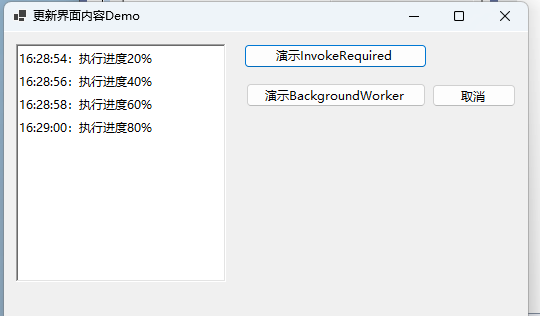
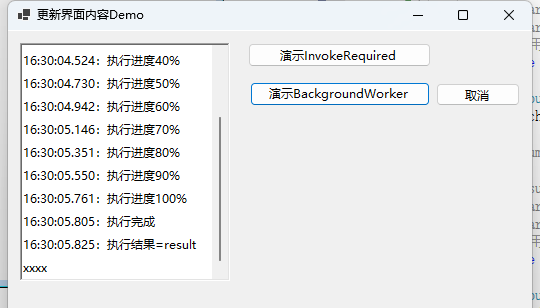
using System.ComponentModel;using System.Diagnostics;using System.Timers;using Tccc.DesktopApp.WinForms1.BLL;namespace Tccc.DesktopApp.WinForms1{ public partial class UIUpdateDemoForm : Form { /// <summary> /// /// </summary> public UIUpdateDemoForm() { InitializeComponent(); backgroundWorker1.WorkerReportsProgress = true; backgroundWorker1.WorkerSupportsCancellation = true; } #region 演示InvokeRequired /// <summary> /// /// </summary> /// <param name="sender"></param> /// <param name="e"></param> private void invokeRequiredBtn_Click(object sender, EventArgs e) { Debug.WriteLine(DateTime.Now.ToString("HH:mm:ss.fff") + "invokeRequiredBtn_Click 线程ID=" + Thread.CurrentThread.ManagedThreadId); new Thread(() => { Debug.WriteLine(DateTime.Now.ToString("HH:mm:ss.fff") + "BeginWorking_Invoke 线程ID=" + Thread.CurrentThread.ManagedThreadId); BLLWorker.BeginWorking_Invoke(this, "some input param"); }).Start(); } /// <summary> /// /// </summary> public void UpdatingProgress(int progress) { if (this.InvokeRequired) { Debug.WriteLine(DateTime.Now.ToString("HH:mm:ss.fff") + "InvokeRequired=true 线程ID=" + Thread.CurrentThread.ManagedThreadId); this.Invoke(new Action(() => { Debug.WriteLine(DateTime.Now.ToString("HH:mm:ss.fff") + "Sleep2秒 线程ID=" + Thread.CurrentThread.ManagedThreadId); Thread.Sleep(2000);//模拟UI操作慢 UpdatingProgress(progress); })); Debug.WriteLine(DateTime.Now.ToString("HH:mm:ss.fff") + "after Invoke 线程ID=" + Thread.CurrentThread.ManagedThreadId); } else { Debug.WriteLine(DateTime.Now.ToString("HH:mm:ss.fff") + "InvokeRequired=false 线程ID=" + Thread.CurrentThread.ManagedThreadId); richTextBox1.Text += DateTime.Now.ToString("HH:mm:ss") + ":执行进度" + progress + "%" + Environment.NewLine; } } #endregion #region 演示BackgroundWorker /// <summary> /// /// </summary> /// <param name="sender"></param> /// <param name="e"></param> private void bgWorkerBtn_Click(object sender, EventArgs e) { new Thread(() => { //Control.CheckForIllegalCrossThreadCalls = true; //richTextBox1.Text = "可以了?"; }).Start(); Debug.WriteLine("bgWorkerBtn_Click 线程ID=" + Thread.CurrentThread.ManagedThreadId); if (!backgroundWorker1.IsBusy) { richTextBox1.Text = String.Empty; backgroundWorker1.RunWorkerAsync("hello world");// } } private void bgWorkerCancelBtn_Click(object sender, EventArgs e) { Debug.WriteLine("bgWorkerCancelBtn_Click 线程ID=" + Thread.CurrentThread.ManagedThreadId); if (backgroundWorker1.IsBusy) { backgroundWorker1.CancelAsync();// } } /// <summary> /// /// </summary> /// <param name="sender"></param> /// <param name="e"></param> private void backgroundWorker1_DoWork(object sender, DoWorkEventArgs e) { Debug.WriteLine("backgroundWorker1_DoWork 线程ID=" + Thread.CurrentThread.ManagedThreadId); BLLWorker.BeginWorking(sender, e);//控件遍历传递到业务处理程序中 } /// <summary> /// /// </summary> /// <param name="sender"></param> /// <param name="e"></param> private void backgroundWorker1_ProgressChanged(object sender, ProgressChangedEventArgs e) { Debug.WriteLine("backgroundWorker1_ProgressChanged 线程ID=" + Thread.CurrentThread.ManagedThreadId); richTextBox1.Text += Environment.NewLine + DateTime.Now.ToString("HH:mm:ss.fff") + ":执行进度" + e.ProgressPercentage + "%"; } /// <summary> /// /// </summary> /// <param name="sender"></param> /// <param name="e"></param> private void backgroundWorker1_RunWorkerCompleted(object sender, RunWorkerCompletedEventArgs e) { Debug.WriteLine("backgroundWorker1_RunWorkerCompleted 线程ID=" + Thread.CurrentThread.ManagedThreadId); if (e.Cancelled) { richTextBox1.Text += Environment.NewLine + DateTime.Now.ToString("HH:mm:ss.fff") + ":已取消"; } else if (e.Error != null) { richTextBox1.Text += Environment.NewLine + DateTime.Now.ToString("HH:mm:ss.fff") + ":发生错误:" + e.Error.Message; } else { richTextBox1.Text += Environment.NewLine + DateTime.Now.ToString("HH:mm:ss.fff") + ":执行完成"; richTextBox1.Text += Environment.NewLine + DateTime.Now.ToString("HH:mm:ss.fff") + ":执行结果=" + e.Result; } } #endregion } public class BLLWorker { /// <summary> /// /// </summary> /// <param name="sender"></param> /// <param name="e"></param> public static void BeginWorking_Invoke(UIUpdateDemoForm form, string inputData) { int counter = 0; int max = 5; while (counter < max) { System.Threading.Thread.Sleep(200); counter++; form.UpdatingProgress(counter * 20); } } /// <summary> /// 模拟耗时操作(下载、批量操作等) /// </summary> /// <param name="sender"></param> /// <param name="e"></param> public static void BeginWorking(object sender, DoWorkEventArgs e) { BackgroundWorker worker = sender as BackgroundWorker; Debug.WriteLine("inputArgument=" + e.Argument as string); for (int i = 1; i <= 10; i++) { if (worker.CancellationPending == true)//检测是否被取消 { e.Cancel = true; break; } else { // Perform a time consuming operation and report progress. System.Threading.Thread.Sleep(200); worker.ReportProgress(i * 10); } } e.Result = "result xxxx"; } }}
上述代码中,this.InvokeRequired属性就是用来判断当前线程和this控件的创建线程是否一致。
问题来了,调用Invoke()怎么就能实现操作控件了呢?我们在演示程序中的UpdatingProgress()增加了详细的记录,调试输出如下:
16:47:44.907:invokeRequiredBtn_Click 线程ID=116:47:44.924:BeginWorking_Invoke 线程ID=1116:47:45.133:InvokeRequired=true 线程ID=1116:47:45.139:Sleep2秒 线程ID=116:47:47.144:InvokeRequired=false 线程ID=116:47:47.159:after Invoke 线程ID=1116:47:47.363:InvokeRequired=true 线程ID=1116:47:47.371:Sleep2秒 线程ID=116:47:49.392:InvokeRequired=false 线程ID=116:47:49.407:after Invoke 线程ID=1116:47:49.622:InvokeRequired=true 线程ID=1116:47:49.628:Sleep2秒 线程ID=116:47:51.638:InvokeRequired=false 线程ID=116:47:51.642:after Invoke 线程ID=1116:47:51.857:InvokeRequired=true 线程ID=1116:47:51.863:Sleep2秒 线程ID=116:47:53.880:InvokeRequired=false 线程ID=116:47:53.888:after Invoke 线程ID=1116:47:54.099:InvokeRequired=true 线程ID=1116:47:54.104:Sleep2秒 线程ID=116:47:56.118:InvokeRequired=false 线程ID=116:47:56.126:after Invoke 线程ID=11结合程序与执行日志,可以得到以下结论:
BackgroundWorker是一个隐形的控件,这是微软封装程度较高的方案,它使用事件驱动模型。
演示程序的日志输出为:
bgWorkerBtn_Click 线程ID=1backgroundWorker1_DoWork 线程ID=4inputArgument=hello worldbackgroundWorker1_ProgressChanged 线程ID=1backgroundWorker1_ProgressChanged 线程ID=1backgroundWorker1_ProgressChanged 线程ID=1backgroundWorker1_ProgressChanged 线程ID=1backgroundWorker1_ProgressChanged 线程ID=1backgroundWorker1_ProgressChanged 线程ID=1backgroundWorker1_ProgressChanged 线程ID=1backgroundWorker1_ProgressChanged 线程ID=1backgroundWorker1_ProgressChanged 线程ID=1backgroundWorker1_ProgressChanged 线程ID=1backgroundWorker1_RunWorkerCompleted 线程ID=1通过日志同样可以看出:
官方注释:
Gets or sets a value indicating whether to catch calls on the wrong thread that access a control's System.Windows.Forms.Control.Handle property when an application is being debugged.When a thread other than the creating thread of a control tries to access one of that control's methods or properties, it often leads to unpredictable results. A common invalid thread activity is a call on the wrong thread that accesses the control's Handle property. Set CheckForIllegalCrossThreadCalls to true to find and diagnose this thread activity more easily while debugging.
通俗理解:
虽然微软不建议其它线程操作控件,但是如果就这么写了,程序也能执行,比如下面的情况:
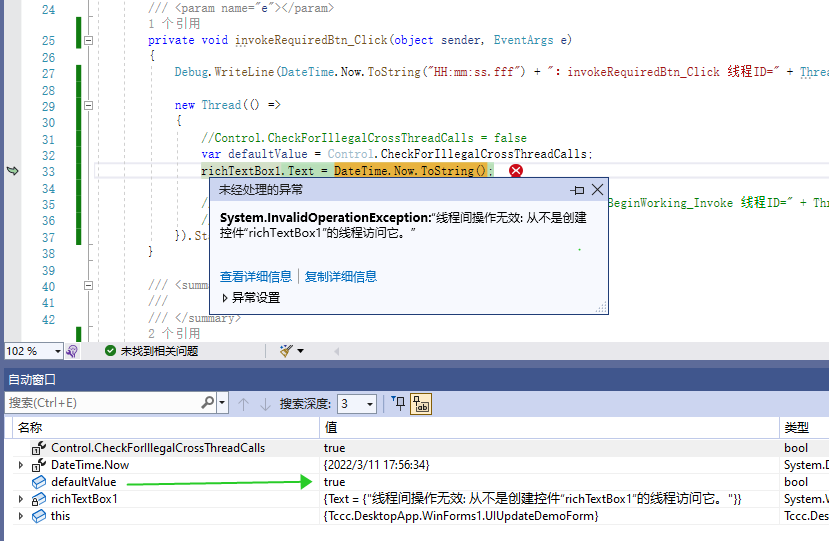
private void invokeRequiredBtn_Click(object sender, EventArgs e) { Debug.WriteLine(DateTime.Now.ToString("HH:mm:ss.fff") + ":invokeRequiredBtn_Click 线程ID=" + Thread.CurrentThread.ManagedThreadId); new Thread(() => { richTextBox1.Text = DateTime.Now.ToString(); }).Start(); }而Control.CheckForIllegalCrossThreadCalls这个属性就是用来设置,是否完全禁止跨线程的操作控件。当设置true,上述操作就完全不能执行了。
注意:在VS中F5调试时,此值默认=true。报错效果:
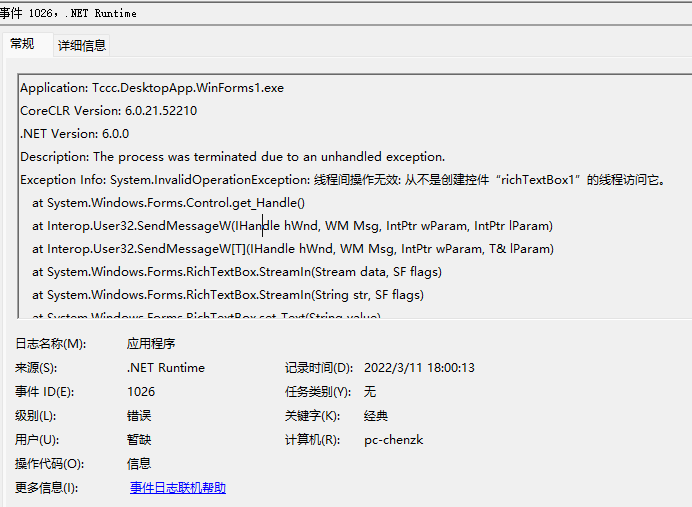
双击生成的exe执行时,此值默认=false,程序还可以执行。当Control.CheckForIllegalCrossThreadCalls设置为true时,双击exe执行程序会异常退出:
建议:如果是新开发的程序,建议设置为true,可以及早的发现隐患问题,避免程序复杂后需要付出高昂的分析成本。
以上是winform开发的基础中的基础,本文在系统的查阅微软文档的基础上,通过演示程序推测和验证相关的逻辑关系。
同时联想到:由于控件的更新都需要UI线程来执行,因此当遇到程序客户端程序响应卡顿/卡死的情况,通过dump分析UI线程的堆栈,应该可以有所发现。

