命令:docker images,列出本地宿主机上的镜像。
(1)命令说明
# 查看本地镜像[root@192 docker]# docker imagesREPOSITORY TAG IMAGE ID CREATED SIZEhello-world latest d1165f221234 9 days ago 13.3kB表头说明:
REPOSITORY:表示镜像的仓库源(名称)。TAG:镜像的标签(版本)。IMAGE ID:镜像的ID。CREATED:镜像的创建时间。SIZE:镜像的大小。说明:
latest表示最新版本。- 同一仓库源可以有多个
TAG,代表这个仓库源的不同个版本,我们使用REPOSITORY:TAG来定义不同的镜像。
如果你不指定一个镜像的版本标签,例如使用Ubuntu镜像,Docker将默认使用ubuntu:latest镜像。
(2)选项说明
-a:列出本地所有的镜像(含中间映像层)。(常用)-q:只显示镜像ID。(常用)--digests:显示镜像的摘要信息(就是备注说明)。--no-trunc:显示完整的镜像信息。举例:
[root@192 docker]# docker images -q --no-truncsha256:d1165f2212346b2bab48cb01c1e39ee8ad1be46b87873d9ca7a4e434980a7726命令:docker search,去Docker官方镜像仓库去搜索需要的镜像,地址https://hub.docker.com/。
(1)通过网页搜索镜像
我们可以直接在网页上访问Docker官方镜像仓库https://hub.docker.com/进行搜索。
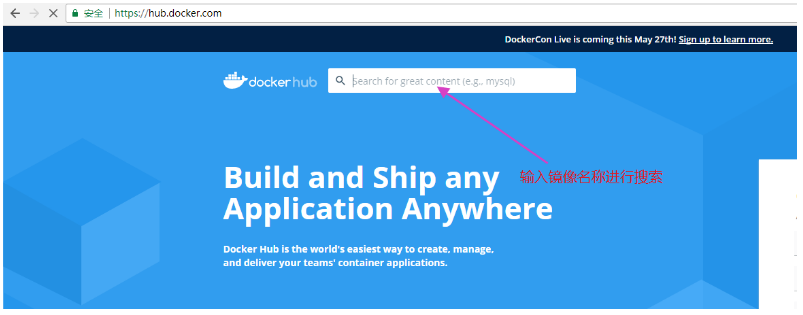
输入mysql进行查询:
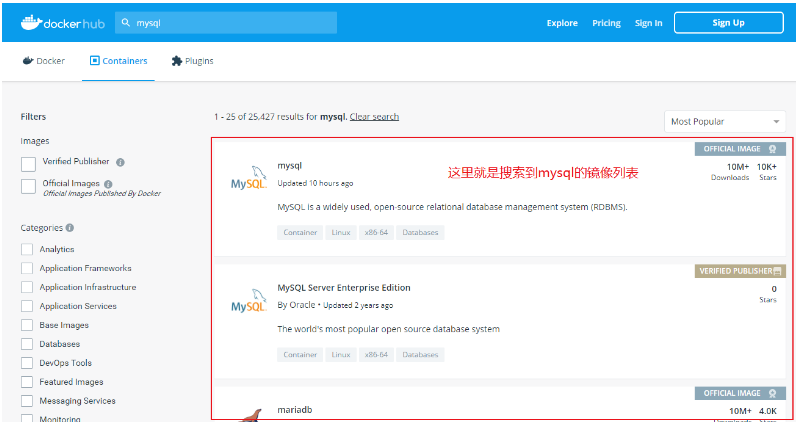
我们点击进入第一个镜像,可以看到对于该镜像的一些详细介绍和说明。
(2)通过命令搜索镜像
# search命令使用方式docker search [OPTIONS] 镜像名字示例:执行命令docker search mysql
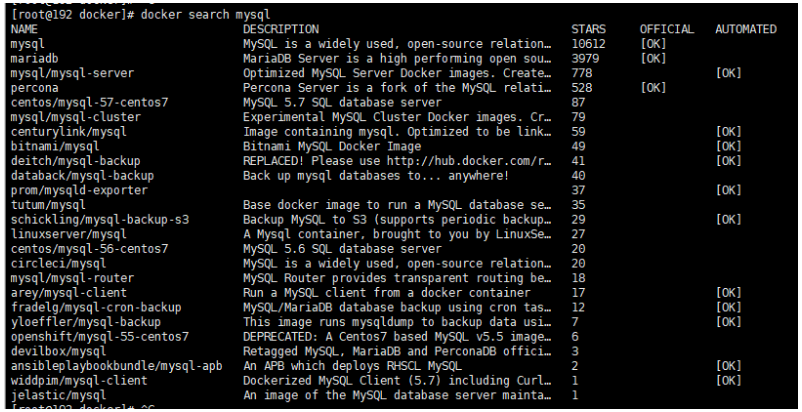
这和我们通过网页搜索到的结果是一样的。
STARS:点赞或喜欢的意思,代表流行率。OFFICIAL:表示Docker官方发布。AUTOMATED:支持自动构建(先理解到这里就可以)。OPTIONS选项说明:
| 名称,简写 | 描述 |
|---|---|
--filter , -f | 根据提供的条件,显示过滤后的搜索结果。 |
--format | 使用Go模板进行漂亮的打印搜索(格式化)。 |
--limit | 显示最多搜索结果数,默认25。 |
--no-trunc | 显示完整的镜像描述,默认值为Fasle。 |
提示:老版本的
--stars和--automated选项都弃用了。对于选项的使用可以使用
--help命令或者去官方文档中去学习,非常的方便,写的很详细。
示例:显示MySQL镜像STARS大于3000的镜像。
[root@192 docker]# docker search mysql --filter=STARS=3000NAME DESCRIPTION STARS OFFICIAL AUTOMATEDmysql MySQL is a widely used, open-source relation… 10612 [OK] mariadb MariaDB Server is a high performing open sou… 3979 [OK] 把Docker hub中的镜像,下载到本地。当然如果我们配置可国内的镜像地址,会从国内镜像仓库进行下载。
命令:docker pull 镜像名字 [:TAG],(pull拉取)
(1)下载最新版本的镜像
例如:下载MySQL镜像。
命令:docker pull mysql
提示:
docker pull mysql等价于docker pull mysql:latest
示例:
[root@192 ~]# docker pull mysqlUsing default tag: latest # 如果不写tag,默认就是latest,也就是默认下载最新版本。latest: Pulling from library/mysqla076a628af6f: Pull complete # 分层下载,docker iamge的核心,联合文件系统f6c208f3f991: Pull complete # 这里不过多解释,后面会详细说明。88a9455a9165: Pull complete 406c9b8427c6: Pull complete 7c88599c0b25: Pull complete 25b5c6debdaf: Pull complete 43a5816f1617: Pull complete 1a8c919e89bf: Pull complete 9f3cf4bd1a07: Pull complete 80539cea118d: Pull complete 201b3cad54ce: Pull complete 944ba37e1c06: Pull complete Digest: sha256:feada149cb8ff54eade1336da7c1d080c4a1c7ed82b5e320efb5beebed85ae8cStatus: Downloaded newer image for mysql:latestdocker.io/library/mysql:latest # 真实下载地址说明:
docker pull mysql等同于docker.io/library/mysql:latest。
这里我们查看一下本地的镜像,就多可一个MySQL镜像。
[root@192 ~]# docker imagesREPOSITORY TAG IMAGE ID CREATED SIZEhello-world latest d1165f221234 9 days ago 13.3kBmysql latest c8562eaf9d81 7 weeks ago 546MB提示:
search搜索的时候是从Docker官方镜像仓库进行搜索,而拉取进行的时候,如果我们设置了国内镜像仓库地址,是从国内镜像仓库进行拉取镜像,这点要注意。
(2)下载指定版本的镜像
命令:docker pull 镜像名字 [:TAG]
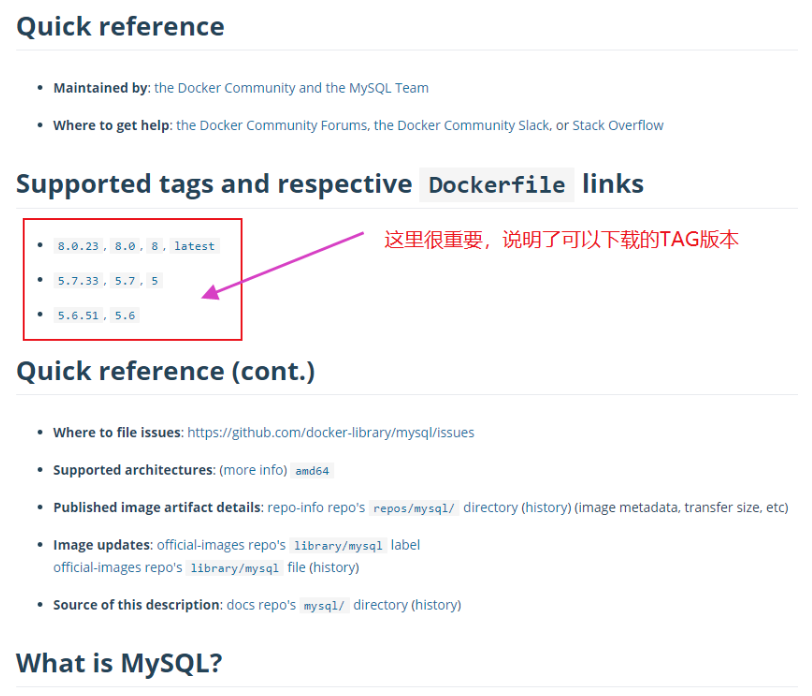
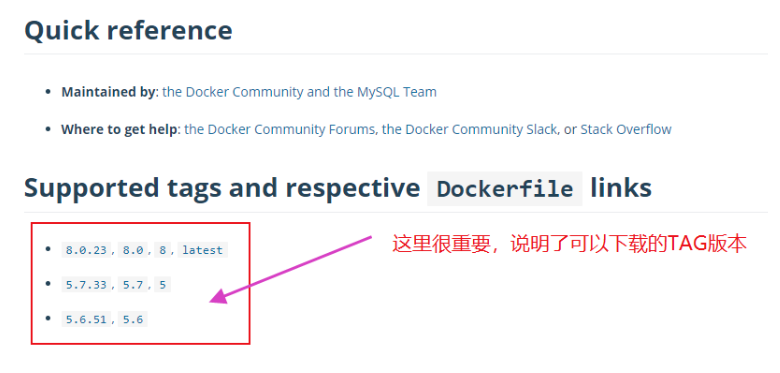
可以在网站上Docker hub的官网中https://hub.docker.com/,搜索相应的镜像,然后点击进入查看镜像的仓库源所支持的TAG版本。
例如以MySQL为例,如下图:
示例:
# 指定镜像版本下载[root@192 ~]# docker pull mysql:5.75.7: Pulling from library/mysqla076a628af6f: Already exists # 联合文件系统,已存在的就不下载了。f6c208f3f991: Already exists # 不多说。88a9455a9165: Already exists 406c9b8427c6: Already exists 7c88599c0b25: Already exists 25b5c6debdaf: Already exists 43a5816f1617: Already exists 1831ac1245f4: Pull complete 37677b8c1f79: Pull complete 27e4ac3b0f6e: Pull complete 7227baa8c445: Pull complete Digest: sha256:b3d1eff023f698cd433695c9506171f0d08a8f92a0c8063c1a4d9db9a55808dfStatus: Downloaded newer image for mysql:5.7docker.io/library/mysql:5.7我们在来查看一下本地镜像。
[root@192 ~]# docker imagesREPOSITORY TAG IMAGE ID CREATED SIZEhello-world latest d1165f221234 9 days ago 13.3kBmysql 5.7 a70d36bc331a 7 weeks ago 449MBmysql latest c8562eaf9d81 7 weeks ago 546MB命令:docker rmi ID或唯一镜像名字
(1)删除单个本地镜像
删除hello-world镜像。
[root@192 ~]# docker rmi hello-world # 等同于docker rmi hello-world:latestError response from daemon: conflict: unable to remove repository reference "hello-world" (must force) - container e0ec28c5891b is using its referenced image d1165f221234我们可以看到hello-world镜像没有删除成功,守护进程daemon告诉我们,无法删除存储库“hello-world”镜像(必须强制),容器e0ec28c5891b正在使用其引用的d1165f221234镜像。
我们加入一个-f选项进行强制删除即可。
[root@192 ~]# docker rmi -f hello-worldUntagged: hello-world:latestUntagged: hello-world@sha256:308866a43596e83578c7dfa15e27a73011bdd402185a84c5cd7f32a88b501a24Deleted: sha256:d1165f2212346b2bab48cb01c1e39ee8ad1be46b87873d9ca7a4e434980a7726我们来查看一下本地镜像,可以看到hello-world镜像已被删除。
REPOSITORY TAG IMAGE ID CREATED SIZEmysql 5.7 a70d36bc331a 7 weeks ago 449MBmysql latest c8562eaf9d81 7 weeks ago 546MB(2)删除多个本地镜像
命令:docker rmi -f 镜像名1:TAG 镜像名2:TAG ...
先来查看一下本地镜像。
[root@192 ~]# docker imagesREPOSITORY TAG IMAGE ID CREATED SIZEmysql 5.7 a70d36bc331a 7 weeks ago 449MBmysql latest c8562eaf9d81 7 weeks ago 546MBnginx 1.18 b9e1dc12387a 2 months ago 133MBnginx latest f6d0b4767a6c 2 months ago 133MBhello-world latest bf756fb1ae65 14 months ago 13.3kB删除nginx和hello-world镜像。
[root@192 ~]# docker rmi -f hello-world nginx nginx:1.18Untagged: hello-world:latestUntagged: hello-world@sha256:31b9c7d48790f0d8c50ab433d9c3b7e17666d6993084c002c2ff1ca09b96391d...# 省略Untagged: nginx:latestUntagged: nginx@sha256:10b8cc432d56da8b61b070f4c7d2543a9ed17c2b23010b43af434fd40e2ca4aa...Untagged: nginx:1.18Untagged: nginx@sha256:ebd0fd56eb30543a9195280eb81af2a9a8e6143496accd6a217c14b06acd1419...查看本地镜像。
[root@192 ~]# docker imagesREPOSITORY TAG IMAGE ID CREATED SIZEmysql 5.7 a70d36bc331a 7 weeks ago 449MBmysql latest c8562eaf9d81 7 weeks ago 546MB(3)删除所有本地镜像
命令:docker rmi -f $(docker images -qa)
我们先来查看本地镜像,只显示镜像的ID信息。
[root@192 ~]# docker images -qaa70d36bc331ac8562eaf9d81f6d0b4767a6cbf756fb1ae65可以看到本地镜像仓库中有4个镜像。
把本地的镜像全部删除。
[root@192 ~]# docker rmi -f $(docker images -qa)Untagged: mysql:5.7Untagged: mysql@sha256:b3d1eff023f698cd433695c9506171f0d08a8f92a0c8063c1a4d9db9a55808df...# 省略Untagged: mysql:latestUntagged: mysql@sha256:feada149cb8ff54eade1336da7c1d080c4a1c7ed82b5e320efb5beebed85ae8c...Untagged: nginx:latestUntagged: nginx@sha256:10b8cc432d56da8b61b070f4c7d2543a9ed17c2b23010b43af434fd40e2ca4aa...Untagged: hello-world:latestUntagged: hello-world@sha256:31b9c7d48790f0d8c50ab433d9c3b7e17666d6993084c002c2ff1ca09b96391d...再来查看本地镜像,可以看到一个都没有了。
[root@192 ~]# docker images REPOSITORY TAG IMAGE ID CREATED SIZE提示:推荐使用镜像ID删除镜像。

