要生成html类型的报告,需要使用pytest-html插件,可以在IDE中安装,也可以在命令行中安装。插件安装
的位置涉及到不同项目的使用,这里不再详述,想了解的可自行查询。
在File>Settings>Project>Project Interpreter界面,点击“ + ”搜索pytest-html即可进行安装。

建议先在命令行中切换到python安装路径“ Lib\site-packages ”目录,再执行安装命令。
pip install -U pytest-html
先准备一个简单的执行脚本
import pytestdef fun(x): return x + 1def test_answer_1(): """测试断言一""" assert fun(3) == 4def test_answer_2(): """测试断言二""" assert fun(5) == 7@pytest.mark.parametrize("test_input,expected",[ ("3+5",8), ("2+4",6), pytest.param("6 * 9",42,marks=pytest.mark.xfail), pytest.param("6 * 6",42,marks=pytest.mark.skip)])def test_mark(test_input,expected): """用例集合""" assert eval(test_input) == expectedif __name__ == '__main__': pytest.main(['-v','--html=report.html','test_08.py'])
生成报告命令 pytest --html=报告名称 要执行的脚本文件 ,执行上述脚本查看结果。
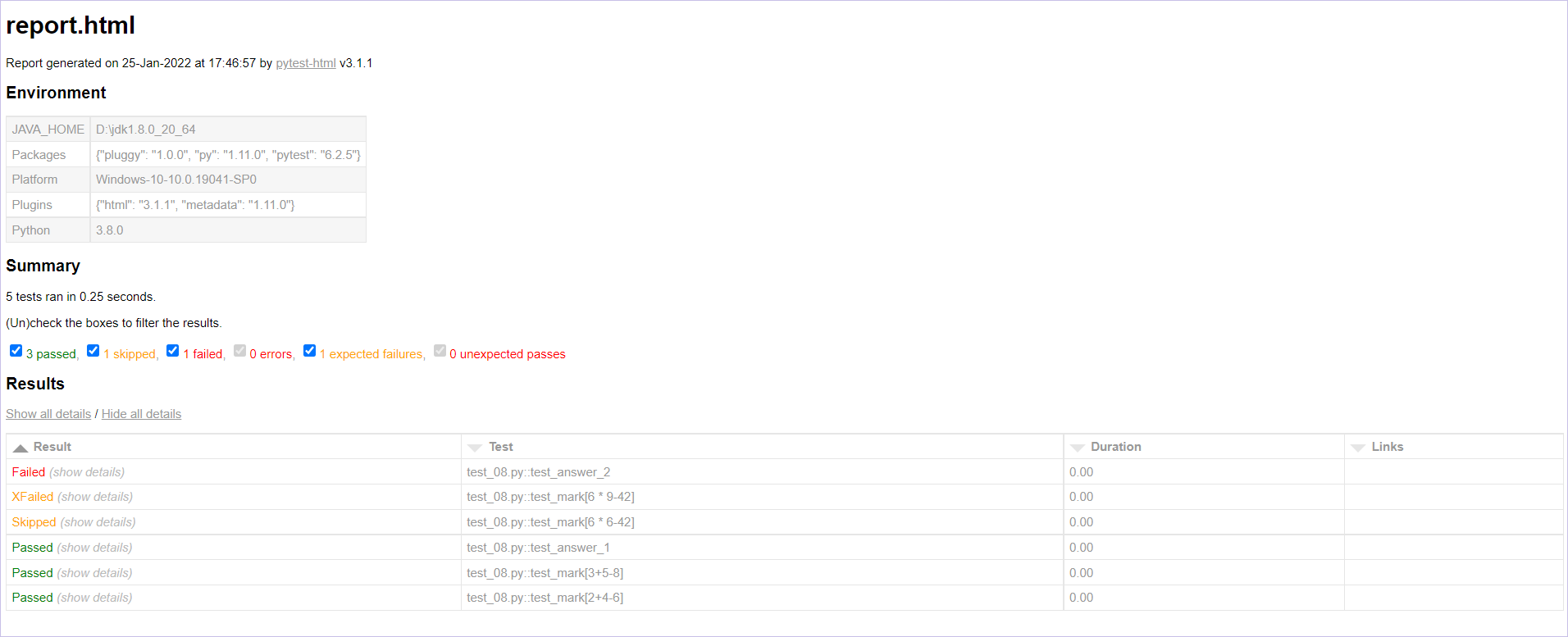
report.html:报告名称,记录报告生成时间以及插件版本
Environment:测试环境
Summary:用例统计
Results:测试结果,点击Show all details / Hide all details可以展开结果详情或收缩全部结果
通过上述命令运行脚本后可以发现,测试报告保存在项目的根目录下,查找报告比较繁琐。我们可以
在运行命令中指定报告路径 pytest -v --html=./outputs/report.html test_08.py ,代码执行完成,
可以发现项目根目录下生成了outputs文件,测试报告也在其中。
当本地执行完成,想把测试报告分享出去,却发现分享出去的报告打开后样式丢失。因为代码执行完成
会生成assets文件,将CSS保存在了本地。我们可以通过命令将CSS写入HTML中,这样生成的测试报告就能
对外分享了。
pytest -v --html=./outputs/report.html --self-contained-html test_08.py
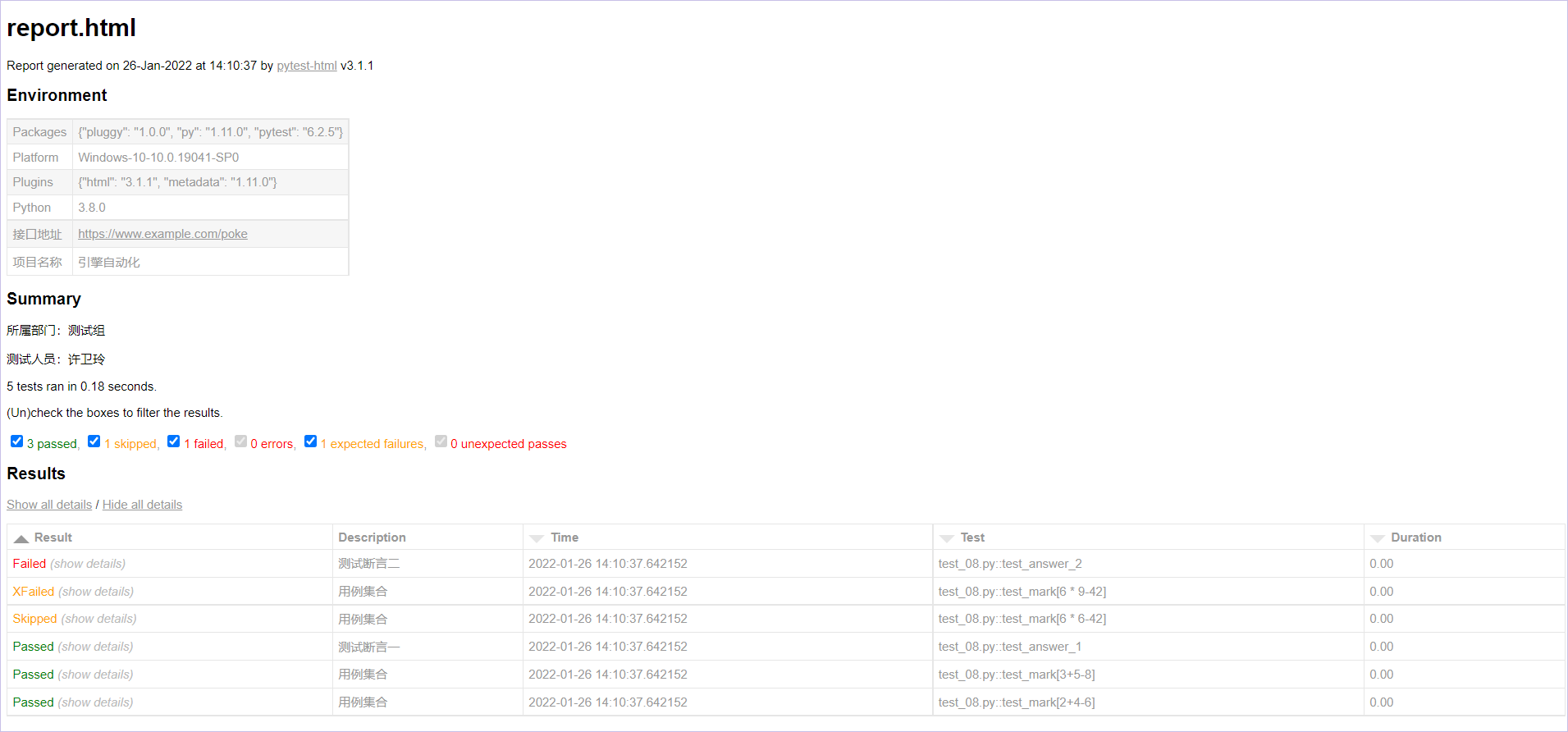
在实际的工作中,通过上述操作生成的测试报告一般不是我们想要的结果。环境信息通过增减更换成需
要展示的内容、增加用例描述、去掉多余的列等等。这里需要将优化代码写入conftest.py文件,该文件名是固
定的不可更改。
import pytestfrom py._xmlgen import htmlfrom datetime import datetime
@pytest.mark.parametrizedef pytest_configure(config): config._metadata.pop("JAVA_HOME") # 删除java_home config._metadata["项目名称"] = "引擎自动化" # 添加项目名称 config._metadata["接口地址"] = "https://www.example.com/poke" # 添加接口地址
@pytest.mark.parametrizedef pytest_html_results_summary(prefix,summary,postfix): prefix.extend([html.p("所属部门:测试组")]) prefix.extend([html.p("测试人员:许卫玲")])
@pytest.mark.optionalhookdef pytest_html_results_table_header(cells): cells.insert(1,html.th("Description")) # 表头添加Description cells.insert(2,html.th("Time",class_="sortable time",col="time")) cells.pop(-1) # 删除link@pytest.mark.optionalhookdef pytest_html_results_table_row(report,cells): cells.insert(1,html.td(report.description)) # 表头对应的内容 cells.insert(2,html.td(datetime.now(),class_="col-time")) cells.pop(-1) # 删除link@pytest.mark.hookwrapperdef pytest_runtest_makereport(item,call): # Description取值为用例说明__doc__ outcome = yield report = outcome.get_result() report.description = str(item.function.__doc__) report.nodeid = report.nodeid.encode("utf-8").decode("unicode_escape")
修改完成,重新执行脚本,查看最终效果。
作者:Sweettesting —— 半醉半醒半浮生
出处:http://www.cnblogs.com/Sweettesting/
本文版权归作者和博客园共有,欢迎转载,但未经作者同意必须保留此段声明,且在文章页面明显位置给出原文连接,否则保留追究法律责任的权利。

