print("Hello World");Name = input('请输入您的姓名:');print(Name);D:\工作空间\Python\venv\Scripts\python.exe D:/工作空间/Python/main.pyHello World请输入您的姓名:AliceAlice进程已结束,退出代码0print("-------------输出语句-------------");message="Hello Python world";print(message);print("-------------首字母大写-------------");name="ada lovelace";print(name.title());print("-------------大小写-------------");print(name.upper());print(name.lower());print("-------------拼接字符串-------------");first_name = "ada"last_name = "lovelace"full_name = first_name + " " + last_nameprint(full_name);print("-------------添加空白-------------");print("\tPython");print("Languages:\nPython\nC\nJavaScript");print("-------------删除空白-------------");print("Hello ".rstrip());print("-------------运算-------------");print(2+3);print(3-2);print(2*3);print(3/2);print(3**2);print(3**3);print(10**6);print(0.1+0.1);print(0.2+0.2);print("------------注释-------------");# 测试注释-------------输出语句-------------Hello Python world-------------首字母大写-------------Ada Lovelace-------------大小写-------------ADA LOVELACEada lovelace-------------拼接字符串-------------ada lovelace-------------添加空白------------- PythonLanguages:PythonCJavaScript-------------删除空白-------------Hello-------------运算-------------5161.592710000000.20.4------------注释-------------Process finished with exit code 0print("-----------------算数运算符-----------------");#+ 加,两个对象相加#- 减,得到负数或是一个数减去另一个数#* 乘,两个数相乘或是返回一个被重复若干次的字符串#x/y 除,x 除以 y#% 取模,返回除法的余数#// 取整除,返回商的整数部分#x**y 幂print(12+13);print(12-13);print(12*13);print(12/13);print(12/13);print(12%13);print(12//13);print(12**13);print("-----------------比较运算符-----------------");#== 等于,比较对象是否相等 (a == b)返回 False#!= 不等于,比较两个对象是否不相等 (a != b)返回 True#<> 不等于,比较两个对象是否不相等 (a <> b)返回 True。这个运算符类似 !=#x > y 大于,返回 x 是否大于 y (a > b)返回 False#x < y小于,返回 x 是否小于 y。所有比较运算符返回 1表示真,返回 0 表示假。这分别与特殊的变量 True 和 False 等价。注意这些变量名的大小写(a < b)返回 True#x >= y 大于等于,返回 x 是否大于等于 y (a >= b)返回 False#x <= y 小于等于,返回 x 是否小于等于 y (a <= b)返回 Trueprint(12>13);print(12>=13);print(12<13);print(12<=13);print(12!=13);print(12==13);print("-----------------赋值运算符-----------------");#= 简单的赋值运算符 c = a + b 将 a + b 的运算结果赋值为 c#+= 加法赋值运算符 c += a 等效于 c = c + a#-= 减法赋值运算符 c-= a 等效于 c = c-a#*= 乘法赋值运算符 c *= a 等效于 c = c * a#/= 除法赋值运算符 c /= a 等效于 c = c / a#%= 取模赋值运算符 c %= a 等效于 c = c % a#**= 幂赋值运算符 c **= a 等效于 c = c ** a#//= 取整除赋值运算符 c //= a 等效于 c = c // aa=21;b=10;c=0;c+=a;print(c);c*=b;print(c);c/=a;print(c);c-=b;print(c);c=2;c%=a;print(c);c**=a;print(c);c//=a;print(c);print("-----------------位运算符-----------------");#& 按位与运算符 (a & b)输出结果 12,二进制解释:0000 1100#| 按位或运算符 (a | b)输出结果 61,二进制解释:0011 1101#^ 按位异或运算符 (a ^ b)输出结果 49,二进制解释:0011 0001#~ 按位取反运算符#(~a)输出结果?61,二进制解释:1100 0011,#在一个有符号二进制数的补码形式#<< 左移动运算符 a << 2 输出结果 240,二进制解释:1111 0000#>> 右移动运算符 a >> 2 输出结果 15,二进制解释:0000 1111a=60;b=13;c=0;c=a&b;print(c);c=a|b;print(c);c=a^b;print(c);c=~a;print(c);c=a<<2;print(c);c=a>>2;print(c);print("-----------------逻辑运算符-----------------");#x and y 布尔“与”,如果 x 为 False,x and y 返回 False,否则它返回 y 的计算值#x or y 布尔“或”,如果 x 是 True,它返回 True,否则它返回 y 的计算值#x not y 布尔“非”,如果 x 为 True,返回 False。如果 x 为 False,它返回 Truea=10;b=20;print(a and b);a=0;print(a and b);D:\工作空间\Python\venv\Scripts\python.exe D:/工作空间/Python/main.py-----------------算数运算符-----------------25-11560.92307692307692310.9230769230769231120106993205379072-----------------比较运算符-----------------FalseFalseTrueTrueTrueFalse-----------------赋值运算符-----------------2121010.00.02209715299864-----------------位运算符-----------------126149-6124015进程已结束,退出代码0print("-------------检查是否相等-------------");car='bmw';print(car=='bmw');print(car=='audi');print(car=='BMW');print(car.upper()=='BMW');age=18;print(age==18);print(age>=18);print(age<=18);print(age>18);print(age<18);age_0 = 22;age_1 = 18;print(age_0 >= 21 and age_1 >= 21);print(age_0 >= 21 or age_1 >= 21);print("-------------if语句-------------");age = 19if age >= 18: print("You are old enough to vote!"); age=17 if age>=18: print("You are old enough to vote!"); else: print("Sorry you are too young"); age = 12 if age < 4: print("Your admission cost is $0.") elif age < 18: print("Your admission cost is $5.") else: print("Your admission cost is $10.") age = 12 if age < 4: price = 0 elif age < 18: price = 5 elif age < 65: price = 10 elif age >= 65: price = 5print("Your admission cost is $" + str(price) + ".")-------------检查是否相等-------------TrueFalseFalseTrueTrueTrueTrueFalseFalseFalseTrue-------------if语句-------------You are old enough to vote!Sorry you are too youngYour admission cost is $5.Your admission cost is $5.Process finished with exit code 0print("-------------函数input()的工作原理-------------");message = input("Tell me something, and I will repeat it back to you: ")print(message)print("-------------编写清晰的程序-------------");name=input("Please enter your name:");print("Hello,"+name+"!");print("-------------求模运算符-------------");print(4%3);print("-------------while循环-------------");current_number = 1while current_number <= 5: print(current_number) current_number += 1print("-------------让用户选择何时退出-------------");prompt = "\nTell me something, and I will repeat it back to you:"prompt += "\nEnter 'quit' to end the program. "message = ""while message != 'quit': message = input(prompt) print(message)print("-------------break语句-------------");prompt = "\nPlease enter the name of a city you have visited:"prompt += "\n(Enter 'quit' when you are finished.) "while True: city = input(prompt) if city == 'quit': break else: print("I'd love to go to " + city.title() + "!")-------------函数input()的工作原理-------------Tell me something, and I will repeat it back to you: Hello WorldHello World-------------编写清晰的程序-------------Please enter your name:AliceHello,Alice!-------------求模运算符-------------1-------------while循环-------------12345-------------让用户选择何时退出-------------Tell me something, and I will repeat it back to you:Enter 'quit' to end the program. Hello WorldHello WorldTell me something, and I will repeat it back to you:Enter 'quit' to end the program. quitquit-------------break语句-------------Please enter the name of a city you have visited:(Enter 'quit' when you are finished.) ShangHaiI'd love to go to Shanghai!Please enter the name of a city you have visited:(Enter 'quit' when you are finished.) quitProcess finished with exit code 0print("-------------字符串操作-------------");#coding=utf-8str = 'Hello World!'print(str) # 输出完整字符串print(str[0]) # 输出字符串中的第一个字符print(str[2:5]) # 输出字符串中第三个至第五个之间的字符串print(str[2:]) # 输出从第三个字符开始的字符串print(str * 2) # 输出字符串两次print(str + "TEST") # 输出连接的字符串print("-------------格式化输出-------------");x="欢迎您,%s,当前第%d 次访问! "y=x%("小明",1)#y=("欢迎您,%s,当前第%d 次访问! "%("小明",1)),以上两行可以合并为这一行。print(y)print("-------------三引号-------------");hi = '''hithere'''print(hi) # str()D:\工作空间\Python\venv\Scripts\python.exe D:/工作空间/Python/main.py-------------字符串操作-------------Hello World!Hllollo World!Hello World!Hello World!Hello World!TEST-------------格式化输出-------------欢迎您,小明,当前第1 次访问! -------------三引号-------------hithere进程已结束,退出代码0print("-------------创建列表-------------");list1 = ['JAVA', 'Hello', 'Python', 'VS', 1, 2, 3]print(list1)list2 = list('Python')print(list2)list3 = []print(list3)print("-------------访问列表中的值-------------");print("list1[0]: ", list1[0])print("list2[1:5]: ", list2[1:5])print("-------------列表函数-------------");list1.append('XYZ') #向 list1 增加'XYZ'对象print(list1.count('Python')) #返回'Python'出现次数list1.extend(list2) #将 list2 加到 list1 后面print(list1)list1.remove('XYZ') #删除对象'XYZ'print(list1.pop()) # 删除列表的最后位置上的对象并返回print(list1)D:\工作空间\Python\venv\Scripts\python.exe D:/工作空间/Python/main.py-------------创建列表-------------['JAVA', 'Hello', 'Python', 'VS', 1, 2, 3]['P', 'y', 't', 'h', 'o', 'n'][]-------------访问列表中的值-------------list1[0]: JAVAlist2[1:5]: ['y', 't', 'h', 'o']-------------列表函数-------------1['JAVA', 'Hello', 'Python', 'VS', 1, 2, 3, 'XYZ', 'P', 'y', 't', 'h', 'o', 'n']n['JAVA', 'Hello', 'Python', 'VS', 1, 2, 3, 'P', 'y', 't', 'h', 'o']进程已结束,退出代码0print("-------------创建访问元祖-------------");#coding=utf-8tuple = ( 'Java', 786 , 2.23, 'john', 70.2 )tinytuple = (123, 'john')print(tuple) # 输出完整元组print(tuple[0])# 输出元组的第一个元素print(tuple[1:3]) # 输出第二个至第三个的元素print(tuple[2:])# 输出从第三个开始至列表末尾的所有元素print(tinytuple * 2) # 输出元组两次print(tuple + tinytuple) # 打印组合的元组D:\工作空间\Python\venv\Scripts\python.exe D:/工作空间/Python/main.py-------------创建访问元祖-------------('Java', 786, 2.23, 'john', 70.2)Java(786, 2.23)(2.23, 'john', 70.2)(123, 'john', 123, 'john')('Java', 786, 2.23, 'john', 70.2, 123, 'john')进程已结束,退出代码0print("-------------创建字典-------------");d1 = {} # 空字典d2={"id":10,"tel":123456,"name":"小明"}print(d1)print(d2)print("-------------访问字典-------------");dict2 = {'name': '小明','id':1, 'dept': '计算机'}print(dict2['dept'])print(dict2['name'])print("-------------修改添加字典-------------");dict1 = {'Name':'小明', 'Age':19, 'major':'计算机'};dict1['Age'] = 18; # 字典中有"Age"键,更新现有元素dict1['college'] = "Tech"; # 字典中无"college"键,执行添加操作print("dict1['Age']: ",dict1['Age'])print("dict1['college']: ",dict1['college'])print("-------------删除字典-------------");dict1={"stu_name":"小明","stu_id":1,"stu_age":24}del dict1["stu_id"] # 删除键为"stu_id"的键值对print(dict1)dict1.clear() # 删除所有键值对print(dict1)D:\工作空间\Python\venv\Scripts\python.exe D:/工作空间/Python/main.py-------------创建字典-------------{}{'id': 10, 'tel': 123456, 'name': '小明'}-------------访问字典-------------计算机小明-------------修改添加字典-------------dict1['Age']: 18dict1['college']: Tech-------------删除字典-------------{'stu_name': '小明', 'stu_age': 24}{}进程已结束,退出代码0print("-------------创建集合-------------");s = set() # 空集print(s)print(type(s))s = {1,2,3} # 直接写入集合元素print(type(s))s=set(["ABC",'XYZ','xyz','123','1',1,1.0])print(s)s=set(i for i in range(10))print(s)s=frozenset("Python 3.3.3")print(s)s= dict((i,0) for i in {1, 'ABC', 'XYZ', 'xyz', '1', '123'})print(s)s= dict((i,0) for i in frozenset({'n', 'o', 'h', ' ', '.', 'y', 't', 'P', '3'}))print(s)print("-------------访问集合-------------");s = set(['A', 'B', 'C', 'D'])# s = {'A', 'B', 'C', 'D'}print('A' in s)print('a' not in s)for i in s: print(i,end='\t')print("-------------更新集合-------------");s = set(['A', 'B', 'C', 'D'])s = s|set('Python') # 使用操作符"|"print(s)s.add('ABC') # add()方法print(s)s.remove('ABC') # remove()方法s.update('JAVAEF') # update()方法print(s)D:\工作空间\Python\venv\Scripts\python.exe D:/工作空间/Python/main.py-------------创建集合-------------set()<class 'set'><class 'set'>{1, '1', 'xyz', 'XYZ', '123', 'ABC'}{0, 1, 2, 3, 4, 5, 6, 7, 8, 9}frozenset({'t', 'o', 'y', 'n', '3', '.', 'h', ' ', 'P'}){1: 0, '1': 0, 'xyz': 0, 'XYZ': 0, '123': 0, 'ABC': 0}{'t': 0, 'o': 0, 'n': 0, '.': 0, 'y': 0, '3': 0, 'h': 0, ' ': 0, 'P': 0}-------------访问集合-------------TrueTrueB D C A -------------更新集合-------------{'B', 't', 'o', 'y', 'n', 'D', 'C', 'h', 'P', 'A'}{'B', 't', 'o', 'ABC', 'y', 'n', 'D', 'C', 'h', 'P', 'A'}{'B', 'E', 't', 'o', 'y', 'n', 'J', 'D', 'C', 'h', 'F', 'P', 'V', 'A'}进程已结束,退出代码0D:\工作空间\Python\venv\Scripts\python.exe D:/工作空间/Python/main.py-------------创建字典-------------{}{'id': 10, 'tel': 123456, 'name': '小明'}-------------访问字典-------------计算机小明-------------修改添加字典-------------dict1['Age']: 18dict1['college']: Tech-------------删除字典-------------{'stu_name': '小明', 'stu_age': 24}{}进程已结束,退出代码0print("-------------定义函数-------------");def print_info():#打印提示信息,返回输入信息 print("欢迎访问学生信息管理系统,请按提示输入操作!") print("1.添加学生信息") print("2.删除学生信息") print("3.修改学生信息") print("4.查询学生信息") print("5.浏览学生信息") print("6.退出系统")print("-------------调用函数-------------");print_info()D:\工作空间\Python\venv\Scripts\python.exe D:/工作空间/Python/main.py-------------定义函数--------------------------调用函数-------------欢迎访问学生信息管理系统,请按提示输入操作!1.添加学生信息2.删除学生信息3.修改学生信息4.查询学生信息5.浏览学生信息6.退出系统进程已结束,退出代码0数称调用这个函数。在程序中可以多次、反复地调用一个定义了的函数。函数必须先定义后
def <函数名>(<参数表>):
<函数体>
return 表达式
方法 1:import <库名>
方法 2:import <库名> as <新名字>
方法 3:from <库名> import <函数名>|
print("-------------创建类-------------");class Stu: name = "张三"print(Stu.name)D:\工作空间\Python\venv\Scripts\python.exe D:/工作空间/Python/main.py-------------创建类-------------张三进程已结束,退出代码0__dict__:类的属性(包含一个字典,由类的数据属性组成)。
__doc__:类的文档字符串。
__name__:类名。
__module__:类定义所在的模块(类的全名是“__main__.className”,如果类位于一
个导入模块 mymod 中,那么 className.__module__ 等于 mymod)。
__bases__:类的所有父类构成元素(包含了由所有父类组成的元组)。
print("-------------实例对象-------------");class Stu: # '定义一个属性 name = "张三" age = 19# 创建 Stu 类的对象stu = Stu()print("学生姓名:%s,年龄:%d" % (stu.name, stu.age))D:\工作空间\Python\venv\Scripts\python.exe D:/工作空间/Python/main.py-------------实例对象-------------学生姓名:张三,年龄:19进程已结束,退出代码0print("-------------构造方法------------");class Stu: # 构造方法 def __init__(self): self.name = "张三" self.stuid = 1 def displayCount(self): print("学生姓名:%s,学号%d" % (self.name, self.stuid))stu = Stu()stu.displayCount()print("-------------析构方法------------");class Stu: # 构造方法 def __init__(self, name, stuid): self.name = name self.stuid = stuid # 析构方法 def __del__(self): print("已释放资源")stu = Stu("张三", 1)del stu # 删除对象 触发析构方法# del stu.name #这是属性的删除 不会触发,整个实例删除是才会触发print("进行垃圾回收")print("-------------封装------------");# coding=utf-8class JustCounter: __secretCount = 0 # 私有变量 publicCount = 0 # 公开变量 def count(self): self.__secretCount += 1 self.publicCount += 1 print(self.__secretCount)counter = JustCounter()counter.count()counter.count()print(counter.publicCount)print(counter._JustCounter__secretCount)D:\工作空间\Python\venv\Scripts\python.exe D:/工作空间/Python/main.py-------------构造方法------------学生姓名:张三,学号1-------------析构方法------------已释放资源进行垃圾回收-------------封装------------1222进程已结束,退出代码0print("-------------类的继承------------");# coding=utf-8class Parent: # 定义父类 parentAttr = 100 def __init__(self): print("调用父类构造函数") def parentMethod(self): print("调用父类方法") def setAttr(self, attr): Parent.parentAttr = attr def getAttr(self): print("父类属性 :", Parent.parentAttr)class Child(Parent): # 定义子类 def __init__(self): print("调用子类构造方法") def childMethod(self): print("调用子类方法 child method")c = Child() # 实例化子类c.childMethod() # 调用子类的方法c.parentMethod() # 调用父类方法c.setAttr(200) # 再次调用父类的方法c.getAttr() # 再次调用父类的方法D:\工作空间\Python\venv\Scripts\python.exe D:/工作空间/Python/main.py-------------类的继承------------调用子类构造方法调用子类方法 child method调用父类方法父类属性 : 200进程已结束,退出代码0【1】在继承中父类的构造(__init__( )方法)不会被自动调用,它需要在其子类的构造中亲自专门调用。
【2】在调用父类的方法时,需要加上父类的类名前缀,且需要带上 self 参数变量,以区别于在类中调用普通函数时并不需要带上 self 参数。
【3】Python 总是首先查找对应类型的方法,如果它不能在子类中找到对应的方法,它才到父类中逐个查找(先在本类中查找调用的方法,找不到才到父类中找)。
print("-------------方法重写------------");# coding=utf-8class Parent: # 定义父类 def myMethod(self): print('调用父类方法')class Child(Parent): # 定义子类 def myMethod(self): print('调用子类方法')c = Child() # 子类实例c.myMethod() # 子类调用重写方法D:\工作空间\Python\venv\Scripts\python.exe D:/工作空间/Python/main.py-------------方法重写------------调用子类方法进程已结束,退出代码0print("-------------运算符重载------------");class Computation(): def __init__(self, value): self.value = value def __add__(self, other): return self.value + other def __sub__(self, other): return self.value - otherc = Computation(5)x = c + 5print("重构后加法运算结果是:", x)y = c - 3print("重构后减法运算结果是:", y)D:\工作空间\Python\venv\Scripts\python.exe D:/工作空间/Python/main.py-------------运算符重载------------重构后加法运算结果是: 10重构后减法运算结果是: 2进程已结束,退出代码0#在同一目录下新建文本文件 test.txtf=open("test.txt","r")print(type(f))g=open("test.txt","rb")print(type(g))D:\工作空间\Python\venv\Scripts\python.exe D:/工作空间/Python/main.py<class '_io.TextIOWrapper'><class '_io.BufferedReader'>进程已结束,退出代码0#coding=utf-8# 打开一个文件f = open("f.txt", "w")f.write( "人生苦短.\n 我用 Python!\n");# 关闭打开的文件f.close()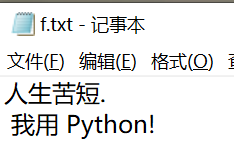
try: f = open("test.txt", "w") f.write("异常处理测试!")except IOError: print("错误: 没找到文件或文件不可用")else: print("读写成功") f.close()D:\工作空间\Python\venv\Scripts\python.exe D:/工作空间/Python/main.py读写成功进程已结束,退出代码0try: raise IndexErrorexcept: print("出错了") raiseD:\工作空间\Python\venv\Scripts\python.exe D:/工作空间/Python/main.pyTraceback (most recent call last): File "D:/工作空间/Python/main.py", line 2, in <module> raise IndexErrorIndexError出错了进程已结束,退出代码1raise 语句
Python 执行 raise 语句时,会引发异常并传递异常类的实例对象。使用 raise 语句能显式
地触发异常,分为三种情况进行处理。
(1)用类名引发异常,创建异常类的实例对象,并引发异常,基本格式如下:
raise 异常类名
raise 语句中,指定异常类名时,创建该类的实例对象,然后引发异常。使用时直接写出类名。例如:
raise IndexError
IndexError 是一个异常类,编码时不实例化,执行时会进行创建。
(2)用异常类实例对象引发异常,引发异常类实例对象对应的异常,基本格式如下:
raise 异常类对象
raise 语句中,使用异常类实例对象引发异常时,通过显式地创建异常类的实例,直接使用该实例来引发异常。例如:
index=IndexError()
raise index
(3)重新引发刚刚发生的异常,基本格式如下:
raise
此时,不带参数的 raise 语句,可以再次引发刚刚发生过的异常,作用就是向外传递异常。

