备忘录模式(Memento Design Pattern),也叫快照(Snapshot)模式。指在不违背封装原则前提下,捕获一个对象的内部状态,并在该对象之外保存这个状态,以便之后恢复对象为先前的状态。
备忘录模式在日常中很常见,比如Word中的回退,MySQL中的undo log日志,Git版本管理等等,我们都可以从当前状态退回之前保存的状态。比如Git中的checkout命令就可以从main版本切换到之前的bugFix版本:

备忘录是一种对象行为型模式,它提供了一种可以恢复状态的机制,并实现了内部状态的封装。下面就来看看备忘录模式的结构及其对应的实现:
备忘录的核心是备忘录类(Memento)和管理备忘录的管理者类(Caretaker)的设计,其结构如下图所示:
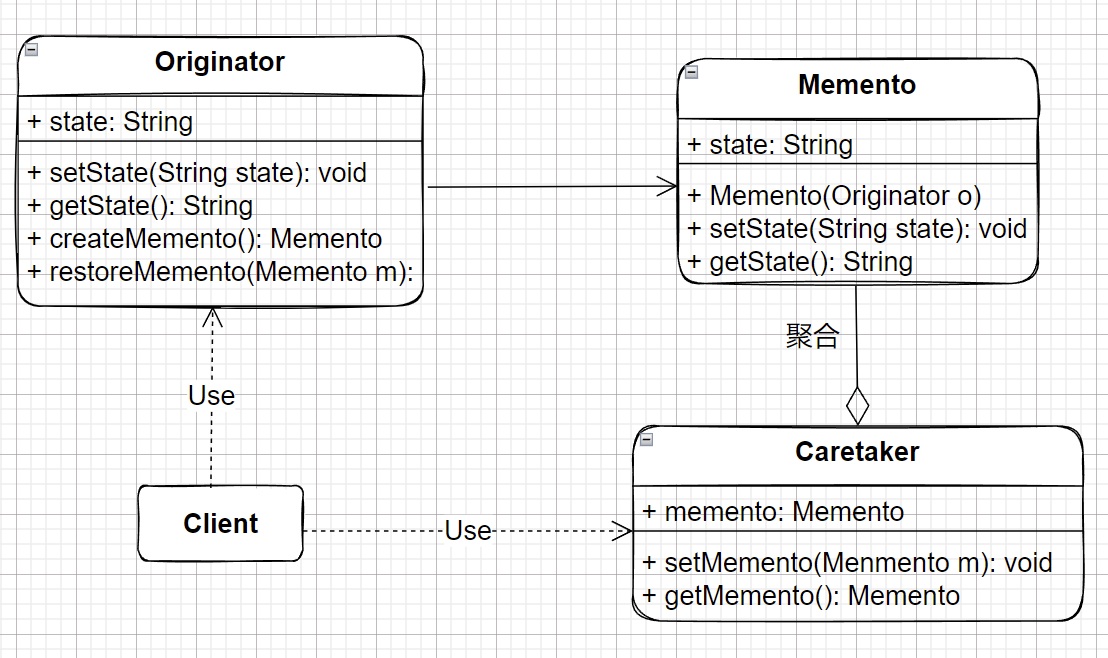
Originator:组织者类,记录当前业务的状态信息,提供备忘录创建和恢复的功能Memento:备忘录类,存储组织者类的内部状态,在需要时候提供这些内部状态给组织者类Caretaker:管理者类,对备忘录进行管理,提供存储于获取备忘录的功能,无法对备忘录对象进行修改和访问在利用备忘录模式时,首先应该设计一个组织者类(Originator),它是一个具体的业务类,存储当前状态。它包含备忘录对象的创建方法createMemeto()和备忘录对象恢复方法restoreMemeto()。
Originator类的具体代码如下:
public class Originator { private String state; public String getState() { return state; } public void setState(String state) { this.state = state; } //创建一个备忘录对象 public Memento createMemento() { return new Memento(this); } //根据备忘录对象,恢复之前组织者的状态 public void restoreMemento(Memento m) { state = m.getState(); }}对于备忘录类(Memento)而言,它存储组织者类(Originator)的状态,其具体代码如下:
public class Memento { private String state; public Memento(Originator o) { this.state = state; } public String getState() { return state; } public void setState(String state) { this.state = state; }}在这里需要考虑备忘录的封装性,除了Originator类外,其他类不能调用备忘录的内部的相关方法。因为外界类的调用可能会引起备忘录内的状态发生变化,这样备忘录的设置就没有了意义。在实际操作中,可以将Memento和Originator类定义在同一个包中来实现封装;也可以将Memento类作为Originator的内部类。
下面再了看看管理者类(Caretaker)的具体代码:
public class Caretaker { private Memento memento; public Memento getMemento() { return memento; } public void setMemento(Memento memento) { this.memento = memento; }}它的作用仅仅是存储备忘录对象,而且其内部中也不应该有直接调用Memento中的状态改变方法。只有当用户需要对Originator类进行恢复时,再将存储在其中的备忘录对象取出。
下面是对整个流程的测试:
public class Client { public static void main(String[] args) { Originator originator = new Originator(); Caretaker caretaker = new Caretaker(); //在originator和caretaker中保存memento对象 originator.setState("1"); System.out.println("当前的状态是:" + originator.getState()); caretaker.setMemento(originator.createMemento()); originator.setState("2"); System.out.println("当前的状态是:" + originator.getState()); //从Caretaker取出Memento对象 originator.restoreMemento(caretaker.getMemento()); System.out.println("执行状态恢复,当前的状态是:" + originator.getState()); }}测试结果为:
当前的状态是:1当前的状态是:2执行状态恢复,当前的状态是:1正如开头提到的,备忘录模式可以用在诸如Word文字编辑器,PhotoShop等软件的状态保存,还有数据库的备份等等场景。下面引用一个文本编辑的代码实现,来自于《设计模式》
/** * @description: 输入text的当前状态 * @author: wjw * @date: 2022/4/8 */public class InputText { private StringBuilder text = new StringBuilder(); public StringBuilder getText() { return text; } public void setText(StringBuilder text) { this.text = text; } //创建SnapMemento对象 public SnapMemento createSnapMemento() { return new SnapMemento(this); } //恢复SnapMemento对象 public void restoreSnapMemento(SnapMemento sm) { text = sm.getText(); }}/** * @description: 快照备忘录 * @author: wjw * @date: 2022/4/8 */public class SnapMemento { private StringBuilder text; public SnapMemento(InputText it) { text = it.getText(); } public StringBuilder getText() { return text; } public void setText(StringBuilder text) { this.text = text; }}/** * @description: 负责SnapMemento对象的获取和存储 * @author: wjw * @date: 2022/4/8 */public class SnapMementoHolder { private Stack<SnapMemento> snapMementos = new Stack<>(); //获取snapMemento对象 public SnapMemento popSnapMemento() { return snapMementos.pop(); } //存储snapMemento对象 public void pushSnapMemento(SnapMemento sm) { snapMementos.push(sm); }}/** * @description: 客户端 * @author: wjw * @date: 2022/4/8 */public class test_memento { public static void main(String[] args) { InputText inputText = new InputText(); StringBuilder first_stringBuilder = new StringBuilder("First StringBuilder"); inputText.setText(first_stringBuilder); SnapMementoHolder snapMementoHolder = new SnapMementoHolder(); snapMementoHolder.pushSnapMemento(inputText.createSnapMemento()); System.out.println("当前的状态是:" + inputText.getText().toString()); StringBuilder second_stringBuilder = new StringBuilder("Second StringBuilder"); inputText.setText(second_stringBuilder); System.out.println("修改过后的状态是:" + inputText.getText().toString()); inputText.restoreSnapMemento(snapMementoHolder.popSnapMemento()); System.out.println("利用备忘录恢复的状态:" + inputText.getText().toString()); }}测试结果:
当前的状态是:First StringBuilder修改过后的状态是:Second StringBuilder利用备忘录恢复的状态:First StringBuilder在本案例中模拟系统在发布上线的过程中记录线上配置文件用于紧急回滚(案例来源于《重学Java设计模式》):

其中配置文件中包含版本、时间、MD5、内容信息和操作人。如果一旦遇到紧急问题,系统可以通过回滚操作将配置文件回退到上一个版本中。那么备忘录存储的信息就是配置文件的内容,根据备忘录模式设计该结构:

ConfigMemento:备忘录类,是对原有配置类的扩展ConfigOriginator:记录者类,相当于之前的管理者(Caretaker),获取和返回备忘录对象Admin:管理员类,操作修改备忘信息,相当于之前的组织者(Originator)ConfigFile配置信息类public class ConfigFile { private String versionNo; private String content; private Date dateTime; private String operator; //getset,constructor}ConfigMemento备忘录类public class ConfigMemento { private ConfigFile configFile; public ConfigMemento(ConfigFile configFile) { this.configFile = configFile; } public ConfigFile getConfigFile() { return configFile; } public void setConfigFile(ConfigFile configFile) { this.configFile = configFile; }}ConfigOriginator配置文件组织者类public class ConfigOriginator { private ConfigFile configFile; public ConfigFile getConfigFile() { return configFile; } public void setConfigFile(ConfigFile configFile) { this.configFile = configFile; } public ConfigMemento saveMemento() { return new ConfigMemento(configFile); } public void getMemento(ConfigMemento memento) { this.configFile = memento.getConfigFile(); }}Admin配置文件管理者类public class Admin { //版本信息 private int cursorIdx = 0; private List<ConfigMemento> mementoList = new ArrayList<>(); private Map<String, ConfigMemento> mementoMap = new ConcurrentHashMap<String, ConfigMemento>(); //新增版本信息 public void append(ConfigMemento memento) { mementoList.add(memento); mementoMap.put(memento.getConfigFile().getVersionNo(), memento); cursorIdx++; } //回滚历史配置 public ConfigMemento undo() { if (--cursorIdx <= 0) { return mementoList.get(0); } return mementoList.get(cursorIdx); } //前进历史配置 public ConfigMemento redo() { if(++cursorIdx > mementoList.size()) { return mementoList.get(mementoList.size() - 1); } return mementoList.get(cursorIdx); } public ConfigMemento get(String versionNo) { return mementoMap.get(versionNo); }}public class ApiTest { private Logger logger = LoggerFactory.getLogger(ApiTest.class); @Test public void test_memento() { Admin admin = new Admin(); ConfigOriginator configOriginator = new ConfigOriginator(); configOriginator.setConfigFile(new ConfigFile("1000001", "配置内容1", new Date(), "ethan")); admin.append(configOriginator.saveMemento()); configOriginator.setConfigFile(new ConfigFile("1000002", "配置内容2", new Date(), "ethan")); admin.append(configOriginator.saveMemento()); configOriginator.setConfigFile(new ConfigFile("1000003", "配置内容3", new Date(), "ethan")); admin.append(configOriginator.saveMemento()); configOriginator.setConfigFile(new ConfigFile("1000004", "配置内容4", new Date(), "ethan")); admin.append(configOriginator.saveMemento()); //(第一次回滚) configOriginator.getMemento(admin.undo()); logger.info("回滚undo: {}", JSON.toJSONString(configOriginator.getConfigFile())); //(第二次回滚) configOriginator.getMemento(admin.undo()); logger.info("回滚undo: {}", JSON.toJSONString(configOriginator.getConfigFile())); // (前进) configOriginator.getMemento(admin.redo()); logger.info("前进redo:{}", JSON.toJSONString(configOriginator.getConfigFile())); // (获取) configOriginator.getMemento(admin.get("1000002")); logger.info("获取get:{}", JSON.toJSONString(configOriginator.getConfigFile())); }}测试结果:
22:44:39.773 [main] INFO ApiTest - 回滚undo: {"content":"配置内容4","dateTime":1649429079642,"operator":"ethan","versionNo":"1000004"}22:44:39.777 [main] INFO ApiTest - 回滚undo: {"content":"配置内容3","dateTime":1649429079642,"operator":"ethan","versionNo":"1000003"}22:44:39.777 [main] INFO ApiTest - 前进redo:{"content":"配置内容4","dateTime":1649429079642,"operator":"ethan","versionNo":"1000004"}22:44:39.777 [main] INFO ApiTest - 获取get:{"content":"配置内容2","dateTime":1649429079642,"operator":"ethan","versionNo":"1000002"}《Java设计模式》
《设计模式》
《重学Java设计模式》
http://c.biancheng.net/view/1400.html