参考资料:
《Spring Microservices in Action》
《Spring Cloud Alibaba 微服务原理与实战》
《B站 尚硅谷 SpringCloud 框架开发教程 周阳》
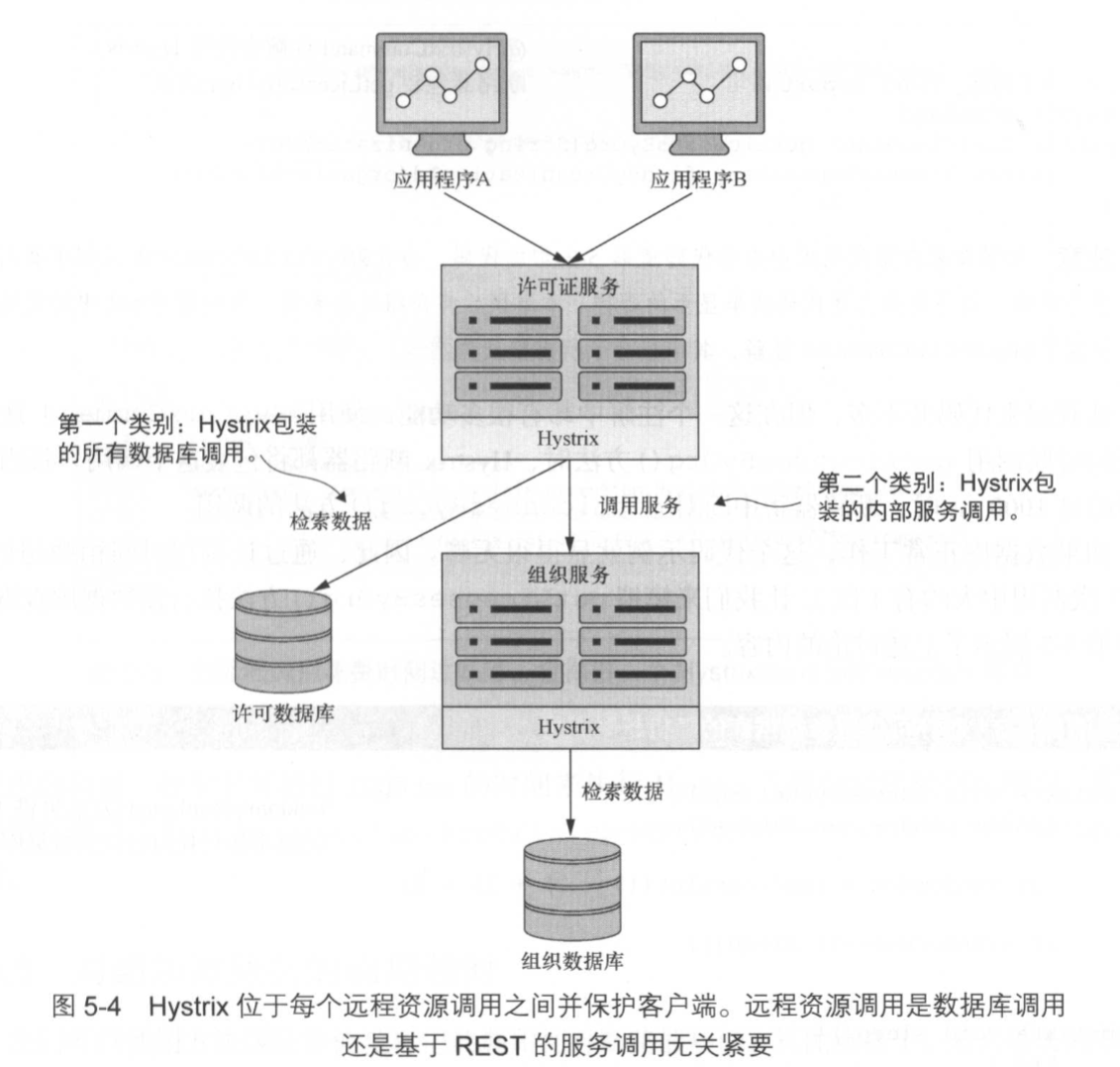
Hystrix 是一个延迟和容灾库,旨在隔离远程系统、服务和第三方库的访问点,停止级联故障,并在故障不可避免的复杂分布式系统中实现弹性;
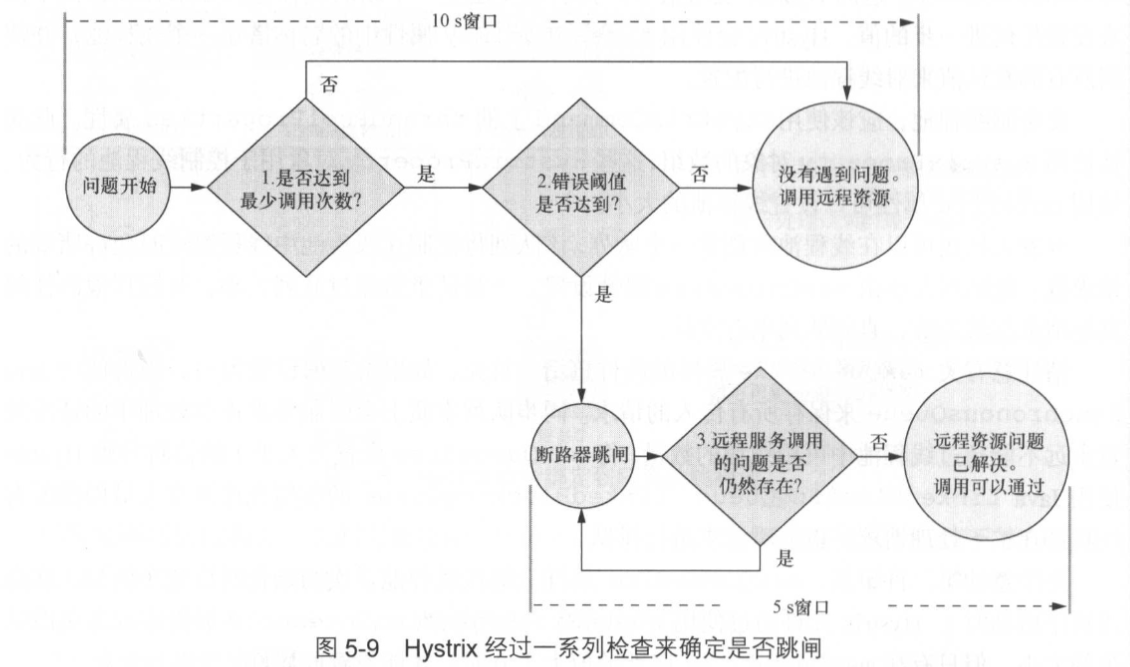
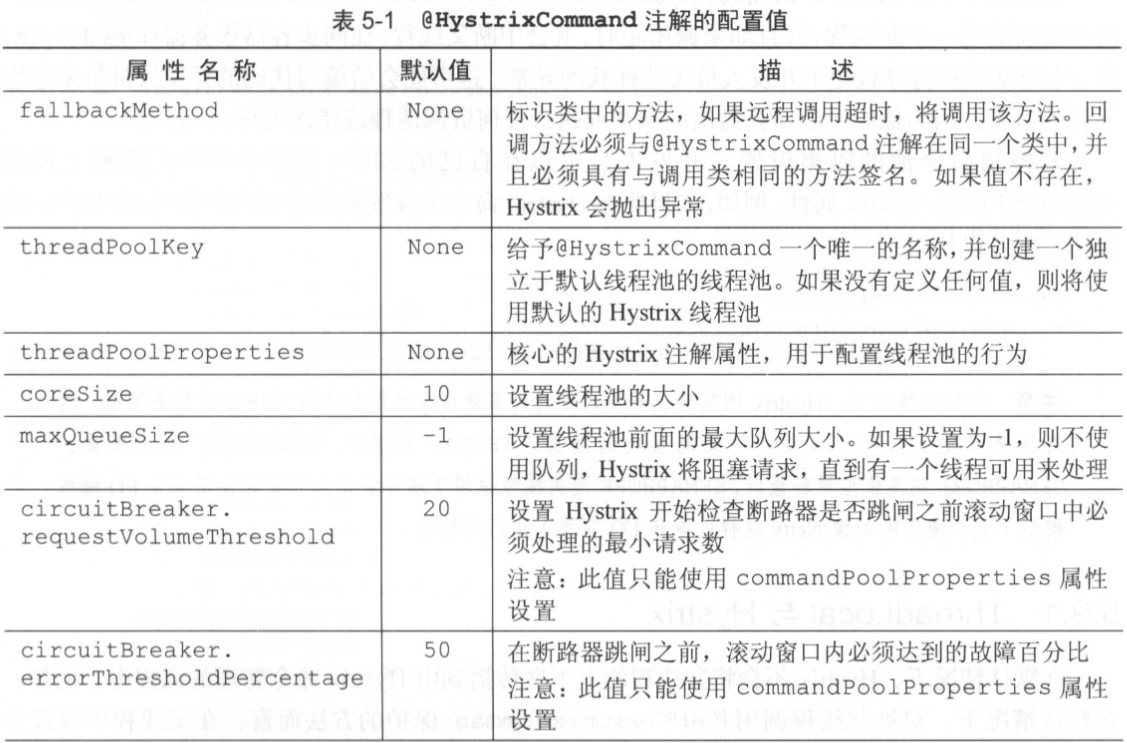
@HystrixCommand(fallbackMethod = "str_fallbackMethod", groupKey = "strGroupCommand", commandKey = "strCommand", threadPoolKey = "strThreadPool", commandProperties = { // 设置隔离策略,THREAD 表示线程池 SEMAPHORE:信号池隔离 @HystrixProperty(name = "execution.isolation.strategy", value = "THREAD"), // 当隔离策略选择信号池隔离的时候,用来设置信号池的大小(最大并发数) @HystrixProperty(name = "execution.isolation.semaphore.maxConcurrentRequests", value = "10"), // 配置命令执行的超时时间 @HystrixProperty(name = "execution.isolation.thread.timeoutinMilliseconds", value = "10"), // 是否启用超时时间 @HystrixProperty(name = "execution.timeout.enabled", value = "true"), // 执行超时的时候是否中断 @HystrixProperty(name = "execution.isolation.thread.interruptOnTimeout", value = "true"), // 执行被取消的时候是否中断 @HystrixProperty(name = "execution.isolation.thread.interruptOnCancel", value = "true"), // 允许回调方法执行的最大并发数 @HystrixProperty(name = "fallback.isolation.semaphore.maxConcurrentRequests", value = "10"), // 服务降级是否启用,是否执行回调函数 @HystrixProperty(name = "fallback.enabled", value = "true"), // 是否启用断路器 @HystrixProperty(name = "circuitBreaker.enabled", value = "true"), // 该属性用来设置在滚动时间窗中,断路器熔断的最小请求数。例如,默认该值为 20 的时候, // 如果滚动时间窗(默认10秒)内仅收到了19个请求, 即使这19个请求都失败了,断路器也不会打开。 @HystrixProperty(name = "circuitBreaker.requestVolumeThreshold", value = "20"), // 该属性用来设置在滚动时间窗中,表示在滚动时间窗中,在请求数量超过 // circuitBreaker.requestVolumeThreshold 的情况下,如果错误请求数的百分比超过50, // 就把断路器设置为 "打开" 状态,否则就设置为 "关闭" 状态。 @HystrixProperty(name = "circuitBreaker.errorThresholdPercentage", value = "50"), // 该属性用来设置当断路器打开之后的休眠时间窗。 休眠时间窗结束之后, // 会将断路器置为 "半开" 状态,尝试熔断的请求命令,如果依然失败就将断路器继续设置为 "打开" 状态, // 如果成功就设置为 "关闭" 状态。 @HystrixProperty(name = "circuitBreaker.sleepWindowinMilliseconds", value = "5000"), // 断路器强制打开 @HystrixProperty(name = "circuitBreaker.forceOpen", value = "false"), // 断路器强制关闭 @HystrixProperty(name = "circuitBreaker.forceClosed", value = "false"), // 滚动时间窗设置,该时间用于断路器判断健康度时需要收集信息的持续时间 @HystrixProperty(name = "metrics.rollingStats.timeinMilliseconds", value = "10000"), // 该属性用来设置滚动时间窗统计指标信息时划分"桶"的数量,断路器在收集指标信息的时候会根据 // 设置的时间窗长度拆分成多个 "桶" 来累计各度量值,每个"桶"记录了一段时间内的采集指标。 // 比如 10 秒内拆分成 10 个"桶"收集这样,所以 timeinMilliseconds 必须能被 numBuckets 整除。否则会抛异常 @HystrixProperty(name = "metrics.rollingStats.numBuckets", value = "10"), // 该属性用来设置对命令执行的延迟是否使用百分位数来跟踪和计算。如果设置为 false, 那么所有的概要统计都将返回 -1。 @HystrixProperty(name = "metrics.rollingPercentile.enabled", value = "false"), // 该属性用来设置百分位统计的滚动窗口的持续时间,单位为毫秒。 @HystrixProperty(name = "metrics.rollingPercentile.timeInMilliseconds", value = "60000"), // 该属性用来设置百分位统计滚动窗口中使用 “ 桶 ”的数量。 @HystrixProperty(name = "metrics.rollingPercentile.numBuckets", value = "60000"), // 该属性用来设置在执行过程中每个 “桶” 中保留的最大执行次数。如果在滚动时间窗内发生超过该设定值的执行次数, // 就从最初的位置开始重写。例如,将该值设置为100, 滚动窗口为10秒,若在10秒内一个 “桶 ”中发生了500次执行, // 那么该 “桶” 中只保留 最后的100次执行的统计。另外,增加该值的大小将会增加内存量的消耗,并增加排序百分位数所需的计算时间。 @HystrixProperty(name = "metrics.rollingPercentile.bucketSize", value = "100"), // 该属性用来设置采集影响断路器状态的健康快照(请求的成功、 错误百分比)的间隔等待时间。 @HystrixProperty(name = "metrics.healthSnapshot.intervalinMilliseconds", value = "500"), // 是否开启请求缓存 @HystrixProperty(name = "requestCache.enabled", value = "true"), // HystrixCommand的执行和事件是否打印日志到 HystrixRequestLog 中 @HystrixProperty(name = "requestLog.enabled", value = "true"), }, threadPoolProperties = { // 该参数用来设置执行命令线程池的核心线程数,该值也就是命令执行的最大并发量 @HystrixProperty(name = "coreSize", value = "10"), // 该参数用来设置线程池的最大队列大小。当设置为 -1 时,线程池将使用 SynchronousQueue 实现的队列, // 否则将使用 LinkedBlockingQueue 实现的队列。 @HystrixProperty(name = "maxQueueSize", value = "-1"), // 该参数用来为队列设置拒绝阈值。 通过该参数, 即使队列没有达到最大值也能拒绝请求。 // 该参数主要是对 LinkedBlockingQueue 队列的补充,因为 LinkedBlockingQueue // 队列不能动态修改它的对象大小,而通过该属性就可以调整拒绝请求的队列大小了。 @HystrixProperty(name = "queueSizeRejectionThreshold", value = "5"), })<!--拉取 Spring Cloud Hystrix 依赖项--><dependency> <groupId>org.springframework.cloud</groupId> <artifactId>spring-cloud-starter-hystrix</artifactId></dependency><dependency> <groupId>com.netflix.hystrix</groupId> <artifactId>hystrix-javanica</artifactId> <version>1.5.9</version></dependency>feign: hystrix: #开启feign的hystrix支持,默认是false enabled: true@EnableCircuitBreaker:表示激活使用服务降级相关策略;
@EnableHystrix:继承了@EnableCircuitBreaker,并对其进行了在封装;
如果忘记将该注解添加到主程序类中,那么 Hystrix 断路器不会处于活动状态。在服务启动时,也不会收到任何警告或错误消息;
在 service 包下的业务类里;方法级注解;
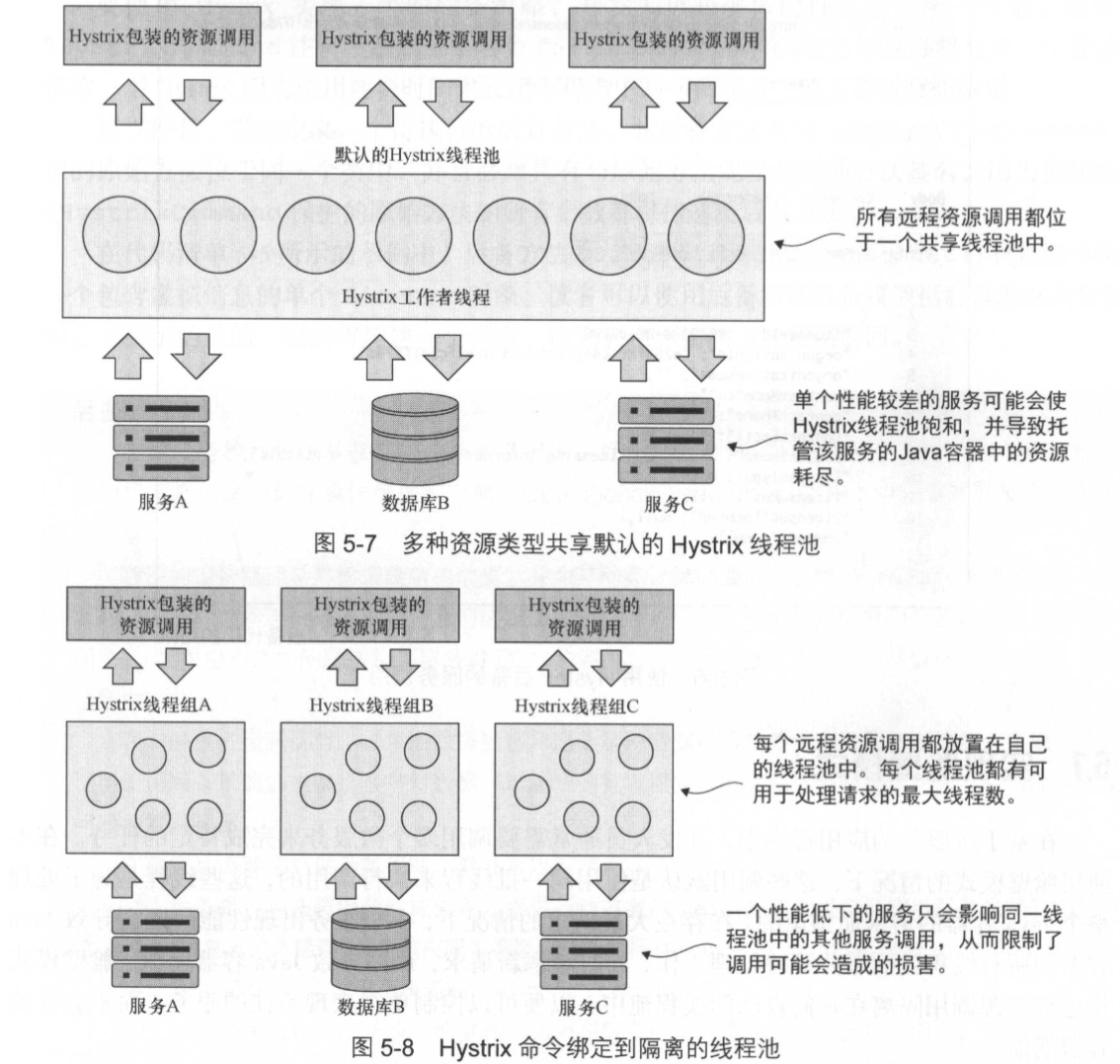
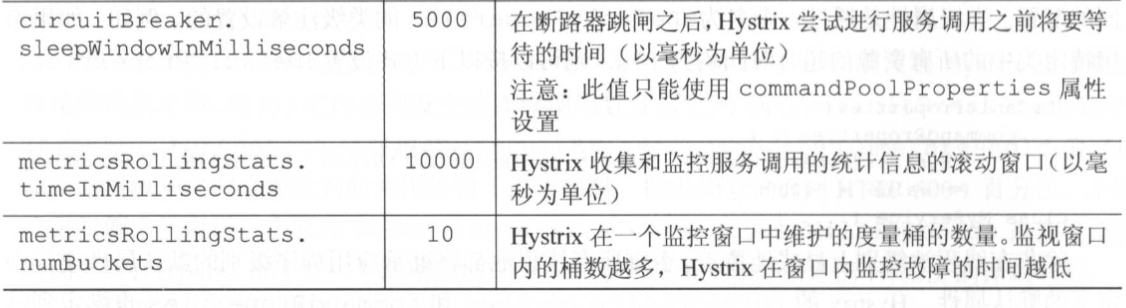
@HystrixCommandprivate Xxx getXxx(String xxxId) { return xxxService.getXxx(xxxId);}@HystrixCommand 注解将动态生成一个代理,该代理将包装该方法,并通过专门用于处理远程调用的线程池来管理对该方法的所有调用;@HystrixCommand 注解,会将所有远程服务调用都放在同一线程池下。可能会导致应用程序中出现问题;@HystrixCommand( fallbackMethod="getYyy", //【可选】舱壁策略,定义线程池的唯一名称后备策略,如果 getXxx 调用失败,那么就会调用该方法。注意两个方法参数需保持一致 threadPoolKey="xxxThreadPool", //【可选】舱壁策略,定义线程池的唯一名称舱壁策略,定义线程池的唯一名称 threadPoolProperties={ @HystrixProperty(name="coreSize",value="30"), //线程池中线程的最大数量 @HystrixProperty(name="maxQueueSize", value="10") //定义一个位于线程池前的队列,对传入的请求进行排队 }, //通过 commandProperties 属性来定制断路器的行为 commandProperties={ @HystrixProperty(name="circuitBreaker.requestVolumeThreshold", value="10"), //断路器触发前 10s 内需要发生的连续调用数量 @HystrixProperty(name="circuitBreaker.errorThresholdPercentage", value="75"), //在断路器跳闸之前必须达到的调用失败百分比 @HystrixProperty(name="circuitBreaker.sleepWindowInMilliseconds", value="7000"), //断路器跳闸之后, Hystrix 允许一个调用通过以便查看服务是否恢复健康之前 Hystrix 的休眠时间 @HystrixProperty(name="metrics.rollingStats.timeInMilliseconds", value="15000"), //Hystr ix 用来监视服务调用问题的窗口大小,其默认值为 10 000ms @HystrixProperty(name="metrics.rollingStats.numBuckets", value="5"), //定义的滚动窗口中收集统计信息的次数 //@HystrixProperty(name="execution.isolation.thread.timeoutInMilliseconds",value="5000"), //设置断路器超时时间 @HystrixProperty(name="execution.isolation.strategy", value="SEMAPHORE"), //修改命令池的隔离设置 })private Xxx getXxx(String xxxId) { return xxxService.getXxx(xxxId);}private Yyy getYyy(String yyyId) { return yyyService.getYyy(yyyId);}属性详解:
threadPoolProperties:
maxQueueSize:如果将其值设置为 -1,则将使用 Java SynchronousQueue 来保存所有传人的请求。同步队列本质上会强制要求正在处理中的请求数量永远不能超过线程池中可用线程的数量;maxQueueSize:设置为大于 1 的值将使用 Java LinkedBlockingQueue;LinkedBlockingQueue 的使用允许开发人员即使所有线程都在忙于处理请求,也能对请求进行排队;maxQueueSize 属性只能在线程池首次初始化时设置(例如,在应用程序启动时)。Hystrix 允许通过使用 queueSizeRejectionThreshold 属性来动态更改队列的大小,但只有在 maxQueueSize 属性的值大于 0 时,才能设置此属性;commandProperties:
execution.isolation.thread.timeoutInMilliseconds:设置断路器超时时间。在实际开发中应该把问题放在解决性能问题而不是增加默认超时。如果确实遇到一些比其他服务调用需要更长时间的服务调用,务必将这些服务调用隔离到单独的线程池中;metrics.rollingStats.numBuckets:其值需要被 metrics.rollingStats.timeInMilliseconds 整除。上例 Hystrix 使用 15s 的窗口,并将统计数据收集到长度为 3 s 的 5 个桶中。查的统计窗口越小且在窗口中保留的桶的数量越多,就越会加剧高请求服务的 CPU 利用率和内存使用率;execution.isolation.strategy:断路器执行时,有两种不同的隔离策略;其他配置属性详情请见本篇《1.6 Hystrix 的所有配置》;
@DefaultProperties( commandProperties={ @HystrixProperty(name="execution.isolation.thread.timeoutInMilliseconds",value="10000")}class MyService{ ...}//扩展基本的 Hystrix ConcurrencyStrategy 类public class ThreadLocalAwareStrategy extends HystrixConcurrencyStrategy{ private HystrixConcurrencyStrategy existingConcurrencyStrategy; //将已存在的并发策略传入到构造器中 public ThreadLocalAwareStrategy(HystrixConcurrencyStrategy existingConcurrencyStrategy) { this.existingConcurrencyStrategy = existingConcurrencyStrategy; } @Override public BlockingQueue<Runnable> getBlockingQueue(int maxQueueSize) { return existingConcurrencyStrategy != null ? existingConcurrencyStrategy.getBlockingQueue(maxQueueSize) : super.getBlockingQueue(maxQueueSize); } @Override public <T> HystrixRequestVariable<T> getRequestVariable( HystrixRequestVariableLifecycle<T> rv) { return existingConcurrencyStrategy != null ? existingConcurrencyStrategy.getRequestVariable(rv) : super.getRequestVariable(rv); } @Override public ThreadPoolExecutor getThreadPool(HystrixThreadPoolKey threadPoolKey, HystrixProperty<Integer> corePoolSize, HystrixProperty<Integer> maximumPoolSize, HystrixProperty<Integer> keepAliveTime, TimeUnit unit, BlockingQueue<Runnable> workQueue) { return existingConcurrencyStrategy != null ? existingConcurrencyStrategy.getThreadPool(threadPoolKey, corePoolSize, maximumPoolSize, keepAliveTime, unit, workQueue) : super.getThreadPool(threadPoolKey, corePoolSize, maximumPoolSize, keepAliveTime, unit, workQueue); } @Override public <T> Callable<T> wrapCallable(Callable<T> callable) { //注入 Callable 实现,用来设置 UserContext return existingConcurrencyStrategy != null ? existingConcurrencyStrategy .wrapCallable(new DelegatingUserContextCallable<T>(callable, UserContextHolder.getContext())) : super.wrapCallable(new DelegatingUserContextCallable<T>(callable, UserContextHolder.getContext())); }}public final class DelegatingUserContextCallable<V> implements Callable<V> { private final Callable<V> delegate; private UserContext originalUserContext; //传递原始 Callable 类,自定义 Callable 将调用 Hystrix 保护的代码与来自父线程的 UserContext public DelegatingUserContextCallable(Callable<V> delegate, UserContext userContext) { this.delegate = delegate; this.originalUserContext = userContext; } //call() 方法在被 @HystrixCommand 注解保护的方法之前调用 public V call() throws Exception { //已设置 UserContext,存储 UserContext 的 ThreadLocal 变量与运行受 Hystrix 保护的方法的线程相关联 UserContextHolder.setContext( originalUserContext ); try { //在 Hystrix 保护的方法上调用 call() 方法 return delegate.call(); } finally { this.originalUserContext = null; } } public static <V> Callable<V> create(Callable<V> delegate, UserContext userContext) { return new DelegatingUserContextCallable<V>(delegate, userContext); }}@Configurationpublic class ThreadLocalConfiguration { //当构造配置对象时,它将自动装配在现有的 HystrixConcurrencyStrategy 中 @Autowired(required = false) private HystrixConcurrencyStrategy existingConcurrencyStrategy; @PostConstruct public void init() { // 保留现有的 Hystrix 插件的引用 //因为要注册一个新的并发策略,所以要获取所有其他的 Hystrix 组件,然后重新设置 Hystrix 组件 HystrixEventNotifier eventNotifier = HystrixPlugins.getInstance() .getEventNotifier(); HystrixMetricsPublisher metricsPublisher = HystrixPlugins.getInstance() .getMetricsPublisher(); HystrixPropertiesStrategy propertiesStrategy = HystrixPlugins.getInstance() .getPropertiesStrategy(); HystrixCommandExecutionHook commandExecutionHook = HystrixPlugins.getInstance() .getCommandExecutionHook(); HystrixPlugins.reset(); //使用 Hystrix 插件注册自定义的 Hystrix 并发策略(ThreadConcurrency Strategy) HystrixPlugins.getInstance().registerConcurrencyStrategy(new ThreadLocalAwareStrategy(existingConcurrencyStrategy)); //重新注册 Hystrix 插件使用的所有组件 HystrixPlugins.getInstance().registerEventNotifier(eventNotifier); HystrixPlugins.getInstance().registerMetricsPublisher(metricsPublisher); HystrixPlugins.getInstance().registerPropertiesStrategy(propertiesStrategy); HystrixPlugins.getInstance().registerCommandExecutionHook(commandExecutionHook); }}<dependency> <groupId>org.springframework.cloud</groupId> <artifactId>spring-cloud-starter-netflix-hystrix-dashboard</artifactId></dependency>主要是修改端口号;
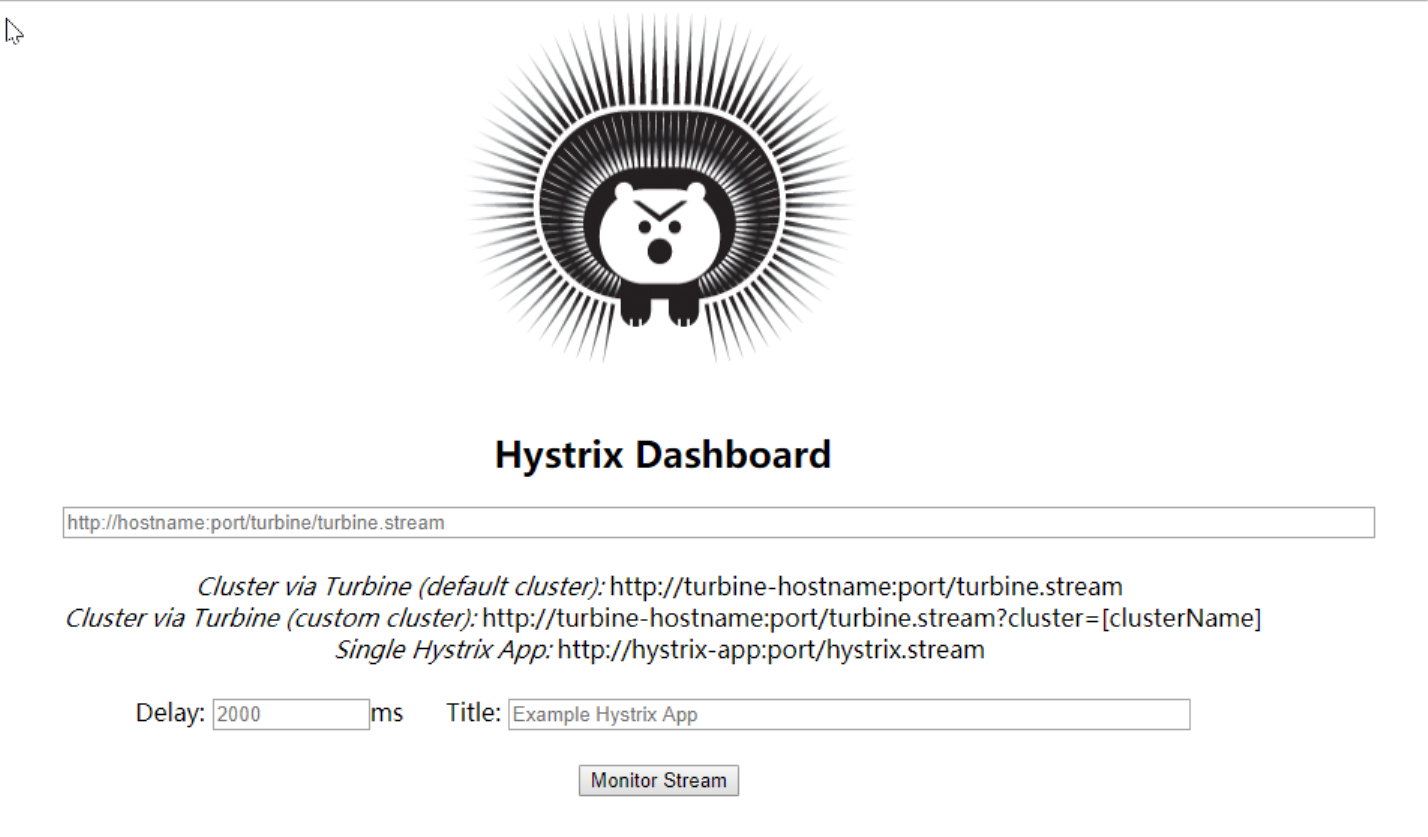
server: port: 9001@EnableHystrixDashboard:表名启用 Hystrix Dashboard 对调用进行监控;
<dependency> <groupId>org.springframework.boot</groupId> <artifactId>spring-boot-starter-actuator</artifactId></dependency>@SpringBootApplication@EnableEurekaClient //本服务启动后会自动注册进eureka服务中@EnableCircuitBreaker//对hystrixR熔断机制的支持public class Application{ public static void main(String[] args){ SpringApplication.run(Application.class,args); }/** *此配置是为了服务监控而配置,与服务容错本身无关,springcloud升级后的坑 *ServletRegistrationBean因为springboot的默认路径不是"/hystrix.stream", *只要在自己的项目里配置上下面的servlet就可以了 */@Beanpublic ServletRegistrationBean getServlet() { HystrixMetricsStreamServlet streamServlet = new HystrixMetricsStreamServlet(); ServletRegistrationBean registrationBean = new ServletRegistrationBean(streamServlet); registrationBean.setLoadOnStartup(1); registrationBean.addUrlMappings("/hystrix.stream"); registrationBean.setName("HystrixMetricsStreamServlet"); return registrationBean;}