pip3.6 install grpcio #安装grpcpip3.6 install grpcio-tools #安装grpc tools新建protobuf文件名:hello.proto
syntax = "proto3";message HelloRequest { string name = 1;}cd hello.proto文件路径下命令:python3.6 -m grpc_tools.protoc --python_out=. --grpc_python_out=. -I. hello.proto注意:只有python生成两个文件命令解释:python3.6 -m grpc_tools.protoc:实际需要使用grpc_tools.protoc这里面的命令--python_out=. :生成的python文件放在当前路径下,这是给rpc用的文件--grpc_python_out=. :生成的python文件放在当前路径下,这是给grpc用的文件-I.:指import,当前目录下找hello.proto文件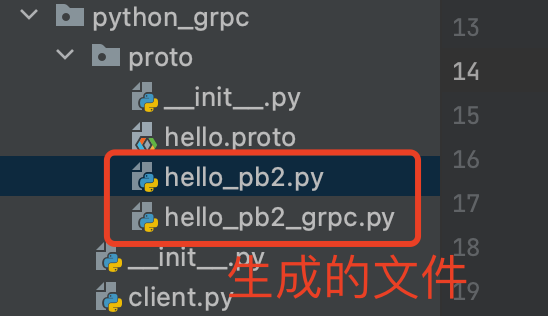
res.SerializeToString() # 序列化二进制res2.ParseFromString(res_str) # 反序列化二进制import jsonfrom python_grpc.proto import hello_pb2def main(): res = hello_pb2.HelloRequest() res.name = "jeff" res_str = res.SerializeToString() # 序列化二进制 print(res_str) # b'\n\x04jeff' print(len((res_str))) # 6,和json对比,josn长度为:16 res2 = hello_pb2.HelloRequest() res2.ParseFromString(res_str) # 反序列化二进制 print(res2.name) # jeff res_json = { "name":"jeff" } print(len(json.dumps(res_json))) # 16,json和proto压缩对比,proto压缩后:6if __name__ == '__main__': main()syntax = "proto3";package services;option go_package = "./;proto";service Greeter { // 定义SayHello方法 rpc SayHello (HelloRequest) returns (HelloReply);}message HelloRequest { string name = 1; //编号}message HelloReply { string message = 1; //编号}cd hello.proto文件路径下命令:python3.6 -m grpc_tools.protoc --python_out=. --grpc_python_out=. -I. hello.proto注意:只有python生成两个文件命令解释:python3.6 -m grpc_tools.protoc:实际需要使用grpc_tools.protoc这里面的命令--python_out=. :生成的python文件放在当前路径下,这是给rpc用的文件--grpc_python_out=. :生成的python文件放在当前路径下,这是给grpc用的文件-I.:指import,当前目录下找hello.proto文件注意:生成的*_grpc.py文件的导包需要修改,否则报错:要让python找到hello_pb2import hello_pb2 as hello__pb2 改为:from python_grpc.proto import hello_pb2 as hello__pb2from concurrent import futuresimport grpcfrom python_grpc.proto import hello_pb2, hello_pb2_grpc# 业务处理class Greeter(hello_pb2_grpc.GreeterServicer): def SayHello(self, request, context): return hello_pb2.HelloReply(message=f"你好,{request.name}")# 启动def start(): # 1.实例化server Thread = futures.ThreadPoolExecutor(max_workers=10) ## 设置线程池,并发大小 server = grpc.server(Thread) # 2.注册逻辑到server中 hello_pb2_grpc.add_GreeterServicer_to_server(Greeter(), server) # 3.启动server server.add_insecure_port("127.0.0.1:8888") server.start() server.wait_for_termination()if __name__ == '__main__': start()import grpcfrom python_grpc.proto import hello_pb2, hello_pb2_grpc# rpc调用def main(): # 这里使用with,调用完会自动关闭。优雅写法 with grpc.insecure_channel("127.0.0.1:8888") as channel: stub = hello_pb2_grpc.GreeterStub(channel) # 调用定义的SayHello方法 rep = stub.SayHello( hello_pb2.HelloRequest(name="jeff") # 传递定义的HelloRequest类型参数 ) return rep# 业务代码def start(): rep = main() print(rep.message) # 你好,jeffif __name__ == '__main__': start()