$ git config 配置文件作用域 user.name '用户名'$ git config 配置文件作用域 user.email '邮箱地址'示例如下:
| 配置 user.name和user.email |
|---|
$ git config --global user.name ‘your_name' |
$ git config --global user.email ‘your_email@domain.com' |
注意:这个email一定是有效的,是你能够收得到邮件的email。
可在任意目录下运行创建命令:git config --system
L@DESKTOP-T2AI2SU MINGW64 /j/git-repository/learngit$ git config --system user.name 'tang_s'L@DESKTOP-T2AI2SU MINGW64 /j/git-repository/learngit$ git config --system user.email 'tang_s@126.com'提示:在Git中,没有提示就是最好的提示。
系统用户注册信息会写在本地Git的安装目录下,...\etc\gitconfig文件中。
L@DESKTOP-T2AI2SU MINGW64 /j/git-repository/learngit$ cat /f/DevInstall/Git/GitforWindows/etc/gitconfig[diff "astextplain"] textconv = astextplain[filter "lfs"] clean = git-lfs clean -- %f smudge = git-lfs smudge -- %f process = git-lfs filter-process required = true[http] sslBackend = openssl sslCAInfo = F:/DevInstall/Git/GitforWindows/mingw64/ssl/certs/ca-bundle.crt[core] autocrlf = true fscache = true symlinks = false[credential] helper = manager[user] name = tang_s email = tang_s@126.com提示:之前的Git版本中,
gitconfig文件是在,Git安装目录下mingw64目录中的etc/gitconfig。
可在任意目录下运行创建命令:git config --global
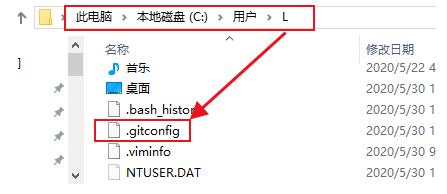
# 在任何位置执行都可以# 执行这个配置表示你这台机器上所有的Git仓库都会使用这个配置,# 当然也可以对某个仓库指定不同的用户名和Email地址(本地用户)。L@DESKTOP-T2AI2SU MINGW64 /j/git-repository/learngit$ git config --global user.name 'sun_wk'L@DESKTOP-T2AI2SU MINGW64 /j/git-repository/learngit$ git config --global user.email 'sun_wk@126.com'全局用户注册的信息,会写到当前用户目录下.gitconfig文件中。
L@DESKTOP-T2AI2SU MINGW64 /j/git-repository/learngit$ cat /c/Users/L/.gitconfig[user] name = sun_wk email = sun_wk@126.com本地库用户只能在当前的本地库目录下运行该命令:
# 注意如果是配置local配置文件签名,可以省略--local参数$ git config --local user.name 'sha_hs'$ git config --local user.email 'sha_hs@126.com'注意:
执行上边命令,要在一个仓库中执行,否则会提示你:
fatal: --local can only be used inside a git repository还有
--local选项只能在Git仓库中使用。
演示:
# 此时learngit目录不是一个本地Git仓库L@DESKTOP-T2AI2SU MINGW64 /j/git-repository/learngit$ git config --local user.name ''fatal: --local can only be used inside a git repository# 初始化learngit目录为Git本地仓库L@DESKTOP-T2AI2SU MINGW64 /j/git-repository/learngit$ git initInitialized empty Git repository in J:/git-repository/learngit/.git/L@DESKTOP-T2AI2SU MINGW64 /j/git-repository/learngit (master)# 配置本地用户签名L@DESKTOP-T2AI2SU MINGW64 /j/git-repository/learngit (master)$ git config --local user.name 'sha_hs'L@DESKTOP-T2AI2SU MINGW64 /j/git-repository/learngit (master)$ git config --local user.email 'sha_hs@126.com'本地用户注册信息,会写到当前版本库目录下的.git目录中的config文件中。
L@DESKTOP-T2AI2SU MINGW64 /j/git-repository/learngit (master)$ cat .git/config[core] repositoryformatversion = 0 filemode = false bare = false logallrefupdates = true symlinks = false ignorecase = true[user] name = sha_hs email = sha_hs@126.com注意:
- 签名设置的用户名和邮箱,主要作用就是区分不同开发人员的身份。
- 这里设置的签名和登录远程库,也就是代码托管中心的账号、密码没有任何关系。
- Email地址没有要求和用户名一致,甚至Email地址不存在都没事。
- 但是在实际工作中,这个Email一定是有效的,是你能够收得到邮件的Email。
通过命令的方式查看三个配置文件的用户签名。
git config命令,来查看各作用域配置文件中的配置信息。(这个命令在任何路径下都能执行)git config命令,会显示git config命令所有的可用参数。git config --list命令,查看当前系统中Git的所有配置,三个配置文件所有的配置都显示出来。| 执行语句 | 说明 |
|---|---|
$ git config --list --local | 查看项目/仓库级别的配置文件信息 |
$ git config --list --global | 查看用户级别配置文件信息 |
$ git config --list --system | 查看系统级别配置文件信息 |
需要进入到一个仓库中,执行$ git config --list --local命令,才能显示该仓库的配置信息。否则会出现提示fatal: --local can only be used inside a git repository,--local选项只能在Git仓库中使用。
L@DESKTOP-T2AI2SU MINGW64 /j/git-repository$ git config --list --localfatal: --local can only be used inside a git repositoryL@DESKTOP-T2AI2SU MINGW64 /j/git-repository$ cd learngit/L@DESKTOP-T2AI2SU MINGW64 /j/git-repository/learngit (master)$ git config --list --localcore.repositoryformatversion=0core.filemode=falsecore.bare=falsecore.logallrefupdates=truecore.symlinks=falsecore.ignorecase=trueuser.name=sha_hsuser.email=sha_hs@126.com提示:
执行$ git config --list --local命令时, Git会读取仓库中.git目录下的.git/config配置文件,该文件含有当前仓库的配置信息。
# 查看.git目录L@DESKTOP-T2AI2SU MINGW64 /j/git-repository/learngit (master)$ ll .git/total 7-rw-r--r-- 1 L 197121 176 4月 2 22:43 config-rw-r--r-- 1 L 197121 73 4月 2 22:41 description-rw-r--r-- 1 L 197121 23 4月 2 22:41 HEADdrwxr-xr-x 1 L 197121 0 4月 2 22:41 hooks/drwxr-xr-x 1 L 197121 0 4月 2 22:41 info/drwxr-xr-x 1 L 197121 0 4月 2 22:41 objects/drwxr-xr-x 1 L 197121 0 4月 2 22:41 refs/# 查看.git/config文件中的内容L@DESKTOP-T2AI2SU MINGW64 /j/git-repository/learngit (master)$ cat .git/config[core] repositoryformatversion = 0 filemode = false bare = false logallrefupdates = true symlinks = false ignorecase = true[user] name = sha_hs email = sha_hs@126.com在任何位置执行$ git config --list --global命令即可。
# 任何目录下执行都可以L@DESKTOP-T2AI2SU MINGW64 /j/git-repository/learngit (master)$ git config --list --globaluser.name=sun_wkuser.email=sun_wk@126.com注意:
如果我们是新安装的Git,还没有配置过
global作用域内的配置信息,global级别的配置文件是没有的,只有我们配置一次global级别的配置信息,配置文件才会生成。
fatal: unable to read config file 'C:/Users/L/.gitconfig': No such file or directory:提示你无法读取配置文件'C:/Users/L/.gitconfig':没有此类文件或目录。
提示:
当我们配置过
global作用域中的信息后,C:/Users/L/中的.gitconfig文件出现了。
执行
git config --list --global命令后,查看的就是C:/Users/L/.gitconfig文件中的内容。
在任何位置执行$ git config --list --system命令即可。
演示:
L@DESKTOP-T2AI2SU MINGW64 /j/git-repository$ git config --list --systemdiff.astextplain.textconv=astextplainfilter.lfs.clean=git-lfs clean -- %ffilter.lfs.smudge=git-lfs smudge -- %ffilter.lfs.process=git-lfs filter-processfilter.lfs.required=truehttp.sslbackend=opensslhttp.sslcainfo=F:/DevInstall/Git/GitforWindows/mingw64/ssl/certs/ca-bundle.crtcore.autocrlf=truecore.fscache=truecore.symlinks=falsecredential.helper=manageruser.name=tang_suser.email=tang_s@126.com提示:
该命令读取的配置文件所在的位置是,Git安装目录下的
etc目录中的gitconfig文件。查看
gitconfig文件中的内容,与上边显示的内容是对应的。
执行git config --list命令,查看当前系统中Git的所有配置,上面三个配置文件所有的配置都显示出来。
示例:
# 如果没有再本地仓库中执行该命令,只显示系统用户和全局用户配置文件中的信息L@DESKTOP-T2AI2SU MINGW64 /j/git-repository$ git config --listdiff.astextplain.textconv=astextplainfilter.lfs.clean=git-lfs clean -- %ffilter.lfs.smudge=git-lfs smudge -- %ffilter.lfs.process=git-lfs filter-processfilter.lfs.required=truehttp.sslbackend=opensslhttp.sslcainfo=F:/DevInstall/Git/GitforWindows/mingw64/ssl/certs/ca-bundle.crtcore.autocrlf=truecore.fscache=truecore.symlinks=falsecredential.helper=manageruser.name=tang_s # 系统用户签名user.email=tang_s@126.comuser.name=sun_wk # 全局用户签名user.email=sun_wk@126.com# 如果在本地仓库中执行该命令,三种用户配置文件的信息都会显示出来L@DESKTOP-T2AI2SU MINGW64 /j/git-repository$ cd learngit/L@DESKTOP-T2AI2SU MINGW64 /j/git-repository/learngit (master)$ git config --listdiff.astextplain.textconv=astextplainfilter.lfs.clean=git-lfs clean -- %ffilter.lfs.smudge=git-lfs smudge -- %ffilter.lfs.process=git-lfs filter-processfilter.lfs.required=truehttp.sslbackend=opensslhttp.sslcainfo=F:/DevInstall/Git/GitforWindows/mingw64/ssl/certs/ca-bundle.crtcore.autocrlf=truecore.fscache=truecore.symlinks=falsecredential.helper=manageruser.name=tang_s # 系统用户签名user.email=tang_s@126.comuser.name=sun_wk # 全局用户签名user.email=sun_wk@126.comcore.repositoryformatversion=0core.filemode=falsecore.bare=falsecore.logallrefupdates=truecore.symlinks=falsecore.ignorecase=trueuser.name=sha_hs # 本地用户签名user.email=sha_hs@126.cometc\gitconfig文件:是对登陆该操作系统的所有用户都普遍适用的配置。若使用git config命令时加上--system选项,读写的就是这个文件中的内容。.gitconfig文件:该配置文件只适用于该用户,该用户可以配置Git用户签名等信息到这个配置文件中,是对这台计算机上所有的Git仓库适用。若使用git config命令时加上--global选项,读写的就是这个文件中的内容。.git/config文件:当前项目的Git本地仓库中的配置文件,文件中的配置仅仅针对当前项目仓库有效。提示:每一个级别的配置都会覆盖上层的相同配置。(
local覆盖global覆盖system)