最近买了一块Raspberry Pi Zero 2W来玩,目的是想搭建一台远程运行的个人服务器,上面放个博客、点个灯啥的。于是就有了这篇文章。
树莓派官网地址:https://www.raspberrypi.com/
首先一开始买到手之后我是很懵的,于是在google上找到了以下几篇文章帮助了我很多。
看了那个youtube上面的视频后,发现其实买之前是可以叫淘宝客服帮忙焊接gpio引脚的。然后发现我身边有一个电烙铁,于是打算试一下(从来焊接过),结局如下
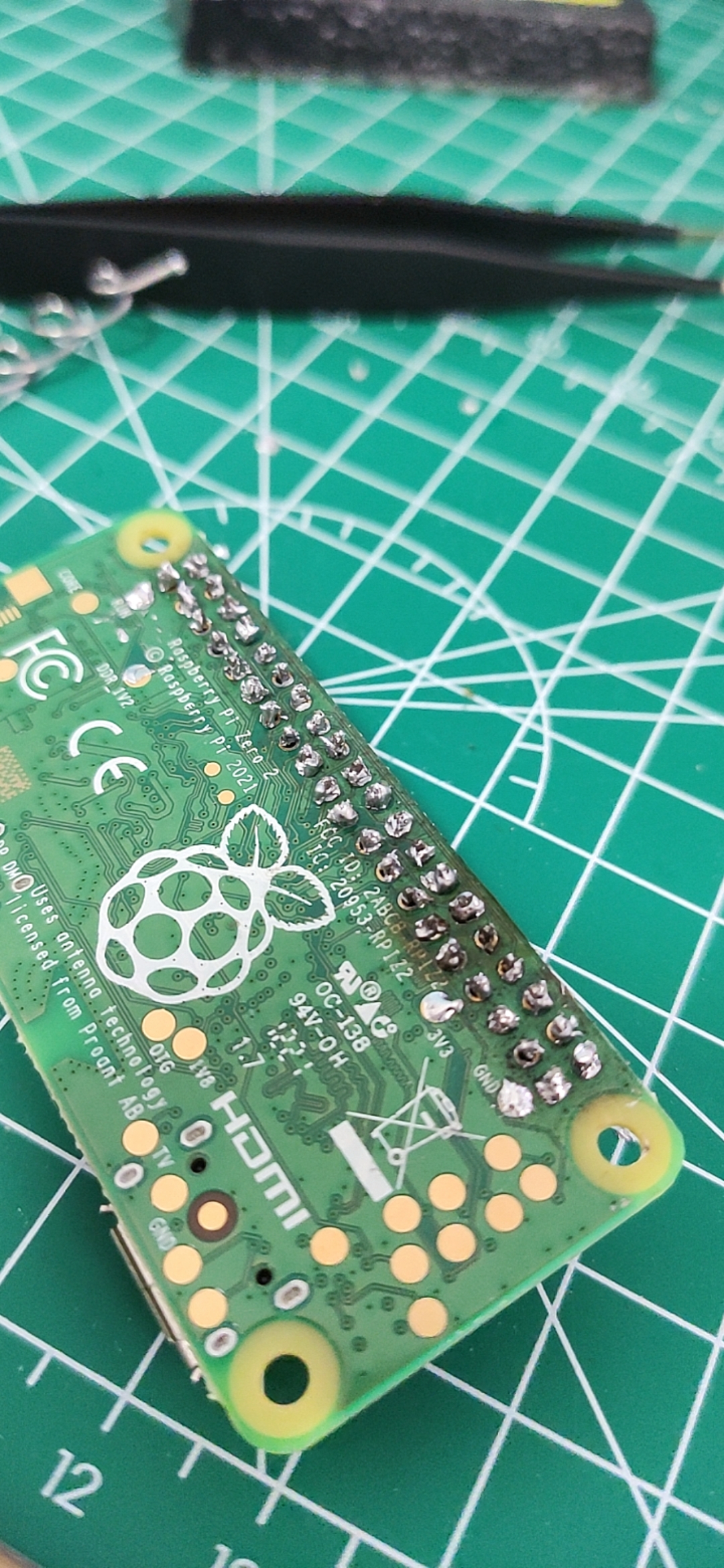
还好,没有坏掉!哈哈,这就是不看教程就直接动手的后果,望大家引以为戒!那么,跟着上面的教程写入操作系统到sd卡之后就是安装驱动和ssh连接树莓派了,连接的时候遇到了一个问题就是pi@raspberrypi.local's password,ssh登录不上去,看了下官方发现:
There are also mechanisms to preconfigure an image without using Imager. To set up a user on first boot and bypass the wizard completely, create a file called userconf or userconf.txt in the boot partition of the SD card; this is the part of the SD card which can be seen when it is mounted in a Windows or MacOS computer.This file should contain a single line of text, consisting of username:encrypted- password – so your desired username, followed immediately by a colon, followed immediately by an encrypted representation of the password you want to use.To generate the encrypted password, the easiest way is to use OpenSSL on a Raspberry Pi that is already running – open a terminal window and enterecho 'mypassword' | openssl passwd -6 -stdinThis will produce what looks like a string of random characters, which is actually an encrypted version of the supplied password.https://www.raspberrypi.com/news/raspberry-pi-bullseye-update-april-2022/
简单来说就是树莓派为了安全起见不在使用默认密码,所以需要在启动前在boot目录下创建一个userconf.txt,格式如下:
username:encrypted-password其中encrypted-password可以用echo 'mypassword' | openssl passwd -6 -stdin这条命令生成,贴一下我生成的配置:
pi:$6$T12E4motTbeG7HXC$0vvzm.7sNj9bsEzVL2JT4P9OYXpvsk3lwqK6CzTVyyLrRdUA.fZVWrfzqmU./mmuU1O/i3xSueXPX4ieBjrCM/也就是用户名为pi,密码为raspberry。重新写入sd卡之后,再次连接一波!
λ ssh pi@raspberrypi.local -p 22Warning: Permanently added the ECDSA host key for IP address '169.254.155.237' to the list of known hosts.pi@raspberrypi.local's password:Linux raspberrypi 5.15.32-v8+ #1538 SMP PREEMPT Thu Mar 31 19:40:39 BST 2022 aarch64The programs included with the Debian GNU/Linux system are free software;the exact distribution terms for each program are described in theindividual files in /usr/share/doc/*/copyright.Debian GNU/Linux comes with ABSOLUTELY NO WARRANTY, to the extentpermitted by applicable law.Last login: Mon Apr 4 15:41:56 2022SSH is enabled and the default password for the 'pi' user has not been changed.This is a security risk - please login as the 'pi' user and type 'passwd' to set a new password.Wi-Fi is currently blocked by rfkill.Use raspi-config to set the country before use.pi@raspberrypi:~ $成功了!!!!!!!!!!!!!!!哇,成就感满满的!
输入sudo raspi-config,选择国家—> “System Options”—>选第一个 —> 输入WiFi名称密码—> 重启sudo reboot
pi@raspberrypi:~ $ ifconfiglo: flags=73<UP,LOOPBACK,RUNNING> mtu 65536 inet 127.0.0.1 netmask 255.0.0.0 inet6 ::1 prefixlen 128 scopeid 0x10<host> loop txqueuelen 1000 (Local Loopback) RX packets 10 bytes 1600 (1.5 KiB) RX errors 0 dropped 0 overruns 0 frame 0 TX packets 10 bytes 1600 (1.5 KiB) TX errors 0 dropped 0 overruns 0 carrier 0 collisions 0usb0: flags=4163<UP,BROADCAST,RUNNING,MULTICAST> mtu 1500 inet 169.254.174.149 netmask 255.255.0.0 broadcast 169.254.255.255 inet6 fe80::74a7:e6a5:d1b2:66e prefixlen 64 scopeid 0x20<link> ether 62:ae:a7:2d:b5:2f txqueuelen 1000 (Ethernet) RX packets 187 bytes 19160 (18.7 KiB) RX errors 0 dropped 0 overruns 0 frame 0 TX packets 30 bytes 5905 (5.7 KiB) TX errors 0 dropped 0 overruns 0 carrier 0 collisions 0wlan0: flags=4163<UP,BROADCAST,RUNNING,MULTICAST> mtu 1500 inet 192.168.1.4 netmask 255.255.255.0 broadcast 192.168.1.255 inet6 240e:379:1a87:b500:fc16:62d:3ce4:de2b prefixlen 64 scopeid 0x0<global> inet6 fe80::4ee:25c1:2732:51c0 prefixlen 64 scopeid 0x20<link> ether e4:5f:01:4b:3a:e4 txqueuelen 1000 (Ethernet) RX packets 157 bytes 24008 (23.4 KiB) RX errors 0 dropped 0 overruns 0 frame 0 TX packets 87 bytes 14755 (14.4 KiB) TX errors 0 dropped 0 overruns 0 carrier 0 collisions 0pi@raspberrypi:~ $ ping www.baidu.comPING www.a.shifen.com (14.215.177.39) 56(84) bytes of data.64 bytes from 14.215.177.39 (14.215.177.39): icmp_seq=1 ttl=55 time=19.8 ms64 bytes from 14.215.177.39 (14.215.177.39): icmp_seq=2 ttl=55 time=23.1 ms64 bytes from 14.215.177.39 (14.215.177.39): icmp_seq=3 ttl=55 time=22.9 ms64 bytes from 14.215.177.39 (14.215.177.39): icmp_seq=4 ttl=55 time=22.9 ms64 bytes from 14.215.177.39 (14.215.177.39): icmp_seq=5 ttl=55 time=22.8 ms64 bytes from 14.215.177.39 (14.215.177.39): icmp_seq=6 ttl=55 time=24.1 ms^C--- www.a.shifen.com ping statistics ---6 packets transmitted, 6 received, 0% packet loss, time 5007msrtt min/avg/max/mdev = 19.849/22.594/24.104/1.306 mspi@raspberrypi:~ $ 连接网络成功!哦耶!
那么先到这里,后续出一个电灯的文章!!!