通过PowerShell 连接到Microsoft Graph 中国区Azure,一直出现AADSTS700016错误, 消息显示 the specific application was not installed in your tenant.
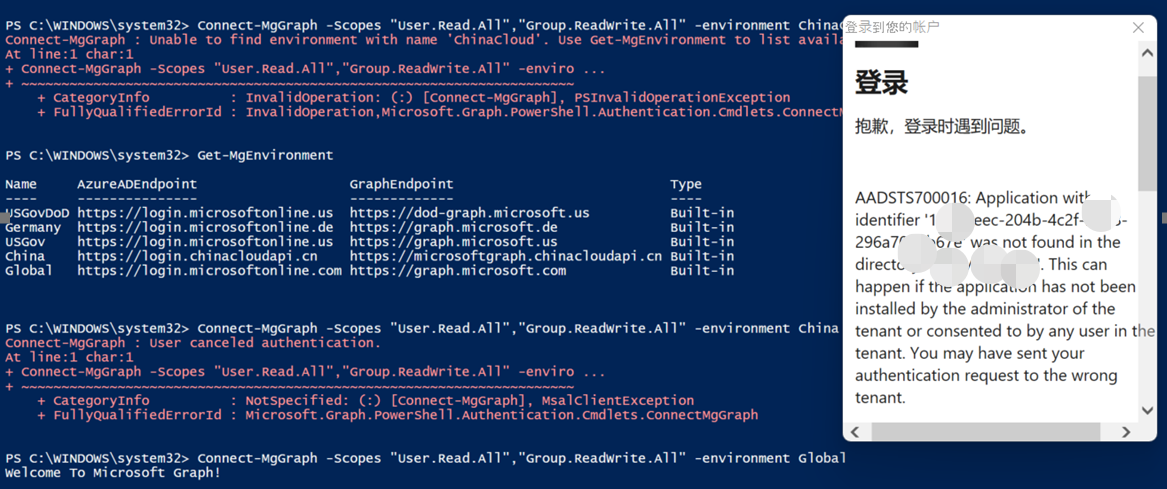
根据弹出框中的错误提示, 这是因为MS Graph PowerShell并灭有注册到中国区Azure环境中,所以它无法找到Applicaiton ID: '14d82eec-204b-4c2f-b7e8-296a70dab67e'。
可以使用以下脚本进行验证:
Get-AzureADApplication -Filter "AppId eq '14d82eec-204b-4c2f-b7e8-296a70dab67e'"
为了解决这个问题,需要自己在Azure AD中主动注册一个Application,然后使用这个Application Id进行相应操作。需要执行的操作有:
1)登录到Azure AD 页面,注册一个App (Registered App: https://portal.azure.cn/#blade/Microsoft_AAD_IAM/ActiveDirectoryMenuBlade/RegisteredApps)
2)赋予这个App相应的操作权限,如 User.Read.All, Group.ReadWrite.All 等
3)生成一个证书,并上传到App中
# 生成自签名证书$Cert = New-SelfSignedCertificate -DnsName icy-ps-sdk-aad -CertStoreLocation "Cert:\CurrentUser\My" -FriendlyName "MicrosoftGraphSDK" -Subject "Test Cert for Microsoft Graph SDK"
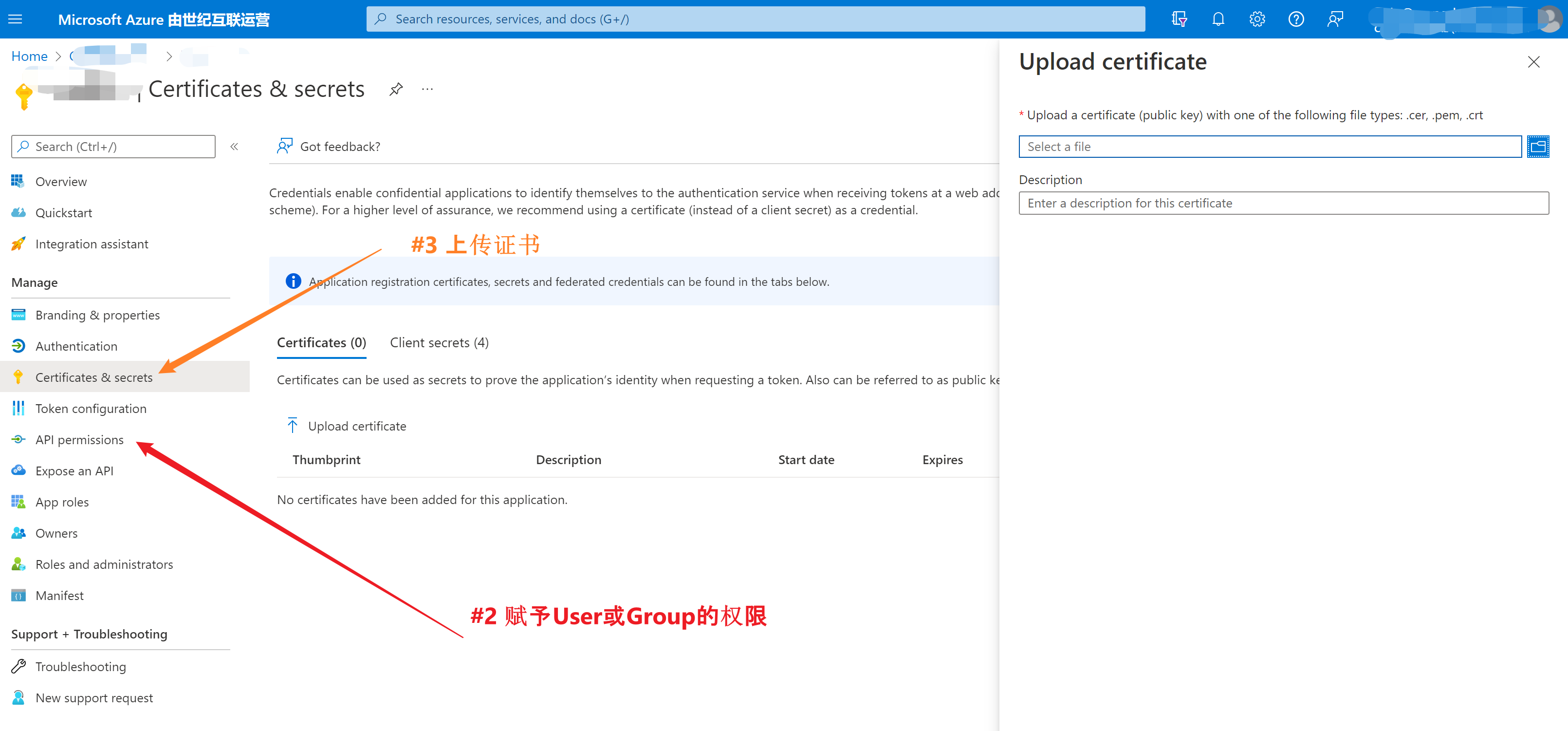
4)在本地也安装同样的证书。
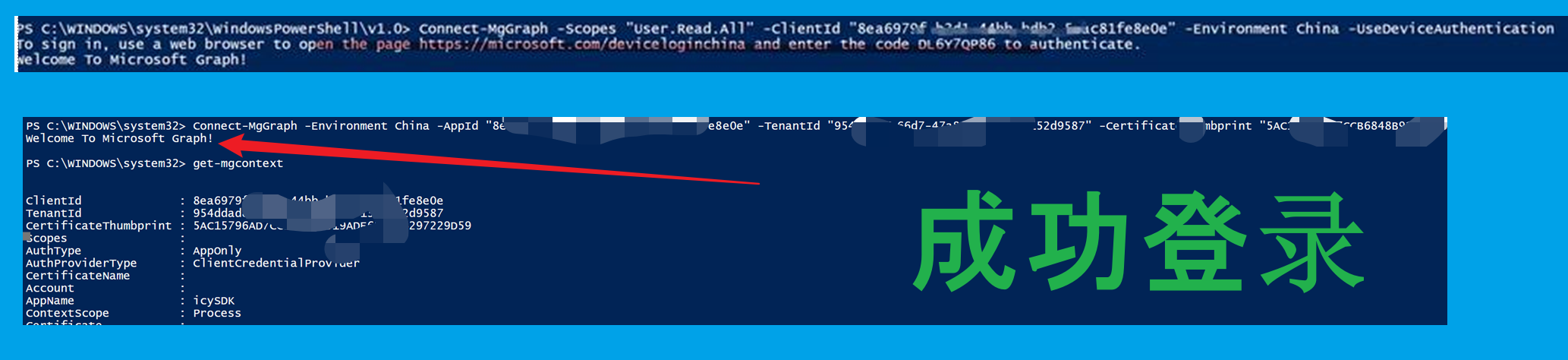
完成以上四步后,就可以使用以下的代码登录中国区Graph了。
#需要选择从本地选择证书,完成登录Connect-MgGraph -Scopes "User.Read.All" -ClientId "你的appid=clientid" -Environment China -UseDeviceAuthentication # 直接登录方式Connect-MgGraph -Environment China -AppId "你的App ID" -TenantId "你的Tenant ID" -CertificateThumbprint "证书指纹 Thumbprint" -Debug
# 生成证书文件$Cert = New-SelfSignedCertificate -DnsName icy-ps-sdk-aad -CertStoreLocation "Cert:\CurrentUser\My" -FriendlyName "MicrosoftGraphSDK" -Subject "Test Cert for Microsoft Graph SDK"Get-ChildItem "Cert:\CurrentUser\My\$($Cert.thumbprint)"Get-ChildItem "Cert:\CurrentUser\My\$($Cert.thumbprint)" | Export-Certificate -FilePath C:\temp\MicrosoftGraphSDK.cer #登录Connect-MgGraph -Scopes "User.Read.All" -ClientId "your clientid" -Environment China -TenantId “your tenant id” -UseDeviceAuthenticationConnect-MgGraph -Scopes "User.Read.All" -ClientId "your clientid" -Environment China -TenantId “your tenant id” -CertificateThumbprint "certificate thumbprint"#获取User Get-MgUserget-mgcontext #退出登录Disconnect-MgGraph
Get started with the Microsoft Graph PowerShell SDK:https://docs.microsoft.com/en-us/powershell/microsoftgraph/get-started?view=graph-powershell-beta
当在复杂的环境中面临问题,格物之道需:浊而静之徐清,安以动之徐生。 云中,恰是如此!