多方式登录接口&登录注册前端页面&发送短信接口
现在比较常见的登录方式:手机号+验证码,邮箱+密码,用户名+密码,下面实现一下多方式登录接口
需求接口
# 登陆和注册功能--->5个接口-多方式登陆接口(手机号,邮箱,用户名 +密码)-验证手机号是否存在接口 -发送短信验证码接口 # 借助于第三方发送短信:阿里,腾讯,容联云通讯,刚注册会送100条短信-手机号+验证码登陆接口-手机号+验证码+密码注册接口这里的短信功能使用的是第三方腾讯云,注册公众号申请腾讯云短信功能,会送100条短信供你玩;
申请好公众号,通过该地址https://console.cloud.tencent.com/smsv2/guide,设置
"""创建短信签名 -签名管理---》创建签名--》使用公众号提交申请---》审核创建短信正文模板 -正文模板管理---》创建正文模板--》等审核发送短信 -API,SDK"""??官网文档
API和SDK区别
-API接口,通过HTTP调用腾讯云发送短信接口,腾讯负责把短信发送到手机上,HTTP接口基于它来写,比较麻烦,需要我们处理请求参数,或者携带很多参数···-SDK:第三方使用不同语言封装好了,只需下载导入,调用函数处理即可使用SDK
# 发短信sdk的使用# 3.x的发送短信sdk,tencentcloud 包含的功能更多pip install tencentcloud-sdk-python# 2.x发送短信sdk:https://cloud.tencent.com/document/product/382/11672# 只是发短信的sdk,功能少,py3.8以后不支持pip install qcloudsms_py在实现页面前我们思考如下问题:
# 思路:使用vue-router实现页面跳转,跳转就涉及到路由,我们可以先把路由配置好1.router/index.js中配置要跳转的路由,这里登录举例,写一个Login组件(登录页面),然后在index.js导入使用:import Login from "@/views/Login";"""{ path: '/login', name: 'login', component: Login }"""2. 访问/login路径就能够跳转到登录页面组件 # 实现点击跳转的两种常用方法## 方法一:绑定点击事件,实现点击跳转 this.$router.push('/login')## 方法二:使用 <router-link to=""></router-link>标签实现跳转 注册:<router-link to="/login"><span>注册</span></router-link> 图片:<router-link to="/"> <img src="../assets/img/head-logo.svg" alt=""> </router-link> <router-link to=""></router-link>标签实现跳转第三方
数据库添加第三方link

demo
<!-- 跳第三方 --><!--如果图片的跳转路径不包含http,那么就跳转本地 --><div v-if="!(item.link.indexOf('http')>-1)"> <router-link :to="item.link"> <img :src="item.image" alt="课程图"> </router-link></div><!-- 如果图片包含了http那么就跳转第三方 --><div v-else> <a :href="item.link"> <img :src="item.image" alt="课程图"> </a></div>如果不进行处理,router-link标签只能跳转本地,如果想要跳转第三方(百度,博客···)需要进一步处理!
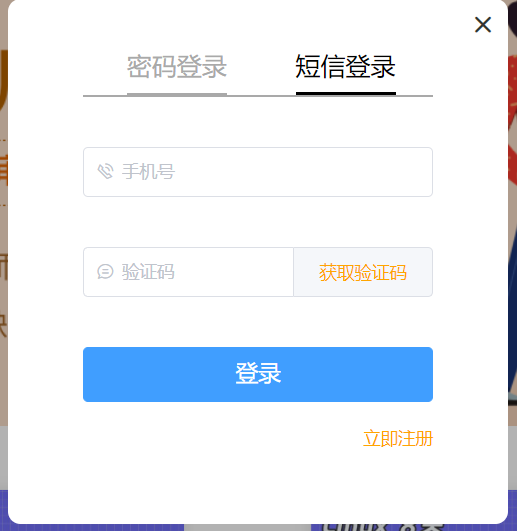
实现的样式是基于弹出框实现,弹出的是模态框
<template> <div > <div > <i @click="close_login"></i> <div > <div > <span : @click="change_login_method('is_pwd')">密码登录</span> <span : @click="change_login_method('is_sms')">短信登录</span> </div> <el-form v-if="login_method === 'is_pwd'"> <el-input placeholder="用户名/手机号/邮箱" prefix-icon="el-icon-user" v-model="username" clearable> </el-input> <el-input placeholder="密码" prefix-icon="el-icon-key" v-model="password" clearable show-password> </el-input> <el-button type="primary">登录</el-button> </el-form> <el-form v-if="login_method === 'is_sms'"> <el-input placeholder="手机号" prefix-icon="el-icon-phone-outline" v-model="mobile" clearable @blur="check_mobile"> </el-input> <el-input placeholder="验证码" prefix-icon="el-icon-chat-line-round" v-model="sms" clearable> <template slot="append"> <span @click="send_sms">{{ sms_interval }}</span> </template> </el-input> <el-button type="primary">登录</el-button> </el-form> <div > <span @click="go_register">立即注册</span> </div> </div> </div> </div></template><script> export default { name: "Login", data() { return { username: '', password: '', mobile: '', sms: '', login_method: 'is_pwd', sms_interval: '获取验证码', is_send: false, } }, methods: { close_login() { this.$emit('close') }, go_register() { this.$emit('go') }, change_login_method(method) { this.login_method = method; }, check_mobile() { if (!this.mobile) return; if (!this.mobile.match(/^1[3-9][0-9]{9}$/)) { this.$message({ message: '手机号有误', type: 'warning', duration: 1000, onClose: () => { this.mobile = ''; } }); return false; } this.is_send = true; }, send_sms() { if (!this.is_send) return; this.is_send = false; let sms_interval_time = 60; this.sms_interval = "发送中..."; let timer = setInterval(() => { if (sms_interval_time <= 1) { clearInterval(timer); this.sms_interval = "获取验证码"; this.is_send = true; // 重新回复点击发送功能的条件 } else { sms_interval_time -= 1; this.sms_interval = `${sms_interval_time}秒后再发`; } }, 1000); } } }</script><style scoped> .login { width: 100vw; height: 100vh; position: fixed; top: 0; left: 0; z-index: 10; background-color: rgba(0, 0, 0, 0.3); } .box { width: 400px; height: 420px; background-color: white; border-radius: 10px; position: relative; top: calc(50vh - 210px); left: calc(50vw - 200px); } .el-icon-close { position: absolute; font-weight: bold; font-size: 20px; top: 10px; right: 10px; cursor: pointer; } .el-icon-close:hover { color: darkred; } .content { position: absolute; top: 40px; width: 280px; left: 60px; } .nav { font-size: 20px; height: 38px; border-bottom: 2px solid darkgrey; } .nav > span { margin: 0 20px 0 35px; color: darkgrey; user-select: none; cursor: pointer; padding-bottom: 10px; border-bottom: 2px solid darkgrey; } .nav > span.active { color: black; border-bottom: 3px solid black; padding-bottom: 9px; } .el-input, .el-button { margin-top: 40px; } .el-button { width: 100%; font-size: 18px; } .foot > span { float: right; margin-top: 20px; color: orange; cursor: pointer; } .sms { color: orange; cursor: pointer; display: inline-block; width: 70px; text-align: center; user-select: none; }</style><template> <div > <div > <i @click="close_register"></i> <div > <div > <span >新用户注册</span> </div> <el-form> <el-input placeholder="手机号" prefix-icon="el-icon-phone-outline" v-model="mobile" clearable @blur="check_mobile"> </el-input> <el-input placeholder="密码" prefix-icon="el-icon-key" v-model="password" clearable show-password> </el-input> <el-input placeholder="验证码" prefix-icon="el-icon-chat-line-round" v-model="sms" clearable> <template slot="append"> <span @click="send_sms">{{ sms_interval }}</span> </template> </el-input> <el-button type="primary">注册</el-button> </el-form> <div > <span @click="go_login">立即登录</span> </div> </div> </div> </div></template><script> export default { name: "Register", data() { return { mobile: '', password: '', sms: '', sms_interval: '获取验证码', is_send: false, } }, methods: { close_register() { this.$emit('close', false) }, go_login() { this.$emit('go') }, check_mobile() { if (!this.mobile) return; if (!this.mobile.match(/^1[3-9][0-9]{9}$/)) { this.$message({ message: '手机号有误', type: 'warning', duration: 1000, onClose: () => { this.mobile = ''; } }); return false; } this.is_send = true; }, send_sms() { if (!this.is_send) return; this.is_send = false; let sms_interval_time = 60; this.sms_interval = "发送中..."; let timer = setInterval(() => { if (sms_interval_time <= 1) { clearInterval(timer); this.sms_interval = "获取验证码"; this.is_send = true; // 重新回复点击发送功能的条件 } else { sms_interval_time -= 1; this.sms_interval = `${sms_interval_time}秒后再发`; } }, 1000); } } }</script><style scoped> .register { width: 100vw; height: 100vh; position: fixed; top: 0; left: 0; z-index: 10; background-color: rgba(0, 0, 0, 0.3); } .box { width: 400px; height: 480px; background-color: white; border-radius: 10px; position: relative; top: calc(50vh - 240px); left: calc(50vw - 200px); } .el-icon-close { position: absolute; font-weight: bold; font-size: 20px; top: 10px; right: 10px; cursor: pointer; } .el-icon-close:hover { color: darkred; } .content { position: absolute; top: 40px; width: 280px; left: 60px; } .nav { font-size: 20px; height: 38px; border-bottom: 2px solid darkgrey; } .nav > span { margin-left: 90px; color: darkgrey; user-select: none; cursor: pointer; padding-bottom: 10px; border-bottom: 2px solid darkgrey; } .nav > span.active { color: black; border-bottom: 3px solid black; padding-bottom: 9px; } .el-input, .el-button { margin-top: 40px; } .el-button { width: 100%; font-size: 18px; } .foot > span { float: right; margin-top: 20px; color: orange; cursor: pointer; } .sms { color: orange; cursor: pointer; display: inline-block; width: 70px; text-align: center; user-select: none; }</style><template> <div > <div > <p>路飞学城 | 帮助有志向的年轻人通过努力学习获得体面的工作和生活</p> </div> <div > <ul > <li > <router-link to="/"> <img src="../assets/img/head-logo.svg" alt=""> </router-link> </li> <li > <span @click="goPage('/free-course')" :>免费课</span> </li> <li > <span @click="goPage('/actual-course')" :>实战课</span> </li> <li > <span @click="goPage('/light-course')" :>轻课</span> </li> </ul> <div > <div> <span @click="put_login">登录</span> <span >|</span> <span @click="put_register">注册</span> </div> </div> <Login v-if="is_login" @close="close_login" @go="put_register"/> <Register v-if="is_register" @close="close_register" @go="put_login"/> </div> </div></template><script> import Login from "@/components/Login"; import Register from "@/components/Register"; export default { name: "Header", data() { return { url_path: sessionStorage.url_path || '/', is_login: false, is_register: false } }, methods: { goPage(url_path) { // 已经是当前路由就没有必要重新跳转 if (this.url_path !== url_path) { this.$router.push(url_path); } sessionStorage.url_path = url_path; }, close_login() { this.is_login = false }, close_register() { this.is_register = false }, put_register() { this.is_register = true this.is_login = false }, put_login() { this.is_register = false this.is_login = true } }, created() { sessionStorage.url_path = this.$route.path; this.url_path = this.$route.path; }, components: { Login, Register } }</script><style scoped> .header { background-color: white; box-shadow: 0 0 5px 0 #aaa; } .header:after { content: ""; display: block; clear: both; } .slogan { background-color: #eee; height: 40px; } .slogan p { width: 1200px; margin: 0 auto; color: #aaa; font-size: 13px; line-height: 40px; } .nav { background-color: white; user-select: none; width: 1200px; margin: 0 auto; } .nav ul { padding: 15px 0; float: left; } .nav ul:after { clear: both; content: ''; display: block; } .nav ul li { float: left; } .logo { margin-right: 20px; } .ele { margin: 0 20px; } .ele span { display: block; font: 15px/36px '微软雅黑'; border-bottom: 2px solid transparent; cursor: pointer; } .ele span:hover { border-bottom-color: orange; } .ele span.active { color: orange; border-bottom-color: orange; } .right-part { float: right; } .right-part .line { margin: 0 10px; } .right-part span { line-height: 68px; cursor: pointer; }</style>
思路:数据库查询,存在返回{“code”:“100”,“msg”:“成功”}
users/views.py
from .models import Userfrom utils.reponse import APIResponsefrom rest_framework.exceptions import APIExceptionfrom rest_framework.viewsets import ViewSetfrom rest_framework.decorators import actionclass MobilePhone(ViewSet): @action(methods=['GET'],detail=False) def check_mobile(self,request): try: # 从请求参数获取手机号 mobile = request.query_params.get('mobile') User.objects.get(mobile=mobile) # 存在返回`{“code”:“100”,“msg”:“成功”}` return APIResponse() except Exception as e: raise APIException(str(e))users/urls.py
from django.urls import path, includefrom rest_framework.routers import SimpleRouterfrom .views import UserViewrouter = SimpleRouter()# 127.0.0.1:8000/api/v1/user/mobile/check_mobilerouter.register('mobile',UserView , 'mobile')urlpatterns = [ path('', include(router.urls)),]
视图
from .models import Userfrom utils.reponse import APIResponsefrom rest_framework.exceptions import APIExceptionfrom rest_framework.viewsets import ViewSet,GenericViewSetfrom rest_framework.decorators import action# 验证手机号是否存在class MobileView(ViewSet): @action(methods=['GET'],detail=False) def check_mobile(self,request): try: # 从请求参数获取手机号 mobile = request.query_params.get('mobile') User.objects.get(mobile=mobile) # 存在返回`{“code”:“100”,“msg”:“成功”}` return APIResponse() except Exception as e: raise APIException(str(e))# 多方式登录from .serializer import MulLoginSerializerclass LoginView(GenericViewSet): serializer_class = MulLoginSerializer queryset = User # 两个登陆方式都写在这里面(多方式,一个是验证码登陆) # login不是保存,但是用post,咱们的想法是把验证逻辑写到序列化类中 @action(methods=["post"], detail=False) def mul_login(self, request): try: ser = MulLoginSerializer(data=request.data, context={'request': request}) ser.is_valid(raise_exception=True) # 如果校验失败,直接抛异常,不需要加if判断了 token = ser.context.get('token') username = ser.context.get('username') icon = ser.context.get('icon') return APIResponse(token=token, username=username, icon=icon) # {code:100,msg:成功,token:dsadsf,username:Hammer} except Exception as e: raise APIException(str(e))序列化类
from .models import Userfrom rest_framework import serializersfrom rest_framework.exceptions import ValidationError# 这个序列化类,只用来做反序列化,数据校验,最后不保存,不用来做序列化class MulLoginSerializer(serializers.ModelSerializer): # 一定要重写username这个字段,因为username这个字段校验规则是从User表映射过来的, # username是唯一,假设数据库中存在HammerZe用户,传入HammerZe用户,字段自己的校验规则就会校验失败,失败原因是数据库存在一个HammerZe用户了 # 所以需要重写这个字段,取消 掉它的unique username = serializers.CharField(max_length=18, min_length=3) # 一定要重写,不重写,字段自己的校验过不去,就到不了全局钩子 class Meta: model = User fields = ['username', 'password'] def validate(self, attrs): # 在这里面完成校验,如果校验失败,直接抛异常 # 1 多方式得到user user = self._get_user(attrs) # 2 user签发token token = self._get_token(user) # 3 把token,username,icon放到context中 self.context['token'] = token self.context['username'] = user.username # 写死的路径 # self.context['icon'] = 'http://127.0.0.1:8000/media/'+str(user.icon) # 对象ImageField的对象 request = self.context['request'] # request.META['HTTP_HOST']取出服务端的ip地址 icon = 'http://%s/media/%s' % (request.META['HTTP_HOST'], str(user.icon)) self.context['icon'] =icon return attrs # 正则校验登录方式 # 意思是该方法只在类内部用,但是外部也可以用,如果写成__就只能再内部用了 def _get_user(self, attrs): import re username = attrs.get('username') if re.match(r'^1[3-9][0-9]{9}$', username): user = User.objects.filter(mobile=username).first() elif re.match(r'^.+@.+$', username): user = User.objects.filter(email=username).first() else: user = User.objects.filter(username=username).first() if not user: # raise ValidationError('用户不存在') raise ValidationError('用户名或密码错误') # 取出前端传入的密码 password = attrs.get('password') if not user.check_password(password): # 学auth时讲的,通过明文校验密码 raise ValidationError("用户名或密码错误") return user def _get_token(self, user): # jwt模块中提供的 from rest_framework_jwt.serializers import jwt_payload_handler, jwt_encode_handler payload = jwt_payload_handler(user) token = jwt_encode_handler(payload) return token路由
from django.urls import path,includefrom user import viewsfrom rest_framework.routers import SimpleRouterrouter = SimpleRouter()router.register('mobile',views.MobileView,'mobile') # 127.0.0.1:8000/api/v1/user/mobile/check_mobilerouter.register('login',views.LoginView , 'login') # 127.0.0.1:8000/api/v1/user/login/mul_loginurlpatterns = [ path('',include(router.urls)),]测试


实现发送短信接口配置和验证
\libs\tencent_sms_v3_init_.py
from .sms import get_code, send_sms\libs\tencent_sms_v3\sms.py
import randomfrom . import settingsfrom utils.log import loggerfrom tencentcloud.common import credentialfrom tencentcloud.common.exception.tencent_cloud_sdk_exception import TencentCloudSDKException# 导入对应产品模块的client models。from tencentcloud.sms.v20210111 import sms_client, models# 导入可选配置类from tencentcloud.common.profile.client_profile import ClientProfilefrom tencentcloud.common.profile.http_profile import HttpProfile# 写两个函数,# 获取验证码的函数def get_code(count=4): code_str = '' for i in range(count): num = random.randint(0, 9) code_str += str(num) return code_str# 发送短信的函数def send_sms(phone, code): try: cred = credential.Credential(settings.SECRETID, settings.SECRETKEY) # 实例化一个http选项,可选的,没有特殊需求可以跳过。 httpProfile = HttpProfile() httpProfile.reqMethod = "POST" # post请求(默认为post请求) httpProfile.reqTimeout = 30 # 请求超时时间,单位为秒(默认60秒) httpProfile.endpoint = "sms.tencentcloudapi.com" # 指定接入地域域名(默认就近接入) clientProfile = ClientProfile() clientProfile.signMethod = "TC3-HMAC-SHA256" # 指定签名算法 clientProfile.language = "en-US" clientProfile.httpProfile = httpProfile client = sms_client.SmsClient(cred, "ap-guangzhou", clientProfile) req = models.SendSmsRequest() req.SmsSdkAppId = settings.APPID req.SignName = settings.SIGNAME req.TemplateId = settings.TemplateId req.TemplateParamSet = [code,] req.PhoneNumberSet = ["+86%s"%phone,] req.SessionContext = "" req.ExtendCode = "" req.SenderId = "" client.SendSms(req) # print(resp.to_json_string(indent=2)) return True except TencentCloudSDKException as err: # 如果短信发送失败,记录一下日志--》一旦使用了记录日志,使用的是django 的日志,以后这个包,给别的框架用,要改日志 logger.error('手机号为:%s发送短信失败,失败原因:%s'%phone,str(err))tencent_sms_v3\settings.py
# 都配置成自己的就行了,参考官网文档https://console.cloud.tencent.com/cam/capi# https://cloud.tencent.com/document/product/382/43196SECRETID=''SECRETKEY=''APPID = ""SIGNAME=''TemplateId = ""视图
from libs import tencent_sms_v3class SendSmsView(ViewSet): @action(methods=['GET'],detail=False) def send_message(self, request): try: phone = request.query_params.get('phone') # 生成验证码 code = tencent_sms_v3.get_code() # code要保存,否则后面没法验证 res = tencent_sms_v3.send_sms(phone, code) if res: return APIResponse(msg='短信发送成功') else: raise APIException("短信发送失败") except Exception as e: raise APIException(str(e))路由
router.register('send',views.SendSmsView , 'send') # 127.0.0.1:8000/api/v1/user/send/send_message/--->get请求测试