互联网飞速发展的今天,各种App的验证方法也越来越方便用户,从一开始的密码输入,到后来的指纹解锁,演变成如今的刷脸认证。刷个脸,就可以解锁设备、在线/线下支付、通过门禁、快速检票等。与此同时也伴随了很多安全问题,首要就是如何判断用户的真实性。
HMS Core机器学习服务(ML Kit)的人脸比对和活体检测能力能够快速捕捉人脸,通过识别并提取模板中的人脸特征,不需要用户配合做动作就可以判断是真实人脸,还是人脸攻击,同时将模板人像和人脸进行高精度比对,输出相似度值,进而判断两者是否为同一个人。
基于此,开发者可以快速构建人脸检测能力,比如在金融类App中,比对用户身份证照片和人脸检测结果,判断用户信息真实性,可提供快速安全的身份核验流程,适用于互联网远程开户、刷脸支付等金融业务。在办公App中,可采取刷脸考勤,识别是否为本人,有效防止代打卡等行为。

从效果展示图来看,活体检测几秒钟就可以完成精准识别手机上的假照片。
在AppGallery Connect中配置相关信息,具体开发准备可以参考文档。
配置HMS Core SDK的Maven仓地址。
打开Android Studio项目级“build.gradle”文件。
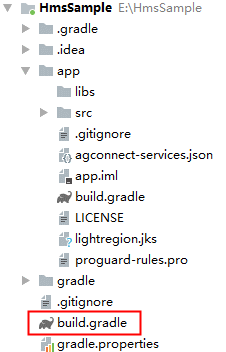
添加AppGallery Connect插件以及Maven代码库。
在“allprojects”>“repositories”里面配置HMS Core SDK的Maven仓地址。
allprojects { repositories { google() jcenter() maven {url 'https://developer.huawei.com/repo/'} } }在“buildscript”>“repositories”里面配置HMS Core SDK的Maven仓地址。
buildscript { repositories { google() jcenter() maven {url 'https://developer.huawei.com/repo/'} } }在“buildscript”>“dependencies”里面增加AppGallery Connect插件配置。
buildscript{ dependencies { classpath 'com.huawei.agconnect:agcp:1.3.1.300' } }MLFaceVerificationAnalyzer analyzer = MLFaceVerificationAnalyzerFactory.getInstance().getFaceVerificationAnalyzer();// 通过bitmap创建MLFrameMLFrame templateFrame = MLFrame.fromBitmap(bitmap);List<MLFaceTemplateResult> results = analyzer.setTemplateFace(templateFrame);for (int i = 0; i < results.size(); i++) { // 处理模板图片识别结果}// 通过bitmap创建MLFrameMLFrame compareFrame = MLFrame.fromBitmap(bitmap);? 异步方法示例代码:
Task<List<MLFaceVerificationResult>> task = analyzer.asyncAnalyseFrame(compareFrame);task.addOnSuccessListener(new OnSuccessListener<List<MLFaceVerificationResult>>() { @Override public void onSuccess(List<MLFaceVerificationResult> results) { // 检测成功 }}).addOnFailureListener(new OnFailureListener() { @Override public void onFailure(Exception e) { // 检测失败 }});? 同步方法示例代码:
SparseArray<MLFaceVerificationResult> results = analyzer.analyseFrame(compareFrame);for (int i = 0; i < results.size(); i++) { // 检测结果处理}if (analyzer != null) { analyzer.stop();}private MLLivenessCapture.Callback callback = new MLLivenessCapture.Callback() { @Override public void onSuccess(MLLivenessCaptureResult result) { //检测成功的处理逻辑,检测结果可能是活体或者非活体。 } @Override public void onFailure(int errorCode) { //检测未完成,如相机异常CAMERA_ERROR,添加失败的处理逻辑。 }};MLLivenessCapture capture = MLLivenessCapture.getInstance();capture.startDetect(activity, callback);了解更多详情>>
访问华为开发者联盟官网
获取开发指导文档
华为移动服务开源仓库地址:GitHub、Gitee
关注我们,第一时间了解 HMS Core 最新技术资讯~

