??前面我们详细介绍了SSO、OAuth2的定义和实现原理,也举例说明了如何在微服务框架中使用spring-security-oauth2实现单点登录授权服务器和单点登录客户端。目前很多平台都提供了单点登录授权服务器功能,比如我们经常用到的QQ登录、微信登录、新浪微博登录、支付宝登录等等。
??如果我们自己的系统需要调用第三方登录,那么我们就需要实现单点登录客户端,然后跟需要对接的平台调试登录SDK。JustAuth是第三方授权登录的工具类库,对接了国外内数十家第三方登录的SDK,我们在需要实现第三方登录时,只需要集成JustAuth工具包,然后配置即可实现第三方登录,省去了需要对接不同SDK的麻烦。
??JustAuth官方提供了多种入门指南,集成使用非常方便。但是如果要贴合我们自有开发框架的业务需求,还是需要进行整合优化。下面根据我们的系统需求,从两方面进行整合:一是支持多租户功能,二是和自有系统的用户进行匹配。
??GitEgg框架支持多租户功能,从多租户的实现来讲,目前大多数平台都是在登录界面输入租户的标识来确定属于哪个租户,这种方式简单有效,但是对于用户来讲体验不是很好。我们更希望的多租户功能是能够让用户无感知,且每个租户有自己不同的界面展示。
??GitEgg在实现多租户功能时,考虑到同一域名可以设置多个子域名,每个子域名可对应不同的租户。所以,对于多租户的识别方式,首先是根据浏览器当前访问的域名或IP地址和系统配置的多租户域名或IP地址信息进行自动识别,如果是域名或IP地址存在多个,或者未找到相关配置时,才会由用户自己选择属于哪个租户。
??在JustAuth的官方Demo中,SpringBoot集成JustAuth是将第三方授权信息配置在yml配置文件中的,对于单租户系统来说,可以这样配置。但是,对于多租户系统,我们需要考虑多种情况:一种是整个多租户系统使用同一套第三方授权,授权之后再由用户选择绑定到具体的租户;另外一种是每个租户配置自己的第三方授权,更具差异化。
??出于功能完整性的考虑,我们两种情况都实现,当租户不配置自有的第三方登录参数时,使用的是系统默认自带的第三方登录参数。当租户配置了自有的第三方登录参数时,就是使用租户自己的第三方授权服务器。我们将JustAuth原本配置在yml配置文件中的第三方授权服务器信息配置在数据库中,并增加多租户标识,这样在不同租户调用第三方登录时就是相互隔离的。
??首先我们通过JustAuth官方Demo justauth-spring-boot-starter-demo 了解到JustAuth主要的配置参数为:
justauth: # JustAuth功能启用开关 enabled: true # 自定义第三方登录的配置信息 extend: enum-class: com.xkcoding.justauthspringbootstarterdemo.extend.ExtendSource config: TEST: request-class: com.xkcoding.justauthspringbootstarterdemo.extend.ExtendTestRequest client-id: xxxxxx client-secret: xxxxxxxx redirect-uri: http://oauth.xkcoding.com/demo/oauth/test/callback MYGITLAB: request-class: com.xkcoding.justauthspringbootstarterdemo.extend.ExtendMyGitlabRequest client-id: xxxxxx client-secret: xxxxxxxx redirect-uri: http://localhost:8443/oauth/mygitlab/callback # 内置默认第三方登录的配置信息 type: GOOGLE: client-id: xxxxxx client-secret: xxxxxxxx redirect-uri: http://localhost:8443/oauth/google/callback ignore-check-state: false scopes: - profile - email - openid # Http请求代理的配置信息 http-config: timeout: 30000 proxy: GOOGLE: type: HTTP hostname: 127.0.0.1 port: 10080 MYGITLAB: type: HTTP hostname: 127.0.0.1 port: 10080 # 缓存的配置信息 cache: type: default prefix: 'demo::' timeout: 1h??在对配置文件存储格式进行设计时,结合对多租户系统的需求分析,我们需要选择哪些配置是系统公共配置,哪些是租户自己的配置。比如自定义第三方登录的enum-class这个是需要由系统开发的,是整个多租户系统的功能,这种可以看做是通用配置,但是在这里,考虑到后续JustAuth系统升级,我们不打算破坏原先配置文件的结构,所以我们仍选择各租户隔离配置。
??我们将JustAuth配置信息拆分为两张表存储,一张是配置JustAuth开关、自定义第三方登录配置类、缓存配置、Http超时配置等信息的表(t_just_auth_config),这些配置信息的同一特点是与第三方登录系统无关,不因第三方登录系统的改变而改变;还有一张表是配置第三方登录相关的参数、Http代理请求表(t_just_auth_source)。租户和t_just_auth_config为一对一关系,和t_just_auth_source为一对多关系。
t_just_auth_config(租户第三方登录功能配置表)表定义:
SET NAMES utf8mb4;SET FOREIGN_KEY_CHECKS = 0;-- ------------------------------ Table structure for t_just_auth_config-- ----------------------------DROP TABLE IF EXISTS `t_just_auth_config`;CREATE TABLE `t_just_auth_config` ( `id` bigint(20) NOT NULL AUTO_INCREMENT COMMENT '主键', `tenant_id` bigint(20) NOT NULL DEFAULT 0 COMMENT '租户id', `enabled` tinyint(1) NULL DEFAULT NULL COMMENT 'JustAuth开关', `enum_class` varchar(255) CHARACTER SET utf8mb4 COLLATE utf8mb4_general_ci NULL DEFAULT NULL COMMENT '自定义扩展第三方登录的配置类', `http_timeout` bigint(20) NULL DEFAULT NULL COMMENT 'Http请求的超时时间', `cache_type` varchar(32) CHARACTER SET utf8mb4 COLLATE utf8mb4_general_ci NULL DEFAULT NULL COMMENT '缓存类型', `cache_prefix` varchar(100) CHARACTER SET utf8mb4 COLLATE utf8mb4_general_ci NULL DEFAULT NULL COMMENT '缓存前缀', `cache_timeout` varchar(255) CHARACTER SET utf8mb4 COLLATE utf8mb4_general_ci NULL DEFAULT NULL COMMENT '缓存超时时间', `create_time` datetime(0) NULL DEFAULT NULL COMMENT '创建时间', `creator` bigint(20) NULL DEFAULT NULL COMMENT '创建者', `update_time` datetime(0) NULL DEFAULT NULL COMMENT '更新时间', `operator` bigint(20) NULL DEFAULT NULL COMMENT '更新者', `del_flag` tinyint(2) NULL DEFAULT 0 COMMENT '是否删除', PRIMARY KEY (`id`) USING BTREE) ENGINE = InnoDB AUTO_INCREMENT = 1 CHARACTER SET = utf8mb4 COLLATE = utf8mb4_general_ci COMMENT = '租户第三方登录功能配置表' ROW_FORMAT = DYNAMIC;SET FOREIGN_KEY_CHECKS = 1;t_just_auth_sourc(租户第三方登录信息配置表)表定义:
SET NAMES utf8mb4;SET FOREIGN_KEY_CHECKS = 0;-- ------------------------------ Table structure for t_just_auth_source-- ----------------------------DROP TABLE IF EXISTS `t_just_auth_source`;CREATE TABLE `t_just_auth_source` ( `id` bigint(20) NOT NULL AUTO_INCREMENT COMMENT '主键', `tenant_id` bigint(20) NOT NULL DEFAULT 0 COMMENT '租户id', `source_name` varchar(32) CHARACTER SET utf8mb4 COLLATE utf8mb4_general_ci NULL DEFAULT NULL COMMENT '第三方登录的名称', `source_type` varchar(32) CHARACTER SET utf8mb4 COLLATE utf8mb4_general_ci NULL DEFAULT NULL COMMENT '第三方登录类型:默认default 自定义custom', `request_class` varchar(255) CHARACTER SET utf8mb4 COLLATE utf8mb4_general_ci NULL DEFAULT NULL COMMENT '自定义第三方登录的请求Class', `client_id` varchar(100) CHARACTER SET utf8mb4 COLLATE utf8mb4_general_ci NULL DEFAULT NULL COMMENT '客户端id:对应各平台的appKey', `client_secret` varchar(100) CHARACTER SET utf8mb4 COLLATE utf8mb4_general_ci NULL DEFAULT NULL COMMENT '客户端Secret:对应各平台的appSecret', `redirect_uri` varchar(255) CHARACTER SET utf8mb4 COLLATE utf8mb4_general_ci NULL DEFAULT NULL COMMENT '登录成功后的回调地址', `alipay_public_key` varchar(100) CHARACTER SET utf8mb4 COLLATE utf8mb4_general_ci NULL DEFAULT NULL COMMENT '支付宝公钥:当选择支付宝登录时,该值可用', `union_id` varchar(100) CHARACTER SET utf8mb4 COLLATE utf8mb4_general_ci NULL DEFAULT NULL COMMENT '是否需要申请unionid,目前只针对qq登录', `stack_overflow_key` varchar(100) CHARACTER SET utf8mb4 COLLATE utf8mb4_general_ci NULL DEFAULT NULL COMMENT 'Stack Overflow Key', `agent_id` varchar(100) CHARACTER SET utf8mb4 COLLATE utf8mb4_general_ci NULL DEFAULT NULL COMMENT '企业微信,授权方的网页应用ID', `user_type` varchar(100) CHARACTER SET utf8mb4 COLLATE utf8mb4_general_ci NULL DEFAULT NULL COMMENT '企业微信第三方授权用户类型,member|admin', `domain_prefix` varchar(255) CHARACTER SET utf8mb4 COLLATE utf8mb4_general_ci NULL DEFAULT NULL COMMENT '域名前缀 使用 Coding 登录和 Okta 登录时,需要传该值。', `ignore_check_state` tinyint(1) NOT NULL DEFAULT 0 COMMENT '忽略校验code state}参数,默认不开启。', `scopes` varchar(100) CHARACTER SET utf8mb4 COLLATE utf8mb4_general_ci NULL DEFAULT NULL COMMENT '支持自定义授权平台的 scope 内容', `device_id` varchar(100) CHARACTER SET utf8mb4 COLLATE utf8mb4_general_ci NULL DEFAULT NULL COMMENT '设备ID, 设备唯一标识ID', `client_os_type` int(11) NULL DEFAULT NULL COMMENT '喜马拉雅:客户端操作系统类型,1-iOS系统,2-Android系统,3-Web', `pack_id` varchar(100) CHARACTER SET utf8mb4 COLLATE utf8mb4_general_ci NULL DEFAULT NULL COMMENT '喜马拉雅:客户端包名', `pkce` tinyint(1) NULL DEFAULT NULL COMMENT ' 是否开启 PKCE 模式,该配置仅用于支持 PKCE 模式的平台,针对无服务应用,不推荐使用隐式授权,推荐使用 PKCE 模式', `auth_server_id` varchar(255) CHARACTER SET utf8mb4 COLLATE utf8mb4_general_ci NULL DEFAULT NULL COMMENT 'Okta 授权服务器的 ID, 默认为 default。', `ignore_check_redirect_uri` tinyint(1) NOT NULL DEFAULT 0 COMMENT '忽略校验 {@code redirectUri} 参数,默认不开启。', `proxy_type` varchar(10) CHARACTER SET utf8mb4 COLLATE utf8mb4_general_ci NULL DEFAULT NULL COMMENT 'Http代理类型', `proxy_host_name` varchar(100) CHARACTER SET utf8mb4 COLLATE utf8mb4_general_ci NULL DEFAULT NULL COMMENT 'Http代理Host', `proxy_port` int(11) NULL DEFAULT NULL COMMENT 'Http代理Port', `create_time` datetime(0) NULL DEFAULT NULL COMMENT '创建时间', `creator` bigint(20) NULL DEFAULT NULL COMMENT '创建者', `update_time` datetime(0) NULL DEFAULT NULL COMMENT '更新时间', `operator` bigint(20) NULL DEFAULT NULL COMMENT '更新者', `del_flag` tinyint(2) NULL DEFAULT 0 COMMENT '是否删除', PRIMARY KEY (`id`) USING BTREE) ENGINE = InnoDB AUTO_INCREMENT = 1 CHARACTER SET = utf8mb4 COLLATE = utf8mb4_general_ci COMMENT = '租户第三方登录信息配置表' ROW_FORMAT = DYNAMIC;SET FOREIGN_KEY_CHECKS = 1;??我们将JustAuth配置信息管理的相关代码和JustAuth实现业务逻辑的代码分开,配置信息我们在系统启动时加载到Redis缓存,JustAuth在调用时,直接调用Redis缓存中的配置。
??前面讲过如何通过数据库表设计生成CRUD的前后端代码,这里不再赘述,生成好的后台代码我们放在gitegg-service-extension工程下,和短信、文件存储等的配置放到同一工程下,作为框架的扩展功能。
基础配置: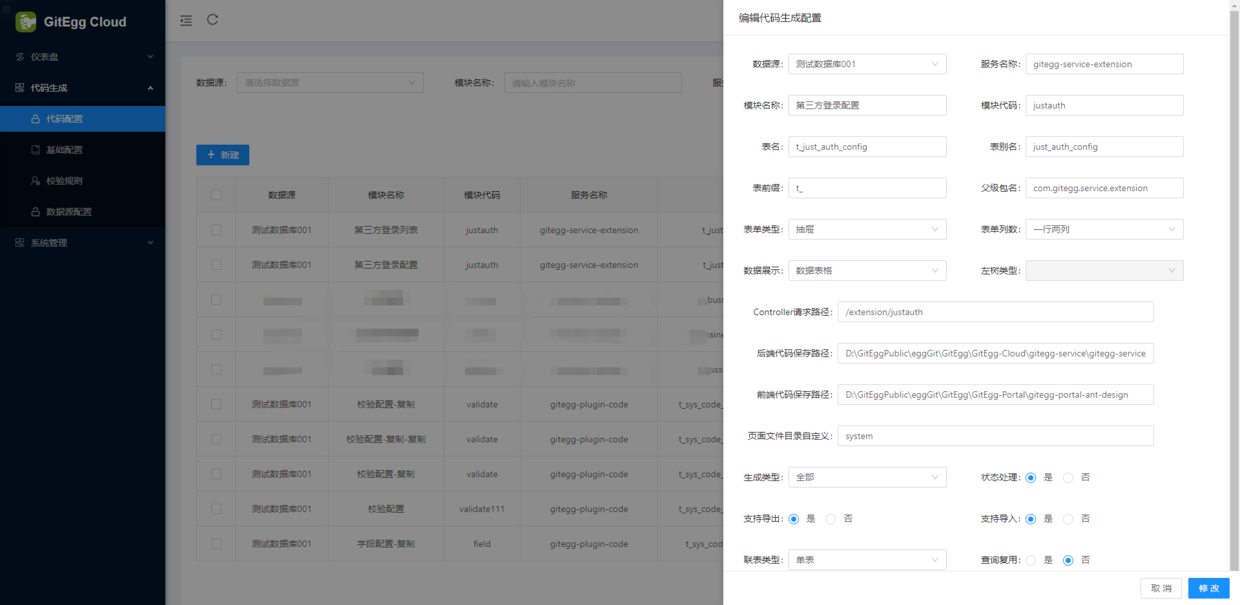
第三方列表: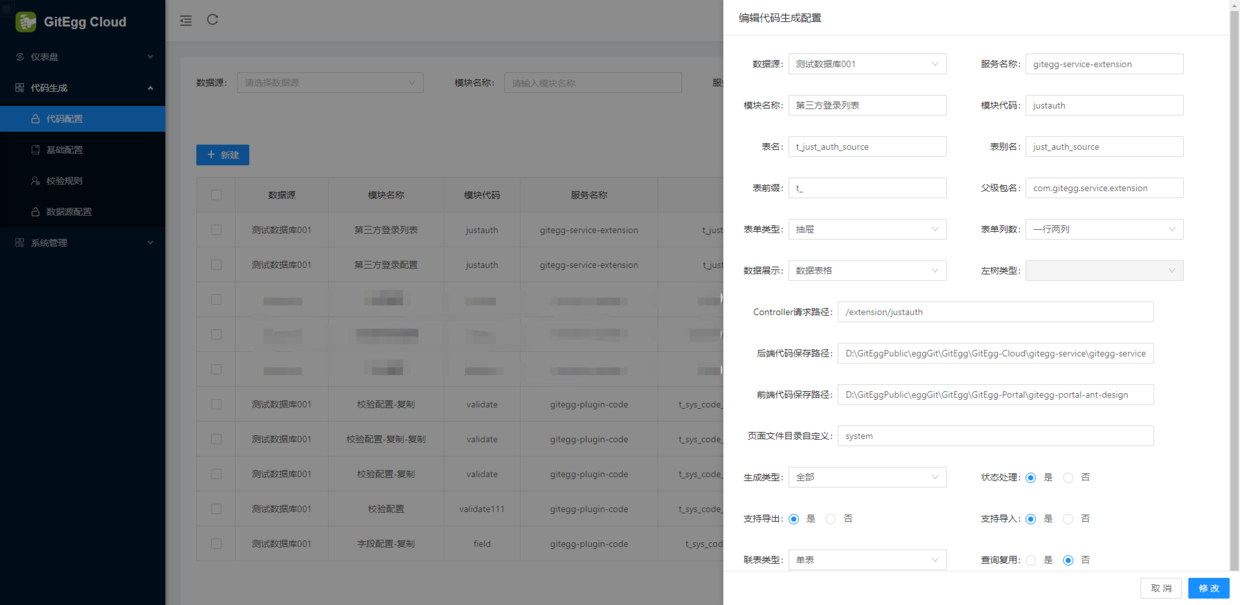
/** * 容器启动完成加载资源权限数据到缓存 * @author GitEgg */@Slf4j@RequiredArgsConstructor(onConstructor_ = @Autowired)@Componentpublic class InitExtensionCacheRunner implements CommandLineRunner { private final IJustAuthConfigService justAuthConfigService; private final IJustAuthSourceService justAuthSourceService; @Override public void run(String... args) { log.info("InitExtensionCacheRunner running"); // 初始化第三方登录主配置 justAuthConfigService.initJustAuthConfigList(); // 初始化第三方登录 第三方配置 justAuthSourceService.initJustAuthSourceList(); }} /** * 初始化配置表列表 * @return */ @Override public void initJustAuthConfigList() { QueryJustAuthConfigDTO queryJustAuthConfigDTO = new QueryJustAuthConfigDTO(); queryJustAuthConfigDTO.setStatus(GitEggConstant.ENABLE); List<JustAuthConfigDTO> justAuthSourceInfoList = justAuthConfigMapper.initJustAuthConfigList(queryJustAuthConfigDTO); // 判断是否开启了租户模式,如果开启了,那么角色权限需要按租户进行分类存储 if (enable) { Map<Long, List<JustAuthConfigDTO>> authSourceListMap = justAuthSourceInfoList.stream().collect(Collectors.groupingBy(JustAuthConfigDTO::getTenantId)); authSourceListMap.forEach((key, value) -> { String redisKey = AuthConstant.SOCIAL_TENANT_CONFIG_KEY + key; redisTemplate.delete(redisKey); addJustAuthConfig(redisKey, value); }); } else { redisTemplate.delete(AuthConstant.SOCIAL_CONFIG_KEY); addJustAuthConfig(AuthConstant.SOCIAL_CONFIG_KEY, justAuthSourceInfoList); } } private void addJustAuthConfig(String key, List<JustAuthConfigDTO> configList) { Map<String, String> authConfigMap = new TreeMap<>(); Optional.ofNullable(configList).orElse(new ArrayList<>()).forEach(config -> { try { authConfigMap.put(config.getTenantId().toString(), JsonUtils.objToJson(config)); redisTemplate.opsForHash().putAll(key, authConfigMap); } catch (Exception e) { log.error("初始化第三方登录失败:{}" , e); } }); } /** * 初始化配置表列表 * @return */ @Override public void initJustAuthSourceList() { QueryJustAuthSourceDTO queryJustAuthSourceDTO = new QueryJustAuthSourceDTO(); queryJustAuthSourceDTO.setStatus(GitEggConstant.ENABLE); List<JustAuthSourceDTO> justAuthSourceInfoList = justAuthSourceMapper.initJustAuthSourceList(queryJustAuthSourceDTO); // 判断是否开启了租户模式,如果开启了,那么角色权限需要按租户进行分类存储 if (enable) { Map<Long, List<JustAuthSourceDTO>> authSourceListMap = justAuthSourceInfoList.stream().collect(Collectors.groupingBy(JustAuthSourceDTO::getTenantId)); authSourceListMap.forEach((key, value) -> { String redisKey = AuthConstant.SOCIAL_TENANT_SOURCE_KEY + key; redisTemplate.delete(redisKey); addJustAuthSource(redisKey, value); }); } else { redisTemplate.delete(AuthConstant.SOCIAL_SOURCE_KEY); addJustAuthSource(AuthConstant.SOCIAL_SOURCE_KEY, justAuthSourceInfoList); } } private void addJustAuthSource(String key, List<JustAuthSourceDTO> sourceList) { Map<String, String> authConfigMap = new TreeMap<>(); Optional.ofNullable(sourceList).orElse(new ArrayList<>()).forEach(source -> { try { authConfigMap.put(source.getSourceName(), JsonUtils.objToJson(source)); redisTemplate.opsForHash().putAll(key, authConfigMap); } catch (Exception e) { log.error("初始化第三方登录失败:{}" , e); } }); }······ <!-- JustAuth第三方登录 --> <just.auth.version>1.16.5</just.auth.version> <!-- JustAuth SpringBoot集成 --> <just.auth.spring.version>1.4.0</just.auth.spring.version>······ <!--JustAuth第三方登录--> <dependency> <groupId>me.zhyd.oauth</groupId> <artifactId>JustAuth</artifactId> <version>${just.auth.version}</version> </dependency> <!--JustAuth SpringBoot集成--> <dependency> <groupId>com.xkcoding.justauth</groupId> <artifactId>justauth-spring-boot-starter</artifactId> <version>${just.auth.spring.version}</version> </dependency>······ <dependencies> <!-- gitegg Spring Boot自定义及扩展 --> <dependency> <groupId>com.gitegg.platform</groupId> <artifactId>gitegg-platform-boot</artifactId> </dependency> <!--JustAuth第三方登录--> <dependency> <groupId>me.zhyd.oauth</groupId> <artifactId>JustAuth</artifactId> </dependency> <!--JustAuth SpringBoot集成--> <dependency> <groupId>com.xkcoding.justauth</groupId> <artifactId>justauth-spring-boot-starter</artifactId> <!-- 不使用JustAuth默认版本--> <exclusions> <exclusion> <groupId>me.zhyd.oauth</groupId> <artifactId>JustAuth</artifactId> </exclusion> <exclusion> <groupId>org.springframework.boot</groupId> <artifactId>spring-boot-starter-data-redis</artifactId> </exclusion> <exclusion> <groupId>org.springframework.boot</groupId> <artifactId>spring-boot-autoconfigure</artifactId> </exclusion> <exclusion> <groupId>org.springframework.boot</groupId> <artifactId>spring-boot-configuration-processor</artifactId> </exclusion> </exclusions> </dependency> </dependencies>/** * GitEggAuthRequestFactory工厂类 * * @author GitEgg */@Slf4j@RequiredArgsConstructorpublic class GitEggAuthRequestFactory { private final RedisTemplate redisTemplate; private final AuthRequestFactory authRequestFactory; private final JustAuthProperties justAuthProperties; /** * 是否开启租户模式 */ @Value("${tenant.enable}") private Boolean enable; public GitEggAuthRequestFactory(AuthRequestFactory authRequestFactory, RedisTemplate redisTemplate, JustAuthProperties justAuthProperties) { this.authRequestFactory = authRequestFactory; this.redisTemplate = redisTemplate; this.justAuthProperties = justAuthProperties; } /** * 返回当前Oauth列表 * * @return Oauth列表 */ public List<String> oauthList() { // 合并 return authRequestFactory.oauthList(); } /** * 返回AuthRequest对象 * * @param source {@link AuthSource} * @return {@link AuthRequest} */ public AuthRequest get(String source) { if (StrUtil.isBlank(source)) { throw new AuthException(AuthResponseStatus.NO_AUTH_SOURCE); } // 组装多租户的缓存配置key String authConfigKey = AuthConstant.SOCIAL_TENANT_CONFIG_KEY; if (enable) { authConfigKey += GitEggAuthUtils.getTenantId(); } else { authConfigKey = AuthConstant.SOCIAL_CONFIG_KEY; } // 获取主配置,每个租户只有一个主配置 String sourceConfigStr = (String) redisTemplate.opsForHash().get(authConfigKey, GitEggAuthUtils.getTenantId()); AuthConfig authConfig = null; JustAuthSource justAuthSource = null; AuthRequest tenantIdAuthRequest = null; if (!StringUtils.isEmpty(sourceConfigStr)) { try { // 转为系统配置对象 JustAuthConfig justAuthConfig = JsonUtils.jsonToPojo(sourceConfigStr, JustAuthConfig.class); // 判断该配置是否开启了第三方登录 if (justAuthConfig.getEnabled()) { // 根据配置生成StateCache CacheProperties cacheProperties = new CacheProperties(); if (!StringUtils.isEmpty(justAuthConfig.getCacheType()) && !StringUtils.isEmpty(justAuthConfig.getCachePrefix()) && null != justAuthConfig.getCacheTimeout()) { cacheProperties.setType(CacheProperties.CacheType.valueOf(justAuthConfig.getCacheType().toUpperCase())); cacheProperties.setPrefix(justAuthConfig.getCachePrefix()); cacheProperties.setTimeout(Duration.ofMinutes(justAuthConfig.getCacheTimeout())); } else { cacheProperties = justAuthProperties.getCache(); } GitEggRedisStateCache gitEggRedisStateCache = new GitEggRedisStateCache(redisTemplate, cacheProperties, enable); // 组装多租户的第三方配置信息key String authSourceKey = AuthConstant.SOCIAL_TENANT_SOURCE_KEY; if (enable) { authSourceKey += GitEggAuthUtils.getTenantId(); } else { authSourceKey = AuthConstant.SOCIAL_SOURCE_KEY; } // 获取具体的第三方配置信息 String sourceAuthStr = (String)redisTemplate.opsForHash().get(authSourceKey, source.toUpperCase()); if (!StringUtils.isEmpty(sourceAuthStr)) { // 转为系统配置对象 justAuthSource = JsonUtils.jsonToPojo(sourceAuthStr, JustAuthSource.class); authConfig = BeanCopierUtils.copyByClass(justAuthSource, AuthConfig.class); // 组装scopes,因为系统配置的是逗号分割的字符串 if (!StringUtils.isEmpty(justAuthSource.getScopes())) { String[] scopes = justAuthSource.getScopes().split(StrUtil.COMMA); authConfig.setScopes(Arrays.asList(scopes)); } // 设置proxy if (StrUtil.isAllNotEmpty(justAuthSource.getProxyType(), justAuthSource.getProxyHostName()) && null != justAuthSource.getProxyPort()) { JustAuthProperties.JustAuthProxyConfig proxyConfig = new JustAuthProperties.JustAuthProxyConfig(); proxyConfig.setType(justAuthSource.getProxyType()); proxyConfig.setHostname(justAuthSource.getProxyHostName()); proxyConfig.setPort(justAuthSource.getProxyPort()); if (null != proxyConfig) { HttpConfig httpConfig = HttpConfig.builder().timeout(justAuthSource.getProxyPort()).proxy(new Proxy(Proxy.Type.valueOf(proxyConfig.getType()), new InetSocketAddress(proxyConfig.getHostname(), proxyConfig.getPort()))).build(); if (null != justAuthConfig.getHttpTimeout()) { httpConfig.setTimeout(justAuthConfig.getHttpTimeout()); } authConfig.setHttpConfig(httpConfig); } } // 组装好配置后,从配置生成request,判断是默认的第三方登录还是自定义第三方登录 if (SourceTypeEnum.DEFAULT.key.equals(justAuthSource.getSourceType())) { tenantIdAuthRequest = this.getDefaultRequest(source, authConfig, gitEggRedisStateCache); } else if (!StringUtils.isEmpty(justAuthConfig.getEnumClass()) && SourceTypeEnum.CUSTOM.key.equals(justAuthSource.getSourceType())) { try { Class enumConfigClass = Class.forName(justAuthConfig.getEnumClass()); tenantIdAuthRequest = this.getExtendRequest(enumConfigClass, source, (ExtendProperties.ExtendRequestConfig) authConfig, gitEggRedisStateCache); } catch (ClassNotFoundException e) { log.error("初始化自定义第三方登录时发生异常:{}", e); } } } } } catch (Exception e) { log.error("获取第三方登录时发生异常:{}", e); } } if (null == tenantIdAuthRequest) { tenantIdAuthRequest = authRequestFactory.get(source); } return tenantIdAuthRequest; } /** * 获取单个的request * @param source * @return */ private AuthRequest getDefaultRequest(String source, AuthConfig authConfig, GitEggRedisStateCache gitEggRedisStateCache) { AuthDefaultSource authDefaultSource; try { authDefaultSource = EnumUtil.fromString(AuthDefaultSource.class, source.toUpperCase()); } catch (IllegalArgumentException var4) { return null; } // 从缓存获取租户单独配置 switch(authDefaultSource) { case GITHUB: return new AuthGithubRequest(authConfig, gitEggRedisStateCache); case WEIBO: return new AuthWeiboRequest(authConfig, gitEggRedisStateCache); case GITEE: return new AuthGiteeRequest(authConfig, gitEggRedisStateCache); case DINGTALK: return new AuthDingTalkRequest(authConfig, gitEggRedisStateCache); case DINGTALK_ACCOUNT: return new AuthDingTalkAccountRequest(authConfig, gitEggRedisStateCache); case BAIDU: return new AuthBaiduRequest(authConfig, gitEggRedisStateCache); case CSDN: return new AuthCsdnRequest(authConfig, gitEggRedisStateCache); case CODING: return new AuthCodingRequest(authConfig, gitEggRedisStateCache); case OSCHINA: return new AuthOschinaRequest(authConfig, gitEggRedisStateCache); case ALIPAY: return new AuthAlipayRequest(authConfig, gitEggRedisStateCache); case QQ: return new AuthQqRequest(authConfig, gitEggRedisStateCache); case WECHAT_OPEN: return new AuthWeChatOpenRequest(authConfig, gitEggRedisStateCache); case WECHAT_MP: return new AuthWeChatMpRequest(authConfig, gitEggRedisStateCache); case WECHAT_ENTERPRISE: return new AuthWeChatEnterpriseQrcodeRequest(authConfig, gitEggRedisStateCache); case WECHAT_ENTERPRISE_WEB: return new AuthWeChatEnterpriseWebRequest(authConfig, gitEggRedisStateCache); case TAOBAO: return new AuthTaobaoRequest(authConfig, gitEggRedisStateCache); case GOOGLE: return new AuthGoogleRequest(authConfig, gitEggRedisStateCache); case FACEBOOK: return new AuthFacebookRequest(authConfig, gitEggRedisStateCache); case DOUYIN: return new AuthDouyinRequest(authConfig, gitEggRedisStateCache); case LINKEDIN: return new AuthLinkedinRequest(authConfig, gitEggRedisStateCache); case MICROSOFT: return new AuthMicrosoftRequest(authConfig, gitEggRedisStateCache); case MI: return new AuthMiRequest(authConfig, gitEggRedisStateCache); case TOUTIAO: return new AuthToutiaoRequest(authConfig, gitEggRedisStateCache); case TEAMBITION: return new AuthTeambitionRequest(authConfig, gitEggRedisStateCache); case RENREN: return new AuthRenrenRequest(authConfig, gitEggRedisStateCache); case PINTEREST: return new AuthPinterestRequest(authConfig, gitEggRedisStateCache); case STACK_OVERFLOW: return new AuthStackOverflowRequest(authConfig, gitEggRedisStateCache); case HUAWEI: return new AuthHuaweiRequest(authConfig, gitEggRedisStateCache); case GITLAB: return new AuthGitlabRequest(authConfig, gitEggRedisStateCache); case KUJIALE: return new AuthKujialeRequest(authConfig, gitEggRedisStateCache); case ELEME: return new AuthElemeRequest(authConfig, gitEggRedisStateCache); case MEITUAN: return new AuthMeituanRequest(authConfig, gitEggRedisStateCache); case TWITTER: return new AuthTwitterRequest(authConfig, gitEggRedisStateCache); case FEISHU: return new AuthFeishuRequest(authConfig, gitEggRedisStateCache); case JD: return new AuthJdRequest(authConfig, gitEggRedisStateCache); case ALIYUN: return new AuthAliyunRequest(authConfig, gitEggRedisStateCache); case XMLY: return new AuthXmlyRequest(authConfig, gitEggRedisStateCache); case AMAZON: return new AuthAmazonRequest(authConfig, gitEggRedisStateCache); case SLACK: return new AuthSlackRequest(authConfig, gitEggRedisStateCache); case LINE: return new AuthLineRequest(authConfig, gitEggRedisStateCache); case OKTA: return new AuthOktaRequest(authConfig, gitEggRedisStateCache); default: return null; } } private AuthRequest getExtendRequest(Class clazz, String source, ExtendProperties.ExtendRequestConfig extendRequestConfig, GitEggRedisStateCache gitEggRedisStateCache) { String upperSource = source.toUpperCase(); try { EnumUtil.fromString(clazz, upperSource); } catch (IllegalArgumentException var8) { return null; } if (extendRequestConfig != null) { Class<? extends AuthRequest> requestClass = extendRequestConfig.getRequestClass(); if (requestClass != null) { return (AuthRequest) ReflectUtil.newInstance(requestClass, new Object[]{extendRequestConfig, gitEggRedisStateCache}); } } return null; }}??实现了第三方登录功能,我们自己的系统也需要做相应的用户匹配,通过OAuth2协议我们可以了解到,单点登录成功后可以获取第三方系统的用户信息,当然,具体获取到第三方用户的哪些信息是由第三方系统决定的。所以目前大多数系统平台再第三方登录成功之后,都会显示用户注册或绑定页面,将第三方用户和自有系统平台用户进行绑定。那么在下一次第三方登录成功之后,就会自动匹配到自有系统的用户,进一步的获取到该用户在自有系统的权限、菜单等。
JustAuth官方提供的账户整合流程图: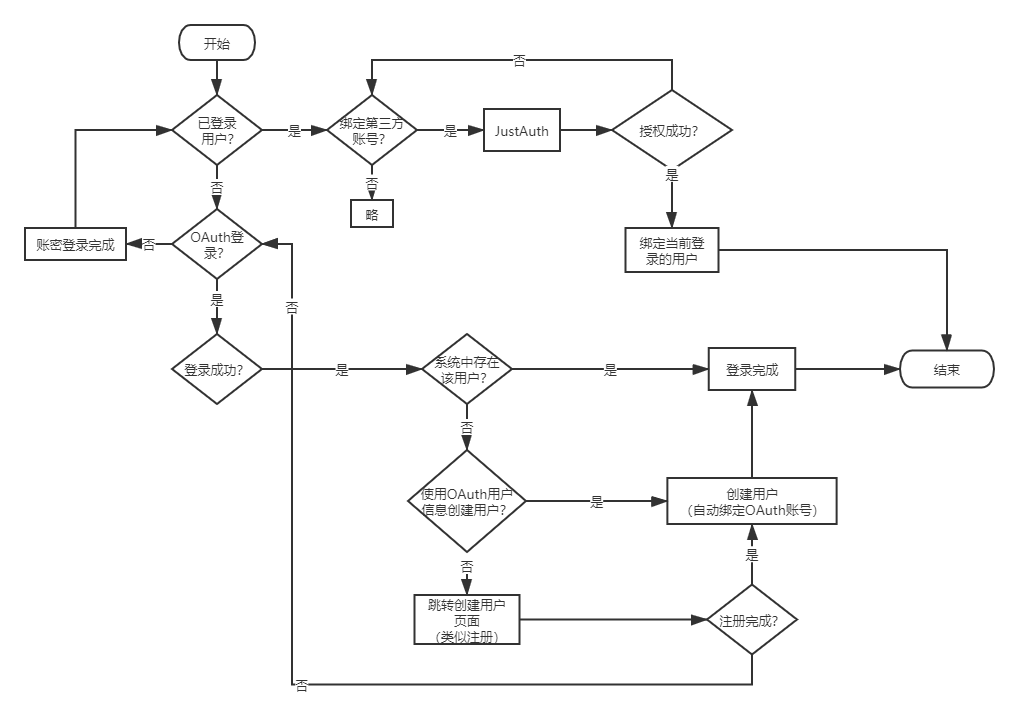
??我们通常的第三方登录业务流程是点击登录,获取到第三方授权时,会去查询自有系统数据是否有匹配的用户,如果有,则自动登录到后台,如果没有,则跳转到账号绑定或者注册页面,进行账户绑定或者注册。我们将此业务流程放到gitegg-oauth微服务中去实现,新建SocialController类:
/** * 第三方登录 * @author GitEgg */@Slf4j@RestController@RequestMapping("/social")@RequiredArgsConstructor(onConstructor_ = @Autowired)public class SocialController { private final GitEggAuthRequestFactory factory; private final IJustAuthFeign justAuthFeign; private final IUserFeign userFeign; private final ISmsFeign smsFeign; @Value("${system.secret-key}") private String secretKey; @Value("${system.secret-key-salt}") private String secretKeySalt; private final RedisTemplate redisTemplate; /** * 密码最大尝试次数 */ @Value("${system.maxTryTimes}") private int maxTryTimes; /** * 锁定时间,单位 秒 */ @Value("${system.maxTryTimes}") private long maxLockTime; /** * 第三方登录缓存时间,单位 秒 */ @Value("${system.socialLoginExpiration}") private long socialLoginExpiration; @GetMapping public List<String> list() { return factory.oauthList(); } /** * 获取到对应类型的登录url * @param type * @return */ @GetMapping("/login/{type}") public Result login(@PathVariable String type) { AuthRequest authRequest = factory.get(type); return Result.data(authRequest.authorize(AuthStateUtils.createState())); } /** * 保存或更新用户数据,并进行判断是否进行注册或绑定 * @param type * @param callback * @return */ @RequestMapping("/{type}/callback") public Result login(@PathVariable String type, AuthCallback callback) { AuthRequest authRequest = factory.get(type); AuthResponse response = authRequest.login(callback); if (response.ok()) { AuthUser authUser = (AuthUser) response.getData(); JustAuthSocialInfoDTO justAuthSocialInfoDTO = BeanCopierUtils.copyByClass(authUser, JustAuthSocialInfoDTO.class); BeanCopierUtils.copyByObject(authUser.getToken(), justAuthSocialInfoDTO); // 获取到第三方用户信息后,先进行保存或更新 Result<Object> createResult = justAuthFeign.userCreateOrUpdate(justAuthSocialInfoDTO); if(createResult.isSuccess() && null != createResult.getData()) { Long socialId = Long.parseLong((String)createResult.getData()); // 判断此第三方用户是否被绑定到系统用户 Result<Object> bindResult = justAuthFeign.userBindQuery(socialId); // 这里需要处理返回消息,前端需要根据返回是否已经绑定好的消息来判断 // 将socialId进行加密返回 DES des = new DES(Mode.CTS, Padding.PKCS5Padding, secretKey.getBytes(), secretKeySalt.getBytes()); // 这里将source+uuid通过des加密作为key返回到前台 String socialKey = authUser.getSource() + StrPool.UNDERLINE + authUser.getUuid(); // 将socialKey放入缓存,默认有效期2个小时,如果2个小时未完成验证,那么操作失效,重新获取,在system:socialLoginExpiration配置 redisTemplate.opsForValue().set(AuthConstant.SOCIAL_VALIDATION_PREFIX + socialKey, createResult.getData(), socialLoginExpiration, TimeUnit.SECONDS); String desSocialKey = des.encryptHex(socialKey); bindResult.setData(desSocialKey); // 这里返回的成功是请求成功,里面放置的result是是否有绑定用户的成功 return Result.data(bindResult); } return Result.error("获取第三方用户绑定信息失败"); } else { throw new BusinessException(response.getMsg()); } } /** * 绑定用户手机号 * 这里不走手机号登录的流程,因为如果手机号不存在那么可以直接创建一个用户并进行绑定 */ @PostMapping("/bind/mobile") @ApiOperation(value = "绑定用户手机号") public Result<?> bindMobile(@Valid @RequestBody SocialBindMobileDTO socialBind) { Result<?> smsResult = smsFeign.checkSmsVerificationCode(socialBind.getSmsCode(), socialBind.getPhoneNumber(), socialBind.getCode()); // 判断短信验证是否成功 if (smsResult.isSuccess() && null != smsResult.getData() && (Boolean)smsResult.getData()) { // 解密前端传来的socialId DES des = new DES(Mode.CTS, Padding.PKCS5Padding, secretKey.getBytes(), secretKeySalt.getBytes()); String desSocialKey = des.decryptStr(socialBind.getSocialKey()); // 将socialKey放入缓存,默认有效期2个小时,如果2个小时未完成验证,那么操作失效,重新获取,在system:socialLoginExpiration配置 String desSocialId = (String)redisTemplate.opsForValue().get(AuthConstant.SOCIAL_VALIDATION_PREFIX + desSocialKey); // 查询第三方用户信息 Result<Object> justAuthInfoResult = justAuthFeign.querySocialInfo(Long.valueOf(desSocialId)); if (null == justAuthInfoResult || !justAuthInfoResult.isSuccess() || null == justAuthInfoResult.getData()) { throw new BusinessException("未查询到第三方用户信息,请返回到登录页重试"); } JustAuthSocialInfoDTO justAuthSocialInfoDTO = BeanUtil.copyProperties(justAuthInfoResult.getData(), JustAuthSocialInfoDTO.class); // 查询用户是否存在,如果存在,那么直接调用绑定接口 Result<Object> result = userFeign.queryUserByPhone(socialBind.getPhoneNumber()); Long userId; // 判断返回信息 if (null != result && result.isSuccess() && null != result.getData()) { GitEggUser gitEggUser = BeanUtil.copyProperties(result.getData(), GitEggUser.class); userId = gitEggUser.getId(); } else { // 如果用户不存在,那么调用新建用户接口,并绑定 UserAddDTO userAdd = new UserAddDTO(); userAdd.setAccount(socialBind.getPhoneNumber()); userAdd.setMobile(socialBind.getPhoneNumber()); userAdd.setNickname(justAuthSocialInfoDTO.getNickname()); userAdd.setPassword(StringUtils.isEmpty(justAuthSocialInfoDTO.getUnionId()) ? justAuthSocialInfoDTO.getUuid() : justAuthSocialInfoDTO.getUnionId()); userAdd.setStatus(GitEggConstant.UserStatus.ENABLE); userAdd.setAvatar(justAuthSocialInfoDTO.getAvatar()); userAdd.setEmail(justAuthSocialInfoDTO.getEmail()); userAdd.setStreet(justAuthSocialInfoDTO.getLocation()); userAdd.setComments(justAuthSocialInfoDTO.getRemark()); Result<?> resultUserAdd = userFeign.userAdd(userAdd); if (null != resultUserAdd && resultUserAdd.isSuccess() && null != resultUserAdd.getData()) { userId = Long.parseLong((String) resultUserAdd.getData()); } else { // 如果添加失败,则返回失败信息 return resultUserAdd; } } // 执行绑定操作 return justAuthFeign.userBind(Long.valueOf(desSocialId), userId); } return smsResult; } /** * 绑定账号 * 这里只有绑定操作,没有创建用户操作 */ @PostMapping("/bind/account") @ApiOperation(value = "绑定用户账号") public Result<?> bindAccount(@Valid @RequestBody SocialBindAccountDTO socialBind) { // 查询用户是否存在,如果存在,那么直接调用绑定接口 Result<?> result = userFeign.queryUserByAccount(socialBind.getUsername()); // 判断返回信息 if (null != result && result.isSuccess() && null != result.getData()) { GitEggUser gitEggUser = BeanUtil.copyProperties(result.getData(), GitEggUser.class); // 必须添加次数验证,和登录一样,超过最大验证次数那么直接锁定账户 // 从Redis获取账号密码错误次数 Object lockTimes = redisTemplate.boundValueOps(AuthConstant.LOCK_ACCOUNT_PREFIX + gitEggUser.getId()).get(); // 判断账号密码输入错误几次,如果输入错误多次,则锁定账号 if(null != lockTimes && (int)lockTimes >= maxTryTimes){ throw new BusinessException("密码尝试次数过多,请使用其他方式绑定"); } PasswordEncoder passwordEncoder = PasswordEncoderFactories.createDelegatingPasswordEncoder(); String password = AuthConstant.BCRYPT + gitEggUser.getAccount() + DigestUtils.md5DigestAsHex(socialBind.getPassword().getBytes()); // 验证账号密码是否正确 if ( passwordEncoder.matches(password, gitEggUser.getPassword())) { // 解密前端传来的socialId DES des = new DES(Mode.CTS, Padding.PKCS5Padding, secretKey.getBytes(), secretKeySalt.getBytes()); String desSocialKey = des.decryptStr(socialBind.getSocialKey()); // 将socialKey放入缓存,默认有效期2个小时,如果2个小时未完成验证,那么操作失效,重新获取,在system:socialLoginExpiration配置 String desSocialId = (String)redisTemplate.opsForValue().get(AuthConstant.SOCIAL_VALIDATION_PREFIX + desSocialKey); // 执行绑定操作 return justAuthFeign.userBind(Long.valueOf(desSocialId), gitEggUser.getId()); } else { // 增加锁定次数 redisTemplate.boundValueOps(AuthConstant.LOCK_ACCOUNT_PREFIX + gitEggUser.getId()).increment(GitEggConstant.Number.ONE); redisTemplate.expire(AuthConstant.LOCK_ACCOUNT_PREFIX +gitEggUser.getId(), maxLockTime , TimeUnit.SECONDS); throw new BusinessException("账号或密码错误"); } } else { throw new BusinessException("账号不存在"); } }}SocialTokenGranter.java
/** * 第三方登录模式 * @author GitEgg */public class SocialTokenGranter extends AbstractTokenGranter { private static final String GRANT_TYPE = "social"; private final AuthenticationManager authenticationManager; private UserDetailsService userDetailsService; private IJustAuthFeign justAuthFeign; private RedisTemplate redisTemplate; private String captchaType; private String secretKey; private String secretKeySalt; public SocialTokenGranter(AuthenticationManager authenticationManager, AuthorizationServerTokenServices tokenServices, ClientDetailsService clientDetailsService, OAuth2RequestFactory requestFactory, RedisTemplate redisTemplate, IJustAuthFeign justAuthFeign, UserDetailsService userDetailsService, String captchaType, String secretKey, String secretKeySalt) { this(authenticationManager, tokenServices, clientDetailsService, requestFactory, GRANT_TYPE); this.redisTemplate = redisTemplate; this.captchaType = captchaType; this.secretKey = secretKey; this.secretKeySalt = secretKeySalt; this.justAuthFeign = justAuthFeign; this.userDetailsService = userDetailsService; } protected SocialTokenGranter(AuthenticationManager authenticationManager, AuthorizationServerTokenServices tokenServices, ClientDetailsService clientDetailsService, OAuth2RequestFactory requestFactory, String grantType) { super(tokenServices, clientDetailsService, requestFactory, grantType); this.authenticationManager = authenticationManager; } @Override protected OAuth2Authentication getOAuth2Authentication(ClientDetails client, TokenRequest tokenRequest) { Map<String, String> parameters = new LinkedHashMap<>(tokenRequest.getRequestParameters()); String socialKey = parameters.get(TokenConstant.SOCIAL_KEY); // Protect from downstream leaks of password parameters.remove(TokenConstant.SOCIAL_KEY); // 校验socialId String socialId; try { // 将socialId进行加密返回 DES des = new DES(Mode.CTS, Padding.PKCS5Padding, secretKey.getBytes(), secretKeySalt.getBytes()); String desSocialKey = des.decryptStr(socialKey); // 获取缓存中的key socialId = (String) redisTemplate.opsForValue().get(AuthConstant.SOCIAL_VALIDATION_PREFIX + desSocialKey); } catch (Exception e) { throw new InvalidGrantException("第三方登录验证已失效,请返回登录页重新操作"); } if (StringUtils.isEmpty(socialId)) { throw new InvalidGrantException("第三方登录验证已失效,请返回登录页重新操作"); } // 校验userId String userId; try { Result<Object> socialResult = justAuthFeign.userBindQuery(Long.parseLong(socialId)); if (null == socialResult || StringUtils.isEmpty(socialResult.getData())) { throw new InvalidGrantException("操作失败,请返回登录页重新操作"); } userId = (String) socialResult.getData(); } catch (Exception e) { throw new InvalidGrantException("操作失败,请返回登录页重新操作"); } if (StringUtils.isEmpty(userId)) { throw new InvalidGrantException("操作失败,请返回登录页重新操作"); } // 这里是通过用户id查询用户信息 UserDetails userDetails = this.userDetailsService.loadUserByUsername(userId); Authentication userAuth = new UsernamePasswordAuthenticationToken(userDetails, null, userDetails.getAuthorities()); ((AbstractAuthenticationToken)userAuth).setDetails(parameters); OAuth2Request storedOAuth2Request = getRequestFactory().createOAuth2Request(client, tokenRequest); return new OAuth2Authentication(storedOAuth2Request, userAuth); }}??因为是前后端分离的项目,我们这里需要将第三方回调接口配置在vue页面,前端页面根据账户信息判断是直接登录还是进行绑定或者注册等操作。新建SocialCallback.vue用于处理前端第三方登录授权后的回调操作。
SocialCallback.vue
<template> <div> </div></template><script>import { socialLoginCallback } from '@/api/login'import { mapActions } from 'vuex'export default { name: 'SocialCallback', created () { this.$loading.show({ tip: '登录中......' }) const query = this.$route.query const socialType = this.$route.params.socialType this.socialCallback(socialType, query) }, methods: { ...mapActions(['Login']), getUrlKey: function (name) { // eslint-disable-next-line no-sparse-arrays return decodeURIComponent((new RegExp('[?|&]' + name + '=' + '([^&;]+?)(&|#|;|$)').exec(window.opener.location.href) || [, ''])[1].replace(/\+/g, '%20')) || null }, socialCallback (socialType, parameter) { const that = this socialLoginCallback(socialType, parameter).then(res => { that.$loading.hide() const bindResult = res.data if (bindResult && bindResult !== '') { if (bindResult.success && bindResult.data) { // 授权后发现已绑定,那么直接调用第三方登录 this.socialLogin(bindResult.data) } else if (bindResult.code === 601) { // 授权后没有绑定则跳转到绑定界面 that.$router.push({ name: 'socialBind', query: { redirect: this.getUrlKey('redirect'), key: bindResult.data } }) } else if (bindResult.code === 602) { // 该账号已绑定多个账号,请联系系统管理员,或者到个人中心解绑 this.$notification['error']({ message: '错误', description: ((res.response || {}).data || {}).message || '该账号已绑定多个账号,请联系系统管理员,或者到个人中心解绑', duration: 4 }) } else { // 提示获取第三方登录失败 this.$notification['error']({ message: '错误', description: '第三方登录失败,请稍后再试', duration: 4 }) } } else { // 提示获取第三方登录失败 this.$notification['error']({ message: '错误', description: '第三方登录失败,请稍后再试', duration: 4 }) } }) }, // 第三方登录后回调 socialLogin (key) { const { Login } = this // 执行登录操作 const loginParams = { grant_type: 'social', social_key: key } this.$loading.show({ tip: '登录中......' }) Login(loginParams) .then((res) => this.loginSuccess(res)) .catch(err => this.loginError(err)) .finally(() => { this.$loading.hide() if (this.getUrlKey('redirect')) { window.opener.location.href = window.opener.location.origin + this.getUrlKey('redirect') } else { window.opener.location.reload() } window.close() }) }, loginSuccess (res) { this.$notification['success']({ message: '提示', description: '第三方登录成功', duration: 4 }) }, loginError (err) { this.$notification['error']({ message: '错误', description: ((err.response || {}).data || {}).message || '请求出现错误,请稍后再试', duration: 4 }) } }}</script><style></style>JustAuth官方提供了详细的第三方登录的使用指南,按照其介绍,到需要的第三方网站申请,然后进行配置即可,这里只展示GitHub的登录测试步骤。
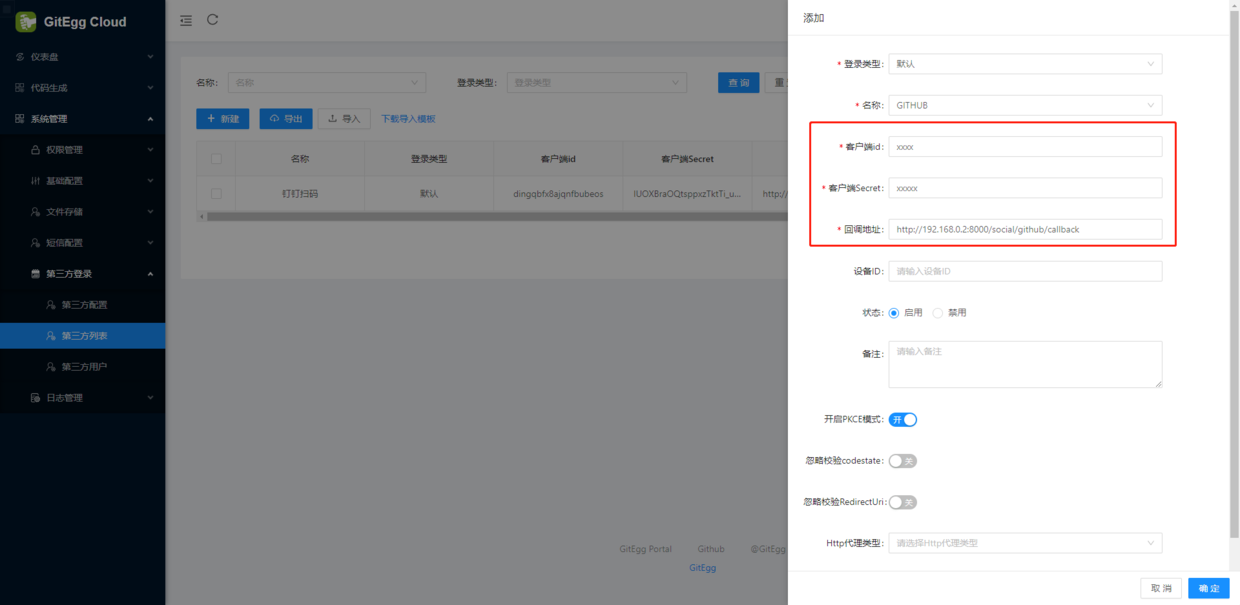
1、按照官方提供的注册申请步骤,获取到GitHub的client-id和client-secret并配置回调地址redirect-uri
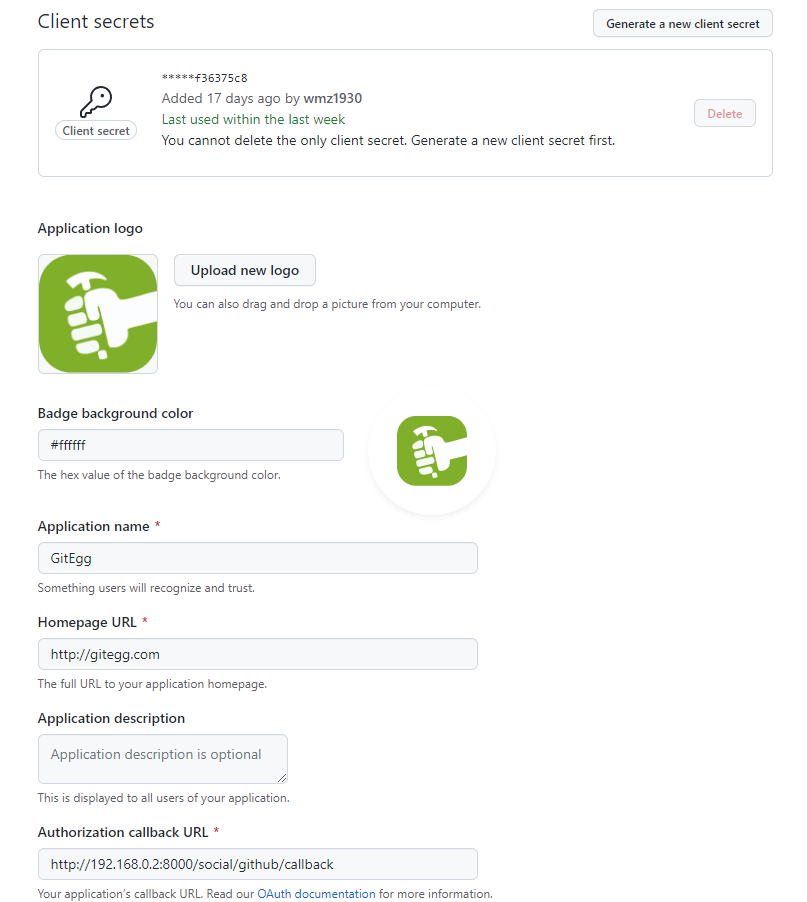
client-id: 59ced49784f3cebfb208 client-secret: 807f52cc33a1aae07f97521b5501adc6f36375c8 redirect-uri: http://192.168.0.2:8000/social/github/callback ignore-check-state: false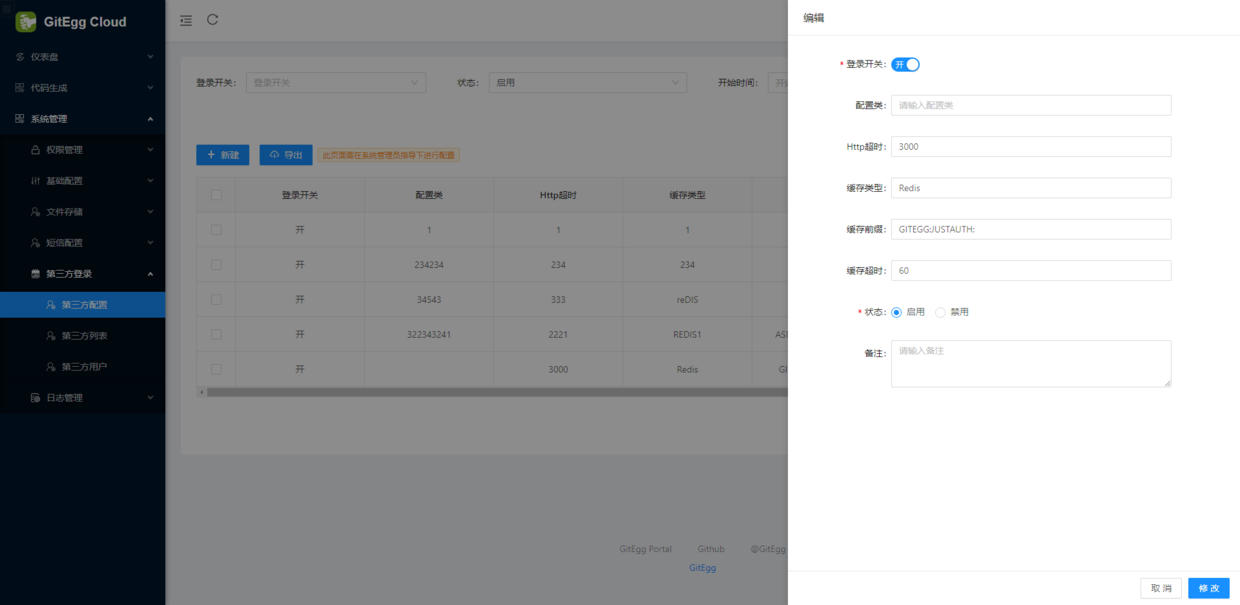
2、登录页添加Github登录链接
<div > <span>{{ $t('user.login.sign-in-with') }}</span> <a @click="openSocialLogin('wechat_open')"> <a-icon type="wechat"></a-icon> </a> <a @click="openSocialLogin('qq')"> <a-icon type="qq"></a-icon> </a> <a @click="openSocialLogin('github')"> <a-icon type="github"></a-icon> </a> <a @click="openSocialLogin('dingtalk')"> <a-icon type="dingding"></a-icon> </a> <a @click="openRegister" >{{ $t('user.login.signup') }} </a> </div>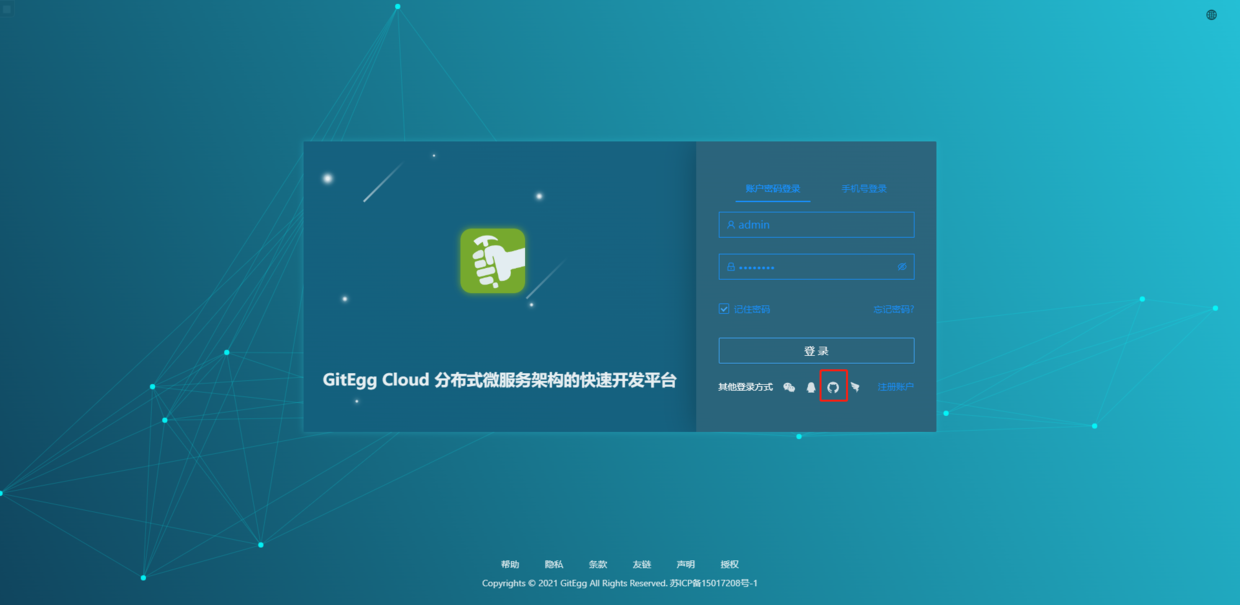
3、点击登录,如果此时GitHub账号没有登录过,则跳转到绑定或者注册账号界面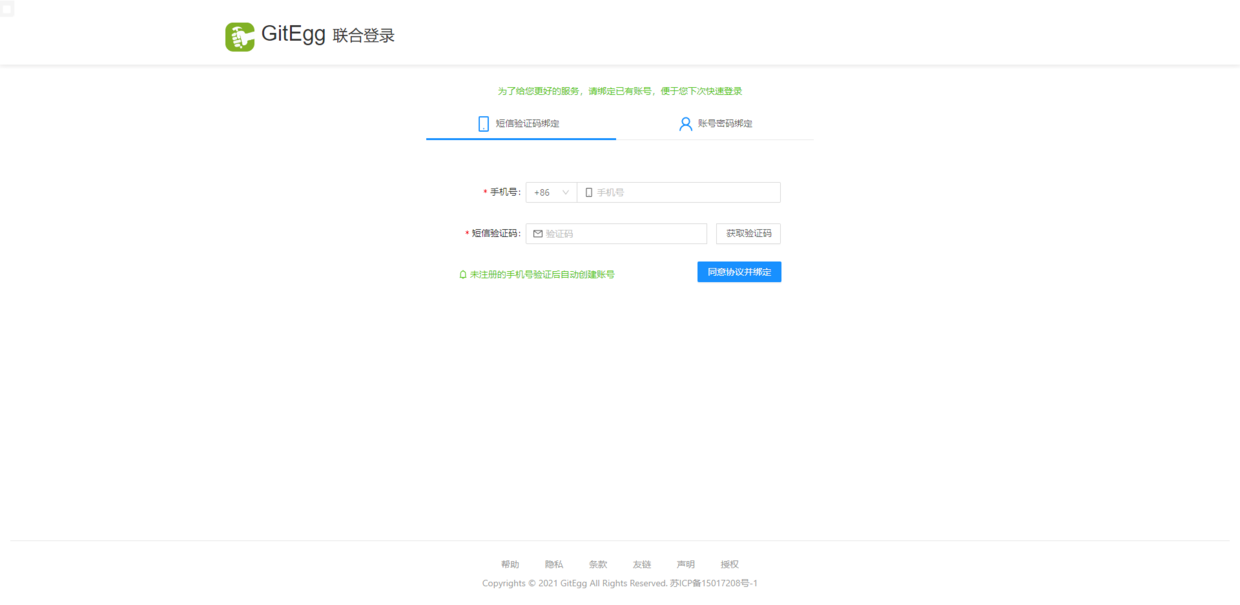
4、输入手机号+验证码或者账号+密码,即可进入到登录前的页面。使用手机号+验证码的模式,如果系统不存在账号,可以直接注册新账号并登录。
5、JustAuth支持的第三方登录列表,只需到相应第三方登录申请即可,下面图片取自JustAuth官网:
Gitee: https://gitee.com/wmz1930/GitEgg
GitHub: https://github.com/wmz1930/GitEgg

