下面将会实现这样的效果: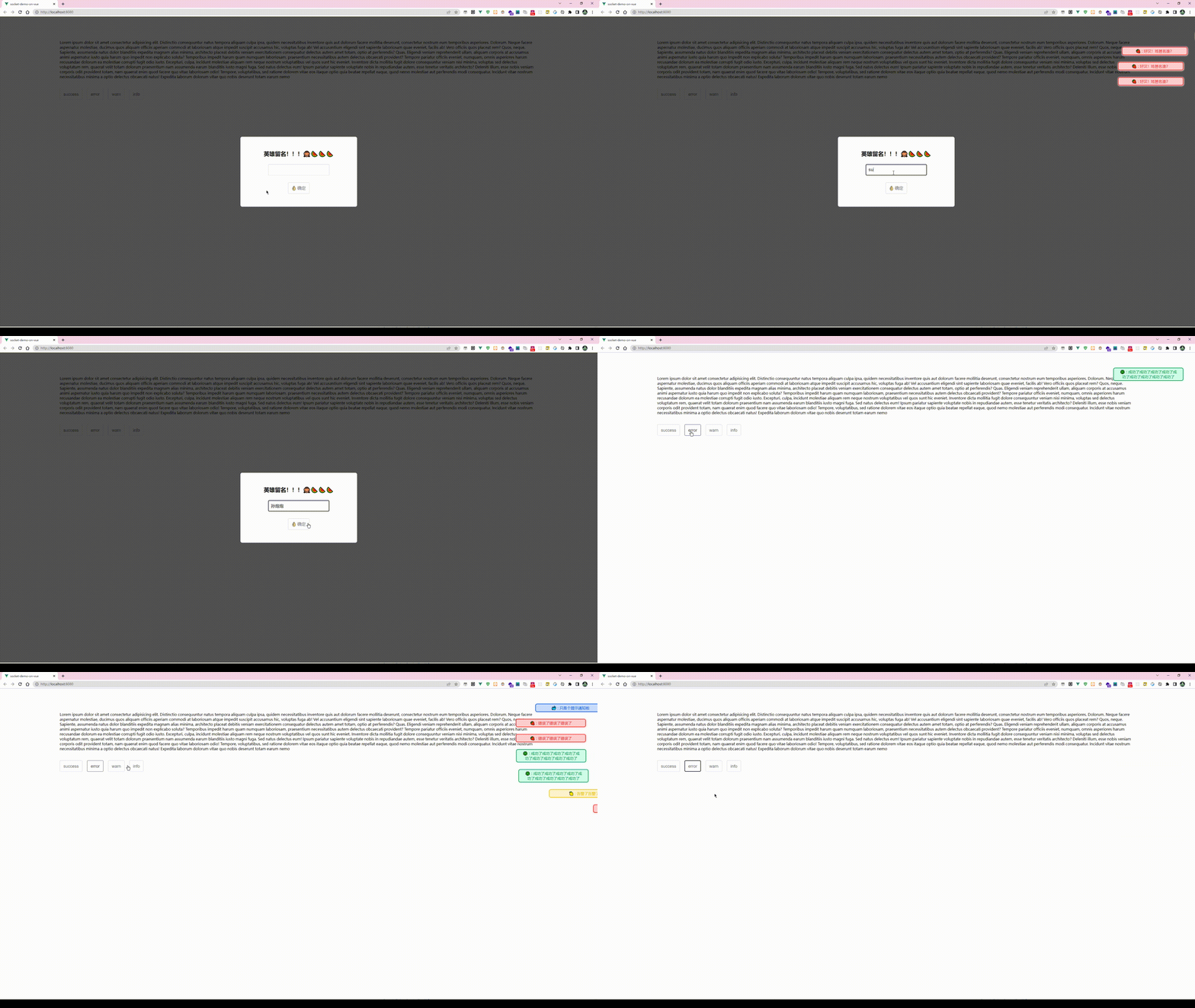
组件动态创建脚本:
NotificationBanner.js
import Vue from "vue";import Notice from "@/components/Noticer/Notice.vue";function create(Component, props) { // 先建立实例 const vm = new Vue({ render(h) { //h就是createElement,它返回VNode return h(Component, { props }); }, }).$mount(); // 手动挂载 // 判断是否存在container,如果不存在则先创建 let container; container = document.querySelector(".noticer-container"); if (container == null) { container = document.createElement("div"); container.classList.add("noticer-container"); container.style.position = "fixed"; container.style.top = "50px"; container.style.right = "0px"; container.style.overflow = "hidden"; container.style.zIndex = 9999; document.body.appendChild(container); } container.appendChild(vm.$el); //销毁方法 const comp = vm.$children[0]; comp.remove = function () { container.removeChild(comp["$el"]); vm.$destroy(); }; comp.show(); return comp;}Vue.prototype.$notice = { error: function (props) { create(Notice, Object.assign(props, { type: "error" })); }, info: function (props) { create(Notice, Object.assign(props, { type: "info" })); }, success: function (props) { create(Notice, Object.assign(props, { type: "success" })); }, warn: function (props) { create(Notice, Object.assign(props, { type: "warn" })); },};这里有一些值得注意的地方:
fixed, 而之所以设定为 overflow:hidden 的原因则是,notice 在出现和移除的时候,发生的动画偏移,会让页面出现横向滚动条。为了避免重复创建container, 这里做了一个判断逻辑。然后所有动态生成的notice实例dom都会通过 appendChild 添加到这个容器。vm.$children[0]["$el"] , 原因是,Notice 模板的实现中,外层套了一个 transition , 而这个transition是并不会渲染dom的。创建Notice组件模板:
组件模板
<template> <transition enter-active- leave-active- @after-leave="afterLeave" > <div v-if="isShow" > <div : > {{ type === "error" ? "🍓" : type === "success" ? "🍀" : type === "warn" ? "🍋" : "🐳" }} : {{ message }} </div> </div> </transition></template><script>export default { props: { title: { type: String, default: "", }, message: { type: String, default: "", }, time: { type: Number, default: 1000, }, type: { type: String, }, }, data() { return { isShow: false, }; }, methods: { show() { this.isShow = true; setTimeout(this.hide, this.time); }, hide() { this.isShow = false; }, afterLeave() { this.remove(); }, },};</script><style lang="less" scoped>@error: rgb(255, 30, 30);@warn: rgb(240, 192, 0);@success: rgb(0, 144, 74);@info: rgb(0, 80, 218);@errorBg: rgb(255, 208, 208);@warnBg: rgb(255, 245, 207);@successBg: rgb(210, 255, 233);@infoBg: rgb(203, 222, 255);.notice__root { user-select: none; padding: 5px 50px 5px 5px;}.noticer { padding: 5px 20px; margin: 10px 0px; // margin-right: 50px; border-radius: 8px; font-size: 16px; width: auto; min-width: 280px; max-width: 300px; word-break: break-all; text-align: center; box-sizing: border-box;}.notice-type-error { color: @error !important; border: 2px solid @error; box-shadow: 1px 1px 5px 2px @errorBg; background-color: @errorBg; // border: 1px solid red;}.notice-type-warn { color: @warn !important; border: 2px solid @warn; background-color: @warnBg; box-shadow: 1px 1px 5px 2px @warnBg;}.notice-type-success { color: @success !important; border: 2px solid @success; background-color: @successBg; box-shadow: 1px 1px 5px 2px @successBg;}.notice-type-info { color: @info !important; border: 2px solid @info; background-color: @infoBg; box-shadow: 1px 1px 5px 2px @infoBg;}</style>在 main.js 中引入执行该脚本即可
import Vue from "vue";import App from "./App.vue";import "animate.css";import "@/components/Noticer/NotificationBanner.js";new Vue({ render: (h) => h(App),}).$mount("#app");代码中使用实例:
if (!this.nickname) { this.$notice.error({ message: "好汉!姓甚名谁?", time: 3000, });} else { this.showModal = false; this.$notice.info({ message: this.nickname + "来了!!!", time: 3000, });}动态创建组件的执行逻辑:
当在使用的时候:
this.$notice.error({ message: "好汉!姓甚名谁?", time: 3000,});上方代码触发,实际上会触发 NotificationBanner.js 中的 create函数,该函数创建了一个notice 的组件实例,并在实力上添加了一个remove 方法,然后直接触发组件中的 show 方法。
notice 模板实例中:
methods: { show() { this.isShow = true; setTimeout(this.hide, this.time); }, hide() { this.isShow = false; }, afterLeave() { this.remove(); },},show 方法执行,除了展示 notice,立即设定一个延时函数执行 hide 方法。
hide 方法执行, vue 提供的 transition 钩子 afterleave() 会在移除动画执行完毕后触发。 这时候,去触发 remove 方法,将该notice 组件实例移除。

