在了解Lucene之前,我们先了解下全文数据查询。
我们的数据一般分为两种:结构化数据和非结构化数据
数据库适合结构化数据的精确查询,而不适合半结构化、非结构化数据的模糊查询及灵活搜索(特别是数据量大时),无法提供想要的实时性。
全文数据查询
所谓顺序扫描,就是要找内容包含一个字符串的文件,就是一个文档一个文档的看。对于每一个文档,从头看到尾,如果此文档包含此字符串,则此文档为我们要找的文件,接着看下一个文件,直到扫描完所有的文件。
全文检索是指计算机索引程序通过扫描文章中的每一个词,对每一个词建立一个索引,指明该词在文章中出现的次数和位置,当用户查询时,检索程序就根据事先建立的索引进行查找,并将查找的结果反馈给用户的检索方式。这个过程类似于通过字典中的检索字表查字的过程。
全文检索的基本思路,就是将非结构化数据中的一部分信息提取出来,重新组织,使其变得有一定结构,然后对这个有一定结构的数据进行搜索,从而达到搜索相对较快的目的。
这部分从非结构化数据中提取出的然后重新组织的信息,我们称之索引,这种先建立索引,再对索引进行搜索的过程就叫全文检索(Full-text Search) 。
具体应用的有单机软件的搜索(word中的搜索) 站内搜索 ( 京东、 taobao、拉勾职位搜索) 专业搜索引擎公司 (google、baidu)的搜索。
全文检索通常使用倒排索引来实现。
3. 正排索引
正排索引是指文档ID为key,表中记录每个关键字出现的次数位置等,查找时扫描表中的每个文档中字的信息,直到找到所有包含查询关键字的文档。
格式如下:
文档1的ID > 单词1:出现次数,出现位置列表;单词2:出现次数,出现位置列表…………
文档2的ID > 单词1:出现次数,出现位置列表;单词2:出现次数,出现位置列表…………
当用户在主页上搜索关键词“华为手机”时,假设只存在正向索引(forward index),那么就需要扫描索引库中的所有文档,找出所有包含关键词“华为手机”的文档,再根据打分模型进行打分,排出名次后呈现给用户。因为互联网上收录在搜索引擎中的文档的数目是个天文数字,这样的索引结构根本无法满足实时返回排名结果的要求
4. 倒排索引
被用来存储在全文搜索下某个单词在一个文档或一组文档中的存储位置的映射。它是文档检索系统中常用的数据结构。通过倒排索引,可以根据单词快速获取包含这个单词的文档列表。
格式如下:
关键词1 > 文档1的ID :出现次数,出现的位置;文档2的ID:出现次数 ,出现的位置…………
关键词2 > 文档1的ID :出现次数,出现的位置;文档2的ID:出现次数 ,出现的位置…………
Lucene简介
Lucene的作者Doug Cutting是资深的全文索引/检索专家,最开始发布在他本人的主页上,2000年开源,2001年10月贡献给Apache,成为Apache基金的一个子项目。官网https://lucene.apache.org/core。现在是开源全文检索方案的重要选择。
Lucene是非常优秀的成熟的开源的免费的纯java语言的全文索引检索工具包。
Lucene是一个高性能、可伸缩的信息搜索(IR)库。 Information Retrieval (IR) library.它可以为你的应用程序添加索引和搜索能力。
Lucene是为软件开发人员提供一个简单易用的工具包,以方便的在目标系统中实现全文检索的功能,或者是以此为基础建立起完整的全文检索引擎。由Apache软件基金会支持和提供,Lucene提供了一个简单却强大的应用程序接口,能够做全文索引和搜索。Lucene是当前以及最近几年非常受欢迎的免费Java信息检索程序库。
Lucene实现的产品
作为一个开放源代码项目,Lucene从问世之后,引发了开放源代码社群的巨大反响,程序员们不仅使用它构建具体的全文检索应用,而且将之集成到各种系统软件中去,以及构建Web应用,甚至某些商业软件也采用了Lucene作为其内部全文检索子系统的核心。
Nutch:Apache顶级开源项目,包含网络爬虫和搜索引擎(基于lucene)的系统(同 百度、google)。
Hadoop因它而生。
Solr : Lucene下的子项目,基于Lucene构建的独立的企业级开源搜索平台,一个服务。它提供了基于xml/JSON/http的api供外界访问,还有web管理界面。
Elasticsearch:基于Lucene的企业级分布式搜索平台,它对外提供restful-web接口,让程序员可以轻松、方便使用搜索平台。
还有大家所熟知的OSChina、Eclipse、MyEclipse、JForum等等都是使用了Lucene做搜索框架来实现自己的搜索部分内容,在我们自己的项目中很有必要加入他的搜索能力,可以大大提高我们开发系统的搜索体验度。
Lucene的特性
Lucence模块构成
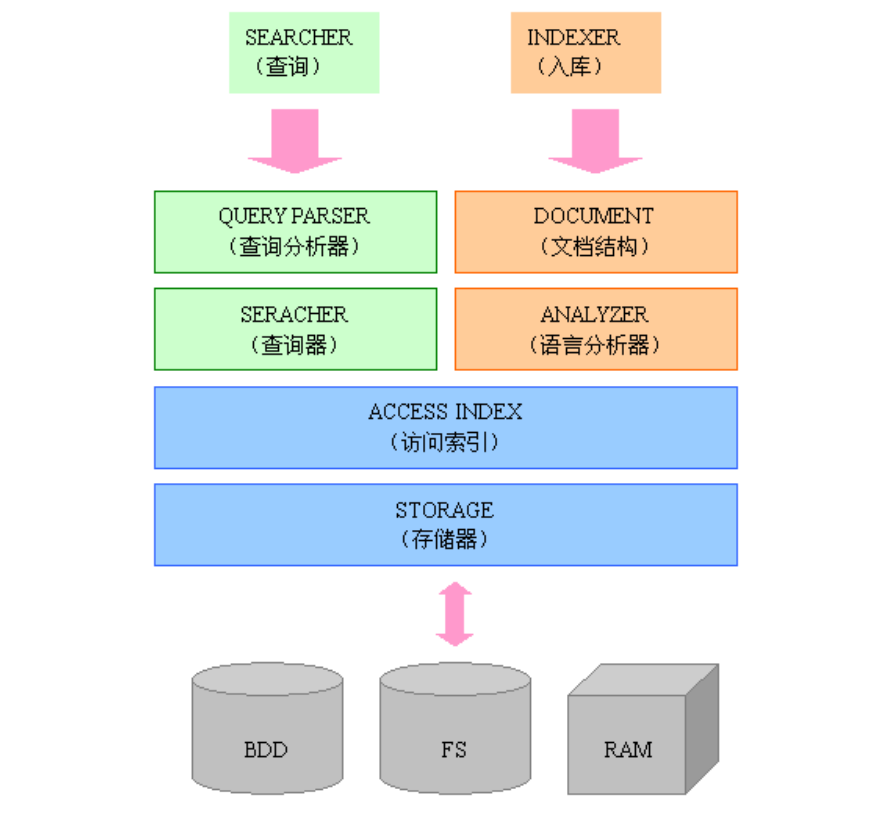
Lucene是一个用Java写的高性能、可伸缩的全文检索引擎工具包,它可以方便的嵌入到各种应用中实现针对应用的全文索引、检索功能。Lucene的目标是为各种中小型应用程序加入全文检索功能
索引创建流程
第一步:采集一些要索引的原文档数据
采集数据分类:
1、对于互联网上网页,可以使用工具将网页抓取到本地生成html文件。
2、数据库中的数据,可以直接连接数据库读取表中的数据。
3、文件系统中的某个文件,可以通过I/O操作读取文件的内容。
第二步:创建文档对象,进行语法分析,将文档传给分词器(Tokenizer)形成一系列词(Term)
获取原始内容的目的是为了索引,在索引前需要将原始内容创建成文档(Document),文档中包括一个一个的域(Field),域中存储内容,再对域中的内容进行分析,分析成为一个一个的单词(Term)。每个Document可以有多个Field。
第三步:索引创建,将得到的词传给索引组件(Indexer)形成倒排索引结构
对所有文档分析得出的词汇单元进行索引,索引的目的是为了搜索,最终要实现只搜索被索引的语汇单元从而找到Document(文档)。
创建索引是对语汇单元索引,通过词语找文档,这种索引的结构叫倒排索引结构。
第四步:通过索引存储器,将索引写入到磁盘
Java代码实现索引创建
引入依赖:
<dependency> <groupId>org.apache.lucene</groupId> <artifactId>lucene-core</artifactId> <version>${lucene-version}</version> </dependency> <dependency> <groupId>org.apache.lucene</groupId> <artifactId>lucene-queryparser</artifactId> <version>${lucene-version}</version> </dependency> <dependency> <groupId>org.apache.lucene</groupId> <artifactId>lucene-analyzers-common</artifactId> <version>${lucene-version}</version> </dependency> <dependency> <groupId>commons-io</groupId> <artifactId>commons-io</artifactId> <version>2.5</version> </dependency>public class TestLuceneIndex { public static void main(String[] args) throws Exception{ // 1. 采集数据 List<Book> bookList = new ArrayList<Book>(); Book book1=new Book(); book1.setId(1); book1.setName("Lucene"); book1.setPrice(new BigDecimal("100.45")); book1.setDesc("Lucene Core is a Java library providing powerful indexing\n" + "and search features, as well as spellchecking, hit highlighting and advanced\n" + "analysis/tokenization capabilities. The PyLucene sub project provides Python\n" + "bindings for Lucene Core"); bookList.add(book1); Book book2=new Book(); book2.setId(2); book2.setName("Solr"); book2.setPrice(new BigDecimal("66.45")); book2.setDesc("Solr is highly scalable, providing fully fault tolerant\n" + "distributed indexing, search and analytics. It exposes Lucene's features through\n" + "easy to use JSON/HTTP interfaces or native clients for Java and other languages"); bookList.add(book2); Book book3=new Book(); book3.setId(3); book3.setName("Hadoop"); book3.setPrice(new BigDecimal("318.33")); book3.setDesc("The Apache Hadoop software library is a framework that\n" + "allows for the distributed processing of large data sets across clusters of\n" + "computers using simple programming models"); bookList.add(book3); //2. 创建docment文档对象 List<Document> documents = new ArrayList<>(); bookList.forEach(x->{ Document document=new Document(); document.add(new TextField("id",x.getId().toString(), Field.Store.YES)); document.add(new TextField("name",x.getName(), Field.Store.YES)); document.add(new TextField("price",x.getPrice().toString(), Field.Store.YES)); document.add(new TextField("desc",x.getDesc(), Field.Store.YES)); documents.add(document); }); //3.创建Analyzer分词器,对文档分词 Analyzer analyzer=new StandardAnalyzer(); //创建Directory对象,声明索引库的位置 Directory directory=FSDirectory.open(Paths.get("D://lucene/index")); //创建IndexWriteConfig对象,写入索引需要的配置 IndexWriterConfig config=new IndexWriterConfig(analyzer); //4.创建IndexWriter对象,添加文档document IndexWriter indexWriter=new IndexWriter(directory,config); documents.forEach(doc-> { try { indexWriter.addDocument(doc); } catch (IOException e) { e.printStackTrace(); } }); //释放资源 indexWriter.close(); }}索引搜索流程
Java代码实现索引查询
public class TestLuceneSearch { public static void main(String[] args) throws IOException, ParseException { //1. 创建Query搜索对象 Analyzer analyzer=new StandardAnalyzer(); //创建搜索解析器 QueryParser queryParser=new QueryParser("id",analyzer); Query query=queryParser.parse("desc:data"); //2. 创建Directory流对象,声明索引库位置 Directory directory=FSDirectory.open(Paths.get("D:/lucene/index")); //3. 创建索引读取对象IndexReader IndexReader reader=DirectoryReader.open(directory); // 4. 创建索引搜索对象 IndexSearcher searcher= new IndexSearcher(reader); //5. 执行搜索,指定返回最顶部的10条数据 TopDocs topDocs = searcher.search(query, 10); ScoreDoc[] scoreDocs = topDocs.scoreDocs; //6. 解析结果集 Stream.of(scoreDocs).forEach(doc->{ //获取文档 Document document = null; try { document = searcher.doc(doc.doc); } catch (IOException e) { e.printStackTrace(); } System.out.println(document.get("name")); System.out.println(document.get("id")); }); reader.close(); }}Lucene存储对象是以Document为存储单元,对象中相关的属性值则存放到Field中。Field是文档中的域,包括Field名和Field值两部分,一个文档包括多个Field,Field值即为要索引的内容,也是要搜索的内容。
Field的三大属性:
是否做分词处理。是:即将Field值进行分词,分词的目的是为了索引。
是否进行索引,将Field分词后的词或整个Field值进行索引,索引的目的是为了搜索。
| Field类型 | 数据类型 | 是否分词 | 是否索引 | 是否存储 | 说明 |
|---|---|---|---|---|---|
| StringField(FieldName,FieldValue, Store.YES) | 字符串 | N | Y | Y/N | 字符串类型Field, 不分词, 作为一个整体进行索引(如: 身份证号, 订单编号), 是否需要存储由Store.YES或Store.NO决定 |
| TextField(FieldName,FieldValue, Store.NO) | 文本类型 | Y | Y | Y/N | 文本类型Field,分词并且索引,是否需要存储由Store.YES或Store.NO决定 |
| LongField(FieldName,FieldValue, Store.YES) 或LongPoint(String name,int... point)等 | 数值型代表 | Y | Y | Y/N | 在Lucene 6.0中,LongField替换为LongPoint,IntField替换为IntPoint,FloatField替换为FloatPoint,DoubleField替换为DoublePoint。对数值型字段索引,索引不存储。要存储结合StoredField即可。 |
| StoredField(FieldName,FieldValue) | 支持多种类型 | N | N | Y | 构建不同类型的Field,不分词,不索引,要存储 |
public static void main(String[] args) throws IOException { // 1. 采集数据 List<Book> bookList = Book.buildBookData(); List<Document> documents=new ArrayList<>(); bookList.forEach(book -> { Document document=new Document(); Field id=new IntPoint("id",book.getId()); Field id_v=new StoredField("id",book.getId()); Field name=new TextField("name",book.getName(),Field.Store.YES); Field price=new FloatPoint("price",book.getPrice().floatValue()); Field desc=new TextField("desc",book.getDesc(),Field.Store.NO); document.add(id); document.add(id_v); document.add(name); document.add(price); document.add(desc); documents.add(document); }); StandardAnalyzer analyzer = new StandardAnalyzer(); Directory directory=FSDirectory.open(Paths.get("D:/lucene/index2")); IndexWriterConfig indexWriterConfig=new IndexWriterConfig(analyzer); IndexWriter indexWriter=new IndexWriter(directory,indexWriterConfig); documents.forEach(doc-> { try { indexWriter.addDocument(doc); } catch (IOException e) { e.printStackTrace(); } }); indexWriter.close(); }indexWriter.addDocument(document);根据Term项删除
indexWriter.deleteDocuments(new Term("name", "solr"));全部删除
indexWriter.deleteAll();public static void main(String[] args) throws IOException { Analyzer analyzer=new StandardAnalyzer(); Directory directory=FSDirectory.open(Paths.get("d:/lucene/index2")); IndexWriterConfig config=new IndexWriterConfig(analyzer); IndexWriter indexWriter=new IndexWriter(directory,config); Document document=new Document(); document.add(new TextField("id","1002", Field.Store.YES)); document.add(new TextField("name","修改后", Field.Store.YES)); indexWriter.updateDocument(new Term("name","solr"),document); indexWriter.close(); }分词器相关概念
分词器:采集到的数据会存储到Document对象的Field域中,分词器就是将Document中Field的value的值切分为一个一个的词。
停用词:停用词是为了节省存储空间和提高搜索效率,搜索程序在索引页面或处理搜索请求时回自动忽略某些字或词,这些字或词被称为Stop Wordds(停用词)。比如语气助词、副词、介词、连接词等。如:“的”、“啊”、“a”、“the”
扩展词:就是分词器默认不会切出的词,但我们希望分词器切出这样的词
借助一些工具,我们可以看到分词后的结果: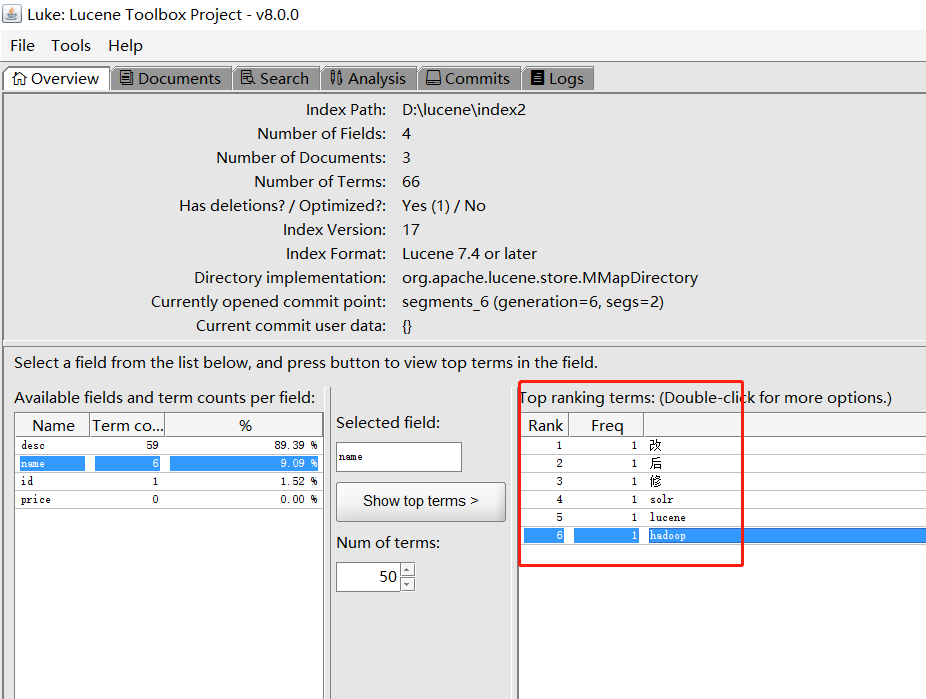
可以看出他将我们的词“修改后”分为了3个字:“修”、“改”、“后”。另外英文是按照一个个单词分的。
中文分词器
英文是以单词为单位的,单词与单词之间以空格或逗号分开,所以英文程序是比较好处理的。
而中文是以字为单位,字又组成词,字和词又组成句子。比如“我爱吃红薯”,程序不知道“红薯”是一个词语还是“吃红”是一个词语。
为了解决这个问题,中文分词器IKAnalyzer应运而生
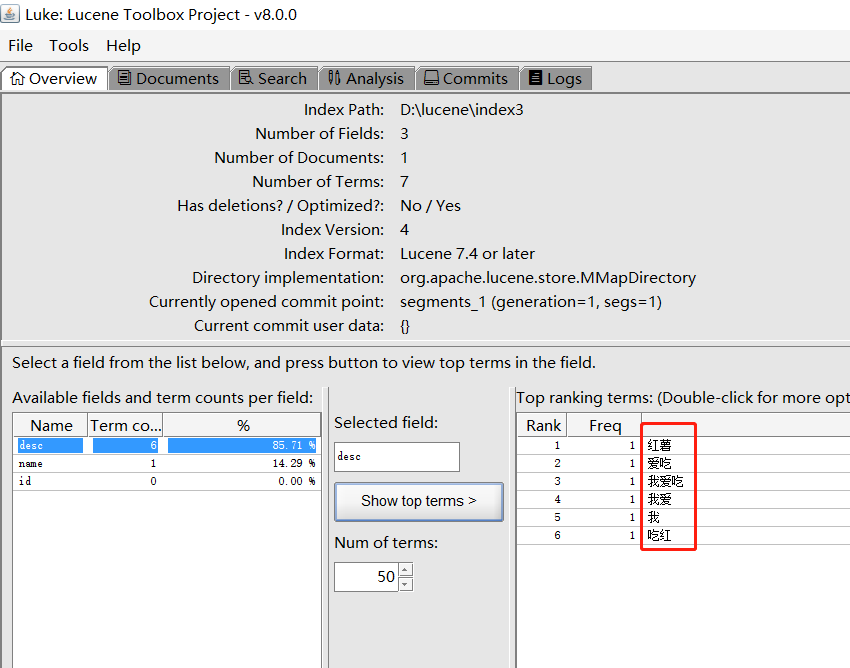
可以看出它把“我爱吃红薯”分成了很多个符合我们语义的词语了。但是里面有一个“吃红”我们是不需要的。这种就需要我们自己自定义配置
扩展中文词库
如果想配置扩展词和停用词,就创建扩展词的文件和停用词的文件。ik给我们提供了自定义配置的扩展,从IKAnalyzer.cfg.xml配置文件可以看出:
<?xml version="1.0" encoding="UTF-8"?><!DOCTYPE properties SYSTEM "http://java.sun.com/dtd/properties.dtd"> <properties> <comment>IK Analyzer 扩展配置</comment> <!--用户可以在这里配置自己的扩展字典 --> <entry key="ext_dict">ext.dic;</entry> <!--用户可以在这里配置自己的扩展停止词字典--> <entry key="ext_stopwords">stopword.dic;</entry> </properties>我们新建一个ext.dic,并配上“吃红”。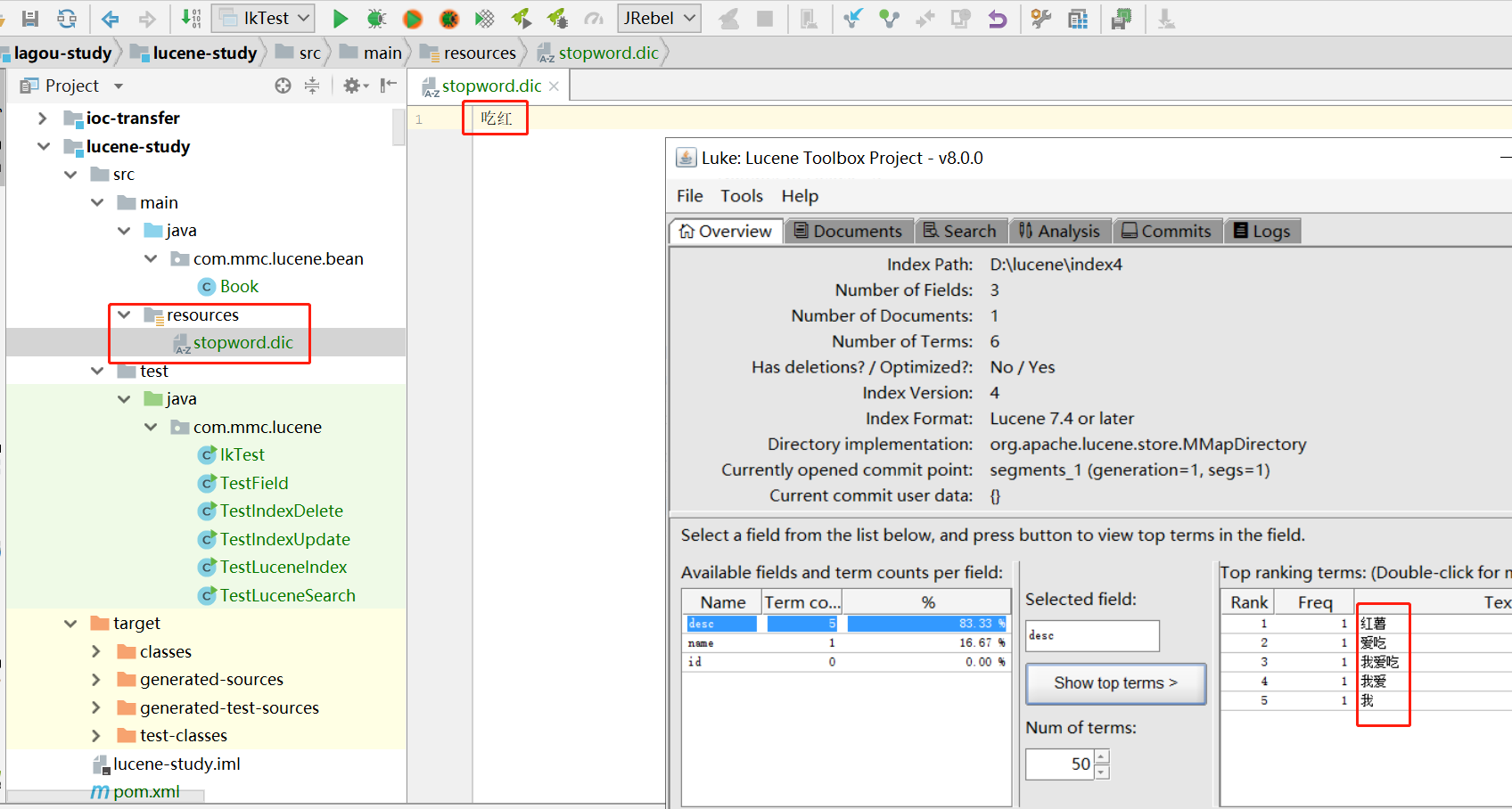
现在看就没有“吃红”这个词了。扩展词典同理。
注意:不要用window自带的记事本保存扩展词文件和停用词文件,那样的话,格式中是含有bom的
创建查询的两种方式。
1)使用Lucene提供的Query子类
2)使用QueryParse解析查询表达式
Query子类
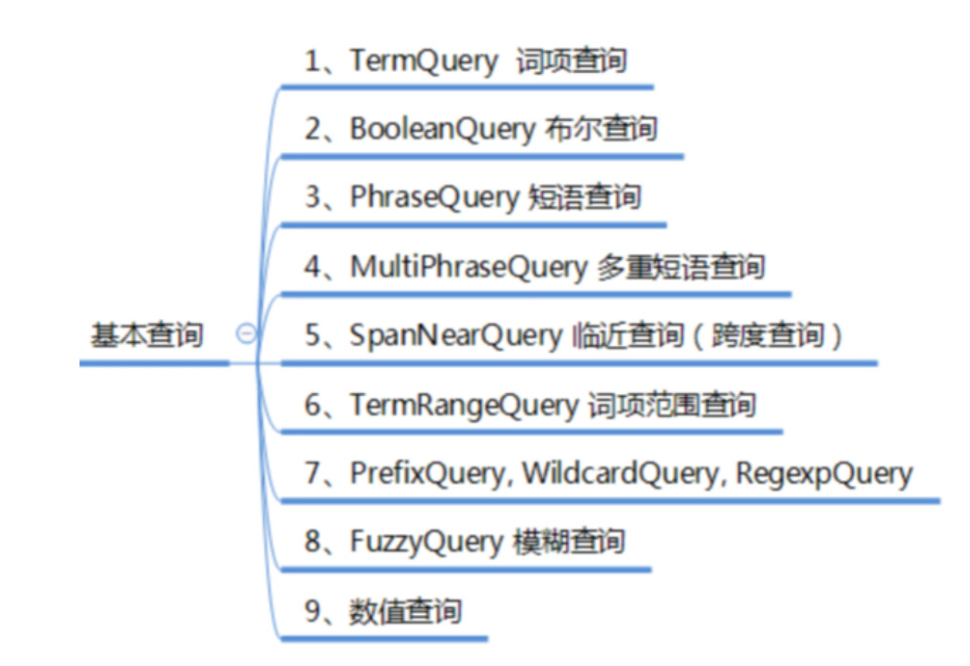
TermQuery词项查询,TermQuery不使用分词器,精确搜索Field域中的词。
public class TestSearch { public static void main(String[] args) throws IOException { Query query=new TermQuery(new Term("name","solr")); doSearch(query); } private static void doSearch(Query query) throws IOException { Directory directory=FSDirectory.open(Paths.get("D:/lucene/index")); IndexReader indexReader=DirectoryReader.open(directory); IndexSearcher searcher=new IndexSearcher(indexReader); TopDocs topDocs = searcher.search(query, 10); System.out.println("查询到数据的总条数:"+topDocs.totalHits); Stream.of(topDocs.scoreDocs).forEach(doc->{ //根据docId查询文档 Document document = null; try { document = searcher.doc(doc.doc); } catch (IOException e) { e.printStackTrace(); } System.out.println(document); }); }}BooleanQuery,实现组合条件查询。
public static void testBooleanQuery() throws IOException { Query query1=new TermQuery(new Term("name","lucene")); Query query2=new TermQuery(new Term("desc","java")); BooleanQuery.Builder builder = new BooleanQuery.Builder(); builder.add(query1,BooleanClause.Occur.MUST); builder.add(query2,BooleanClause.Occur.SHOULD); doSearch(builder.build()); }组合关系代表的意思如下:
PhraseQuery phraseQuery = new PhraseQuery("desc","lucene");两个短语中间有间隔词的查询:
PhraseQuery phraseQuery = new PhraseQuery(3,"desc","lucene","java");能把类似的句子查出来:
Lucene Core is a Java library providing
lucene和java之间隔了3个词语
4. 跨度查询
两个词语之间有其他词语的情况的查询
public static void testSpanTermQuery() throws IOException { SpanTermQuery tq1 = new SpanTermQuery(new Term("desc", "lucene")); SpanTermQuery tq2 = new SpanTermQuery(new Term("desc", "java")); SpanNearQuery spanNearQuery = new SpanNearQuery(new SpanQuery[] { tq1, tq2 },3,true); doSearch(spanNearQuery); }WildcardQuery:通配符查询,*代表0或多个字符,?代表1个字符,\是转义符。通配符查询会比较慢,不可以通配符开头(那样就是所有词项了)
public static void testWildcardQuery() throws IOException { WildcardQuery wildcardQuery=new WildcardQuery(new Term("name","so*")); doSearch(wildcardQuery); }FuzzyQuery:允许查询中有错别字
FuzzyQuery fuzzyQuery = new FuzzyQuery(new Term("name", "slors"), 2);如上面的我把solr打成了slors,也能查询到,上面的参数2代表错别字能错多少个,此参数最大为2.
通过 IntPoint, LongPoint,FloatPoint,DoublePoint中的方法构建对应的查询。
public static void testPointQuery() throws IOException { Query query = IntPoint.newRangeQuery("id", 1, 4); doSearch(query); }QueryParser搜索
查询语法:
Field域名 +":"+搜索的关键字。 例如: name:java
Field域名+":"+[最小值 TO 最大值]。例如: size:[A TO C]
注意:QueryParser不支持对数字范围的搜索,支持的是字符串范围
有两种写法:
写法一:
使用+、减号和不用符号
| 逻辑 | 实现 |
|---|---|
| Occur.MUST 查询条件必须满足,相当于AND | +(加号) |
| Occur.SHOULD 查询条件可选,相当于OR | 空(不用符号) |
| Occur.MUST_NOT 查询条件不能满足,相当于NOT非 | -(减号) |
示例:
+filename:lucene + content:lucene+filename:lucene content:lucenefilename:lucene content:lucene-filename:lucene content:lucene写法二:
使用 AND、OR 、NOT
QueryParser
public static void testQueryParser() throws ParseException, IOException { Analyzer analyzer=new StandardAnalyzer(); QueryParser queryParser=new QueryParser("desc",analyzer); Query query = queryParser.parse("desc:java AND name:lucene"); doSearch(query); }MultiFieldQueryParser
多个Field的查询,以下查询等同于:name:lucene desc:lucene
public static void testSearchMultiFieldQuery() throws IOException, ParseException { Analyzer analyzer=new IKAnalyzer(); String[] fields={"name","desc"}; MultiFieldQueryParser multiFieldQueryParser=new MultiFieldQueryParser(fields,analyzer); Query query = multiFieldQueryParser.parse("lucene"); System.out.println(query); doSearch(query); }StandardQueryParser
public static void testStandardQuery() throws QueryNodeException, IOException { Analyzer analyzer=new StandardAnalyzer(); StandardQueryParser parser = new StandardQueryParser(analyzer); Query query = parser.parse("desc:java AND name:lucene", "desc"); System.out.println(query); doSearch(query); }其他查询:
/通配符匹配 建议通配符在后 通配符在前效率低query = parser.parse("name:L*","desc");query = parser.parse("name:L???","desc");//模糊匹配query = parser.parse("lucene~","desc");//区间查询query = parser.parse("id:[1 TO 100]","desc");//跨度查询 ~2表示词语之间包含两个词语query= parser.parse("\"lucene java\"~2","desc");
