由于工作中项目需求,需要将H5转换为Flutter代码。
其中的斑马纹背景需要根据接口返回的颜色来渲染,所以不能只是图片形式,无法通过decoration属性配置图片背景板。
楼主这边想到的方法就是通过 实现一个canvas绘制斑马纹类。使用Stack布局,将斑马纹放在下方作为背景板,需要展示的内容在上方。
实现 “斑马纹”背景(需要变换颜色)
文章主要分为 效果图、实现思维、代码、计算过程解释。希望对大家有所帮助

使用CustomPaint(size: Size(width, height), painter: 画笔)
CustomPaint( size: Size(widget.width, widget.height), painter: 画笔,)继承 CustomPainter类,实现paint(Canvas canvas, Size size)方法,根据 宽度、高度、画笔宽度、间距 计算出各个点位。使用canvas. drawLine方法 绘制出斑马纹。
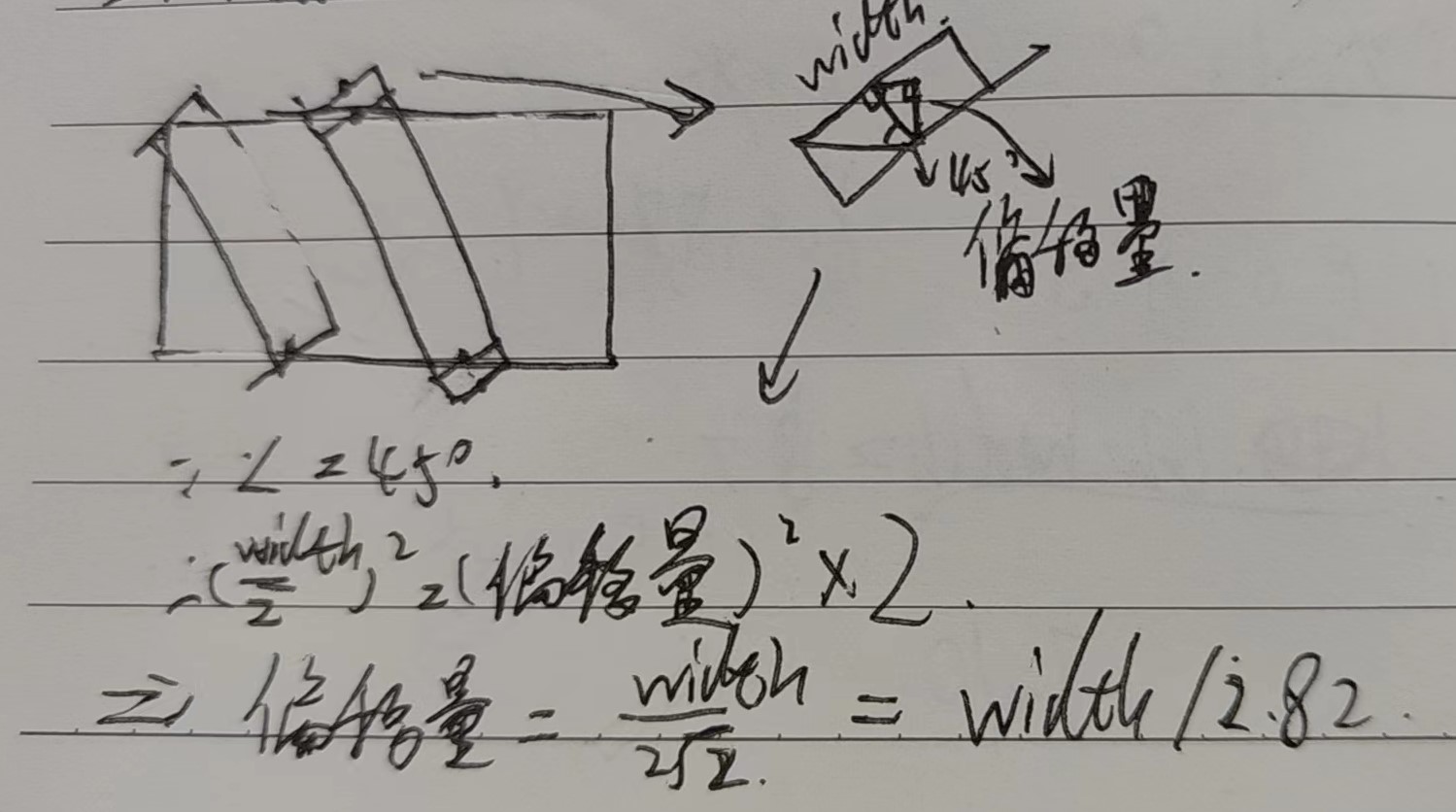
@overridevoid paint(Canvas canvas, Size size) { … canvas. drawLine();}2.82 = 2倍根号2
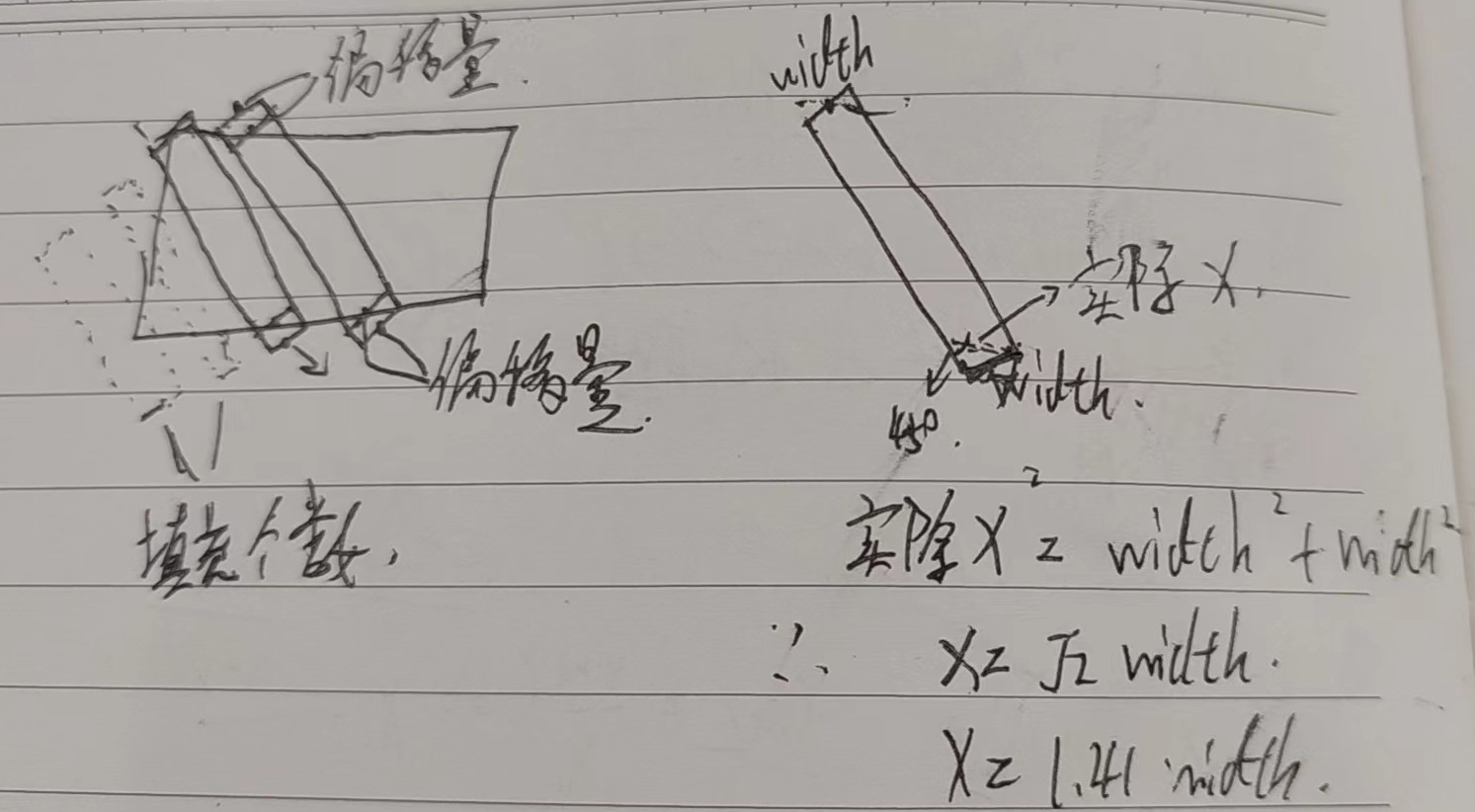
1.41 = 根号二
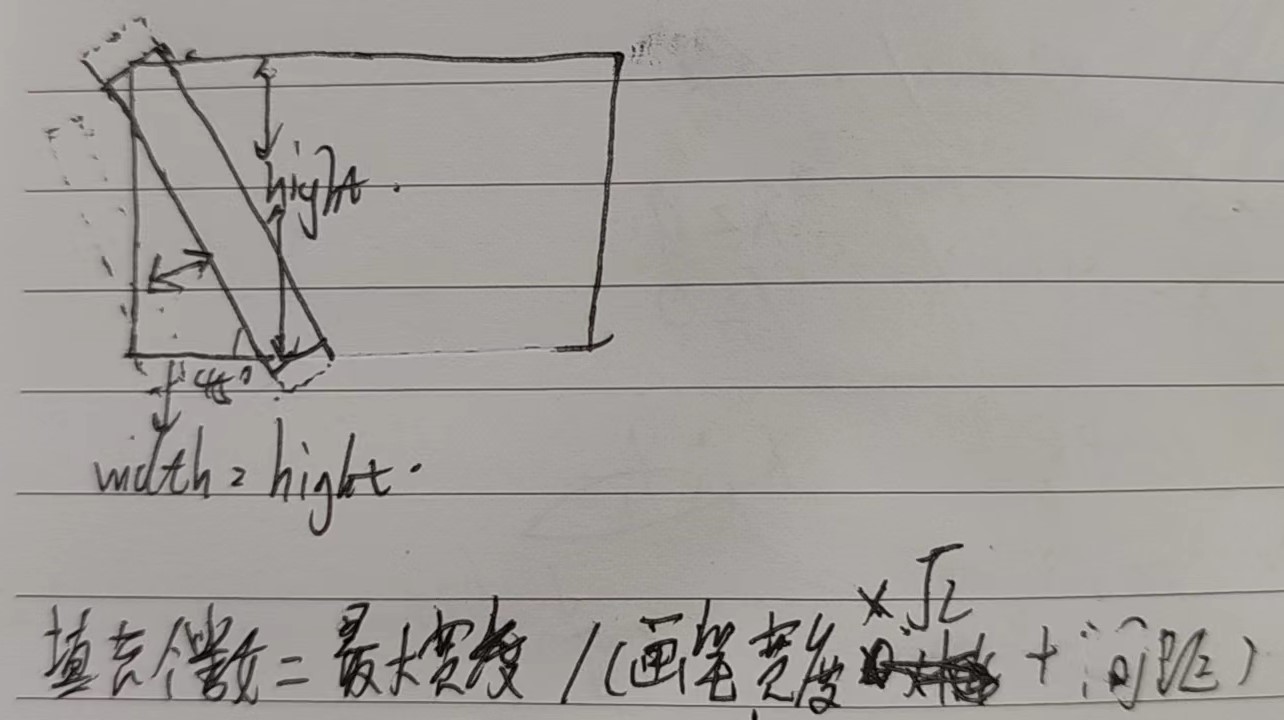
填充个数= 最大高度 / (画笔宽度1.41+间距) 向上取整。(从0, 0开始,左侧会露出空位,所以需要填充)
条纹个数 = 宽度/(画笔宽度1.41+间距) 向上取整。
(x轴y轴) 偏移量 =画笔宽度 / 2.82 (画笔起始点、结束点会露出一小节,需要计算x,y偏移量。将左上角x,y减去偏移量,右下角x,y加上偏移量,补充此部分)
起点坐标 =((画笔宽度1.41+间距) * 条纹index – 偏移量,– 偏移量)
终点坐标 =((画笔宽度1.41+间距) * 条纹index - 偏移量+高度, 高度+偏移量)
由于画笔绘制的是直角的,所以作为背景板会超出,需要裁剪掉四个角。使用
ClipRRect( borderRadius: BorderRadius.all(Radius.circular(10)), child: xxx)使用Stack布局,实现斑马纹在下方作为背景板,需要展示的内容在上方
Stack( children: [ buildZebraBack(…), 需要展示的内容 ])Stack( children: [ Positioned( child: ZebraStripesBack( width: 335, height: 44, lineWidth: 10, spacing: 10, borderRaduis: 10, lineColor: Colors.blue), top: 0, left: 0, ), Container( width: 335, height: 44, alignment: Alignment.center, padding: EdgeInsets.only( top: 10, left: 12, bottom: 10, right: 12), child: Text( "英语", style: TextStyle( color: Color(0xFFFFFFFF), fontSize: 14.sp, fontWeight: FontWeight.w500), ) ) ])import 'dart:math';import 'package:flutter/material.dart';// 斑马纹具体实现类class ZebraStripesBack extends StatefulWidget { ZebraStripesBack({ this.width: 0, this.height: 0, this.spacing: 4, this.lineWidth: 4, this.lineColor: Colors.transparent, this.borderRaduis: 0, }); final double width; // 容器宽度 final double height; // 容器高度 final double lineWidth; // 斑马纹宽度 final double spacing; // 间距 final double borderRaduis; // 容器圆角 final Color lineColor; // 斑马纹颜色 @override State<StatefulWidget> createState() => _ZebraStripesBackState();}class _ZebraStripesBackState extends State<ZebraStripesBack> { @override void initState() { super.initState(); } @override void dispose() { super.dispose(); } @override Widget build(BuildContext context) { return ClipRRect( borderRadius: BorderRadius.all(Radius.circular(widget.borderRaduis)), child: CustomPaint( size: Size(widget.width, widget.height), painter: _ZebraStripesBackPainter( maxWidth: widget.width, maxHeight: widget.height, spacing: widget.spacing, lineWidth: widget.lineWidth, lineColor: widget.lineColor, borderRaduis: widget.borderRaduis, ), )); }}class _ZebraStripesBackPainter extends CustomPainter { _ZebraStripesBackPainter({ this.maxWidth: 0, this.maxHeight: 0, this.spacing: 4, this.lineWidth: 4, this.lineColor: Colors.black12, this.borderRaduis: 0, }); final double maxWidth; final double maxHeight; final double spacing; final double lineWidth; final Color lineColor; final double borderRaduis; @override void paint(Canvas canvas, Size size) { var paint = Paint() ..isAntiAlias = true ..style = PaintingStyle.fill ..color = lineColor ..strokeWidth = lineWidth; int number = 0; // 个数 int fillNumber = 0; // 填充个数 double lineAndSpace = lineWidth *1.41 + spacing; // 单个条纹宽 + 间距宽 if (lineWidth > 0) { number = (maxWidth / lineAndSpace).ceil(); fillNumber = (maxHeight / lineAndSpace).ceil(); // 填充个数 } double deviation = lineWidth / 2.82; // x y轴偏移量 = width / 2倍根号2 for (int i = -fillNumber; i < number; i++) { var left = lineAndSpace * i - deviation; double dx = left; double dy = -deviation; double dx1 = left + maxHeight; double dy1 = maxHeight + deviation; canvas.drawLine( Offset(dx, dy), Offset(dx1, dy1), paint, ); } } @override bool shouldRepaint(CustomPainter oldDelegate) => true;}