Servlet类最终开发步骤:
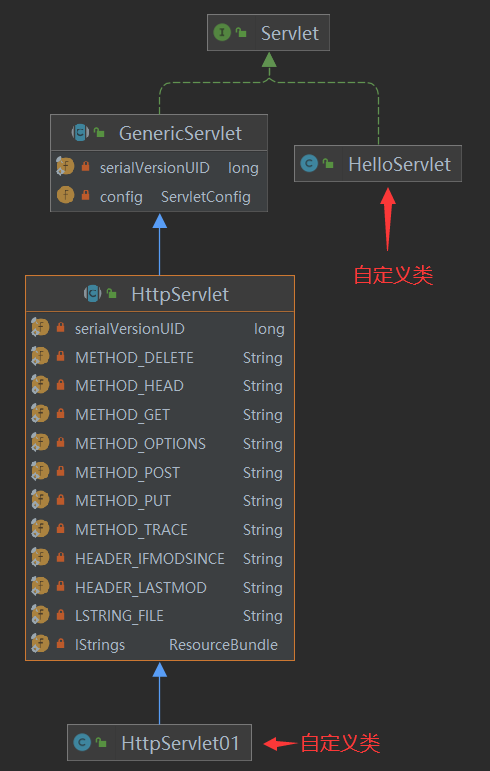
我们来了解一下GenericServlet:
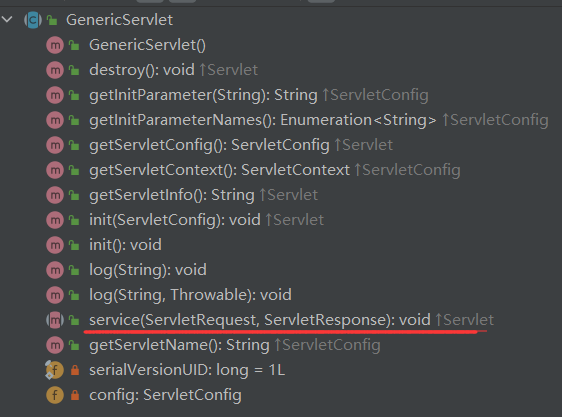
我们来了解一下HttpServlet:
protected void service(HttpServletRequest req, HttpServletResponse resp) throws ServletException, IOException { String method = req.getMethod(); long lastModified; if (method.equals("GET")) { lastModified = this.getLastModified(req); if (lastModified == -1L) { this.doGet(req, resp); } else { long ifModifiedSince; try { ifModifiedSince = req.getDateHeader("If-Modified-Since"); } catch (IllegalArgumentException var9) { ifModifiedSince = -1L; } if (ifModifiedSince < lastModified / 1000L * 1000L) { this.maybeSetLastModified(resp, lastModified); this.doGet(req, resp); } else { resp.setStatus(304); } } } else if (method.equals("HEAD")) { lastModified = this.getLastModified(req); this.maybeSetLastModified(resp, lastModified); this.doHead(req, resp); } else if (method.equals("POST")) { this.doPost(req, resp); } else if (method.equals("PUT")) { this.doPut(req, resp); } else if (method.equals("DELETE")) { this.doDelete(req, resp); } else if (method.equals("OPTIONS")) { this.doOptions(req, resp); } else if (method.equals("TRACE")) { this.doTrace(req, resp); } else { String errMsg = lStrings.getString("http.method_not_implemented"); Object[] errArgs = new Object[]{method}; errMsg = MessageFormat.format(errMsg, errArgs); resp.sendError(501, errMsg); } }doGet()、doPost()等等这些请求的方法就可以了。适配器:适配器就是一种适配中间件,它存在于不匹配的二者之间,用于连接二者,将不匹配变得匹配,简单点理解就是平常所见的转接头,转换器之类的存在。
public interface MyInterface { void m1(); void m2(); void m3(); void m4(); void m5(); void test(); //但是这个接口中我们常用的方法只有test(),我们在实现此接口的时候,还需要实现其他方法,很累赘。 //所以我们就需要一个适配器!}public abstract class Test implements MyInterface{ public void m1() { } public void m2() { } public void m3() { } public void m4() { } public void m5() { } //这是一个适配器 //在创建一个接口的实现类,我们将常用的方法设置为抽象的方法 //这样我们只需要继承该类,然后实现方法即可 public abstract void test();}public class Realize extends Test{ public void test() { //这样我们就不需要再去实现接口中的 其他方法了 }}模板方法模式:是一种行为设计模式, 它在超类中定义了一个算法的框架, 允许子类在不修改结构的情况下重写算法的特定步骤。
模板方法模式建议将算法分解为一系列步骤, 然后将这些步骤改写为方法, 最后在 “模板方法” 中依次调用这些方法。 步骤可以是 抽象的, 也可以有一些默认的实现。 为了能够使用算法, 客户端需要自行提供子类并实现所有的抽象步骤。 如有必要还需重写一些步骤 (但这一步中不包括模板方法自身)。
认真的去阅读上面这段话:你就会发现他说将 算法进行分解,最后在模板中依次调用:
protected void service(HttpServletRequest req, HttpServletResponse resp) throws ServletException, IOException { String method = req.getMethod(); long lastModified; if (method.equals("GET")) { lastModified = this.getLastModified(req); if (lastModified == -1L) { this.doGet(req, resp); } else { long ifModifiedSince; try { ifModifiedSince = req.getDateHeader("If-Modified-Since"); } catch (IllegalArgumentException var9) { ifModifiedSince = -1L; } if (ifModifiedSince < lastModified / 1000L * 1000L) { this.maybeSetLastModified(resp, lastModified); this.doGet(req, resp); } else { resp.setStatus(304); } } } else if (method.equals("HEAD")) { lastModified = this.getLastModified(req); this.maybeSetLastModified(resp, lastModified); this.doHead(req, resp); } else if (method.equals("POST")) { this.doPost(req, resp); } else if (method.equals("PUT")) { this.doPut(req, resp); } else if (method.equals("DELETE")) { this.doDelete(req, resp); } else if (method.equals("OPTIONS")) { this.doOptions(req, resp); } else if (method.equals("TRACE")) { this.doTrace(req, resp); } else { String errMsg = lStrings.getString("http.method_not_implemented"); Object[] errArgs = new Object[]{method}; errMsg = MessageFormat.format(errMsg, errArgs); resp.sendError(501, errMsg); } }if、else if、else 这不就是所谓的将算法分块提炼了出来吗?然后我们只需要去刻画doGet()、doPost()等方法,程序的主框架是不变的,只是其中的细节需要我们自己去实现。
<load-on-startup>1</load-on-startup>配置,指定改Servlet对象在Web应用启动时创建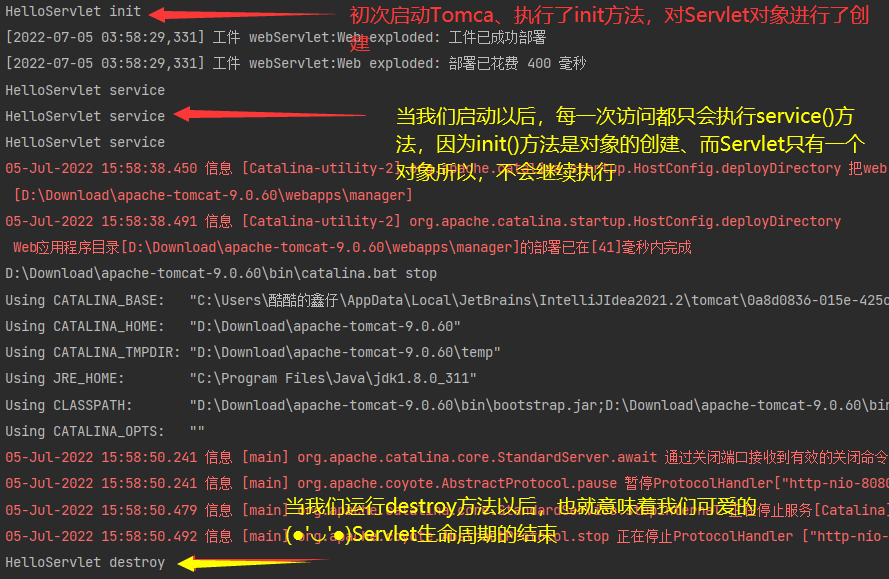
只要用户发送一次请求,service方法必然会被Tomcat调用一次。
关于Servlet类中方法的调用次数:
什么时候使用destroy方法:
request.getRequestDispatcher('/b');<url-pattern>/helloServlet</url-pattern>url-pattern匹配规则:
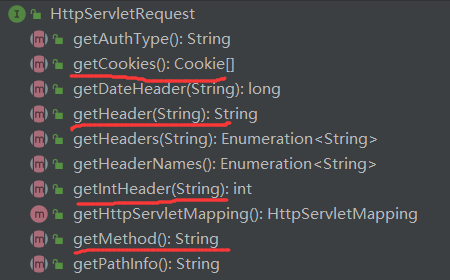
● 在浏览器的url里发送,以查询字符串方式拼接参数(?key=value&key1=value1)
● 使用Ajax,设置请求类型为GET,在请求url后拼接查询字符串
● 用form表单发送
/** * GET,发送的请求参数在请求行内, * 请求行的信息会由Tomcat自动解码 (utf-8) */ @Override protected void doGet(HttpServletRequest req, HttpServletResponse resp) throws ServletException, IOException { System.out.println("HTTPServletOne doGet"); // 1 获取请求参数 System.out.println("根据getParameter获取请求参数值 :"+req.getParameter("name")); // 2获取所有参数名 Enumeration<String> paras = req.getParameterNames(); String s = null; while (paras.hasMoreElements()) { s = paras.nextElement(); System.out.println("根据getParameterNames得到的参数名:"+s +"参数值:"+ req.getParameter(s)); } }● form表单传输,指定请求方式为POST,默认Content-Type为application/x-www-form-urlencoded
/** * 发送POST请求,请求参数都在请求体里 * 请求体的内容由Servlet进行解析,默认编码规范为ISO * 必须指定请求头 Content-Type */ @Override protected void doPost(HttpServletRequest req, HttpServletResponse resp) throws ServletException, IOException { System.out.println("HTTPServletOne doPost"); // 0 设置请求处理字符集 req.setCharacterEncoding("utf-8"); // 1.获取请求参数 System.out.println("根据getParameter获取请求参数值 :"+req.getParameter("name")); }● Ajax传输,指定请求方式为POST,必须添加Content-Type为application/x-www-form-urlencoded;charset=utf-8
/** * 发送POST请求,请求参数都在请求体里 * 请求体的内容由Servlet进行解析,默认编码规范为ISO */ @Override protected void doPost(HttpServletRequest req, HttpServletResponse resp) throws ServletException, IOException { System.out.println("HTTPServletOne doPost"); // 0 设置请求处理字符集 req.setCharacterEncoding("utf-8"); // 1 获取JSON数据 // 2 reader输入流, 是从请求体开始读的 BufferedReader reader = req.getReader(); String s = null; StringBuilder sb = new StringBuilder(); while ((s = reader.readLine()) != null) { sb.append(s); } String json = sb.toString(); // 3 通过FastJson 工具进行解析 Person person = JSON.parseObject(json, Person.class); System.out.println(person); }● 附上前端代码
<!DOCTYPE html><html lang="en"><head> <meta charset="UTF-8"> <title>Title</title> <script type="text/javascript"> function onGet() { //ajax var xhr = new XMLHttpRequest(); xhr.open("GET","http://localhost:8080/httpServlet01?name=123&age=12"); xhr.send(); } function onPost() { //ajax //用GET方式发送的请求参数在请求行内,请求行内的信息会由Tomcat自动解码(utf-8) //如果用POST请求,所有参数都放在了请求体里, //但是请求体的内容不是Tomcat解析的, 是由Servlet进行解析的,默认的编码规范为ISO //则需要声明请求头格式:application/x-www-form-urlencoded //表单发送的话 会默认加上这个类型 var xhr = new XMLHttpRequest(); xhr.open("POST","http://localhost:8080/httpServlet01"); xhr.setRequestHeader("Content-Type","application/json;charset=utf-8") xhr.send("{'name':'123'}"); } function onPut() { //ajax var xhr = new XMLHttpRequest(); xhr.open("PUT","http://localhost:8080/httpServlet01"); xhr.send(); } function onDelete() { //ajax var xhr = new XMLHttpRequest(); xhr.open("DELETE","http://localhost:8080/httpServlet01"); xhr.send(); } </script></head><body> <h1>Hello,Servlet!</h1> <button onclick="onGet()">发送GET请求</button> <button onclick="onPost()">发送POST请求</button> <button onclick="onPut()">发送PUT请求</button> <button onclick="onDelete()">发送DELETE请求</button></body></html>