如何获取前端传来的数据:
String getParameter(String name) // 获取value中第一个元素(最常用)Map<String,String[]> getParameterMap() // 获取键值对的整个集合Enumeration<String> getParameterNames() // 获取所有键keyString[] getParameterValues(java.lang.String name) // 通过key获取值转发和重定向:
转发
//转发都是一次请求//因为他们用的都是当前的Servlet//转发以后它的地址仍然不变//我们每次转发也可以把页面的数据带过去放到作用域里request.setAttribute("user",user);//这样我们在另外一个页面中,也可以获得这个user对象的信息request.getAttribute("user");request.getRequestDispatcher("/list").forward(request,response);//这里再介绍一个方法//这个方法也是转发,只不过是我们转发到list这个页面以后,拿到这个页面的数据,然后再返回到当前页面 req.getRequestDispatcher("/list").include(req,resp);重定向
//重定向要写绝对路径resp.sendRedirect("req.getContextPath() + /list");选择哪个
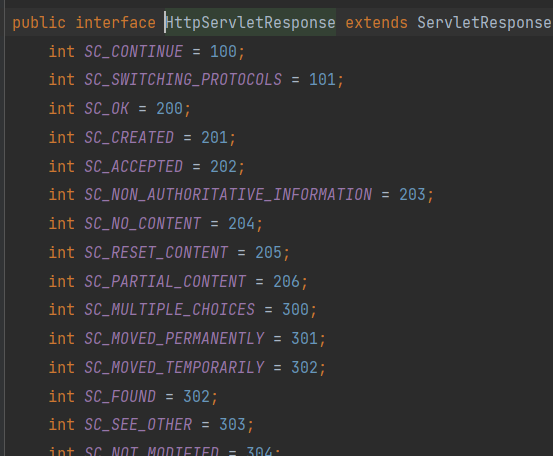
通过观察HttpServletResponse这个接口,我们可以发现它里面定义了很多状态码。
一般 200 就是 ok了
以 4xx这种 一般都是路径写错了,没有找到资源
以 5xx 这种都是后端代码有问题,或者写错了。
| 状态 | 类别 | 原因 |
|---|---|---|
| 1xx | Informational(信息性状态码) | 接受的请求正在处理 |
| 2xx | Success(成功状态码) | 请求正常处理完毕 |
| 3xx | Redirection(重定向) | 需要进行附加操作以完成请求 |
| 4xx | Client error(客户端错误) | 客户端请求出错,服务器无法处理请求 |
| 5xx | Server Error(服务器错误) | 服务器处理请求出错 |
void setContentType(String var1);这个方法来设置数据的响应类型以及编码格式这里演示一个利用ajax从服务器拿到json数据进行解析的小案例:
public void doGet(HttpServletRequest request, HttpServletResponse response) throws ServletException, IOException { response.setContentType("application/json;charset=utf-8"); PrintWriter out = response.getWriter(); //3.响应一段JSON数据 out.println("[{\"name\":\"lx\"},{\"age\":123}]");<script type="text/javascript"> function onJson() { //1.发送ajax请求获取JSON数据 var xhr = new XMLHttpRequest(); xhr.open("GET","/outServlet");//绝对路径 xhr.send(); xhr.onload = function () { //JSON.stringify()是将一个对象格式化成JSON数据 //JSON.parse()是用来解析JSON数据 var arr = JSON.parse(xhr.responseText); arr.forEach((k,v) => { console.log(k,v); }); //这样我们就能拿到服务器返回的json数据,可以利用ajax进行页面的渲染。 } } </script>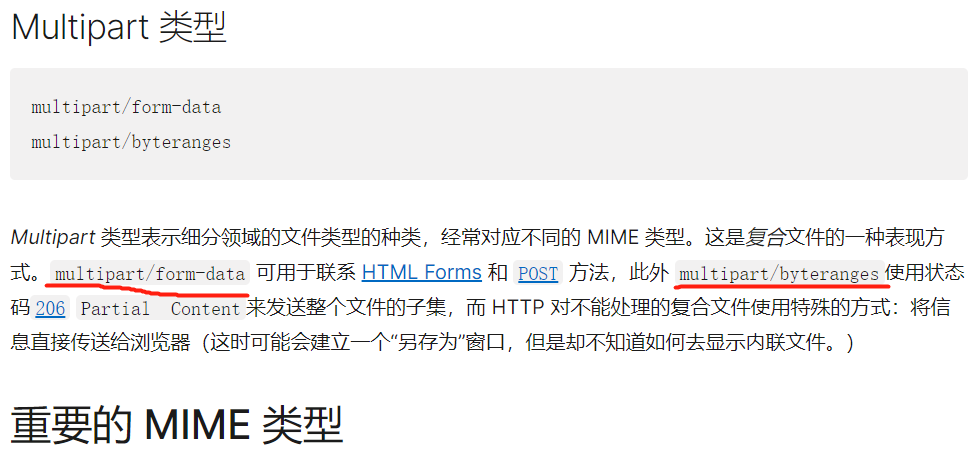
multipart/form-data 可用于HTML 表单从浏览器发送信息给服务器。作为多部分文档格式,它由边界线(一个由'--'开始的字符串)划分出的不同部分组成。每一部分有自己的实体,以及自己的 HTTP 请求头,Content-Disposition和 Content-Type 用于文件上传领域,最常用的 (Content-Length 因为边界线作为分隔符而被忽略)。
1.首先了解response.setContentType("application/force-download");这个方法是强制下载。当我们的浏览器一旦接收到这个请求就会问我们是否进行文件的下载。
2.我们可以通过response.setHeader("Content-Length","文件大小");的方法来设置我们的文件下载大小。
3.根据规范,我们进行设置response.setHeader("Content-Disposition","attachment;filename=test.txt");
public void doGet(HttpServletRequest request, HttpServletResponse response) throws ServletException, IOException { //响应文件 String str = "我靠怎么回事I'm lx,Hello!~~哈哈哈"; //设置强制提示下载 response.setContentType("application/force-download"); //设置文件的大小 response.setHeader("Content-Length","" + str.length()); //根据multipart/form-data规范 response.setHeader("Content-Disposition","attachment;filename=test.txt"); ServletOutputStream out = response.getOutputStream(); //getBytes()默认使用utf-8 //我们这里的getBytes方法已经默认使用了utf-8编码格式,大家可以去看一下源码 out.write(str.getBytes()); }<form action="http://localhost:8000/" method="post" enctype="multipart/form-data"> <!-- 这个enctype="multipart/form-data" 一定要设置!--> <!--与此同时我们也一定要在web.xml中的<Servlet>中配置<multipart-config>来告诉它 因为Servlet是一种懒加载机制,非常的懒,如果我们不去配置,它是不会自己拥有这个功能的,也是为了节省资源吧 --> <input type="text" name="myTextField"> <input type="checkbox" name="myCheckBox">Check</input> <input type="file" name="myFile"> <button>Send the file</button></form>POST / HTTP/1.1Host: localhost:8000User-Agent: Mozilla/5.0 (Macintosh; Intel Mac OS X 10.9; rv:50.0) Gecko/20100101 Firefox/50.0Accept: text/html,application/xhtml+xml,application/xml;q=0.9,*/*;q=0.8Accept-Language: en-US,en;q=0.5Accept-Encoding: gzip, deflateConnection: keep-aliveUpgrade-Insecure-Requests: 1Content-Type: multipart/form-data; boundary=---------------------------8721656041911415653955004498Content-Length: 465//这个请求头也声明了使用boundary边界:-- + 字符串的形式,同时也声明了文件的大小,下面是请求体的内容-----------------------------8721656041911415653955004498Content-Disposition: form-data; name="myTextField"//你会发现这是四个边界,分成了三个模块//三个模块当中介绍了三部分信息,分别对应着我们的form表单//myTextField信息Test-----------------------------8721656041911415653955004498Content-Disposition: form-data; name="myCheckBox"//myCheckBox的信息on-----------------------------8721656041911415653955004498Content-Disposition: form-data; name="myFile"; filename="test.txt"Content-Type: text/plain//myFile 我们的文件Simple file.-----------------------------8721656041911415653955004498--public interface Part { //我们首先来了解一下Part这个接口 InputStream getInputStream() throws IOException; //获取请求类型 String getContentType(); //获取请求的名字 String getName(); //获取我们提交的文件名字 String getSubmittedFileName(); long getSize(); //将我们的文件信息,写入到我们传进来的路径中的文件里。 void write(String var1) throws IOException; void delete() throws IOException; //获得请求头信息 String getHeader(String var1); //遍历拿到所有请求头的信息 Collection<String> getHeaders(String var1); Collection<String> getHeaderNames();}第一种实现方式:
protected void doPost(HttpServletRequest request, HttpServletResponse response) throws ServletException, IOException { request.setCharacterEncoding("utf-8"); for(Part part:request.getParts()) { String name = part.getName(); System.out.println("name = " + name); String value = request.getParameter(name); System.out.println(value); //文件处理 if(part.getContentType() != null) { String path = "D:/uploads/" + part.getSubmittedFileName(); File file = new File(path); //如果我们直接使用 file.createNewFile() 那么如果此时父目录不存在,则也会报错。所以我们要通过父目录是否存在进行判断 File parentFile = file.getParentFile(); if(!parentFile.exists()) { //将所有的父级目录都创建出来 parentFile.mkdirs(); } //将我们拿到的文件信息,写入到这个路径中的文件里 part.write("path"); } } }第二种实现方式:
public void doGet(HttpServletRequest request, HttpServletResponse response) throws ServletException, IOException { request.setCharacterEncoding("utf-8"); String myTextField = request.getParameter("myTextField"); String myCheckBox = request.getParameter("myCheckBox"); //拿到文件信息 Part myFile = request.getPart("myFile"); //拿到我们的文件名称 String fileName = myFile.getSubmittedFileName(); //这里就是为了容错处理。我们将文件以 . 分割成两部分 String[] fs = fileName.split("[.]"); //我们随机生成一串字符 String uuid = UUID.randomUUID().toString(); //我们的文件路径以 父目录/文件名.前缀/当前时间戳/uuid随机字符串/ .后缀构成 String filePath = "D:/uploads/"+ fs[0] + "/" + System.currentTimeMillis() + "/" + uuid + fs[1]; File file = new File(filePath); //如果我们直接使用 file.createNewFile() 那么如果此时父目录不存在,则也会报错。所以我们要通过父目录是否存在进行判断 File parentFile = file.getParentFile(); if(!parentFile.exists()) { //将所有的父级目录都创建出来 parentFile.mkdirs(); } //将我们拿到的文件信息,写入到这个路径中的文件里 myFile.write("path"); }//这是在我们的Servlet中用的注解,就不过多的解释了。jakarta.servlet.annotation.WebServlet@WebServlet({"/list" , "/add" , "/detail" , "/del"})@WebFilter({"/a.do","/b.do"})public class MyFilter implements Filter {这里提到一个解决Servlet类爆炸的问题:
//模板类//目录链接@WebServlet({"/list" , "/add" , "/detail" , "/del"})public class ServletFinally extends HttpServlet { @Override protected void service(HttpServletRequest req, HttpServletResponse resp) throws ServletException, IOException { String servletPath = req.getServletPath(); if(servletPath.equals("/list")) { //根据请求进入相应的方法当中 doList(req,resp); } else if(servletPath.equals("/add")) { doAdd(req,resp); } } private void doList(HttpServletRequest req, HttpServletResponse resp) throws ServletException, IOException { //然后将我们的业务代码放里面 } private void doAdd(HttpServletRequest req, HttpServletResponse resp) throws ServletException, IOException { //然后将我们的业务代码放里面 }}四、结尾

