网络通讯之Socket-Tcp 分成2部分讲解:
网络通讯之Socket-Tcp(一):
1.如何理解Socket
2.Socket通信重要函数
3.Socket Tcp 调用的基本流程图
4.简单Socket实例
网络通讯之Socket-Tcp(二):
1.完善Socket实例【黏包拆包 收发数据】
2.优化Socket
3.Socket网络安全
黏包 拆包需要明白的概念:
客户端给服务器发(协议)消息,tcp是字节流的传输方式,所以我们给服务器发的消息 都需要转化为byte[]数组(包体或消息体)。
为了能够区分一个完整的消息,给服务器发数据包的时候,我们会把 消息体的长度(简称包头) 也写入内存流,这样我们就可以根据 包头的大小 来确定 从内存流中读取多少大小的消息体。
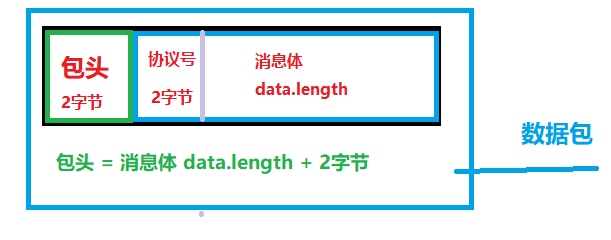
给服务器发的是这样的 数据包。
网络安全(通信安全):大家可行根据项目需求是否需要。
对消息体进行 压缩、异或加密、 crc校验、保证消息不被破解 更改。封装数据包之后形成 新数据包 。
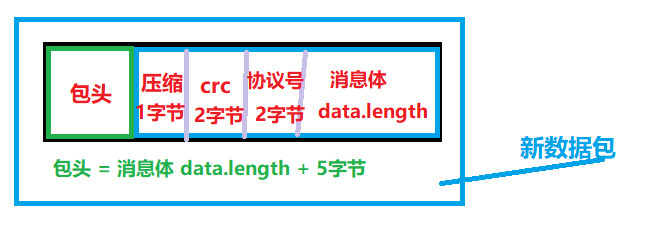
经过封装之后 ,给服务器发的是 新数据包。
Socket优化(通信优化):代码没实现,大家可自行实现
长时间的频繁收发包,导致手机网卡发热,为了防止这种现象,策略是 小包合大包,分帧处理。
实例上图:
客户端给服务器发送一个 赵不灰,服务器给客户端 回一个赵老三的消息。
按 A键 连接服务器,按 S键 发送消息给服务器。

先看服务器代码:
主Program.cs
1 using System; 2 using System.Net; 3 using System.Net.Sockets; 4 using System.Threading; 5 6 namespace ZhaoBuHui.GateWayServer 7 { 8 public sealed class ServerConfig 9 {10 public static string ip = "192.168.124.2";11 public static int point = 8082;12 }13 14 class Program15 {16 private static Socket m_ListenSocket;17 static void Main(string[] args)18 {19 Console.WriteLine("Hello World!");20 StartListen();21 }22 public static void StartListen()23 {24 m_ListenSocket = new Socket(AddressFamily.InterNetwork, SocketType.Stream, ProtocolType.Tcp);25 m_ListenSocket.Bind(new IPEndPoint(IPAddress.Parse(ServerConfig.ip), ServerConfig.point));26 m_ListenSocket.Listen(100);27 Console.WriteLine("启动监听{0}成功", m_ListenSocket.LocalEndPoint.ToString());28 Thread thread = new Thread(ListenClientConnect);29 thread.Start();30 }31 /// <summary>32 /// 监听客户端链接33 /// </summary>34 /// <param name="obj"></param>35 private static void ListenClientConnect(object obj)36 {37 while (true)38 {39 try40 {41 Socket m_ClientSocket = m_ListenSocket.Accept();42 IPEndPoint iPEndPoint = (IPEndPoint)m_ClientSocket.RemoteEndPoint;43 Console.WriteLine("收到客户端IP={0},Port={1}已经连接", iPEndPoint.Address.ToString(), iPEndPoint.Port.ToString());44 PlayerClientSocket playerClientSocket = new PlayerClientSocket(m_ClientSocket);45 new PlayerInfo(playerClientSocket);46 }47 catch (Exception ex)48 {49 Console.WriteLine(ex.ToString());50 }51 }52 }53 }54 }1.每连接进来一个客户端,就会返回一个clientsocket,此clientsocket 负责与客户端的socket 通信。【socket tcp的特性是 点对点】,因此每连接进来我们就会创建一个 PlayerClientSocket。PlayerClientSocket需要有一个Manager 进行管理,感兴趣的同学可以自行实现。
PlayerClientSocket.cs 玩家客户端socket
1 using System; 2 using System.Collections.Generic; 3 using System.Net.Sockets; 4 5 namespace ZhaoBuHui.GateWayServer 6 { 7 //玩家客户端socket 8 public class PlayerClientSocket 9 { 10 private Socket m_Socket; 11 12 /// <summary> 13 /// 接收数据缓存区 14 /// </summary> 15 private byte[] m_Receive = new byte[1024]; 16 private TestMemoryStreamUtil m_ReceiveMS = new TestMemoryStreamUtil(); 17 18 //发送数据队列 19 private Queue<byte[]> m_SendQueue = new Queue<byte[]>(); 20 //压缩阈值 21 private const int m_CompressLen = 200;//255也行 这个自定义 22 public PlayerClientSocket(Socket socket) 23 { 24 m_Socket = socket; 25 ReceiveMsg(); 26 } 27 28 //发送消息 29 public void SendMsg(ushort protoId, byte[] data) 30 { 31 lock (m_SendQueue) 32 { 33 m_SendQueue.Enqueue(PackageData(protoId, data)); 34 } 35 BeginSendMsg(); 36 } 37 38 //封装数据【网络安全:压缩(优化)、加密、crc校验】 39 private byte[] PackageData(ushort protoId, byte[] data) 40 { 41 bool bCompress = data.Length > m_CompressLen; 42 //压缩 43 if (bCompress) data = ZlibHelper.CompressBytes(data); 44 //加密 45 data = SecurityUtil.Xor(data); 46 //Crc16 47 ushort crc = Crc16.CalculateCrc16(data); 48 TestMemoryStreamUtil ms = new TestMemoryStreamUtil(); 49 ms.WriteUShort((ushort)(data.Length + 5));//写入长度 压缩1字节 crc2字节 协议号2字节 50 ms.WriteBool(bCompress);//写入压缩 51 ms.WriteUShort(crc);//写入crc 52 ms.WriteUShort(protoId);//写入协议号 53 ms.Write(data, 0, data.Length);//写入data 54 return ms.ToArray(); 55 } 56 57 private void BeginSendMsg() 58 { 59 while (true) 60 { 61 lock (m_SendQueue) 62 { 63 if (m_SendQueue.Count <= 0) break; ; 64 byte[] data = m_SendQueue.Dequeue(); 65 m_Socket.BeginSend(data, 0, data.Length, SocketFlags.None, SendCallBack, m_Socket); 66 } 67 } 68 } 69 70 private void SendCallBack(IAsyncResult ar) 71 { 72 try 73 { 74 if (!ar.CompletedSynchronously) return; 75 m_Socket.EndSend(ar); 76 } 77 catch (Exception ex) 78 { 79 Console.WriteLine(ex.ToString()); 80 } 81 } 82 83 //接收消息 84 private void ReceiveMsg() 85 { 86 try 87 { 88 //开始接收 89 m_Socket.BeginReceive(m_Receive, 0, m_Receive.Length, SocketFlags.None, ReceiveCallBack, m_Socket); 90 } 91 catch (Exception ex) 92 { 93 Console.WriteLine(ex.ToString()); 94 } 95 } 96 97 private void ReceiveCallBack(IAsyncResult ar) 98 { 99 try100 {101 int len = m_Socket.EndReceive(ar);102 if (len > 0)103 {104 m_ReceiveMS.Position = m_ReceiveMS.Length;105 m_ReceiveMS.Write(m_Receive, 0, len);106 while (true)107 {108 //不完整包过来109 if (len > 2)110 {111 m_ReceiveMS.Position = 0;112 ushort currMsglen = m_ReceiveMS.ReadUShort();//当前包体的长度(压缩 crc 协议号 数据)113 ushort currFullLen = (ushort)(currMsglen + 2);//包体+包头114 //过来一个完整包115 if (len >= currFullLen)116 {117 m_ReceiveMS.Position = 2;118 byte[] currFullData = new byte[currMsglen];119 m_ReceiveMS.Read(currFullData, 0, currMsglen);120 //解封数据121 currFullData = UnBlockData(currFullData, out ushort protoId);122 if (currFullData == null) continue;123 TestCommonEvent.Dispatch(protoId, currFullData);124 //处理剩余字节125 if (len - currFullLen > 0)126 {127 byte[] residueData = new byte[len - currFullLen];128 m_ReceiveMS.Position = currFullLen;129 m_ReceiveMS.Read(residueData, 0, len - currFullLen);130 131 m_ReceiveMS.SetLength(0);132 m_ReceiveMS.Position = 0;133 m_ReceiveMS.Write(residueData, 0, residueData.Length);134 residueData = null;135 }136 else137 {138 m_ReceiveMS.SetLength(0);139 break;140 }141 }142 else143 {144 break; //没有收到一个完整的包 等待下一次处理145 }146 }147 else148 {149 break;//还没收到数据150 }151 }152 ReceiveMsg();153 }154 else155 {156 Console.WriteLine("服务器断开链接");157 }158 }159 catch (Exception)160 {161 Console.WriteLine("服务器断开链接");162 }163 }164 165 //解封数据需要跟封装数据顺序一致 否则拿不到正确数据166 private byte[] UnBlockData(byte[] data, out ushort protoId)167 {168 TestMemoryStreamUtil ms = new TestMemoryStreamUtil();169 ms.SetLength(0);170 ms.Write(data, 0, data.Length);171 ms.Position = 0;172 bool isCompress = ms.ReadBool();173 ushort crc = ms.ReadUShort();174 protoId = ms.ReadUShort();175 ms.Position = 5;176 data = new byte[data.Length - 5];//-5是因为 压缩1字节 crc2字节 协议号2字节 拿到的是真正消息的长度177 ms.Read(data, 0, data.Length);//加密数据178 ushort createCrc = Crc16.CalculateCrc16(data);179 if (createCrc != crc)180 {181 Console.WriteLine("CRC Fail!");182 return null;183 }184 data = SecurityUtil.Xor(data);//拿到压缩之后的数据185 if (isCompress)186 {187 data = ZlibHelper.DeCompressBytes(data);//解压 原始数据188 }189 ms.Dispose();190 return data;191 }192 }193 }注意:封装数据 和解封数据 写入 读取顺序要一致,否则拿不到正确数据。前后端也必须一致。包括 异或加密算法 、crc16。
TestCommonEvent 不知道的请点击
协议id类:
1 public class TestCommonEventId 2 { 3 //事件 4 public const ushort _playerInfo = 10001; 5 } 6 7 8 public class TestCommonProtoId 9 {10 //协议11 public const ushort test1 = 20001;12 }
测试的 PlayerInfo.cs
1 using Google.Protobuf; 2 using System; 3 4 namespace ZhaoBuHui.GateWayServer 5 { 6 class PlayerInfo : IDisposable 7 { 8 PlayerClientSocket playerClientSocket; 9 public PlayerInfo(PlayerClientSocket clientSocket)10 {11 playerClientSocket = clientSocket;12 TestCommonEvent.AddEventListener(TestCommonProtoId.test1, Test1CallBack);13 }14 15 public void Dispose()16 {17 TestCommonEvent.RemoveEventListener(TestCommonProtoId.test1, Test1CallBack);18 }19 20 private void Test1CallBack(object obj)21 {22 test1 protoMsg = test1.Parser.ParseFrom((byte[])obj);23 string name = protoMsg.Name;24 int age = protoMsg.Age;25 string Sex = protoMsg.Sex;26 Console.WriteLine(string.Format("name = {0},age={1},Sex ={2}", name, age, Sex));27 28 test1 proto = new test129 {30 Age = new Random().Next(999, 1999),31 Sex = "boy",32 Name = "赵老三"33 };34 playerClientSocket.SendMsg(TestCommonProtoId.test1, proto.ToByteArray());35 36 }37 }38 }监听客户端发过来的消息,打印出来,然后又给客户端 回了一个消息。
test1: 用google protobuf 生成的c# 代码,不知道的请点击

----------------------------以下是客户端-------------------------------
客户端代码:和服务器基本一样,写好一个 复制粘贴过来就可以了。
TestSocketTcpRoutine.cs socketTcp访问器 1 using System; 2 using System.Collections.Generic; 3 using System.Net; 4 using System.Net.Sockets; 5 6 public class TestSocketTcpRoutine 7 { 8 private Socket m_ClientSocket; 9 10 // 是否连接过socket 11 private bool m_bDoConnect; 12 // 是否连接成功 13 private bool m_IsConnectSuccess; 14 private Action<bool> m_ConnectCompletedHander; 15 16 /// <summary> 17 /// 接收数据缓存区 18 /// </summary> 19 private byte[] m_Receive = new byte[1024]; 20 private TestMemoryStreamUtil m_ReceiveMS = new TestMemoryStreamUtil(); 21 private TestCommonEvent m_CommonEvent = new TestCommonEvent(); 22 23 //发送数据队列 24 private Queue<byte[]> m_SendQueue = new Queue<byte[]>(); 25 private TestMemoryStreamUtil m_SendMS = new TestMemoryStreamUtil(); 26 //压缩阈值 27 private const int m_CompressLen = 200;//255也行 这个自定义 28 29 30 public void OnUpdate() 31 { 32 if (m_bDoConnect) 33 { 34 m_bDoConnect = false; 35 m_ConnectCompletedHander?.Invoke(m_IsConnectSuccess); 36 } 37 if (!m_IsConnectSuccess) return; 38 BeginSendMsg(); 39 } 40 41 //发送消息 42 public void SendMsg(ushort protoId, byte[] data) 43 { 44 lock (m_SendQueue) 45 { 46 m_SendQueue.Enqueue(PackageData(protoId, data)); 47 } 48 } 49 //封装数据【网络安全:压缩(优化)、加密、crc校验】 50 private byte[] PackageData(ushort protoId, byte[] data) 51 { 52 bool bCompress = data.Length > m_CompressLen; 53 //压缩 54 if (bCompress) data = ZlibHelper.CompressBytes(data); 55 //加密 56 data = SecurityUtil.Xor(data); 57 //crc 58 ushort crc = Crc16.CalculateCrc16(data); 59 TestMemoryStreamUtil ms = new TestMemoryStreamUtil(); 60 ms.SetLength(0); 61 ms.WriteUShort((ushort)(data.Length + 5));//写入长度 压缩1字节 crc2字节 协议号2字节 62 ms.WriteBool(bCompress);//写入压缩 63 ms.WriteUShort(crc);//写入crc 64 ms.WriteUShort(protoId);//写入协议号 65 ms.Write(data, 0, data.Length);//写入data 66 return ms.ToArray(); 67 } 68 69 //开始发送消息 70 private void BeginSendMsg() 71 { 72 while (true) 73 { 74 lock (m_SendQueue) 75 { 76 if (m_SendQueue.Count <= 0) break; ; 77 byte[] data = m_SendQueue.Dequeue(); 78 m_ClientSocket.BeginSend(data, 0, data.Length, SocketFlags.None, SendCallBack, m_ClientSocket); 79 } 80 } 81 } 82 83 //发送回调 84 private void SendCallBack(IAsyncResult ar) 85 { 86 try 87 { 88 if (!ar.CompletedSynchronously) return; 89 m_ClientSocket.EndSend(ar); 90 } 91 catch (Exception ex) 92 { 93 Console.WriteLine(ex.ToString()); 94 } 95 } 96 97 //连接socket服务器 98 public void Connect(string ip, int point, Action<bool> bConnectComplete) 99 {100 m_ConnectCompletedHander = bConnectComplete;101 if ((m_ClientSocket != null && m_ClientSocket.Connected) || m_IsConnectSuccess) return;102 m_IsConnectSuccess = false;103 try104 {105 m_ClientSocket = new Socket(AddressFamily.InterNetwork, SocketType.Stream, ProtocolType.Tcp);106 m_ClientSocket.BeginConnect(new IPEndPoint(IPAddress.Parse(ip), point), ConnectCallBack, m_ClientSocket);107 }108 catch (Exception ex)109 {110 m_ConnectCompletedHander?.Invoke(m_IsConnectSuccess);111 UnityEngine.Debug.LogError(ex.ToString());112 }113 }114 115 //连接回调116 private void ConnectCallBack(IAsyncResult ar)117 {118 m_bDoConnect = true;119 if (m_ClientSocket.Connected)120 {121 ReceiveMsg();122 m_IsConnectSuccess = true;123 }124 else125 {126 m_IsConnectSuccess = false;127 UnityEngine.Debug.LogError("服务器断开链接");128 Dispose();129 }130 m_ClientSocket.EndConnect(ar);131 }132 133 //接收消息134 private void ReceiveMsg()135 {136 try137 {138 //开始接收139 m_ClientSocket.BeginReceive(m_Receive, 0, m_Receive.Length, SocketFlags.None, ReceiveCallBack, m_ClientSocket);140 }141 catch (Exception ex)142 {143 UnityEngine.Debug.LogError(ex.ToString());144 }145 }146 //接收回调147 private void ReceiveCallBack(IAsyncResult ar)148 {149 try150 {151 int len = m_ClientSocket.EndReceive(ar);152 if (len > 0)153 {154 m_ReceiveMS.Position = m_ReceiveMS.Length;155 m_ReceiveMS.Write(m_Receive, 0, len);156 while (true)157 {158 //不完整包过来159 if (len > 2)160 {161 m_ReceiveMS.Position = 0;162 ushort currMsglen = m_ReceiveMS.ReadUShort();//当前包体的长度(压缩 crc 协议号 数据)163 ushort currFullLen = (ushort)(currMsglen + 2);//包体+包头164 //过来一个完整包165 if (len >= currFullLen)166 {167 m_ReceiveMS.Position = 2;168 byte[] currFullData = new byte[currMsglen];169 m_ReceiveMS.Read(currFullData, 0, currMsglen);170 //解封数据171 currFullData = UnBlockData(currFullData, out ushort protoId);172 if (currFullData == null) continue;173 //派发消息174 TestGameEntry.EventMgr.commonEvent.Dispatch(protoId, currFullData);175 //处理剩余字节176 if (len - currFullLen > 0)177 {178 byte[] residueData = new byte[len - currFullLen];179 m_ReceiveMS.Position = currFullLen;180 m_ReceiveMS.Read(residueData, 0, len - currFullLen);181 182 m_ReceiveMS.SetLength(0);183 m_ReceiveMS.Position = 0;184 m_ReceiveMS.Write(residueData, 0, residueData.Length);185 residueData = null;186 }187 else188 {189 m_ReceiveMS.SetLength(0);190 break;191 }192 }193 else194 {195 break; //没有收到一个完整的包 等待下一次处理196 }197 }198 else199 {200 break;//还没收到数据201 }202 }203 ReceiveMsg();//递归循环接收204 }205 else206 {207 UnityEngine.Debug.LogError("服务器断开链接");208 Dispose();209 }210 }211 catch (Exception)212 {213 UnityEngine.Debug.LogError("服务器断开链接");214 Dispose();215 }216 }217 218 //解封数据需要跟封装数据顺序一致 否则拿不到正确数据219 private byte[] UnBlockData(byte[] data, out ushort protoId)220 {221 TestMemoryStreamUtil ms = new TestMemoryStreamUtil();222 ms.SetLength(0);223 ms.Write(data, 0, data.Length);224 ms.Position = 0;225 bool isCompress = ms.ReadBool();226 ushort crc = ms.ReadUShort();227 protoId = ms.ReadUShort();228 ms.Position = 5;229 data = new byte[data.Length - 5];//-5是因为 压缩1字节 crc2字节 协议号2字节 拿到的是真正消息的长度230 ms.Read(data, 0, data.Length);//加密数据231 ushort createCrc = Crc16.CalculateCrc16(data);232 if (createCrc != crc)233 {234 UnityEngine.Debug.LogError("CRC Fail!");235 return null;236 }237 data = SecurityUtil.Xor(data);//拿到压缩之后的数据238 if (isCompress)239 {240 data = ZlibHelper.DeCompressBytes(data);//解压 原始数据241 }242 ms.Dispose();243 return data;244 }245 246 public void Dispose()247 {248 m_bDoConnect = false;249 m_IsConnectSuccess = false;250 m_SendQueue.Clear();251 }252 }TestSocketManager.cs 不变,不知道的请点击
TestSocket.cs 测试代码
1 using Google.Protobuf; 2 using UnityEngine; 3 4 public class TestSocket : MonoBehaviour 5 { 6 void Start() 7 { 8 TestGameEntry.EventMgr.commonEvent.AddEventListener(TestCommonProtoId.test1, Test1CallBack); 9 }10 11 private void OnDestroy()12 {13 TestGameEntry.EventMgr.commonEvent.RemoveEventListener(TestCommonProtoId.test1, Test1CallBack);14 }15 16 private void Test1CallBack(object obj)17 {18 test1 protoMsg = test1.Parser.ParseFrom((byte[])obj);19 string name = protoMsg.Name;20 int age = protoMsg.Age;21 string Sex = protoMsg.Sex;22 UnityEngine.Debug.Log(string.Format("name = {0},age={1},Sex ={2}", name, age, Sex));23 }24 25 bool m_isConnectSuccess;26 void Update()27 {28 if (Input.GetKeyDown(KeyCode.A))29 {30 TestGameEntry.SocketMgr.Connect("192.168.124.2", 8082, (bool isConnectSuccess) =>31 {32 m_isConnectSuccess = true;33 UnityEngine.Debug.Log("连接192.168.124.2:8082" + (isConnectSuccess ? "成功" : "失败"));34 });35 }36 37 if (Input.GetKeyDown(KeyCode.S))38 {39 if (!m_isConnectSuccess) return;40 test1 proto = new test141 {42 Age = Random.Range(1, 100),43 Sex = "boy",44 Name = "赵不灰"45 };46 TestGameEntry.SocketMgr.SendMsg(TestCommonProtoId.test1, proto.ToByteArray());47 }48 }49 }
--------------------------------------以下是扩展辅助类-------------------------------------------
Crc16.cs 校验


1 public class Crc16 2 { 3 // Table of CRC values for high-order byte 4 private static readonly byte[] _auchCRCHi = new byte[] { 0x01, 0xC1, 0x81, 0x40, 0x01, 0xC0, 0x80, 0x41, 0x01, 0xC0, 0x80, 0x41, 0x00, 0xC1, 0x81, 0x40, 0x01, 0xC0, 0x80, 0x41, 0x00, 0xC1, 0x81, 0x40, 0x00, 0xC1, 0x81, 0x40, 0x01, 0xC0, 0x80, 0x41, 0x01, 0xC0, 0x80, 0x41, 0x00, 0xC1, 0x81, 0x40, 0x00, 0xC1, 0x81, 0x40, 0x01, 0xC0, 0x80, 0x41, 0x00, 0xC1, 0x81, 0x40, 0x01, 0xC0, 0x80, 0x41, 0x01, 0xC0, 0x80, 0x41, 0x00, 0xC1, 0x81, 0x40, 0x01, 0xC0, 0x80, 0x41, 0x00, 0xC1, 0x81, 0x40, 0x00, 0xC1, 0x81, 0x40, 0x01, 0xC0, 0x80, 0x41, 0x00, 0xC1, 0x81, 0x40, 0x01, 0xC0, 0x80, 0x41, 0x01, 0xC0, 0x80, 0x41, 0x00, 0xC1, 0x81, 0x40, 0x00, 0xC1, 0x81, 0x40, 0x01, 0xC0, 0x80, 0x41, 0x01, 0xC0, 0x80, 0x41, 0x00, 0xC1, 0x81, 0x40, 0x01, 0xC0, 0x80, 0x41, 0x00, 0xC1, 0x81, 0x40, 0x00, 0xC1, 0x81, 0x40, 0x01, 0xC0, 0x80, 0x41, 0x01, 0xC0, 0x80, 0x41, 0x00, 0xC1, 0x81, 0x40, 0x00, 0xC1, 0x81, 0x40, 0x01, 0xC0, 0x80, 0x41, 0x00, 0xC1, 0x81, 0x40, 0x01, 0xC0, 0x80, 0x41, 0x01, 0xC0, 0x80, 0x41, 0x00, 0xC1, 0x81, 0x40, 0x00, 0xC1, 0x81, 0x40, 0x01, 0xC0, 0x80, 0x41, 0x01, 0xC0, 0x80, 0x41, 0x00, 0xC1, 0x81, 0x40, 0x01, 0xC0, 0x80, 0x41, 0x00, 0xC1, 0x81, 0x40, 0x00, 0xC1, 0x81, 0x40, 0x01, 0xC0, 0x80, 0x41, 0x00, 0xC1, 0x81, 0x40, 0x01, 0xC0, 0x80, 0x41, 0x01, 0xC0, 0x80, 0x41, 0x00, 0xC1, 0x81, 0x40, 0x01, 0xC0, 0x80, 0x41, 0x00, 0xC1, 0x81, 0x40, 0x00, 0xC1, 0x81, 0x40, 0x01, 0xC0, 0x80, 0x41, 0x01, 0xC0, 0x80, 0x41, 0x00, 0xC1, 0x81, 0x40, 0x00, 0xC1, 0x81, 0x40, 0x01, 0xC0, 0x80, 0x41, 0x00, 0xC1, 0x81, 0x40, 0x01, 0xC0, 0x80, 0x41, 0x01, 0xC0, 0x80, 0x41, 0x00, 0xC1, 0x81, 0x41 }; 5 6 // Table of CRC values for low-order byte 7 private static readonly byte[] _auchCRCLo = new byte[] { 0x01, 0xC1, 0xC1, 0x01, 0xC3, 0x03, 0x02, 0xC2, 0xC6, 0x06, 0x07, 0xC7, 0x05, 0xC5, 0xC4, 0x04, 0xCC, 0x0C, 0x0D, 0xCD, 0x0F, 0xCF, 0xCE, 0x0E, 0x0A, 0xCA, 0xCB, 0x0B, 0xC9, 0x09, 0x08, 0xC8, 0xD8, 0x18, 0x19, 0xD9, 0x1B, 0xDB, 0xDA, 0x1A, 0x1E, 0xDE, 0xDF, 0x1F, 0xDD, 0x1D, 0x1C, 0xDC, 0x14, 0xD4, 0xD5, 0x15, 0xD7, 0x17, 0x16, 0xD6, 0xD2, 0x12, 0x13, 0xD3, 0x11, 0xD1, 0xD0, 0x10, 0xF0, 0x30, 0x31, 0xF1, 0x33, 0xF3, 0xF2, 0x32, 0x36, 0xF6, 0xF7, 0x37, 0xF5, 0x35, 0x34, 0xF4, 0x3C, 0xFC, 0xFD, 0x3D, 0xFF, 0x3F, 0x3E, 0xFE, 0xFA, 0x3A, 0x3B, 0xFB, 0x39, 0xF9, 0xF8, 0x38, 0x28, 0xE8, 0xE9, 0x29, 0xEB, 0x2B, 0x2A, 0xEA, 0xEE, 0x2E, 0x2F, 0xEF, 0x2D, 0xED, 0xEC, 0x2C, 0xE4, 0x24, 0x25, 0xE5, 0x27, 0xE7, 0xE6, 0x26, 0x22, 0xE2, 0xE3, 0x23, 0xE1, 0x21, 0x20, 0xE0, 0xA0, 0x60, 0x61, 0xA1, 0x63, 0xA3, 0xA2, 0x62, 0x66, 0xA6, 0xA7, 0x67, 0xA5, 0x65, 0x64, 0xA4, 0x6C, 0xAC, 0xAD, 0x6D, 0xAF, 0x6F, 0x6E, 0xAE, 0xAA, 0x6A, 0x6B, 0xAB, 0x69, 0xA9, 0xA8, 0x68, 0x78, 0xB8, 0xB9, 0x79, 0xBB, 0x7B, 0x7A, 0xBA, 0xBE, 0x7E, 0x7F, 0xBF, 0x7D, 0xBD, 0xBC, 0x7C, 0xB4, 0x74, 0x75, 0xB5, 0x77, 0xB7, 0xB6, 0x76, 0x72, 0xB2, 0xB3, 0x73, 0xB1, 0x71, 0x70, 0xB0, 0x50, 0x90, 0x91, 0x51, 0x93, 0x53, 0x52, 0x92, 0x96, 0x56, 0x57, 0x97, 0x55, 0x95, 0x94, 0x54, 0x9C, 0x5C, 0x5D, 0x9D, 0x5F, 0x9F, 0x9E, 0x5E, 0x5A, 0x9A, 0x9B, 0x5B, 0x99, 0x59, 0x58, 0x98, 0x88, 0x48, 0x49, 0x89, 0x4B, 0x8B, 0x8A, 0x4A, 0x4E, 0x8E, 0x8F, 0x4F, 0x8D, 0x4D, 0x4C, 0x8C, 0x44, 0x84, 0x85, 0x45, 0x87, 0x47, 0x46, 0x86, 0x82, 0x42, 0x43, 0x83, 0x41, 0x81, 0x80, 0x41 }; 8 9 /// <summary>10 /// 获得CRC16效验码11 /// </summary>12 /// <param name="buffer"></param>13 /// <returns></returns>14 public static ushort CalculateCrc16(byte[] buffer)15 {16 byte crcHi = 0xff; // high crc byte initialized17 byte crcLo = 0xff; // low crc byte initialized18 for (int i = 0; i < buffer.Length; i++)19 {20 int crcIndex = crcHi ^ buffer[i];21 // calculate the crc lookup index22 crcHi = (byte)(crcLo ^ _auchCRCHi[crcIndex]);23 crcLo = _auchCRCLo[crcIndex];24 }25 return (ushort)(crcHi << 8 | crcLo);26 }27 }
SecurityUtil.cs 异或加密
1 public sealed class SecurityUtil 2 { 3 #region xorScale 异或因子 4 /// <summary> 5 /// 异或因子 6 /// </summary> 7 private static readonly byte[] xorScale = new byte[] { 45, 66, 38, 55, 23, 254, 9, 165, 90, 19, 41, 45, 201, 58, 55, 37, 254, 185, 165, 169, 19, 171 };//.data文件的xor加解密因子 8 #endregion 9 10 /// <summary>11 /// 对数组进行异或[]12 /// </summary>13 /// <param name="buffer"></param>14 /// <returns></returns>15 public static byte[] Xor(byte[] buffer)16 {17 int iScaleLen = xorScale.Length;18 for (int i = 0; i < buffer.Length; i++)19 {20 buffer[i] = (byte)(buffer[i] ^ xorScale[i % iScaleLen]);21 }22 return buffer;23 }24 }
ZlibHelper.cs 压缩帮助类
1 using ComponentAce.Compression.Libs.zlib; 2 using System; 3 using System.IO; 4 5 /// <summary> 6 /// 压缩帮助类 7 /// </summary> 8 public class ZlibHelper 9 { 10 #region CompressBytes 对原始字节数组进行zlib压缩,得到处理结果字节数组 11 /// <summary> 12 /// 对原始字节数组进行zlib压缩,得到处理结果字节数组 13 /// </summary> 14 /// <param name="OrgByte">需要被压缩的原始Byte数组数据</param> 15 /// <param name="CompressRate">压缩率:默认为zlibConst.Z_DEFAULT_COMPRESSION</param> 16 /// <returns>压缩后的字节数组,如果出错则返回null</returns> 17 public static byte[] CompressBytes(byte[] OrgByte, int CompressRate = zlibConst.Z_BEST_SPEED) 18 { 19 if (OrgByte == null) return null; 20 21 using (MemoryStream OrgStream = new MemoryStream(OrgByte)) 22 { 23 using (MemoryStream CompressedStream = new MemoryStream()) 24 { 25 using (ZOutputStream outZStream = new ZOutputStream(CompressedStream, CompressRate)) 26 { 27 try 28 { 29 CopyStream(OrgStream, outZStream); 30 outZStream.finish();//重要!否则结果数据不完整! 31 //程序执行到这里,CompressedStream就是压缩后的数据 32 if (CompressedStream == null) return null; 33 34 return CompressedStream.ToArray(); 35 } 36 catch 37 { 38 return null; 39 } 40 } 41 } 42 } 43 } 44 #endregion 45 46 #region DeCompressBytes 对经过zlib压缩的数据,进行解密和zlib解压缩,得到原始字节数组 47 /// <summary> 48 /// 对经过zlib压缩的数据,进行解密和zlib解压缩,得到原始字节数组 49 /// </summary> 50 /// <param name="CompressedBytes">被压缩的Byte数组数据</param> 51 /// <returns>解压缩后的字节数组,如果出错则返回null</returns> 52 public static byte[] DeCompressBytes(byte[] CompressedBytes) 53 { 54 if (CompressedBytes == null) return null; 55 56 using (MemoryStream CompressedStream = new MemoryStream(CompressedBytes)) 57 { 58 using (MemoryStream OrgStream = new MemoryStream()) 59 { 60 using (ZOutputStream outZStream = new ZOutputStream(OrgStream)) 61 { 62 try 63 { 64 //----------------------- 65 //解压缩 66 //----------------------- 67 CopyStream(CompressedStream, outZStream); 68 outZStream.finish();//重要! 69 //程序执行到这里,OrgStream就是解压缩后的数据 70 71 if (OrgStream == null) 72 { 73 return null; 74 } 75 return OrgStream.ToArray(); 76 } 77 catch 78 { 79 return null; 80 } 81 } 82 } 83 } 84 } 85 #endregion 86 87 #region CompressString 压缩字符串 88 /// <summary> 89 /// 压缩字符串 90 /// </summary> 91 /// <param name="SourceString">需要被压缩的字符串</param> 92 /// <returns>压缩后的字符串,如果失败则返回null</returns> 93 public static string CompressString(string SourceString, int CompressRate = zlibConst.Z_DEFAULT_COMPRESSION) 94 { 95 byte[] byteSource = System.Text.Encoding.UTF8.GetBytes(SourceString); 96 byte[] byteCompress = CompressBytes(byteSource, CompressRate); 97 if (byteCompress != null) 98 { 99 return Convert.ToBase64String(byteCompress);100 }101 else102 {103 return null;104 }105 }106 #endregion107 108 #region DecompressString 解压字符串109 /// <summary>110 /// 解压字符串111 /// </summary>112 /// <param name="SourceString">需要被解压的字符串</param>113 /// <returns>解压后的字符串,如果处所则返回null</returns>114 public static string DecompressString(string SourceString)115 {116 byte[] byteSource = Convert.FromBase64String(SourceString);117 byte[] byteDecompress = DeCompressBytes(byteSource);118 if (byteDecompress != null)119 {120 121 return System.Text.Encoding.UTF8.GetString(byteDecompress);122 }123 else124 {125 return null;126 }127 }128 #endregion129 130 #region CopyStream 拷贝流131 /// <summary>132 /// 拷贝流133 /// </summary>134 /// <param name="input"></param>135 /// <param name="output"></param>136 private static void CopyStream(Stream input, Stream output)137 {138 byte[] buffer = new byte[2000];139 int len;140 while ((len = input.Read(buffer, 0, 2000)) > 0)141 {142 output.Write(buffer, 0, len);143 }144 output.Flush();145 }146 #endregion147 148 #region GetStringByGZIPData 将解压缩过的二进制数据转换回字符串149 /// <summary>150 /// 将解压缩过的二进制数据转换回字符串151 /// </summary>152 /// <param name="zipData"></param>153 /// <returns></returns>154 public static string GetStringByGZIPData(byte[] zipData)155 {156 return (string)(System.Text.Encoding.UTF8.GetString(zipData));157 }158 #endregion159 }
源码地址:http://www.componentace.com/download/
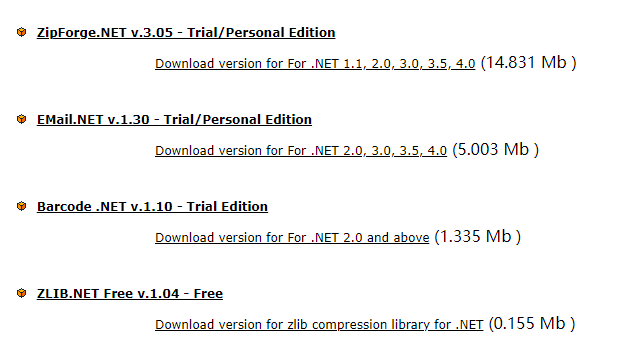
自行选择一个版本,我用的是 ZLIB.NET Free v.1.04 - Free
下载完成之后,解压,把zlib.net.dll 导入到unity客户端
服务端则导入源码文件(source)即可。
不懂的小伙伴可自行留言哈,欢迎大家提出批评和建议~