C++20 如何以 Bazel & Clang 进行构建呢?
本文将介绍:
本文示例可见: https://github.com/ikuokuo/start-cpp20
本文是于 Ubuntu 20 上进行的实践,Windows 可以用 WSL 准备环境。
Bazelisk 是安装 Bazel 的推荐方式,我们安装它的二进制发布即可:
cd ~wget https://github.com/bazelbuild/bazelisk/releases/download/v1.12.0/bazelisk-linux-amd64 -O bazelisk-1.12.0-linux-amd64chmod a+x bazelisk-*sudo ln -s $(pwd)/bazelisk-1.12.0-linux-amd64 /usr/local/bin/bazeltouch WORKSPACE# 国内下载 Bazel 可能遇到如下问题,配置 .bazeliskrc 解决# could not resolve the version 'latest' to an actual version number# https://github.com/bazelbuild/bazelisk/issues/220cat <<-EOF > .bazeliskrcBAZELISK_BASE_URL=https://github.com/bazelbuild/bazel/releases/downloadUSE_BAZEL_VERSION=5.2.0EOFbazel version更多方式,可见官方文档。进一步,推荐安装 buildtools,下载后软链一下:
sudo ln -s $(pwd)/buildifier-5.1.0-linux-amd64 /usr/local/bin/buildifiersudo ln -s $(pwd)/buildozer-5.1.0-linux-amd64 /usr/local/bin/buildozerBazel 如何构建 C++ 项目,可见我的 Start Bazel 笔记。
Clang 有关 std::fromat 文本格式化的特性,默认未开启:
The paper is implemented but still marked as an incomplete feature (the feature-test macro is not set and the libary is only available when built with LIBCXX_ENABLE_INCOMPLETE_FEATURES). Not yet implemented LWG-issues will cause API and ABI breakage.
C++20 特性,编译器支持情况:
因此,这里以源码方式安装 LLVM,需要构建 Clang & libc++:
git clone -b llvmorg-14.0.6 --depth 1 https://github.com/llvm/llvm-project.gitcd llvm-projectmkdir _buildcd _build# llvm install path, such as /usr/local/llvmLLVM_PREFIX=$HOME/Apps/llvm-14.0.6cmake -DCMAKE_BUILD_TYPE=Release \-DCMAKE_INSTALL_PREFIX=$LLVM_PREFIX \-DLLVM_ENABLE_PROJECTS=clang \-DLLVM_ENABLE_RUNTIMES="libcxx;libcxxabi" \-DLIBCXX_ENABLE_INCOMPLETE_FEATURES=ON \../llvmmake -j`nproc`make installsudo ln -s $LLVM_PREFIX /usr/local/llvmcat <<-EOF >> ~/.bashrc# llvmexport LLVM_HOME=/usr/local/llvmexport PATH=\$LLVM_HOME/bin:\$PATHexport LD_LIBRARY_PATH=\$LLVM_HOME/lib/x86_64-unknown-linux-gnu:\$LD_LIBRARY_PATHEOFllvm-config --versionclang --versionLLVM_PREFIX 安装路径自己决定。最后,编译测试:
cat <<-EOF > hello.cc#include <format>#include <iostream>int main() { std::string message = std::format("The answer is {}.", 42); std::cout << message << std::endl;}EOFclang++ -std=c++20 -stdlib=libc++ hello.cc -o hello./hello可省略该节。本文实践未用此方式,因为想开启更多 C++20 特性。这里仅作记录,有需要可参考。
方式 1. 安装二进制发布:
cd ~wget https://github.com/llvm/llvm-project/releases/download/llvmorg-13.0.0/clang+llvm-13.0.0-x86_64-linux-gnu-ubuntu-20.04.tar.xztar -xf clang+llvm-*.tar.xzsudo ln -s $(pwd)/clang+llvm-13.0.0-x86_64-linux-gnu-ubuntu-20.04 /usr/local/llvmcat <<-EOF >> ~/.bashrc# llvmexport LLVM_HOME=/usr/local/llvmexport PATH=\$LLVM_HOME/bin:\$PATHEOFllvm-config --versionclang --version方式 2. 用 apt 进行安装: https://apt.llvm.org/
方式 3. 用已配好的工具链: LLVM toolchain for Bazel
本文依照 Bazel Tutorial: Configure C++ Toolchains 步骤配置的 Clang 工具链,最后项目根目录会多如下文件:
WORKSPACE 表示 Bazel 工作区,内容空。
.bazelrc 允许 --config=clang_config 启用 Clang 工具链:
# Use our custom-configured c++ toolchain.build:clang_config --crosstool_top=//toolchain:clang_suite# Use --cpu as a differentiator.build:clang_config --cpu=linux_x86_64# Use the default Bazel C++ toolchain to build the tools used during the build.build:clang_config --host_crosstool_top=@bazel_tools//tools/cpp:toolchaintoolchain/BUILD 配置 Clang 工具链信息:
load(":cc_toolchain_config.bzl", "cc_toolchain_config")package(default_visibility = ["//visibility:public"])#filegroup(name = "clang_suite")cc_toolchain_suite( name = "clang_suite", toolchains = { "linux_x86_64": ":linux_x86_64_toolchain", },)filegroup(name = "empty")cc_toolchain( name = "linux_x86_64_toolchain", toolchain_identifier = "linux_x86_64-toolchain", toolchain_config = ":linux_x86_64_toolchain_config", all_files = ":empty", compiler_files = ":empty", dwp_files = ":empty", linker_files = ":empty", objcopy_files = ":empty", strip_files = ":empty", supports_param_files = 0,)#filegroup(name = "linux_x86_64_toolchain_config")cc_toolchain_config(name = "linux_x86_64_toolchain_config")toolchain/cc_toolchain_config.bzl 配置 Clang 工具链规则:
# C++ Toolchain Configuration# https://bazel.build/docs/cc-toolchain-config-reference# https://github.com/bazelbuild/bazel/blob/master/tools/build_defs/cc/action_names.bzlload("@bazel_tools//tools/build_defs/cc:action_names.bzl", "ACTION_NAMES")load( "@bazel_tools//tools/cpp:cc_toolchain_config_lib.bzl", "feature", "flag_group", "flag_set", "tool_path",)all_compile_actions = [ ACTION_NAMES.c_compile, ACTION_NAMES.cpp_compile, ACTION_NAMES.linkstamp_compile, ACTION_NAMES.assemble, ACTION_NAMES.preprocess_assemble, ACTION_NAMES.cpp_header_parsing, ACTION_NAMES.cpp_module_compile, ACTION_NAMES.cpp_module_codegen,]all_link_actions = [ ACTION_NAMES.cpp_link_executable, ACTION_NAMES.cpp_link_dynamic_library, ACTION_NAMES.cpp_link_nodeps_dynamic_library,]def _impl(ctx): llvm_version = "14.0.6" llvm_prefix = "/home/john/Apps/llvm-{}".format(llvm_version) llvm_bindir = llvm_prefix + "/bin" tool_paths = [ tool_path( name = "gcc", path = llvm_bindir + "/clang", ), tool_path( name = "ld", path = llvm_bindir + "/ld.lld", ), tool_path( name = "ar", path = llvm_bindir + "/llvm-ar", ), tool_path( name = "cpp", path = llvm_bindir + "/clang-cpp", ), tool_path( name = "gcov", path = llvm_bindir + "/llvm-cov", ), tool_path( name = "nm", path = llvm_bindir + "/llvm-nm", ), tool_path( name = "objdump", path = llvm_bindir + "/llvm-objdump", ), tool_path( name = "strip", path = llvm_bindir + "/llvm-strip", ), ] features = [ feature( name = "default_compiler_flags", enabled = True, flag_sets = [ flag_set( actions = all_compile_actions, flag_groups = ([ flag_group( flags = [ "-O2", "-DNDEBUG", "-Wall", "-Wextra", "-Wpedantic", "-fPIC", "-std=c++20", "-stdlib=libc++", ], ), ]), ), ], ), feature( name = "default_linker_flags", enabled = True, flag_sets = [ flag_set( actions = all_link_actions, flag_groups = ([ flag_group( flags = [ "-lc++", "-lc++abi", "-lm", "-ldl", "-lpthread", ], ), ]), ), ], ), ] return cc_common.create_cc_toolchain_config_info( ctx = ctx, features = features, cxx_builtin_include_directories = [ llvm_prefix + "/lib/clang/{}/include".format(llvm_version), llvm_prefix + "/include/x86_64-unknown-linux-gnu/c++/v1", llvm_prefix + "/include/c++/v1", "/usr/local/include", "/usr/include/x86_64-linux-gnu", "/usr/include", ], toolchain_identifier = "local", host_system_name = "local", target_system_name = "local", target_cpu = "linux_x86_64", target_libc = "unknown", compiler = "clang", abi_version = "unknown", abi_libc_version = "unknown", tool_paths = tool_paths, )cc_toolchain_config = rule( implementation = _impl, attrs = {}, provides = [CcToolchainConfigInfo],)llvm_prefix 给到自己的 LLVM 安装路径。
本文示例的 code/00/ 路径下准备了 C++20 的库与应用:
code/00/├── BUILD├── greet│ ├── BUILD│ ├── greet.cc│ └── greet.h└── main.ccmain.cc:
#include <format>#include <iostream>#include <string>#include <string_view>#include "greet/greet.h"template <typename... Args>std::string dyna_print(std::string_view rt_fmt_str, Args&&... args) { return std::vformat(rt_fmt_str, std::make_format_args(args...));}int main() { std::cout << greet::hello("world") << std::endl; std::string fmt; for (int i{}; i != 3; ++i) { fmt += "{} "; // constructs the formatting string std::cout << fmt << " : "; std::cout << dyna_print(fmt, "alpha", 'Z', 3.14, "unused"); std::cout << '\n'; }}BUILD:
load("@rules_cc//cc:defs.bzl", "cc_binary")cc_binary( name = "main", srcs = ["main.cc"], deps = [ "//code/00/greet:greet", ],)greet.h:
#pragma once#include <string>#include <string_view>namespace greet {std::string hello(std::string_view who);} // namespace greetgreet.cc:
#include "greet.h"#include <format>#include <utility>namespace greet {std::string hello(std::string_view who) { return std::format("Hello {}!", std::move(who));}} // namespace greetBUILD:
load("@rules_cc//cc:defs.bzl", "cc_library")package(default_visibility = ["//visibility:public"])cc_library( name = "greet", srcs = [ "greet.cc", ], hdrs = [ "greet.h", ],)bazel build --config=clang_config //code/00:main$ bazel-bin/code/00/mainHello world!{} : alpha{} {} : alpha Z{} {} {} : alpha Z 3.14sudo apt update && sudo apt install graphviz xdot -y# viewxdot <(bazel query --notool_deps --noimplicit_deps "deps(//code/00:main)" --output graph)# to svgdot -Tsvg <(bazel query --notool_deps --noimplicit_deps "deps(//code/00:main)" --output graph) -o 00_main.svg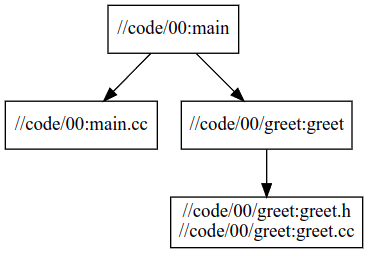
GoCoding 个人实践的经验分享,可关注公众号!

