之前在 使用spire.doc导出支持编辑Latex公式的标准格式word 博客中写过,使用spire.doc来生成word,不得不说spire.doc的api操作起来还是比较方便,但是使用的过程中还是发生了一些异常,如∑求和公式会报错,类似 \limit \widehat \sideset \overline \leqslant \geqslant \textcircled 均遇到了问题,类似解析失败无法渲染、求和公式设置上下限报空指针异常等,使用同样的方式转换MathML之后还是同样的问题,无法解决,一个两个还能以图片的形式显示,随着这么多问题的出现,终究不是办法
POI转Latex转WORD过程是 Latex → MathML(数学标记语言) → OMML(Word公式)
POI支持MathML,我基本上生成的都是数学试卷,Latex公式有了,但是需要转换为MathML,一开始准备使用fmath三件套,这里需要吐槽一下,这个官网的下载链接已经失效,搜了一下看到很久没去的CSDN有资源,一下载50积分没了,貌似不管啥资源都是50分起步,看来CSDN已经不是我等P民可以混迹的存在了
但是实验了一下,fmath导出的复杂公式在word中显示偶尔有问题,可能是因为版本太老了,在StackOverflow上看到有人推荐使用snuggletex-core这个类库,我就更换了实现方式,我来找了大量的数学公式latex,先看下效果
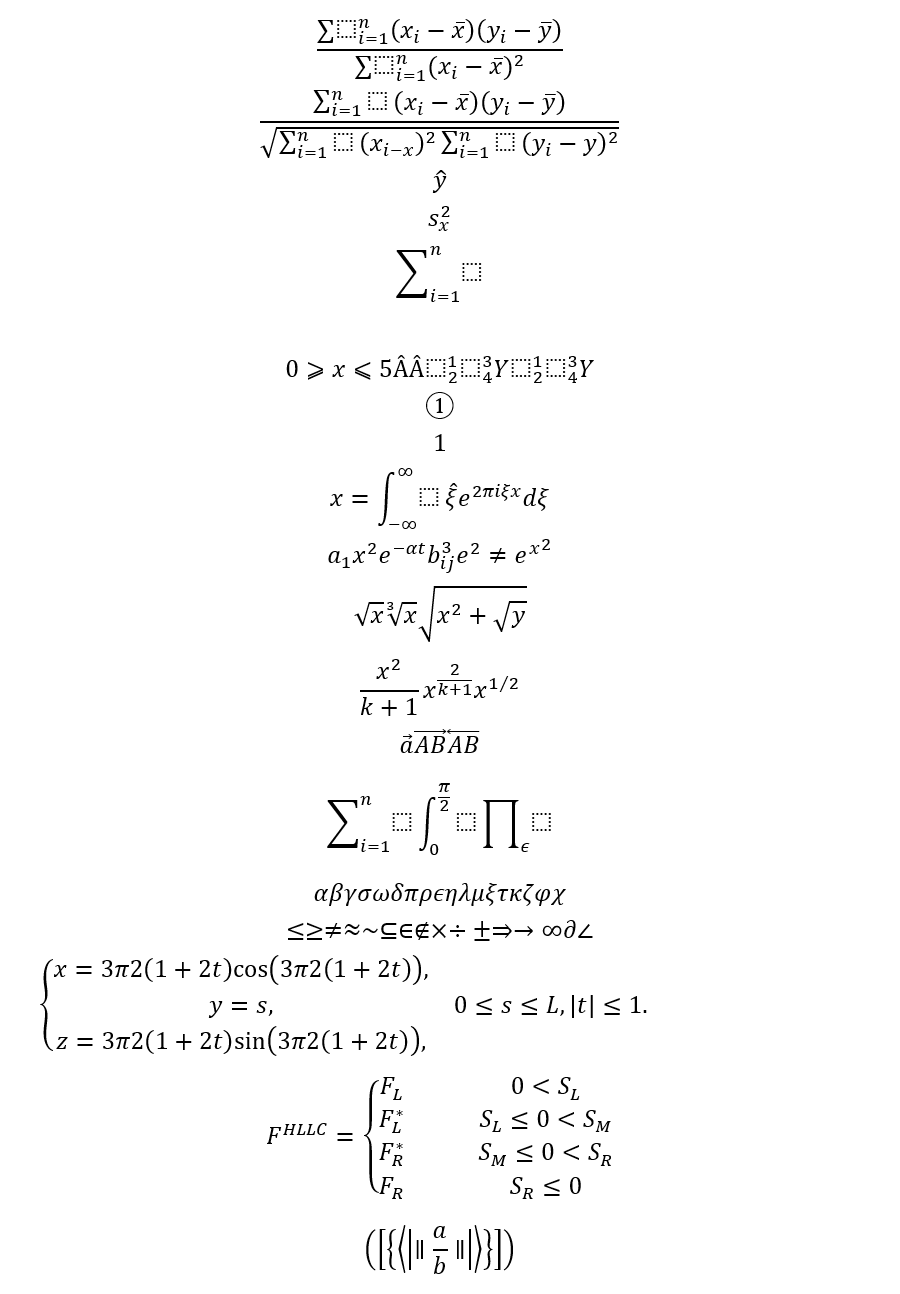
<!-- https://mvnrepository.com/artifact/de.rototor.snuggletex/snuggletex-core --><dependency> <groupId>de.rototor.snuggletex</groupId> <artifactId>snuggletex-core</artifactId> <version>1.3.0</version></dependency><!-- https://mvnrepository.com/artifact/org.apache.poi/poi --><dependency> <groupId>org.apache.poi</groupId> <artifactId>poi</artifactId> <version>4.1.2</version></dependency><!-- https://mvnrepository.com/artifact/org.apache.poi/ooxml-schemas --><dependency> <groupId>org.apache.poi</groupId> <artifactId>ooxml-schemas</artifactId> <version>1.4</version></dependency><!-- https://mvnrepository.com/artifact/org.apache.poi/poi-ooxml --><dependency> <groupId>org.apache.poi</groupId> <artifactId>poi-ooxml</artifactId> <version>4.1.2</version></dependency><dependency> <groupId>commons-io</groupId> <artifactId>commons-io</artifactId> <version>2.11.0</version></dependency>注意:这里的latex必须用$$包裹,否则在转换MathML的时候会报错
@SneakyThrowspublic static void addLatex(String latex, XWPFParagraph paragraph) { paragraph.setAlignment(ParagraphAlignment.LEFT); paragraph.setFontAlignment(ParagraphAlignment.LEFT.getValue()); SnuggleEngine engine = new uk.ac.ed.ph.snuggletex.SnuggleEngine(); SnuggleSession session = engine.createSession(); SnuggleInput input = new uk.ac.ed.ph.snuggletex.SnuggleInput(latex); session.parseInput(input); String mathML = session.buildXMLString(); CTOMath ctOMath = getOMML(mathML); CTP ctp = paragraph.getCTP(); CTOMath ctoMath = ctp.addNewOMath(); ctoMath.set(ctOMath);}MML2OMML.XSL在windows的Office安装目录里面直接搜就能拿到
private static File stylesheet = new File("D:\\MML2OMML.XSL");private static TransformerFactory tFactory = TransformerFactory.newInstance();private static StreamSource stylesource = new StreamSource(stylesheet);private static CTOMath getOMML(String mathML) throws Exception { Transformer transformer = tFactory.newTransformer(stylesource); StringReader stringreader = new StringReader(mathML); StreamSource source = new StreamSource(stringreader); StringWriter stringwriter = new StringWriter(); StreamResult result = new StreamResult(stringwriter); transformer.transform(source, result); String ooML = stringwriter.toString(); stringwriter.close(); CTOMathPara ctOMathPara = CTOMathPara.Factory.parse(ooML); CTOMath ctOMath = ctOMathPara.getOMathArray(0); //for making this to work with Office 2007 Word also, special font settings are necessary XmlCursor xmlcursor = ctOMath.newCursor(); while (xmlcursor.hasNextToken()) { XmlCursor.TokenType tokentype = xmlcursor.toNextToken(); if (tokentype.isStart()) { if (xmlcursor.getObject() instanceof CTR) { CTR cTR = (CTR) xmlcursor.getObject(); cTR.addNewRPr2().addNewRFonts().setAscii("Cambria Math"); cTR.getRPr2().getRFonts().setHAnsi("Cambria Math"); // up to apache poi 4.1.2 //cTR.getRPr2().getRFontsArray(0).setHAnsi("Cambria Math"); // since apache poi 5.0.0 } } } return ctOMath;}尝试了很多中组件,spire.doc 、fmath 等都无法渲染 \textcircled ,这个是latex标准支持的公式,效果文本外面圈一个圈类似①这样的效果,这里尝试无果之后只能暂时以比较恶心的方式解决这个问题,方法latexFilter,我这里只有①②③④这个四个出现的比较多,其他的都没有出现,如果要使用这个地方需要注意一下
private static String latexFilter(String latex){ if(!latex.contains("textcircled")){ return latex; } return TextCircledEnum.replaceTextCircled(latex);}private enum TextCircledEnum{ Zero("\\\\textcircled\\{0\\}","?"), One("\\\\textcircled\\{1\\}","①"), Two("\\\\textcircled\\{2\\}","②"), Three("\\\\textcircled\\{3\\}","③"), Four("\\\\textcircled\\{4\\}","④"), Five("\\\\textcircled\\{5\\}","⑤"), Six("\\\\textcircled\\{6\\}","⑥"), Seven("\\\\textcircled\\{7\\}","⑦"), Eight("\\\\textcircled\\{8\\}","⑧"), Nine("\\\\textcircled\\{9\\}","⑨"), Ten("\\\\textcircled\\{10\\}","⑩") ; TextCircledEnum(String code, String v) { this.code = code; this.v = v; } public final String code; public final String v; public static String replaceTextCircled(String latex){ for (TextCircledEnum c : TextCircledEnum.values()) { latex = latex.replaceAll(c.code,c.v); } return latex; }}public static void main(String[] args) throws Exception { XWPFDocument document = new XWPFDocument(); XWPFParagraph paragraph = document.createParagraph(); paragraph.setAlignment(ParagraphAlignment.LEFT); List<String> latexList = Arrays.asList("$\\frac{\\sum\\limits_{i=1}^{n}({x}_{i}?\\overline{x})({y}_{i}?\\overline{y})}{\\sum\\limits_{i=1}^{n}({x}_{i}?\\overline{x}{)}^{2}}$" , "$\\frac{ \\sum _{i=1}^{n} (x_ {i}-\\overline {x})(y_ {i}-\\overline {y})}{\\sqrt { \\sum _{i=1}^{n} (x_ {i-x})^ {2} \\sum _{i=1}^{n} (y_ {i}-y)^ {2}}}$" , "$\\widehat{y}$" , "$s_{x}^ {2}$" , "$\\sum _{i=1}^{n}$" , "$\\frac%…7B(a+b)(c+d)(a+c)(b+d)}$" , "$0 \\geqslant x\\leqslant 5 \\widehat{A} \\hat{A} \\sideset{^1_2}{^3_4}Y \\sideset{^1_2}{^3_4}Y $" , "$\\textcircled{1}$" , "$\\textcircled1$" , "$\\f\\relax{x} = \\int_{-\\infty}^\\infty \\f\\hat\\xi\\,e^{2 \\pi i \\xi x} \\,d\\xi$" , "$a_{1} \\quad x^2 \\quad e^{- \\alpha t} \\quad b^{3}_{ij} \\quad e^{2}\\neq {e^x}^2$" , "$\\sqrt{x} \\quad \\sqrt[3]{x} \\quad \\sqrt{x^{2}+ \\sqrt{y}}$" , "$\\frac{x^2}{k+1} \\quad x^{\\frac{2}{k+1}} \\quad x^{1/2}$" , "$\\vec a \\qquad \\overrightarrow{AB} \\qquad \\overleftarrow{AB}$" , "$\\sum_{i=1}^{n} \\quad \\int_{0}^{\\frac{\\pi}{2}} \\quad \\prod_{\\epsilon}$" , "$\\alpha \\beta \\gamma \\sigma \\omega \\delta \\pi \\rho \\epsilon \\eta \\lambda \\mu \\xi \\tau \\kappa \\zeta \\phi \\chi$" , "$\\le \\ge \\ne \\approx \\sim \\subseteq \\in \\notin \\times \\div \\pm \\Rightarrow \\rightarrow \\infty \\partial \\angle \\triangle$" , "$\\left\\{ \n" + " \\begin{array}{**lr**} \n" + " x=\\dfrac{3\\pi}{2}(1+2t)\\cos(\\dfrac{3\\pi}{2}(1+2t)), & \\\\ \n" + " y=s, & 0\\leq s\\leq L,|t|\\leq1.\\\\ \n" + " z=\\dfrac{3\\pi}{2}(1+2t)\\sin(\\dfrac{3\\pi}{2}(1+2t)), & \n" + " \\end{array} \n" + "\\right. \n$" ,"$F^{HLLC}=\\left\\{\n" + "\\begin{array}{rcl}\n" + "F_L & & {0 < S_L}\\\\\n" + "F^*_L & & {S_L \\leq 0 < S_M}\\\\\n" + "F^*_R & & {S_M \\leq 0 < S_R}\\\\\n" + "F_R & & {S_R \\leq 0}\n" + "\\end{array} \\right. $" ,"$\\Bigg ( \\bigg [ \\Big \\{\\big \\langle \\left \\vert \\parallel \\frac{a}{b} \\parallel \\right \\vert \\big \\rangle \\Big \\} \\bigg ] \\Bigg )$" ); latexList.forEach(latex -> addLatex(latexFilter(latex), document.createParagraph())); FileOutputStream out = new FileOutputStream("CreateWordFormulaFromMathML.docx"); document.write(out); out.close(); document.close();}上面的公式用fmath三件套的转换的时候有报错地方,而且转换后的效果有不及预期的,所以就弃用了,下面是fmath转换的代码
@SneakyThrowspublic static void addLatexByFMath(String latex, XWPFParagraph paragraph) { String mathML = fmath.conversion.ConvertFromLatexToMathML.convertToMathML(latex); mathML = mathML.replaceFirst("<math ", "<math xmlns=\"http://www.w3.org/1998/Math/MathML\" "); mathML = mathML.replaceAll("±", "±"); CTOMath ctOMath = getOMML(mathML); CTP ctp = paragraph.getCTP(); CTOMath ctoMath = ctp.addNewOMath(); ctoMath.set(ctOMath);}private XWPFParagraph newParagraph(XWPFDocument document) { XWPFParagraph paragraph = document.createParagraph(); paragraph.setSpacingLineRule(LineSpacingRule.AUTO); paragraph.setSpacingBefore(30); paragraph.setAlignment(ParagraphAlignment.LEFT); return paragraph;}注:POI不支持 \r \n 之类的换行符,如果需要换行显示调用 xwpfRun.addBreak() 来实现换行
public void addText(String text, XWPFParagraph paragraph) { if (StringUtils.isEmpty(text)) { return; } XWPFRun xwpfRun = paragraph.createRun(); String[] lines = text.split("\n"); if (lines.length < 1) { return; } xwpfRun.setText(lines[0], 0); for (int m = 1; m < lines.length; m++) { xwpfRun.addBreak(); xwpfRun.setText(lines[m]); } if (text.endsWith("\n")) { xwpfRun.addBreak(); }}注:这里在渲染的时候把table行数和列数全部都已计算好(这个不涉及单元格合并功能),table.setWidth() 也是POI4.X版本才支持传入字符串设置百分比
private void parse2Table(WordInnerPojo innerPojo, XWPFParagraph paragraph) { XWPFTable table = paragraph.getDocument().createTable(innerPojo.rows, innerPojo.lines); table.setWidth("100%"); for (int i = 0; i < innerPojo.rowLines.size(); i++) { List<String> rowLine = innerPojo.rowLines.get(i); for (int j = 0; j < rowLine.size(); j++) { XWPFTableCell cell = table.getRow(i).getCell(j); XWPFParagraph innerParagraph = cell.getParagraphs().size() > 0 ? cell.getParagraphs().get(0) : cell.addParagraph(); innerParagraph.setSpacingBefore(0); innerParagraph.setVerticalAlignment(TextAlignment.CENTER); innerParagraph.setAlignment(ParagraphAlignment.LEFT); addContent(rowLine.get(j), innerParagraph); } } paragraph.getDocument().createParagraph();}注:单位需要转换为em,直接调用org.apache.poi.util.Units的toEMU方法即可,这样的写法直接在文本的后面增加图片,不换行
paragraph.createRun().addPicture(new ByteArrayInputStream(innerPojo.image), XWPFDocument.PICTURE_TYPE_JPEG, "", Units.toEMU(width.intValue()), Units.toEMU(height.intValue()));一段原始的html文本需要分段解析的,文本、公式、表格、图片等,需要解析抽象生成一个POJO类,把这些非文本的类型提出来并标记好占位符,用于替换和渲染
POJO类
private static class WordInnerPojo { protected static final int LATEX_TYPE = 0; protected static final int IMG_TYPE = 1; protected static final int TABLE_TYPE = 2; private int type; private byte[] image; private String latex; private String imageUrl; private int rows; private int lines; private List<List<String>> rowLines; private BufferedImage imageTemp; @SneakyThrows BufferedImage readImage() { if (this.imageTemp == null) { this.imageTemp = ImageIO.read(new ByteArrayInputStream(this.image)); } return imageTemp; } private Integer getImageWidth() { return readImage().getWidth(); } private Integer getImageHeight() { return readImage().getHeight(); }}渲染逻辑
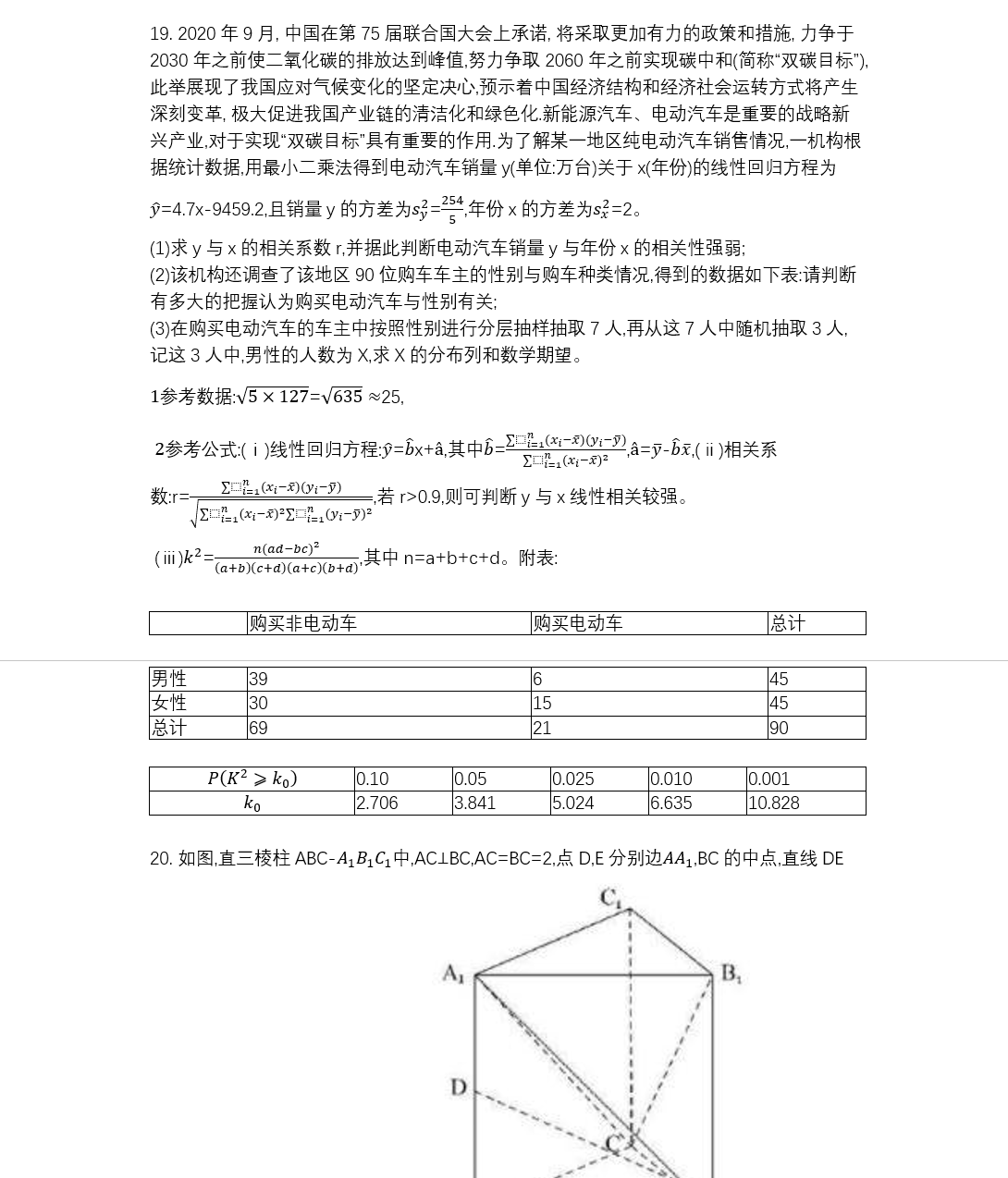
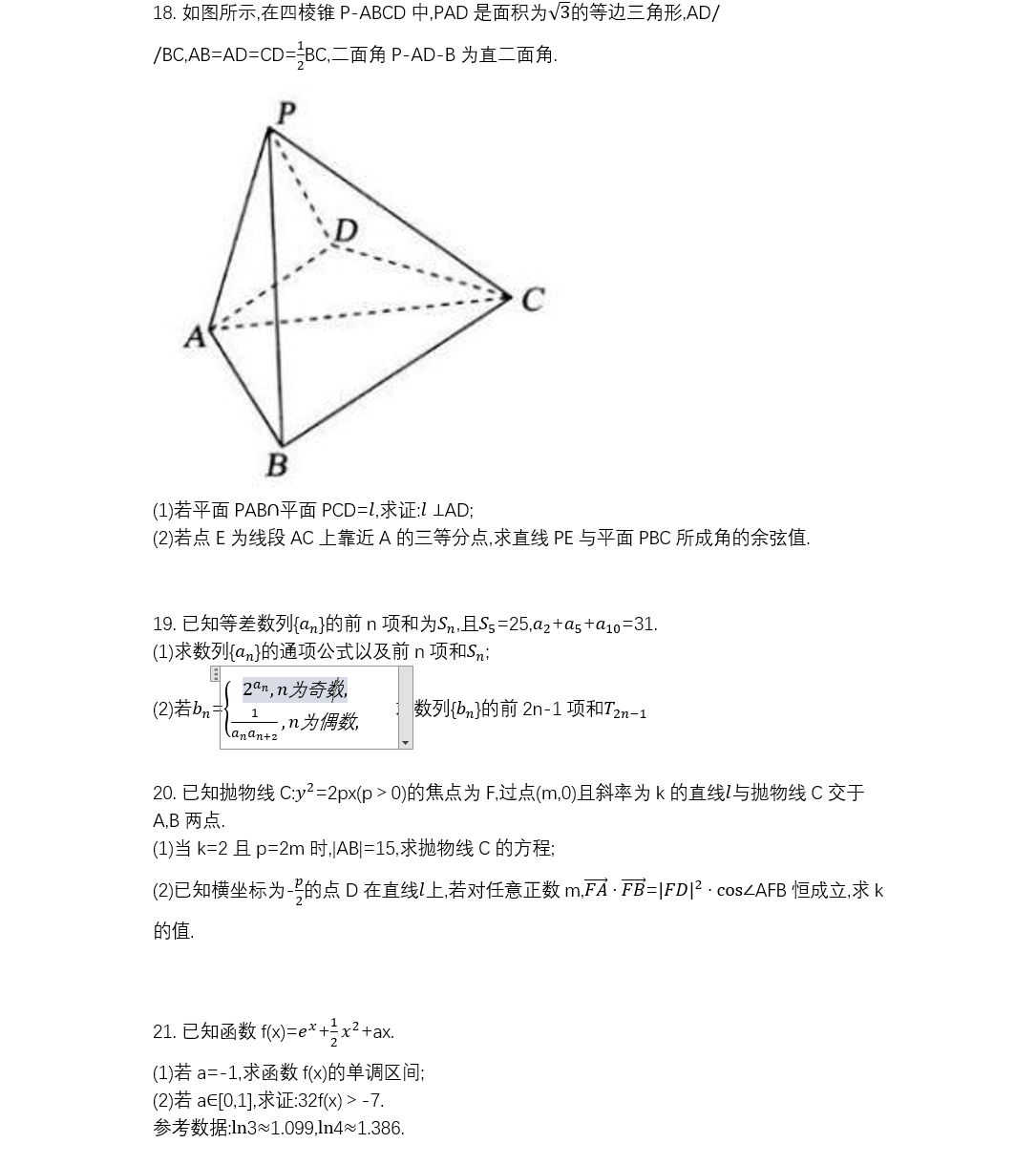
@SneakyThrowsprivate void appendWordInnerPojo(WordInnerPojo innerPojo, XWPFParagraph paragraph) { switch (innerPojo.type) { case WordInnerPojo.LATEX_TYPE: addLatex(latexFilter(MessageFormat.format("${0}$", URLDecoder.decode(innerPojo.latex, "UTF-8")))), paragraph); break; case WordInnerPojo.IMG_TYPE: log.info("imageUrl:{}", innerPojo.imageUrl); /* 控制word中的图片渲染大小,不要太大 */ Float width = Float.valueOf(innerPojo.getImageWidth()); Float height = Float.valueOf(innerPojo.getImageHeight()); if (width > 300 && width > height) { BigDecimal rate = BigDecimal.valueOf(300).divide(BigDecimal.valueOf(width), 8, BigDecimal.ROUND_DOWN); height = height * rate.floatValue(); width = 300f; } else if (height > 200 && height > width) { BigDecimal rate = BigDecimal.valueOf(200).divide(BigDecimal.valueOf(height), 8, BigDecimal.ROUND_DOWN); width = width * rate.floatValue(); height = 200f; } paragraph.createRun().addPicture(new ByteArrayInputStream(innerPojo.image), XWPFDocument.PICTURE_TYPE_JPEG, "", Units.toEMU(width.intValue()), Units.toEMU(height.intValue())); paragraph.createRun().addBreak(); break; case WordInnerPojo.TABLE_TYPE: parse2Table(innerPojo, paragraph); break; }}搞定!导出的部分样例如下: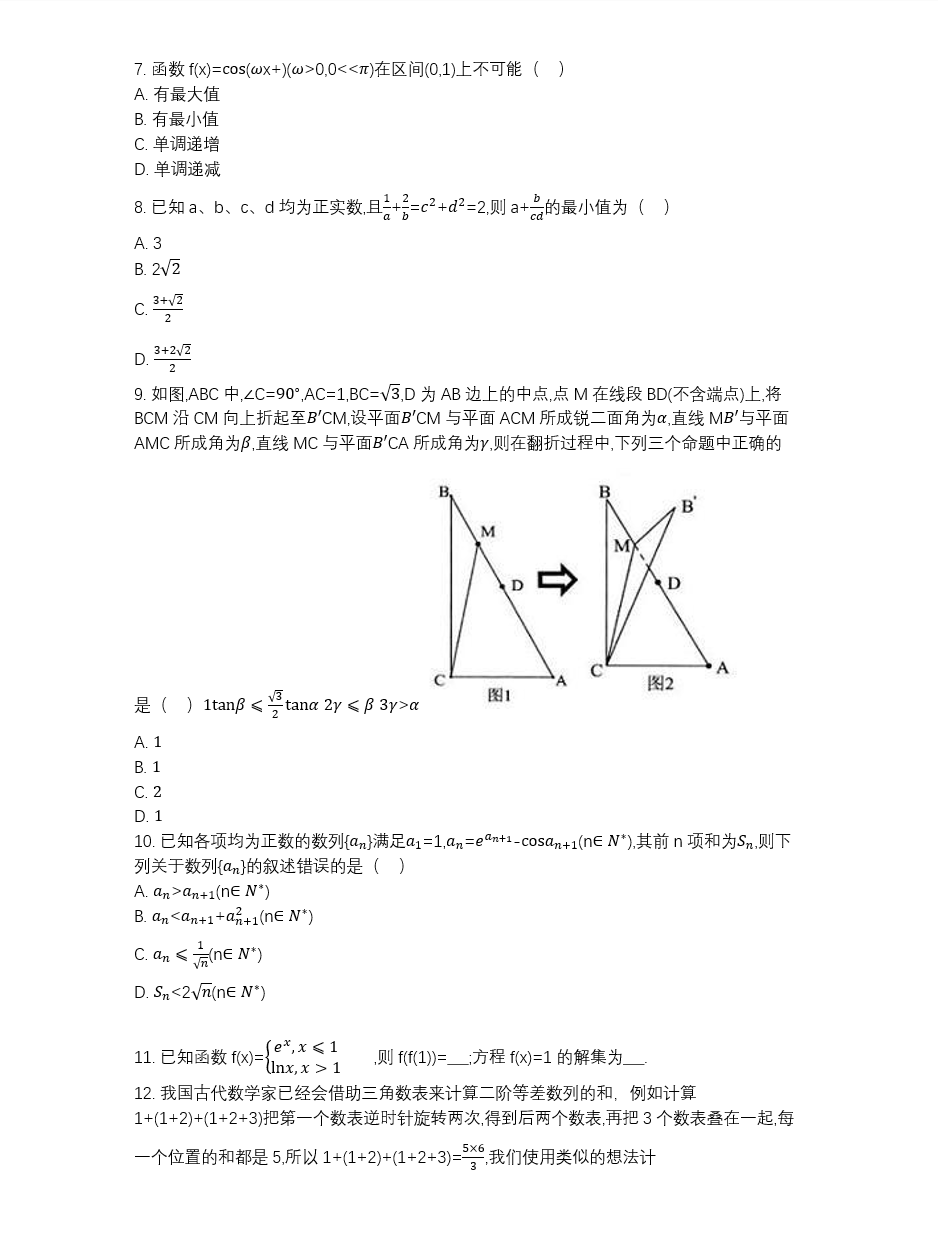
https://stackoverflow.com/questions/46623554/add-latex-type-equation-in-word-docx-using-apache-poi