kind表现上就是一个二进制程序,下载对应版本并增加执行权限即可:
curl -Lo ./kind https://kind.sigs.k8s.io/dl/v0.11.1/kind-linux-amd64chmod +x ./kindmv ./kind /usr/bin/kindkind versioncurl -LO "https://dl.k8s.io/release/$(curl -L -s https://dl.k8s.io/release/stable.txt)/bin/linux/amd64/kubectl"sudo install -o root -g root -m 0755 kubectl /usr/local/bin/kubectlkubectl version --clientroot@e5pc-vm-01:~# kind create cluster --name myk8s-01
Creating cluster "myk8s-01" ... ? Ensuring node image (kindest/node:v1.21.1) ?? ? Preparing nodes ?? ? Writing configuration ?? ? Starting control-plane ????????????????????????????????????????????????????????????????????????????????????????????????????????????????????????????????????????????????????????????????????????????????????????????????????????????????????????????????????????????????????????????????????????????????????????????????????????????????????????????????????????????????????????????????????????????????????????????????????????????????????????????????????????????????????????????????????????????????????????????????????????????????????????????????????????????????????????????????????????????????????????????????????????????????????????????????????????????????????????????????????????????????????????????????????????????????????????????????????????????????????????????????? ? Installing CNI ?? ? Installing StorageClass ?? Set kubectl context to "kind-myk8s-01"You can now use your cluster with:kubectl cluster-info --context kind-myk8s-01Have a nice day! ??至此已得到一个可用的k8s集群了:
root@e5pc-vm-01:~# kubectl get nodesNAME STATUS ROLES AGE VERSIONmyk8s-01-control-plane Ready control-plane,master 66s v1.21.1root@e5pc-vm-01:~# docker imagesREPOSITORY TAG IMAGE ID CREATED SIZEubuntu latest 2b4cba85892a 2 days ago 72.8MBkindest/node <none> 32b8b755dee8 9 months ago 1.12GB
root@e5pc-vm-01:~# docker psCONTAINER ID IMAGE COMMAND CREATED STATUS PORTS NAMESb4bde05b0190 kindest/node:v1.21.1 "/usr/local/bin/entr…" 12 minutes ago Up 12 minutes 127.0.0.1:42267->6443/tcp myk8s-01-control-planeroot@e5pc-vm-01:~# cat .kube/config apiVersion: v1clusters:- cluster: certificate-authority-data: xxxx server: https://127.0.0.1:42267 name: kind-myk8s-01contexts:- context: cluster: kind-myk8s-01 user: kind-myk8s-01 name: kind-myk8s-01current-context: kind-myk8s-01kind: Configpreferences: {}users:- name: kind-myk8s-01 user: client-certificate-data: xxxx client-key-data: xxxxkind创建k8s集群的架构图为:
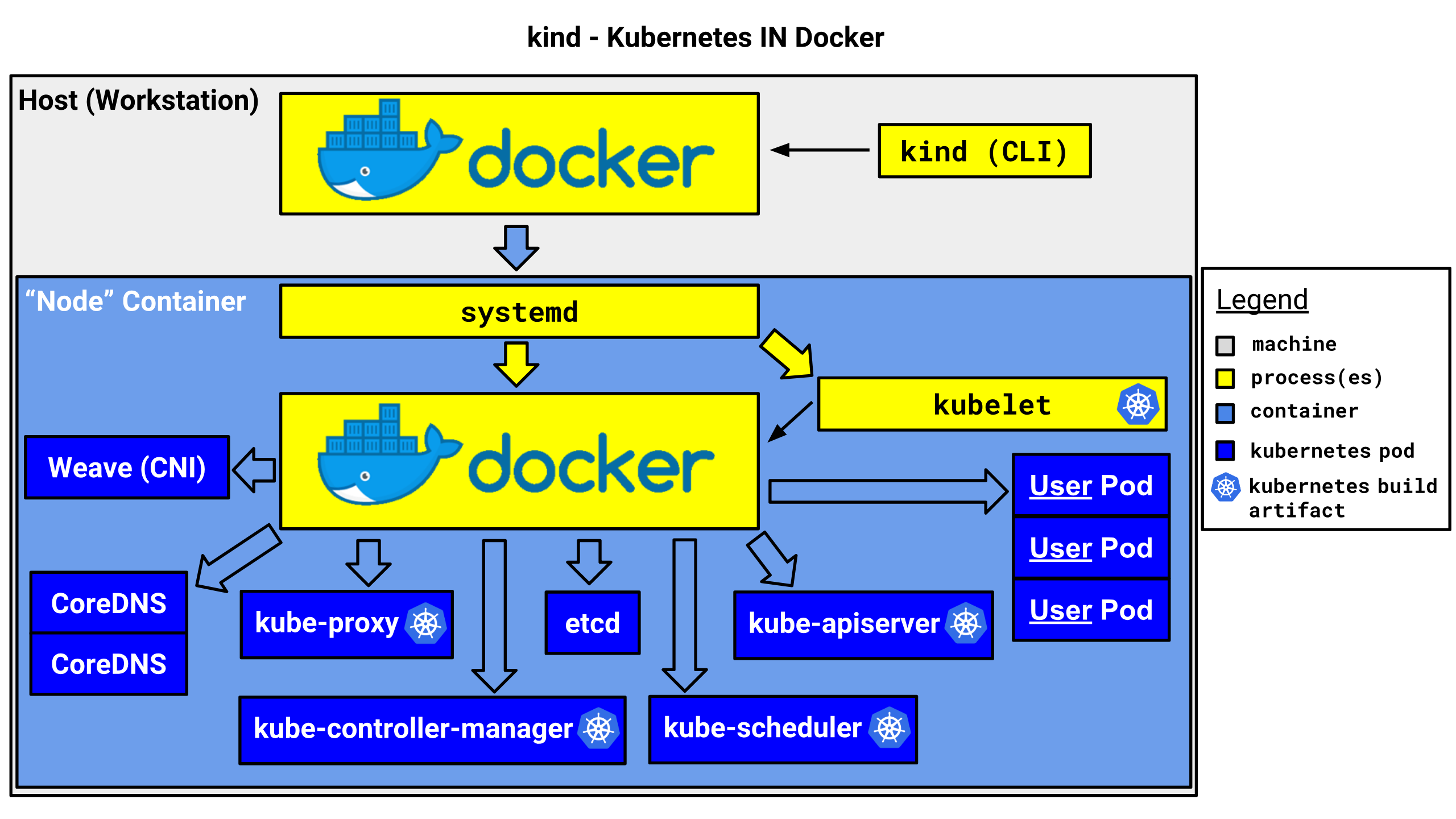
前面展示的集群创建操作是最简单的单master集群,kind当然可以创建更完整的集群。这就需要用到配置文件模式来创建集群:
root@e5pc-vm-01:~# cat kindcfg-tccc.biz.ymlkind: ClusterapiVersion: kind.x-k8s.io/v1alpha4nodes:- role: control-plane- role: worker- role: worker- role: workerroot@e5pc-vm-01:~# kind create cluster --name myk8s-02 --config ./kindcfg-tccc.biz.yml配置文件如下:
kind: ClusterapiVersion: kind.x-k8s.io/v1alpha4containerdConfigPatches:- |- [plugins."io.containerd.grpc.v1.cri".registry.mirrors."harbor.xxxx.top:60666"] endpoint = ["http://harbor.xxxx.top:60666"]nodes:- role: control-plane- role: worker地址:https://raw.githubusercontent.com/kubernetes-sigs/kind/main/site/content/docs/user/kind-example-config.yaml
# this config file contains all config fields with comments# NOTE: this is not a particularly useful config filekind: ClusterapiVersion: kind.x-k8s.io/v1alpha4# patch the generated kubeadm config with some extra settingskubeadmConfigPatches:- | apiVersion: kubelet.config.k8s.io/v1beta1 kind: KubeletConfiguration evictionHard: nodefs.available: "0%"# patch it further using a JSON 6902 patchkubeadmConfigPatchesJSON6902:- group: kubeadm.k8s.io version: v1beta2 kind: ClusterConfiguration patch: | - op: add path: /apiServer/certSANs/- value: my-hostname# 1 control plane node and 3 workersnodes:# the control plane node config- role: control-plane# the three workers- role: worker- role: worker- role: workerkind是学习和测试k8s集群时非常有帮助的工具。它启动快速,资源消耗很低,并且它也是CNCF认证兼容的安装工具之一,大家可放心使用。

